Listen to this Post
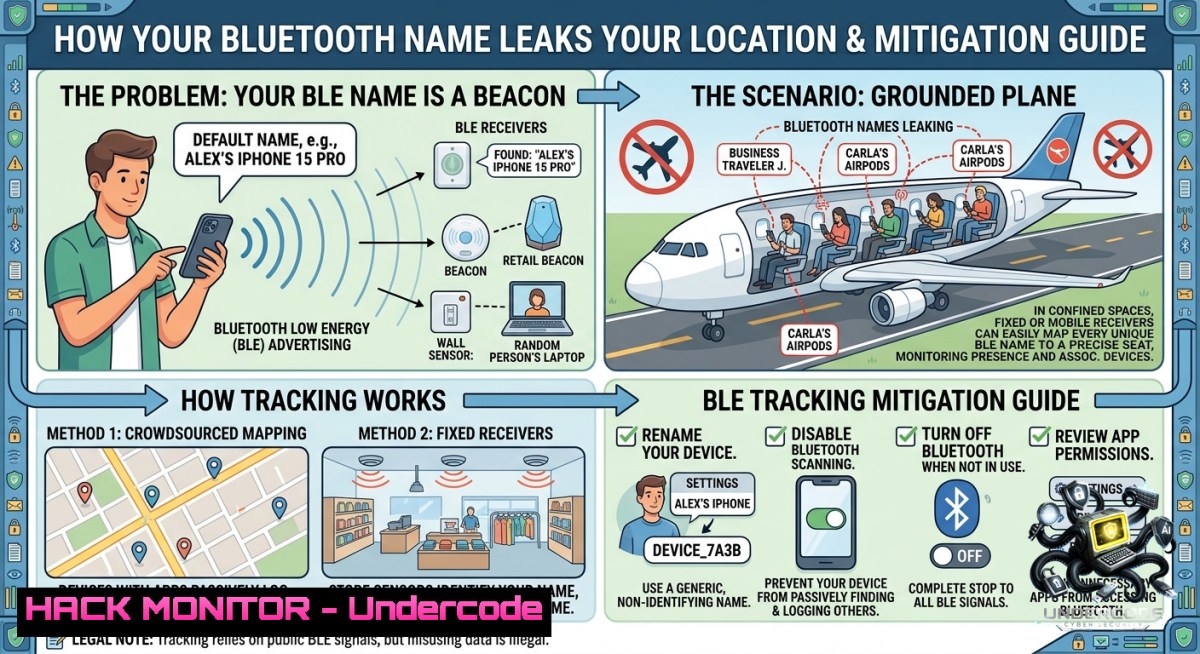
Introduction:
Bluetooth Low Energy (BLE) beacons and device advertising packets constantly broadcast unique identifiers, device names, and MAC addresses—often without user awareness. Attackers and trackers can passively sniff these signals to build precise movement profiles, even when you are not actively paired. This article explores how a simple “grounded plane” (a Faraday shield or RF-absorbing surface) can physically disrupt BLE tracking, alongside software-based countermeasures and active reconnaissance techniques for security professionals.
Learning Objectives:
– Understand how BLE advertisement packets expose personally identifiable information (PII) via device names and MAC addresses.
– Implement both passive detection (sniffing) and active mitigation (grounded enclosures, MAC randomization, and signal jamming).
– Execute Linux/Windows commands to enumerate Bluetooth adapters, capture BLE traffic, and verify grounding effectiveness.
You Should Know:
1. BLE Advertising Channels and the “Grounded Plane” Concept
BLE uses three primary advertising channels (37, 38, 39) at 2.4 GHz. A “grounded plane” refers to a continuous conductive surface connected to electrical ground, which can reflect or absorb RF energy. In practice, a grounded metal sheet (copper, aluminum) or a Faraday bag blocks BLE signals by creating an equipotential surface that cancels incoming electromagnetic waves.
Why this matters for tracking: Many IoT devices (smart watches, earbuds, fitness trackers) broadcast their Bluetooth name (e.g., “John’s AirPods”) and a static MAC address. An attacker with a simple Raspberry Pi and a BLE sniffer can log these advertisements and correlate them with physical location.
Step‑by‑step guide to test BLE visibility with and without a grounded plane:
Linux (using `bluetoothctl` and `hcitool`):
 Install BlueZ utilities
sudo apt install bluez bluez-utils

 Bring up Bluetooth interface
sudo hciconfig hci0 up

 Scan for BLE devices (passive scan)
sudo hcitool lescan --passive

 Or use bluetoothctl for interactive scanning
bluetoothctl
[bash] scan on
[bash] devices
Windows (PowerShell as Admin):
 Get Bluetooth adapter status
Get-PnpDevice -Class Bluetooth | Select-Object Status, FriendlyName

 Enable detailed BLE advertisement capture (requires Windows 10/11 and a compatible adapter)
 Use the BluetoothLEAdvertisementWatcher class in PowerShell script
$watcher = New-Object -TypeName Windows.Devices.Bluetooth.Advertisement.BluetoothLEAdvertisementWatcher
$watcher.Start()
Test procedure:
1. Place your phone/smartwatch in normal room conditions – note the visible device names.
2. Wrap the device in a grounded conductive bag (or place on a copper sheet connected to earth ground).
3. Repeat the scan – no BLE packets should be received. If you still see the device, the grounded plane is ineffective (e.g., openings, poor grounding).
2. Passive BLE Tracking: Capturing Device Names and MAC Addresses
Attackers often deploy low-cost BLE sniffers like the Ubertooth One or Nordic nRF52840 dongle. Using Wireshark with the `nrf_sniffer` plugin, they can decode advertisement packets and extract:
– Device name (e.g., “Pixel 6” or “Fitbit Charge”)
– Manufacturer-specific data
– RSSI (signal strength) for triangulation
Step‑by‑step capture with Ubertooth + Wireshark (Linux):
 Install dependencies
sudo apt install ubertooth wireshark

 Flash firmware (if needed)
ubertooth-dfu -d bluetooth_rxtx.dfu

 Start sniffing on advertising channels
ubertooth-btle -f -c 37,38,39

 Pipe output to Wireshark
ubertooth-btle -f -c 37,38,39 -w capture.pcap
wireshark capture.pcap
Filtering BLE advertisement packets in Wireshark:
`btle.advertising_header.type == 0x00` (ADV_IND – connectable undirected advertising)
Then expand `Bluetooth` > `Bluetooth Low Energy Link Layer` > `Advertising Data` to view device name.
3. Software Mitigation: MAC Randomization and Name Obfuscation
Modern OSes support MAC address randomization, but many devices leak real addresses during initial connection attempts or when Wi-Fi is off. To harden against BLE tracking:
Windows 10/11 (disable BLE advertisement):
 Turn off "Let apps use Bluetooth advertisements"
Set-ItemProperty -Path "HKCU:\Software\Microsoft\Windows\CurrentVersion\Bluetooth" -1ame "AdvertisingEnabled" -Value 0

 Enable random MAC (if supported by adapter)
 Check adapter capabilities: Get-1etAdapterAdvancedProperty -1ame "Bluetooth" -DisplayName "Network Address"
Android (developer options):
– Enable “Bluetooth scanning” off (Settings > Location > Wi-Fi and Bluetooth scanning)
– Force “Randomized MAC” for each new connection (Android 10+)
iOS (limited control):
Apple rotates MAC addresses every 15 minutes when not connected, but the device name in iBeacon frames can still be static.
4. Active Deauthentication and Jamming (Ethical Testing Only)
To test the resilience of BLE tracking, security researchers may use deauthentication frames or RF jamming. Note: Jamming is illegal in most jurisdictions without authorization. Instead, use a Faraday cage as a passive countermeasure.
Linux – Deauth BLE connection using `bleah` or `gattool`:
 Install bleah (BLE scanner)
pip install bleah

 Scan and discover connection handle
bleah -d <target_mac>

 Send LL_TERMINATE_IND (requires custom firmware like Adafruit nRF52)
 Alternative: Use a software-controlled relay to cut power to the target device
Windows – No native BLE deauth; use third-party tools like BluetoothView from NirSoft for monitoring only.
5. Building a Portable Grounded Plane Faraday Enclosure
A low-cost, effective grounded plane can be made from:
– Copper foil tape (adhesive conductive) applied to a plastic container.
– A metal cookie tin (ensure lid seals tightly).
– ESD (electrostatic discharge) bag (pink or silver metallized plastic).
Step‑by‑step assembly and validation:
1. Cut a copper sheet (30 cm x 30 cm) and attach a grounding wire (14 AWG) with solder or a lug.
2. Connect the other end of the wire to a known earth ground (cold water pipe, grounding rod, or mains ground via a resistor – consult an electrician).
3. Place the target BLE device on the copper sheet and cover with a second grounded sheet (forming a parallel plate capacitor).
4. Test with the scanning commands from Section 1 – no BLE advertisements should be received outside the enclosure.
Why this works: The grounded plane creates a boundary condition where the tangential electric field is zero. BLE’s 2.4 GHz waves cannot propagate beyond the plane because they are reflected and cancel out.
6. Enterprise BLE Tracking Mitigation & Policy
Organizations deploying BLE beacons for asset tracking must ensure compliance with privacy regulations (GDPR, CCPA). Security teams can:
– Deploy BLE scanners to monitor unauthorized beacons.
– Use a “BLE firewall” like the nRF52840 DK to filter or spoof advertisement packets.
– Implement “grounded storage” policies: laptops and phones placed in metallized pouches when in sensitive meeting rooms.
Linux command to detect rogue BLE beacons (using `hcidump`):
sudo hcidump --raw -i hci0 | grep -i "company\|device name"
Windows – Use `Get-BluetoothDevice` (PowerShell module):
Install-Module -1ame BluetoothDeviceTools
Get-BluetoothDevice -Discovered | Format-Table Name, Address, RSSI
What Undercode Say:
– Key Takeaway 1: The simplicity of BLE tracking is alarming—anyone with a $10 BLE dongle can build a movement profile of your devices. Grounded planes are a physical, deterministic defense that defeats RF sniffing.
– Key Takeaway 2: MAC randomization alone is insufficient; device names and manufacturer data often remain static. Combining randomized MACs with a grounded Faraday sleeve when moving through high-risk areas (airports, protests, adversary-controlled zones) is the only reliable mitigation.
Expected Output:
This article provides both offensive (sniffing, deauth) and defensive (grounded plane, policy) techniques for BLE tracking awareness. Security professionals should integrate periodic BLE wardriving into their assessment toolkit and advise users to disable Bluetooth when not needed—or store devices in grounded enclosures during sensitive travel.
Prediction:
– -1 BLE tracking will evolve into ubiquitous retail and law enforcement surveillance, with passive sniffers hidden in light poles and smart city infrastructure, eroding anonymity for anyone carrying a smartphone.
– +1 Adoption of Bluetooth 5.4 and 6.0 (Channel Sounding, LE Audio with randomization enhancements) may force manufacturers to implement per-packet MAC rotation, making passive tracking significantly harder by 2027.
– -1 Airline “grounded plane” policies (i.e., airplane mode) are often ignored; attackers will exploit BLE beacons during flights to deanonymize passengers, leading to mid-flight cyber‑harassment cases.
– +1 Open‑source tools like `BLEAH` and `BetterCAP` are driving awareness, pushing regulators to mandate anti‑tracking features in all BLE devices by 2026.
▶️ Related Video (80% Match):
🎯Let’s Practice For Free:
🎓 Live Courses & Certifications:
[Join Undercode Academy for Verified Certifications](https://undercode.co.uk/certifications/)
🚀 Request a Custom Project:
Secure, high-velocity infrastructure and disruptive technological engineering. Contact our engineering team for high-tier development and proprietary systems:
[[email protected]](mailto:[email protected])
💎 Smart Architecture | 🛡️ Secure by Design | ⭐ Trusted by Thousands
IT/Security Reporter URL:
Reported By: [Lukasstefanko Bluetooth](https://www.linkedin.com/posts/lukasstefanko_bluetooth-ugcPost-7468209637134241792-R5LD/) – Hackers Feeds
Extra Hub: Undercode MoN
Basic Verification: Pass ✅
🔐JOIN OUR CYBER WORLD [ CVE News • HackMonitor • UndercodeNews ]
[💬 Whatsapp](https://undercode.help/whatsapp) | [💬 Telegram](https://t.me/UndercodeCommunity)
📢 Follow UndercodeTesting & Stay Tuned:
[𝕏 formerly Twitter 🐦](https://x.com/undercodeupdate) | [@ Threads](https://www.threads.net/@undercodetesting) | [🔗 Linkedin](https://www.linkedin.com/company/undercodetesting/) | [🦋BlueSky](https://bsky.app/profile/undercode.bsky.social)


