Listen to this Post
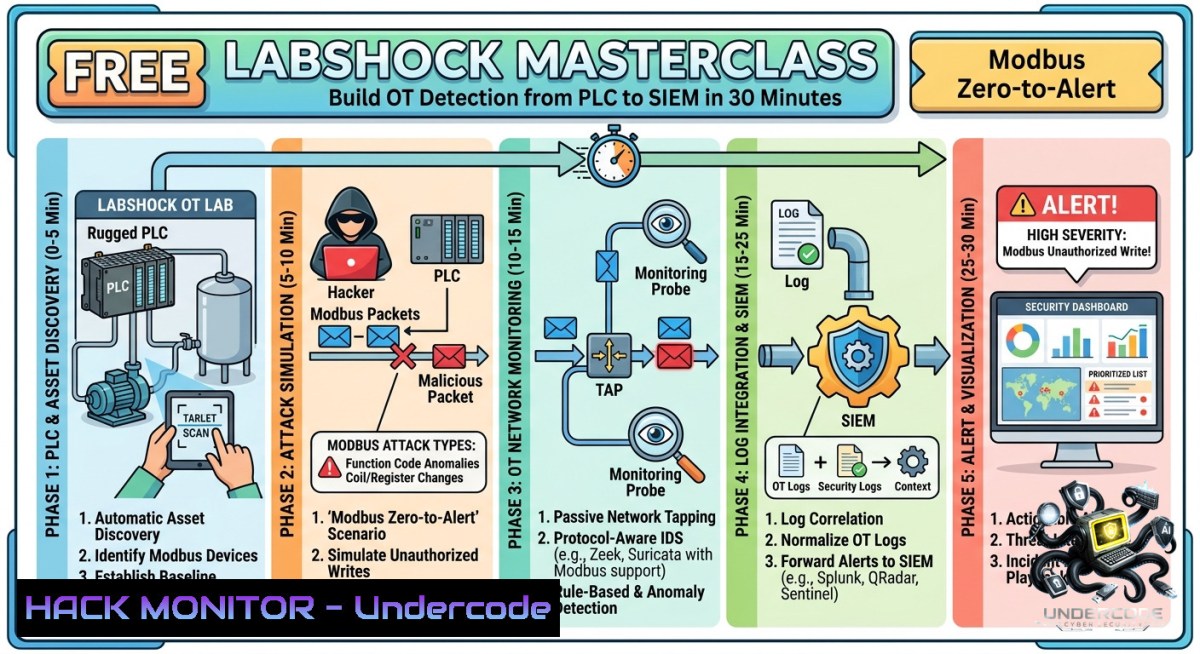
Introduction:
Operational Technology (OT) security differs fundamentally from IT because network anomalies may look benign while a physical process—like a valve opening or a tank overfilling—has already been compromised. Real detection requires connecting the full chain: PLC → Protocol → IDS → SIEM → SOC Analyst. This article replicates the Labshock masterclass flow, showing you how to generate Modbus write traffic, trigger IDS alerts, forward logs to Splunk, and build an investigation that maps network events to physical impact.
Learning Objectives:
– Generate and detect malicious Modbus write commands using open-source IDS rules.
– Forward IDS alerts to a SIEM (Splunk) and create correlation alerts.
– Map network-level detections to physical process changes in an OT lab environment.
You Should Know:
1. Setting Up Your OT Lab Environment (PLC Simulator + Modbus Server)
Start by creating a lightweight OT simulation where a PLC responds to Modbus TCP writes. Use `pymodbus` to run a mock PLC that controls a simulated “tank level” register.
Linux (Ubuntu/Debian):
sudo apt update && sudo apt install python3 python3-pip -y
pip3 install pymodbus
Create a file `plc_simulator.py`:
from pymodbus.server import StartTcpServer
from pymodbus.datastore import ModbusSlaveContext, ModbusServerContext
from pymodbus.datastore import ModbusSequentialDataBlock

 Initialize holding register for tank level (address 0)
store = ModbusSlaveContext(hr=ModbusSequentialDataBlock(0, [bash]))
context = ModbusServerContext(slaves=store, single=True)

print("Mock PLC running on port 5020 – Tank level at register 0")
StartTcpServer(context, address=("0.0.0.0", 5020))
Run: `python3 plc_simulator.py`. Windows users can use WSL or the same Python script with a Windows Python installation (ensure firewall allows port 5020).
2. Generating Modbus Write Traffic (Simulating an Attacker)
Use `mbpoll` (Linux) or a Python script to write a dangerous value (e.g., set tank level to 100%) to the PLC.
Install mbpoll: `sudo apt install mbpoll -y`
Send a write command to register 0 with value 100:
mbpoll -a 1 -t 4:0 -r 0 100 localhost:5020
Explanation: `-a 1` slave ID, `-t 4:0` write holding register, `-r 0` register address, `100` new value.
Alternative Python script (`write_modbus.py`):
from pymodbus.client import ModbusTcpClient
client = ModbusTcpClient('localhost', port=5020)
client.write_register(0, 100)  register 0 = tank level
client.close()
print("Modbus write sent: tank level = 100")
Run: `python3 write_modbus.py`. This mimics an attacker changing physical state without any network anomaly in many basic detection systems.
3. Configuring IDS for Modbus Detection (Snort/Suricata)
Install Snort and create a rule that alerts on any write to holding register 0 with a value > 80 (critical threshold).
Install Snort on Linux:
sudo apt install snort -y
Edit local rules file (`/etc/snort/rules/local.rules`):
alert tcp any any -> any 502 (msg:"Modbus write to register 0 with high value"; content:"|00 00 00 00 00 06 01 06|"; depth:12; content:"|00 64|"; within:2; sid:1000001; rev:1;)
Breakdown: This matches Modbus function code 0x06 (write single register) to register 0 (`00 00`) with value 100 (`00 64`). Adjust for your traffic.
Run Snort in IDS mode:
sudo snort -i eth0 -c /etc/snort/snort.conf -A console
When you rerun `write_modbus.py`, Snort should trigger an alert. For better OT protocol parsing, consider Modbus plugin for Suricata (install Suricata with `sudo apt install suricata` and enable modbus app-layer).
4. Forwarding IDS Alerts to Splunk (SIEM Integration)
Splunk can ingest Snort logs (syslog or file) via Universal Forwarder. This step mirrors the Labshock flow of connecting IDS → SIEM.
On Linux – configure Snort to log to a file that Splunk monitors:
sudo snort -i eth0 -c /etc/snort/snort.conf -l /var/log/snort
Install Splunk Universal Forwarder:
wget -O splunkforwarder.deb "https://download.splunk.com/products/universalforwarder/releases/9.2.0/linux/splunkforwarder-9.2.0-123456-linux-2.6-amd64.deb"
sudo dpkg -i splunkforwarder.deb
sudo /opt/splunkforwarder/bin/splunk enable boot-start
Forward the Snort alert file (`/var/log/snort/alert`) to your Splunk indexer (replace `YOUR_SPLUNK_IP`):
sudo /opt/splunkforwarder/bin/splunk add monitor /var/log/snort/alert -index main
sudo /opt/splunkforwarder/bin/splunk set deploy-poll YOUR_SPLUNK_IP:9997
Windows alternative: Use Windows Event Log or file monitor with Splunk UF. For testing, Splunk Free (local) can receive via TCP input: create a TCP input on port 5140 and use `logger` command on Linux to send alerts.
5. Creating SIEM Alerts and Investigation Workflow
Inside Splunk, create a correlation alert that triggers when more than 3 Modbus writes to register 0 occur in 60 seconds.
Search query:
index=main sourcetype="snort_alert" "Modbus write" | stats count by src_ip, dest_ip, _time | where count > 3
Alert action: Send email or trigger a webhook to a SOAR platform. Build an investigation dashboard that shows:
– Timestamp of each Modbus write
– Register address and written value
– Physical impact (e.g., tank level register value from PLC poll)
Poll the PLC to verify physical state:
mbpoll -a 1 -t 3 -r 0 -c 1 localhost:5020
This reads register 0 – if it shows 100, the physical process has changed, confirming the alert is not a false positive.
6. Mapping Network Events to Physical Process Impact (The OT Differentiator)
Most IT security stops at logs. OT security requires mapping the log to a physical consequence. Extend your lab by linking register 0 to a simulated valve open/close.
Extend `plc_simulator.py` with a callback:
def write_callback(register_address, value):
if register_address == 0:
if value > 80:
print(f"ALERT: Tank level critical ({value}) – Opening relief valve")
elif value == 0:
print("Valve closed – normal operation")

 Integrate with pymodbus custom context (simplified – use context update handler)
Now every SIEM alert includes a mapping to the physical action. In a real OT environment, you would correlate ICS/SCADA historian data (e.g., OPC UA values) with IDS logs.
Hardening recommendations from this flow:
– Implement Modbus ACLs on the PLC to allow writes only from trusted engineering workstation IPs.
– Use Modbus function code whitelisting (e.g., block function 06 except for specific registers).
– Deploy industrial IDS (e.g., Nozomi, Claroty) or open-source Zeek with Modbus analyzer.
What Undercode Say:
– Key Takeaway 1: Network-only detection fails in OT because Modbus writes look identical to normal traffic; you must combine IDS logs with physical process telemetry.
– Key Takeaway 2: The chain PLC → Protocol → IDS → SIEM → Analyst is incomplete without the final step: mapping an event to physical impact (valve state, tank level, motor speed).
Analysis (10 lines): The Labshock masterclass exposes a critical blind spot in OT security – most organizations deploy IDS and SIEM but never correlate alerts with process behavior. By building this pipeline from Modbus generation to Splunk alert to physical register verification, you learn why an IT-style “alert” is insufficient. Attackers like TRITON and Industroyer used valid Modbus commands to cause physical damage while evading signature-based detection. The missing piece is context: is this write to register 0 operationally normal? Your lab should include a baseline of “normal” register ranges and flag deviations. Furthermore, many OT networks lack proper logging at the PLC level – using a Modbus proxy or mirror port with deep packet inspection (DPI) is essential. Finally, this flow demonstrates why SOC analysts need OT training: they must recognize that a Modbus write alert is not an IT event but a potential kinetic action.
Expected Output:
Introduction:
Operational Technology (OT) security differs fundamentally from IT because network anomalies may look benign while a physical process has already been compromised. Real detection requires connecting the full chain: PLC → Protocol → IDS → SIEM → SOC Analyst. This article replicates the Labshock masterclass flow, showing how to generate Modbus write traffic, trigger IDS alerts, forward logs to Splunk, and map network events to physical impact.
What Undercode Say:
– Key Takeaway 1: Network-only detection fails in OT; combine IDS with physical telemetry.
– Key Takeaway 2: The full detection chain must end with “physical impact mapping” to avoid blind spots.
Prediction:
– -1 Over the next 18 months, OT security teams that rely solely on IT-style SIEM alerts will experience at least three major physical-impact breaches, as attackers weaponize legitimate Modbus commands that bypass signature rules.
– +1 Adoption of open-source pipelines (Snort + Splunk + pymodbus) will democratize OT detection, enabling small manufacturing firms to build cheap, effective monitoring without expensive commercial IDS.
– -1 The complexity of mapping network logs to process variables will create a skills gap, leading to false-positive fatigue and missed detections until automated correlation tools (e.g., OT-SOAR) mature.
– +1 Community-driven projects (like Labshock’s masterclass) will accelerate the development of OT-specific detection rules and playbooks, shifting the industry from “alert-focused” to “impact-focused” security.
▶️ Related Video (78% Match):
🎯Let’s Practice For Free:
🎓 Live Courses & Certifications:
[Join Undercode Academy for Verified Certifications](https://undercode.co.uk/certifications/)
🚀 Request a Custom Project:
Secure, high-velocity infrastructure and disruptive technological engineering. Contact our engineering team for high-tier development and proprietary systems:
[[email protected]](mailto:[email protected])
💎 Smart Architecture | 🛡️ Secure by Design | ⭐ Trusted by Thousands
IT/Security Reporter URL:
Reported By: [Zakharb Ids](https://www.linkedin.com/posts/zakharb_ids-siem-soc-share-7468332048449953792-2KGN/) – Hackers Feeds
Extra Hub: Undercode MoN
Basic Verification: Pass ✅
🔐JOIN OUR CYBER WORLD [ CVE News • HackMonitor • UndercodeNews ]
[💬 Whatsapp](https://undercode.help/whatsapp) | [💬 Telegram](https://t.me/UndercodeCommunity)
📢 Follow UndercodeTesting & Stay Tuned:
[𝕏 formerly Twitter 🐦](https://x.com/undercodeupdate) | [@ Threads](https://www.threads.net/@undercodetesting) | [🔗 Linkedin](https://www.linkedin.com/company/undercodetesting/) | [🦋BlueSky](https://bsky.app/profile/undercode.bsky.social)


