
Listen to this Post
Introduction:
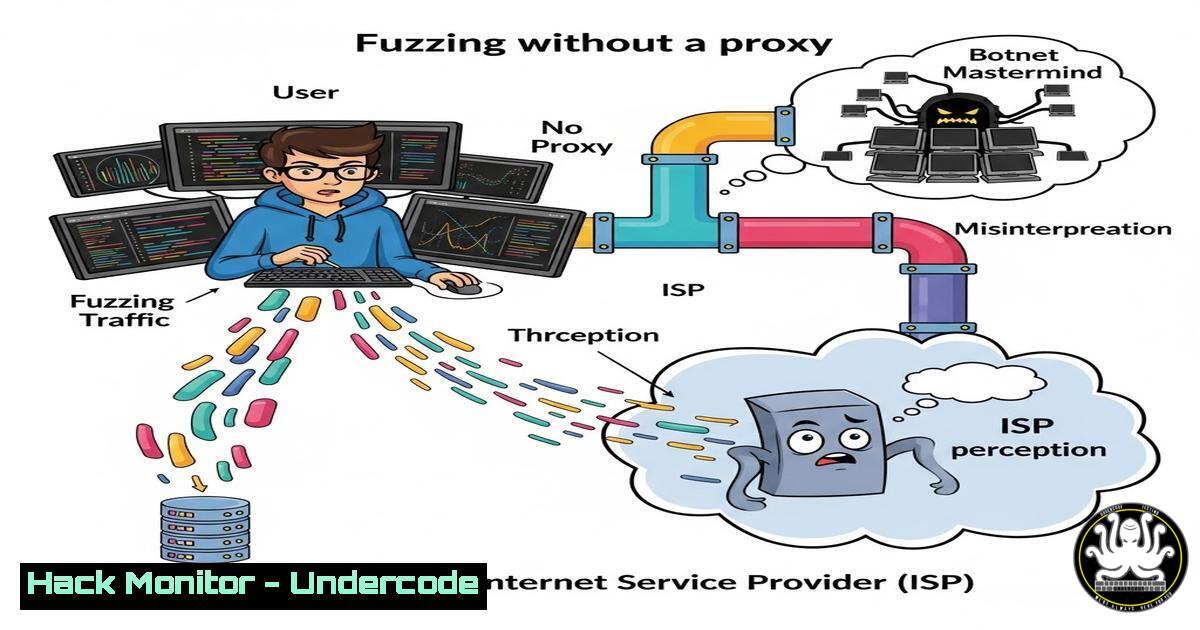
The line between legitimate security research and malicious attack traffic is perilously thin, often defined by a single layer of obfuscation: the proxy. A recent cautionary post from a cybersecurity researcher underscores a fundamental rule of engagement—directly fuzzing targets without masking your origin IP will likely trigger defensive systems, not just at the target, but at your own Internet Service Provider (ISP). This article delves into the critical tradecraft of anonymizing your reconnaissance and testing activities to maintain operational security and avoid being mistakenly flagged as a botnet participant.
Learning Objectives:
- Understand why ISPs and network defenders classify unmasked fuzzing as malicious botnet activity.
- Learn to configure and use robust proxy chains (like Proxychains) and web application proxies (like Burp Suite) for traffic obfuscation.
- Implement secure, automated fuzzing workflows that protect your identity and infrastructure.
You Should Know:
- The Anatomy of a Botnet Flag: Why Your ISP is Watching
When you fuzz a web application or API by sending massive, automated, and unexpected payloads directly from your home IP, you exhibit behavioral fingerprints identical to a compromised machine in a botnet. Network Intrusion Detection Systems (NIDS) and ISP traffic analysis tools look for high-volume, repetitive request patterns to known endpoints. Your carrier’s primary goal is to protect its network and customers; an IP generating what appears to be DDoS precursor scans or brute-force attacks will be throttled, flagged, or even suspended.
Step‑by‑step guide explaining what this does and how to use it.
Diagnose Your Traffic Footprint: Before you start, understand what you look like. Use `tcpdump` or Wireshark to capture your fuzzing traffic.
sudo tcpdump -i eth0 -w fuzz_capture.pcap port 80 or port 443
Analyze the `.pcap` file. The high rate of similar packets from a single source is the tell-tale sign.
- Building Your Armor: Proxychains & SOCKS5 Proxy Tunnels
Proxychains is a tool that forces any TCP connection made by any application to go through configured proxies (like TOR, SOCKS5, or HTTP proxies). This effectively anonymizes the source IP address seen by the target server.
Step‑by‑step guide explaining what this does and how to use it.
Installation: `sudo apt install proxychains4` (Kali/Ubuntu) or via brew on macOS.
Configuration: Edit /etc/proxychains4.conf. Comment out the strict `dynamic_chain` and uncomment `random_chain` for better anonymity. At the bottom, define your proxy list.
 Example: Using TOR's default SOCKS5 proxy
socks5 127.0.0.1 9050
 Example: Adding a paid, rotating proxy service
 http 192.168.1.1 8080 user pass
Usage: Prepend `proxychains4` to any command.
proxychains4 nmap -sT -Pn --top-ports 100 target.com
proxychains4 ffuf -u http://target.com/FUZZ -w wordlist.txt
- The Web Hacker’s Swiss Army Knife: Burp Suite as a Local Proxy
Burp Suite acts as an intercepting web proxy, sitting between your browser and the target. It allows you to manipulate traffic and, crucially, can be used as a upstream proxy for other tools, while also providing a platform for automated fuzzing with Intruder.
Step‑by‑step guide explaining what this does and how to use it.
Setup: Launch Burp, go to the Proxy > Options tab. Ensure the proxy listener is active (e.g., 127.0.0.1:8080).
Configure System/Browser Proxy: Point your browser or tool’s proxy settings to HTTP://127.0.0.1:8080`.proxychains4`.
Chain Proxychains to Burp: For an extra layer, route tools through Proxychains to Burp. Configure `proxychains4.conf` with `http 127.0.0.1 8080` and run your tool with
Fuzz with Intruder: Capture a request in Burp, send to Intruder, define payload positions, and launch the attack. All fuzzing traffic originates from Burp’s proxy IP (which should itself be behind a VPN).
4. The Foundation: VPNs for Geographic Obfuscation
A reliable, no-logs VPN is your first and most critical layer. It masks your real IP from the proxy services you use and provides a baseline of geographic obfuscation. For security research, choose a provider known for strong privacy policies and support for OpenVPN or WireGuard protocols.
Step‑by‑step guide explaining what this does and how to use it.
WireGuard on Linux:
sudo apt install wireguard
wg genkey | sudo tee /etc/wireguard/private.key | wg pubkey | sudo tee /etc/wireguard/public.key
 Edit /etc/wireguard/wg0.conf with config from your provider
sudo systemctl enable --now wg-quick@wg0
5. Automating the Secure Fuzzing Pipeline
Manual steps are error-prone. Script your workflow to ensure you never accidentally leak your IP.
Step‑by‑step guide explaining what this does and how to use it.
Bash Script Example:
!/bin/bash
 secure_fuzz.sh
TARGET=$1
WORDLIST=$2

Check if VPN is up (using WireGuard example)
if ! ip a show wg0 > /dev/null 2>&1; then
echo "[-] VPN not connected. Starting..."
sudo wg-quick up wg0
sleep 5
fi

Run ffuf through proxychains, targeting the Burp proxy
echo "[+] Launching fuzzer through proxy chain..."
proxychains4 ffuf -u http://$TARGET/FUZZ \
-w $WORDLIST \
-p 0.5 \  Delay to reduce rate
-H "User-Agent: Legit-Browser/1.0" \
-o fuzz_results.json
echo "[+] Fuzzing complete. Results saved."
Run with: `./secure_fuzz.sh example.com /usr/share/wordlists/dirb/common.txt`
6. Windows Equivalent: Proxifier & Fiddler Combo
On Windows, Proxifier performs a similar function to Proxychains, allowing you to force system-wide or application-specific traffic through a proxy chain.
Step‑by‑step guide explaining what this does and how to use it.
Install Proxifier.
Create a profile that routes all traffic from your chosen tool (e.g., ffuf.exe, nmap.exe) through a SOCKS5 proxy (like your VPN’s SOCKS5 endpoint or TOR).
Use Fiddler Classic (a web debugging proxy like Burp) as an additional layer for HTTP/HTTPS inspection and manipulation before it hits Proxifier’s chain.
7. Mitigation for Defenders: Detecting Proxied Attacks
As a defender, assume attackers are using these techniques. Focus on behavioral analytics rather than just IP reputation.
Detect Anomalous Request Rates per Session: Even from “clean” IPs, a session generating 10,000 login attempts is malicious.
Implement Challenge-Response (CAPTCHA, JS Puzzles): For sensitive endpoints like login or API gates, after a certain request threshold.
Correlate with Other Signals: Unusual geo-location + new user agent + high error rate (404s, 400s from fuzzing) = high-risk event.
What Undercode Say:
- Operational Security is Non-Negotiable: Failing to proxy your research traffic is a fundamental breach of opsec that risks your ability to conduct work and your relationship with your ISP. It’s the digital equivalent of conducting surveillance in a neon orange vest.
- Layered Anonymity is Key: Relying on a single proxy or VPN is fragile. A mature researcher uses a chain:
Tool -> Proxychains -> Burp Suite -> VPN -> Internet. This distributes trust and provides redundancy. - Analysis: The post highlights a cultural and technical divide in cybersecurity. New researchers often focus on the offensive tool (the fuzzer) without understanding the defensive ecosystem they are operating within. This rule isn’t just about avoiding trouble; it’s about professionalism. The infrastructure of anonymity is as important a skill as writing an exploit. As AI-driven behavioral analysis on networks becomes standard, the sophistication of these obfuscation techniques must also evolve. The future will see a rise in AI-powered “adversarial proxies” that intelligently mimic human traffic patterns to bypass next-gen detection systems.
Prediction:
Within the next 2-3 years, ISP-level Deep Packet Inspection (DPI) and carrier-grade AI will automatically quarantine devices exhibiting automated attack patterns, even at low volumes, pushing security research and ethical hacking into heavily pre-provisioned, whitelisted cloud labs. The era of fuzzing from a residential IP address, even through commercial VPNs, will come to an end, making anonymized, decentralized research networks (like specialized Tor services) a necessity for independent researchers.
▶️ Related Video (82% Match):
🎯Let’s Practice For Free:
IT/Security Reporter URL:
Reported By: Naresh J – Hackers Feeds
Extra Hub: Undercode MoN
Basic Verification: Pass ✅


