Listen to this Post
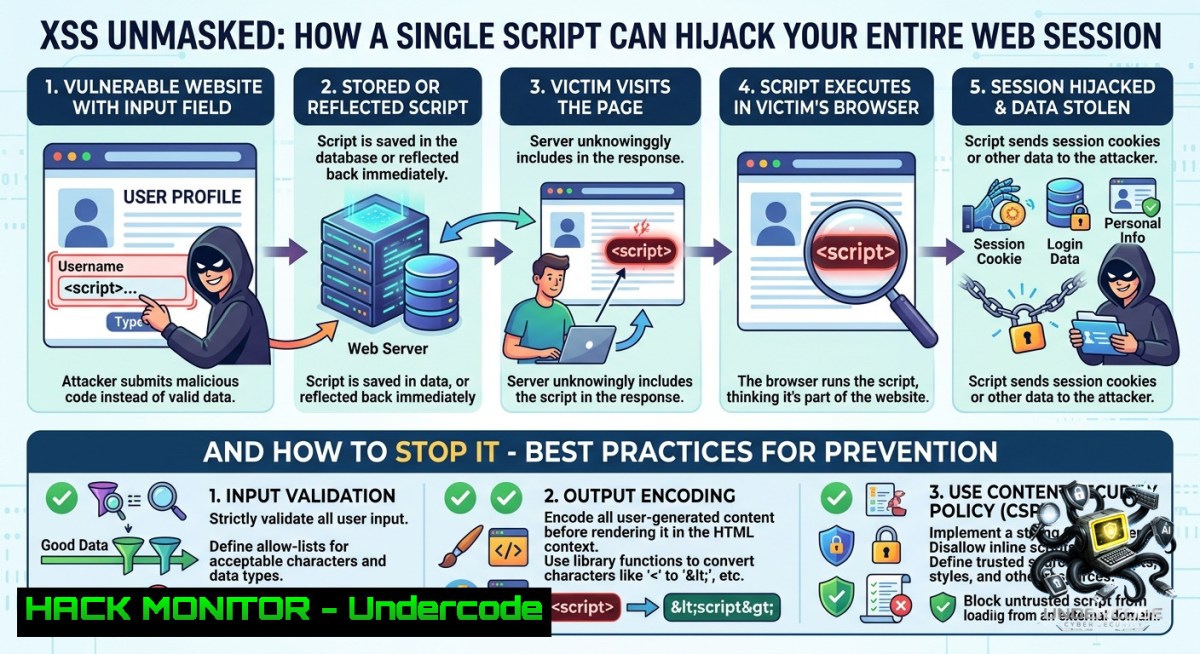
Introduction:
Cross-Site Scripting (XSS) remains one of the most pervasive web application vulnerabilities, allowing attackers to inject malicious client‑side scripts into trusted websites. When executed in a victim’s browser, these scripts can bypass same‑origin policies and lead to session cookie theft, account takeover, or even malware delivery. Understanding both the exploitation mechanics and defensive coding practices is essential for any developer or security professional.
Learning Objectives:
– Identify reflected, stored, and DOM‑based XSS vulnerabilities in web applications.
– Implement effective mitigations including input validation, output encoding, and Content Security Policy (CSP).
– Use command‑line tools and browser developer consoles to test for and remediate XSS flaws.
You Should Know:
1. Reflected XSS – The Crafted Link Attack
Reflected XSS occurs when a malicious script is embedded in a request parameter and immediately returned by the server without sanitization. An attacker tricks a victim into clicking a specially crafted URL, causing the script to execute in the victim’s browser context.
Step‑by‑step guide to test for reflected XSS:
1. Identify a URL parameter that reflects user input (e.g., `?search=test`).
2. Insert a simple JavaScript payload: `?search=`.
3. If an alert box appears, the parameter is vulnerable.
4. Use `curl` to verify server response without a browser:
curl "http://vulnerable-site.com/search?q=<script>alert(1)</script>"
5. On Windows PowerShell (invoke‑webrequest):
Invoke-WebRequest -Uri "http://vulnerable-site.com/search?q=<script>alert(1)</script>" | Select-Object -ExpandProperty Content
2. Stored XSS – Persisting Malicious Payloads
Stored XSS saves the malicious script on the server (e.g., in a database, comment field, or forum post). Every subsequent visitor loads the tainted page, making it particularly dangerous for high‑traffic areas like profile pages or message boards.
Step‑by‑step guide to simulate and mitigate stored XSS:
1. Simulation: Post a comment containing `` on a test blog platform.
2. Monitor storage: Check the database entry via SQLite or MySQL:
SELECT comment_text FROM comments WHERE id = 42;
3. Mitigation – Output encoding: Encode dynamic content using language‑specific libraries.
PHP: `htmlspecialchars($user_input, ENT_QUOTES, ‘UTF-8’)`
Python (Flask/Jinja): `{{ user_input | e }}` or `escape(user_input)`
4. Server‑side validation: Reject obvious script patterns using regex (not a complete solution, but adds a layer):
import re
if re.search(r'<script|javascript:|on\w+\s=', user_input, re.IGNORECASE):
reject_input()
3. Setting HttpOnly and Secure Flags on Cookies
Without the `HttpOnly` flag, client‑side scripts (including XSS payloads) can read session cookies via `document.cookie`. The `Secure` flag ensures cookies are only sent over HTTPS.
Step‑by‑step guide to harden cookie security:
1. For Apache (mod_headers): Add to `.htaccess` or virtual host:
Header always edit Set-Cookie (.) "$1; HttpOnly; Secure; SameSite=Strict"
2. For Nginx: Inside `server` block:
proxy_cookie_path / "/; HTTPOnly; Secure; SameSite=Strict";
3. For application code (Node.js/Express):
res.cookie('sessionId', token, { httpOnly: true, secure: true, sameSite: 'strict' });
4. Verify with browser DevTools: Open Application → Cookies. Look for the checkmark next to `HttpOnly` and `Secure`.
5. Test cookie exfiltration attempt (only on your own environment):
// This should return nothing if HttpOnly is set
console.log(document.cookie);
4. Content Security Policy (CSP) – A Powerful Last Line of Defense
CSP allows you to declare which dynamic resources are allowed to load. A strict CSP can block inline scripts and `eval()` even if an XSS vulnerability exists.
Step‑by‑step guide to deploy CSP:
1. Start with a report‑only policy to monitor violations without breaking functionality:
Content-Security-Policy-Report-Only: default-src 'self'; script-src 'self' https://trusted-cdn.com; report-uri /csp-violation
2. Once ready, enforce a strict policy that disallows inline scripts:
Content-Security-Policy: default-src 'none'; script-src 'self'; object-src 'none'; base-uri 'self';
3. For modern applications, use nonce‑based CSP:
<script nonce="r@nd0m123">console.log('safe')</script>
Header: `Content-Security-Policy: script-src ‘nonce-r@nd0m123’`
4. Test CSP effectiveness using `curl`:
curl -I https://yourdomain.com | grep -i content-security-policy
5. On Windows (using `findstr`):
curl -Uri https://yourdomain.com -Method Head | Select-String "Content-Security-Policy"
5. Automated XSS Detection with OWASP ZAP and Burp Suite
Manual testing is essential, but automation speeds up discovery. Both OWASP ZAP and Burp Suite provide active scanners for reflected and stored XSS.
Step‑by‑step guide using OWASP ZAP:
1. Launch ZAP and set your browser to proxy through `localhost:8080`.
2. Browse the target web application to map all endpoints.
3. Right‑click the target site in the Sites tree → Attack → Active Scan.
4. In the scan policy, ensure Cross‑Site Scripting (Reflected) and Cross‑Site Scripting (Persistent) are enabled.
5. Review Alerts tab. For each XSS finding, right‑click and select Show evidence.
6. For API endpoints (REST, GraphQL): Use ZAP’s Script Console to write a custom passive scan rule that checks JSON responses for unencoded `<` and `>` characters.
Burp Suite alternative:
– Use Intruder with a payload list of XSS vectors (e.g., PortSwigger’s XSS cheat sheet).
– Filter responses for the same payload echoed back without encoding.
6. DOM‑Based XSS – The Client‑Side Risk
DOM‑based XSS arises when JavaScript directly writes user‑controllable data into the DOM using unsafe methods like `innerHTML`, `document.write()`, or `eval()`.
Step‑by‑step guide to prevent DOM XSS:
1. Identify dangerous sinks in your JavaScript code:
// Dangerous – allows script injection
element.innerHTML = userProvidedData;
document.write(location.hash);
eval("var x = " + userInput);
2. Replace with safe alternatives:
– Use `textContent` or `innerText` for plain text.
– Use `setAttribute()` for attributes.
– For dynamic HTML, use a sanitization library like DOMPurify:
import DOMPurify from 'dompurify';
element.innerHTML = DOMPurify.sanitize(userProvidedData, { ALLOWED_TAGS: ['b', 'i'] });
3. Avoid using `location.hash` or `document.URL` directly. Validate against a whitelist:
const allowedParams = ['view', 'sort'];
const param = new URLSearchParams(location.search).get('page');
if (allowedParams.includes(param)) {
// safe to use
}
4. Test DOM XSS manually: Open browser console and try:
// Replace with actual vulnerable sink
document.body.innerHTML = '<img src=x onerror=alert("DOM XSS")>';
If an alert appears, your sink is unsafe.
What Undercode Say:
– Key Takeaway 1: XSS is not just a developer oversight; it’s a failure of multiple defense layers. Relying solely on input filtering gives false security – proper output encoding and CSP are non‑negotiable.
– Key Takeaway 2: Automated scanners catch reflected XSS reliably, but stored and DOM‑based XSS require manual code review and context‑aware sanitization. The most dangerous XSS flaws are often business‑logic specific (e.g., PDF generators, markdown parsers).
Analysis (10 lines):
The post rightly emphasizes that XSS can lead to complete account takeover, yet many organizations still treat it as a low‑priority bug. What’s missing is the nuance of modern front‑end frameworks: React’s JSX escapes by default, but `dangerouslySetInnerHTML` reintroduces risk. Similarly, Angular’s bypassSecurityTrust functions must be avoided. API security is another blind spot – JSON endpoints that reflect unsanitized user input can enable XSS when consumed by mobile or single‑page apps. Attackers today use XSS to pivot to internal networks via stolen tokens, making it a gateway to deeper compromise. Defensively, combining CSP with `nonce` or `hash` sources is the only reliable way to block inline script execution, but it requires rigorous maintenance. The Linux/Windows commands shown for cookie hardening and CSP headers are immediately actionable for DevOps teams. Finally, training courses should move beyond `alert(1)` demonstrations and teach how to abuse XSS in real‑world scenarios like post‑message hijacking or web socket poisoning.
Prediction:
– -1 Rise of AI‑generated XSS payloads will bypass traditional signature‑based WAF rules, forcing a shift toward behavioral analysis and runtime application self‑protection (RASP).
– +1 Browser‑level mitigations like Trusted Types (currently Chromium only) will become standard across all major browsers, virtually eliminating DOM‑based XSS by 2028.
– -1 Third‑party script supply chain attacks (e.g., compromised CDN libraries) will be the new XSS – where even secure first‑party code executes malicious injected scripts from external sources.
– +1 Server‑side rendering frameworks (Next.js, Nuxt, SvelteKit) reduce client‑side XSS surface by default, but misconfigured CSP headers will remain a common misstep.
– -1 Legacy on‑premise applications without update paths will continue to suffer stored XSS breaches, especially in healthcare and industrial control systems where manual patching is slow.
▶️ Related Video (72% Match):
🎯Let’s Practice For Free:
🎓 Live Courses & Certifications:
[Join Undercode Academy for Verified Certifications](https://undercode.co.uk/certifications/)
🚀 Request a Custom Project:
Secure, high-velocity infrastructure and disruptive technological engineering. Contact our engineering team for high-tier development and proprietary systems:
[[email protected]](mailto:[email protected])
💎 Smart Architecture | 🛡️ Secure by Design | ⭐ Trusted by Thousands
IT/Security Reporter URL:
Reported By: [Xss Crosssitescripting](https://www.linkedin.com/posts/xss-crosssitescripting-cybersecurity-share-7469746341905285123-ci4-/) – Hackers Feeds
Extra Hub: Undercode MoN
Basic Verification: Pass ✅
🔐JOIN OUR CYBER WORLD [ CVE News • HackMonitor • UndercodeNews ]
[💬 Whatsapp](https://undercode.help/whatsapp) | [💬 Telegram](https://t.me/UndercodeCommunity)
📢 Follow UndercodeTesting & Stay Tuned:
[𝕏 formerly Twitter 🐦](https://x.com/undercodeupdate) | [@ Threads](https://www.threads.net/@undercodetesting) | [🔗 Linkedin](https://www.linkedin.com/company/undercodetesting/) | [🦋BlueSky](https://bsky.app/profile/undercode.bsky.social)


