Listen to this Post
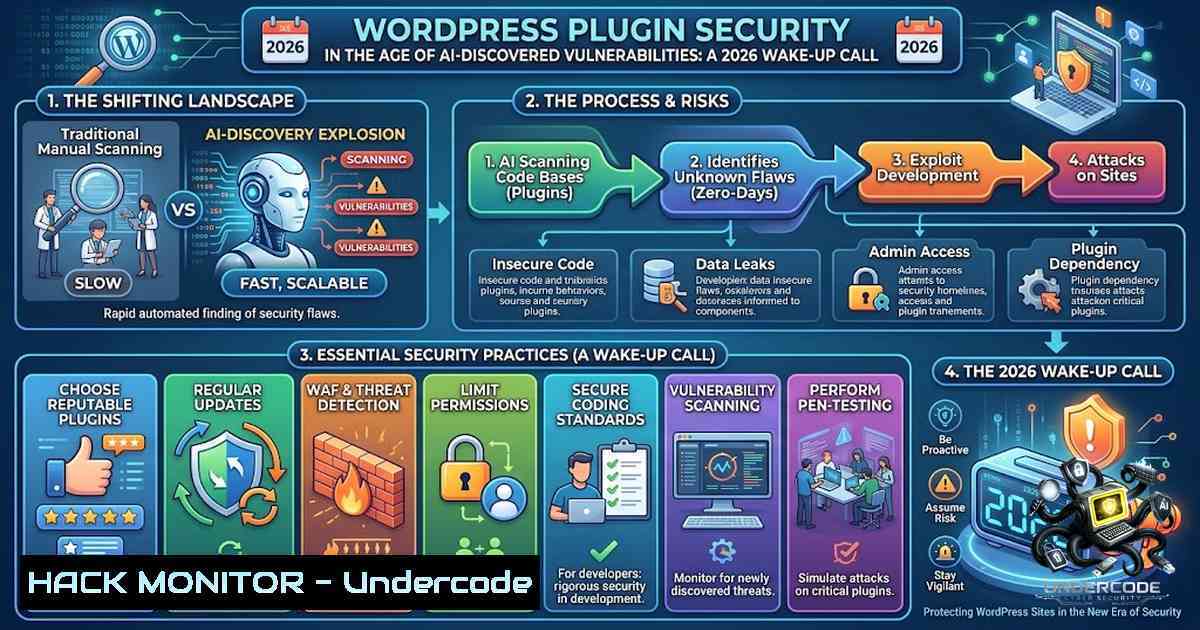
Introduction:
The WordPress plugin ecosystem is experiencing an unprecedented security crisis as AI-powered vulnerability discovery tools accelerate the identification of flaws at a scale never before seen. In 2026, researchers demonstrated a system that surfaced more than 300 critical zero-day vulnerabilities across the WordPress plugin ecosystem in just 72 hours of scanning, pairing AI-driven static analysis with automated Docker provisioning and dynamic verification. This capability has fundamentally shifted the threat landscape: whereas plugin security reports once arrived about once per month, they now arrive at least once per week. According to Patchstack’s 2026 State of WordPress Security report, 11,334 WordPress vulnerabilities were recorded — a 42% year-over-year increase — with 46% of plugin vulnerabilities having no developer fix at the time of public disclosure and the median time to mass exploitation for high-impact vulnerabilities standing at just 5 hours.
Learning Objectives & Secrets:
- Objective 1: Implement Automated Vulnerability Scanning in CI/CD Pipelines — Integrate security scanning directly into your development workflow. The highest-signal pattern for CMS extension teams is a two-lane pipeline: a PR Fast Lane for immediate feedback (PHPCS, unit tests, dependency scanning) and a Deep AI Security Lane for scheduled semantic auditing. Run WP-CLI against an ephemeral instance of the site on every PR and fail the build on real signals: plugin vulnerabilities, autoload bloat, broken activations, and security misconfigurations.
-
Objective 2 Secret Tip: Leverage GitHub Security Lab’s AI Framework — The GitHub Security Lab provides a YAML taskflow grammar for multi-agent workflows that excels at finding semantic logic flaws traditional scanners miss. Run these as scheduled nightly scans rather than PR gates, as audit taskflows can take hours and generate many AI requests. Use the framework’s triage matrix to identify access bypasses by analyzing custom route controllers.
-
Objective 3 Secret Tip: Proactive Supply Chain Defense — The 2026 Essential Plugin portfolio compromise demonstrated that trusted plugins can be sold and weaponized without detection. Implement SBOM management, vet third-party extensions, and treat every plugin update as potentially malicious. Set spending caps on AI provider dashboards before pasting any API key into WordPress, and use environment variables and PHP constants as higher-priority sources than the database for sensitive credentials.
You Should Know:
- The AI Vulnerability Discovery Revolution — Understanding the New Attack Surface
The most consequential shift isn’t AI writing better malware — it’s AI enabling attackers to operate at a scale that wasn’t previously possible without substantial resources. An estimated 97% of WordPress attacks are already automated, and AI is making those automated attacks faster, smarter, and harder to block. Attackers use bots and machine learning to scan thousands of WordPress sites in seconds, checking plugin versions, theme files, and server configurations against known vulnerability databases. Most plugin vulnerabilities can be exploited using fully automated, large-scale attacks with no prior access required, and over half require no authentication at all.
Real-world examples from August 2026 demonstrate the severity: The TranslatePress plugin (versions up to 3.2.5) was found vulnerable to unauthenticated Stored Cross-Site Scripting via special gettext markers ‘!trpst’ and ‘!trpen’ that are unconditionally rewritten to HTML tags, allowing attackers to execute malicious JavaScript in visitors’ browsers. The AI Agent by SiteGround plugin (versions up to 1.2.7) suffered from an authorization bypass allowing unauthenticated attackers to upload arbitrary images to the WordPress media library. These vulnerabilities were discovered and patched within days — but the speed of discovery now outpaces the speed of patching.
Step‑by‑Step Guide: Implementing AI-Powered Vulnerability Scanning in CI/CD
- Set up a two-lane CI pipeline for your WordPress plugin repository:
PR Fast Lane (required, < 10 minutes)
name: PR Security Fast Lane
on: [bash]
jobs:
fast-scan:
runs-on: ubuntu-latest
steps:</li>
</ol>

- uses: actions/checkout@v4
- name: PHPCS WordPress Coding Standards
run: vendor/bin/phpcs --standard=WordPress .
- name: Dependency Vulnerability Scan
run: composer audit
- name: Secret Detection
run: |
if grep -r "API_KEY|SECRET|PASSWORD" --include=".php" .; then
echo "❌ Secrets found in code!"
exit 1
fi
Deep AI Security Lane (scheduled, can take hours) name: Deep AI Security Audit on: schedule: - cron: "30 3 " workflow_dispatch: jobs: seclab-audit: runs-on: ubuntu-latest timeout-minutes: 360 steps: - uses: actions/checkout@v4 - name: Set up Python uses: actions/setup-python@v5 with: python-version: "3.11" - name: Clone SecLab Taskflows run: | git clone --depth 1 https://github.com/GitHubSecurityLab/seclab-taskflow-agent.git git clone --depth 1 https://github.com/GitHubSecurityLab/seclab-taskflows.git - name: Run AI Security Audit env: AI_API_TOKEN: ${{ secrets.AI_API_TOKEN }} GH_TOKEN: ${{ secrets.GH_TOKEN }} run: | cd seclab-taskflows ./scripts/audit/run_audit.sh ${{ github.repository }}- Run WP-CLI security checks on every PR by spinning up an ephemeral WordPress instance:
!/bin/bash
CI Security Check Script

Download and configure WordPress
wp core download --path=./wp-test --allow-root
wp config create --path=./wp-test --dbname=test --dbuser=root --dbpass=root --dbhost=127.0.0.1 --allow-root
wp db create --path=./wp-test --allow-root
wp core install --path=./wp-test --url=http://localhost --title="Test" --admin_user=admin --admin_password=test123 [email protected] --allow-root

Activate all production plugins from the PR
for plugin in $(ls -d ./wp-content/plugins//); do
wp plugin activate $(basename $plugin) --path=./wp-test --allow-root
done

Run security checks
wp doctor check --all --path=./wp-test --allow-root
wp plugin list --status=inactive --path=./wp-test --allow-root | grep -v "active" && exit 1

Check for known CVEs (requires wpscan or wpvulnerability package)
wp package install wp-cli/doctor-command:@stable --allow-root
wp doctor check core-update plugin-update --path=./wp-test --allow-root
-
Audit autoload options bloat — a common performance and security issue:
wp option list --autoload=yes --fields=option_name,size_bytes --path=./wp-test --allow-root | sort -k2 -1 -r | head -20
-
Vulnerability Classes Being Actively Probed — What to Watch For
Based on April 2026 bug bounty leaderboard data with 114 total reports and an $8,850 monthly bounty pool, the most dangerous vulnerability classes for WordPress include:
- Authentication and Authorization Bypass — Attack surface includes REST API endpoints, custom AJAX actions, and poorly-restricted admin AJAX handlers. Impact: unauthorized data access, privilege escalation, mass account takeover.
- Cross-Site Scripting (XSS) — Impact: session theft, admin compromise, execution of malicious JavaScript leading to full site takeover when chained with other flaws.
- Arbitrary File Upload / RFI / LFI — Impact: remote code execution and persistent malware.
- SQL Injection — Less common but still critical in custom queries and unsafe SQL assembly.
- CSRF / Missing Nonces — State-changing actions that lack nonce validation.
- Unauthenticated REST/Endpoint Vulnerabilities — Exposed REST endpoints that accept and trust user input.
Step‑by‑Step Guide: Hardening Against the Top Vulnerability Classes
- Implement proper nonce verification for all state-changing actions:
// In your plugin code public function handle_form_submission() { // Verify nonce if (!isset($_POST['_wpnonce']) || !wp_verify_nonce($_POST['_wpnonce'], 'my_plugin_action')) { wp_die('Security check failed'); }</li> </ol> // Verify user capabilities if (!current_user_can('manage_options')) { wp_die('Insufficient permissions'); } // Sanitize all inputs $safe_input = sanitize_text_field($_POST['user_input']); // Escape all outputs echo esc_html($safe_input); }- Secure REST API endpoints with proper permission checks:
// Register REST route with permission callback
register_rest_route('myplugin/v1', '/secure-action', array(
'methods' => 'POST',
'callback' => 'myplugin_secure_callback',
'permission_callback' => function() {
return current_user_can('edit_posts');
}
));
3. Linux server hardening commands for WordPress environments:
Identify suspicious plugin files ls -lrtha /var/www/html/wp-content/plugins/ Find files modified in the last 24 hours find /var/www/html/wp-content/plugins/ -type f -mtime -1 Check for suspicious PHP functions grep -r "eval|base64_decode|system|exec|shell_exec" /var/www/html/wp-content/plugins/ --include=".php" Lock down file permissions find /var/www/html -type f -exec chmod 644 {} \; find /var/www/html -type d -exec chmod 755 {} \; chown -R www-data:www-data /var/www/html- Implement WAF rules to block common attack patterns:
Nginx WAF rules for WordPress location ~ /wp-admin/admin-ajax.php { Block requests without nonce if ($http_referer !~ "^https?://(www.)?example.com") { return 403; } } Block suspicious query strings if ($args ~ "(eval()|(base64_)") { return 403; } -
WordPress Core Security vs. Plugin Vulnerabilities — The Numbers Don’t Lie
WordPress core remains remarkably secure, with only 6 low-priority issues reported in core for all of 2025. However, plugins represent 91% of newly reported vulnerabilities, and themes account for 9%. In a single week in April 2026, researchers logged 185 vulnerabilities, 161 of which were found in plugins. The CVE count for WordPress jumped from 19 in 2025 to 71 in 2026, with 100% of tracked CVEs remaining unpatched at the time of analysis. The average CVSS score stands at 6.1, with a security grade of “D (RISKY)”.
Step‑by-Step Guide: Automated Vulnerability Monitoring and Remediation
- Set up automated vulnerability scanning using WP-CLI and vulnerability databases:
Install WP-CLI vulnerability scanner
wp package install wp-cli/doctor-command:@stable

Check all plugins for known vulnerabilities
wp doctor check plugin-update --all

Update vulnerable plugins immediately
wp plugin update $(wp plugin list --format=csv --field=name | grep -v "active")

One-liner for emergency patching
wp plugin update suretriggers --allow-root && wp plugin deactivate vulnerable-plugin --allow-root
2. Implement WordPress security monitoring with Bash:
!/bin/bash
 WordPress vulnerability scanner using WPVulnerability.net API
 Requires: curl, jq, wp-cli

WP_PATH="/var/www/html"
cd $WP_PATH

Get list of active plugins
PLUGINS=$(wp plugin list --status=active --field=name --path=$WP_PATH --allow-root)

Check each plugin against vulnerability database
for PLUGIN in $PLUGINS; do
VERSION=$(wp plugin get $PLUGIN --field=version --path=$WP_PATH --allow-root)
echo "Checking $PLUGIN version $VERSION..."

Query vulnerability API (example using Wordfence Intelligence API)
RESPONSE=$(curl -s "https://www.wordfence.com/api/intelligence/vulnerabilities/wordpress-plugins/$PLUGIN/$VERSION")

if echo $RESPONSE | grep -q '"vulnerable":true'; then
echo "⚠️ VULNERABLE: $PLUGIN $VERSION"
echo "Fix: wp plugin update $PLUGIN --path=$WP_PATH --allow-root"
fi
done
- Use Wordfence Intelligence API for programmatic vulnerability detection:
Query the Wordfence Intelligence API (free for personal and commercial use)
curl -X GET "https://www.wordfence.com/api/intelligence/vulnerabilities/wordpress-plugins/sg-ai-studio/1.2.7"
4. Supply Chain Attacks — The Invisible Threat
The 2026 Essential Plugin compromise serves as a stark warning. A portfolio of over 30 legitimate WordPress plugins with hundreds of thousands of installations was quietly sold and continued operating normally. Months later, it was discovered that all plugins had been infected with malicious code granting attackers a backdoor. The code sat dormant before injecting SEO spam only visible to crawlers, all under the guise of routine compatibility updates. Third-party involvement in breaches has doubled to 30%, reinforcing the critical importance of supply chain security.
Step‑by-Step Guide: Supply Chain Security Implementation
- Generate and maintain SBOM (Software Bill of Materials) for your WordPress installation:
Using composer to generate SBOM
composer show --format=json > composer-sbom.json

Using wp-cli to list all plugins and themes
wp plugin list --format=json --path=/var/www/html > plugin-sbom.json
wp theme list --format=json --path=/var/www/html > theme-sbom.json
2. Monitor plugin integrity with checksum verification:
 WordPress core integrity check
wp core verify-checksums --path=/var/www/html

Plugin integrity (requires plugin checksums from WordPress.org)
for PLUGIN in $(wp plugin list --field=name --path=/var/www/html); do
wp plugin verify-checksums $PLUGIN --path=/var/www/html
done
3. Implement dependency scanning in CI/CD:
GitHub Actions workflow for dependency scanning - name: Snyk Security Scan uses: snyk/actions/php@master env: SNYK_TOKEN: ${{ secrets.SNYK_TOKEN }} with: command: monitor <ul> <li>name: OWASP Dependency Check uses: dependency-check/Dependency-Check_Action@main with: project: 'WordPress Plugins' path: '.' format: 'HTML' - Secure REST API endpoints with proper permission checks:
- Key Takeaway 1: The WordPress plugin ecosystem is facing an existential security crisis driven by AI-powered vulnerability discovery. The speed of finding vulnerabilities now dramatically outpaces the speed of patching them, with the median time to exploitation at just 5 hours and 46% of vulnerabilities lacking patches at disclosure. This represents a fundamental shift from reactive to proactive security — developers can no longer wait for vulnerability reports to come in; they must build security into every stage of the development lifecycle.
-
Key Takeaway 2: The solution requires a multi-layered approach combining automated CI/CD scanning, AI-powered semantic analysis, supply chain security, and rigorous code review practices. Tools like WP-CLI, GitHub Security Lab’s AI framework, and vulnerability databases like Wordfence Intelligence provide the technical foundation, but organizational commitment to security-first development is equally critical.
- +1 The democratization of AI-powered security tools will lead to a new generation of WordPress plugins being built with security-by-design principles from the ground up, potentially reducing the vulnerability rate for new plugins by 40-50% within 24 months.
-
-1 The volume of AI-discovered vulnerabilities will continue to overwhelm the WordPress plugin ecosystem, with the number of reported vulnerabilities potentially doubling again in 2027, straining the capacity of security teams and bounty programs.
-
-1 Supply chain attacks will become more sophisticated and frequent, with attackers acquiring legitimate plugins and injecting backdoors that remain undetected for months, potentially affecting millions of sites.
-
+1 Automated patching systems and AI-driven remediation tools will emerge as standard components of WordPress hosting, reducing the mean time to patch from days to hours and automatically applying security updates to vulnerable plugins.
-
-1 The economic pressure on plugin developers will increase dramatically, with smaller developers unable to keep pace with security requirements, leading to consolidation and the abandonment of thousands of plugins currently in the repository.
-
+1 WordPress core will introduce more robust security APIs and sandboxing mechanisms in version 8.0, providing plugin developers with safer foundations and reducing the attack surface of the entire ecosystem.
-
-1 The cost of data breaches involving WordPress will continue to rise — already averaging $4.44 million globally — as attackers leverage AI to chain multiple vulnerabilities for maximum impact.
-
+1 Security-focused WordPress hosting companies will differentiate themselves by offering real-time vulnerability scanning and automated mitigation, creating a market incentive for better security practices across the ecosystem.
-
-1 The talent gap in WordPress security will widen, with demand for developers skilled in AI-powered security analysis and automated vulnerability remediation far exceeding supply, leading to increased costs for securing WordPress sites.
What Undercode Say:
The data is clear and alarming: 91% of WordPress vulnerabilities originate in plugins, with 11,334 vulnerabilities recorded in 2025 alone — a 42% year-over-year increase. Meanwhile, AI-driven systems can now discover over 300 critical zero-day vulnerabilities in just 72 hours. The old model of waiting for vulnerability reports and then patching is no longer viable. WordPress developers must embrace automated security scanning, AI-powered code review, and proactive supply chain monitoring as non-1egotiable components of their development workflow. Companies like PublishPress and MetaSlider have already entirely rebuilt their deployment systems with proactive PR scanning and dedicated security inboxes — this is the new baseline, not the exception. The security industry, including leaders like Patchstack, acknowledges that their systems need significant work to keep pace. The work ahead is substantial, but the tools and practices to meet this challenge exist today — it’s time to implement them at scale.
Prediction:
▶️ Related Video (82% Match):
https://www.youtube.com/watch?v=1l8n2JE_-iU
🎯Let’s Practice For Free:
🎓 Live Courses & Certifications:
Join Undercode Academy for Verified Certifications
🚀 Request a Custom Project:
Secure, high-velocity infrastructure and disruptive technological engineering. Contact our engineering team for high-tier development and proprietary systems:
[email protected]
💎 Smart Architecture | 🛡️ Secure by Design | ⭐ Trusted by ThousandsIT/Security Reporter URL:
Reported By: https://lnkd.in/p/eGqFBjAb – Hackers Feeds
Extra Hub: Undercode MoN
Basic Verification: Pass ✅🔐JOIN OUR CYBER WORLD [ CVE News • HackMonitor • UndercodeNews ]
📢 Follow UndercodeTesting & Stay Tuned:
- Run WP-CLI security checks on every PR by spinning up an ephemeral WordPress instance:


