Listen to this Post
Introduction:
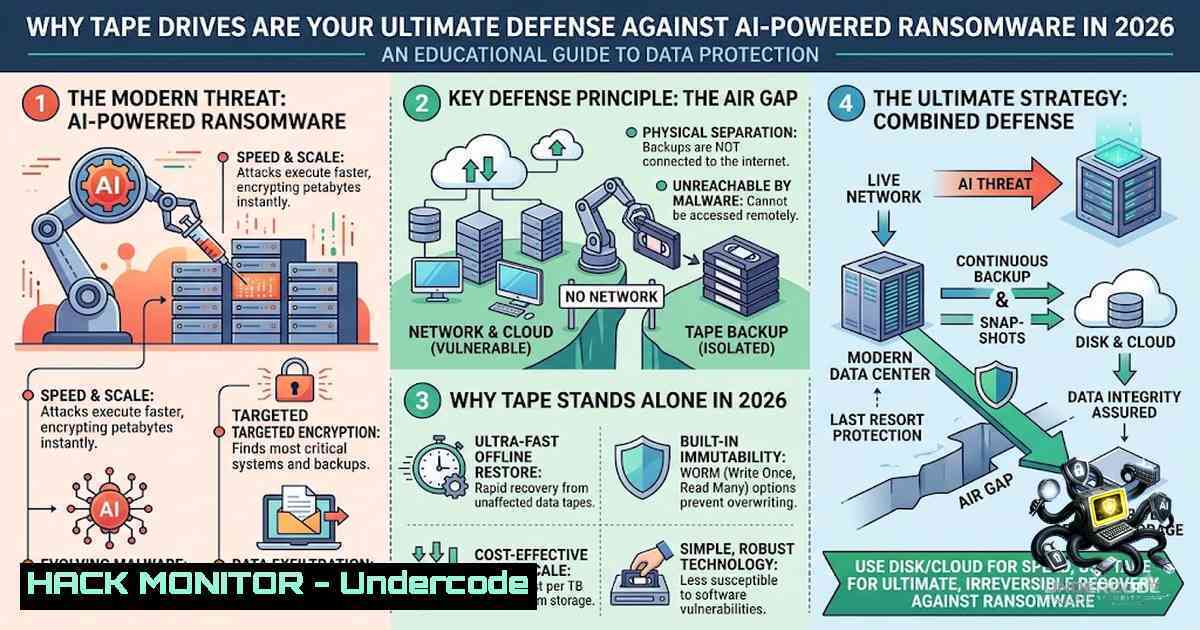
As AI-powered hacking tools evolve from theoretical concepts into autonomous attack agents, traditional backup strategies are proving dangerously inadequate. In an era where ransomware can autonomously discover Active Directory, evade EDR solutions, and systematically corrupt online and cloud backups within minutes, the question “What keeps you up at night?” becomes obsolete when proactive, physically isolated defense mechanisms are in place. Magnetic tape storage—often dismissed as legacy technology—has re-emerged as the cybersecurity industry’s most resilient last line of defense, offering an immutable, offline air gap that no AI-driven malware can bridge.
Learning Objectives:
- Understand why AI-generated malware renders traditional online and cloud backups vulnerable, and how physical air gaps provide true isolation
- Master the implementation of tape-based backup strategies, including WORM (Write Once, Read Many) technology and AES-256 hardware encryption
- Learn practical Linux and Windows commands for tape drive configuration, data backup, and secure media sanitization following NIST SP 800-88 guidelines
- The AI Hacking Threat Landscape: Why Your Backups Are No Longer Safe
The cybersecurity paradigm shifted dramatically in 2026. AI-generated malware frameworks like VoidLink—an 88,000-line Linux malware framework built almost entirely by AI by a single developer in under one week—have demonstrated that attack sophistication is no longer constrained by human coding limitations. The Avalon framework, complete with CrownX ransomware capabilities, bears unmistakable signs of AI-assisted development. Most alarmingly, JADEPUFFER became the first confirmed AI agent to execute a full ransomware attack with zero human involvement.
These AI-driven threats specifically target backup infrastructure. Rather than immediately encrypting production data, modern ransomware strategically identifies and corrupts backup repositories first, ensuring victims cannot recover without paying. Online backups, cloud copies, and even logically isolated storage remain vulnerable because they possess network-addressable interfaces that AI agents can discover and exploit.
Tape’s Advantage: A physically ejected LTO cartridge has no IP address and no network interface. When stored offline in a vault, it becomes completely unreachable by ransomware and attackers. This physical air gap—the complete physical interruption of all network connections—remains intact even if an attacker achieves full domain administrator privileges.
- The 3-2-1-1-0 Backup Strategy: Making Tape Your Immutable Layer
The industry-standard 3-2-1 backup rule has evolved. The modern 3-2-1-1-0 strategy mandates:
- 3 copies of your data (production + 2 backups)
- 2 different media types (e.g., disk + tape)
- 1 copy stored offsite
- 1 copy offline or air-gapped (this is where tape excels)
- 0 errors or undetected corruption verified through recovery testing
Tape serves as the critical “+1” air-gapped layer. Unlike disk-based immutable snapshots that can be deleted by an attacker with sufficient privileges, tape cartridges removed from the library and stored in a fireproof safe or offsite vault provide physical immutability. NIST guidelines explicitly recommend keeping backup files isolated so ransomware cannot readily spread to them.
Implementation Checklist:
- Designate one backup copy exclusively for tape storage
- Rotate tapes offline immediately after each backup cycle
- Store tapes in a physically secure, fireproof location with controlled access
- Test tape restores quarterly to verify data integrity and recovery procedures
- WORM Technology: The Immutable Archive That Cannot Be Altered
Write Once, Read Many (WORM) technology transforms tape into an immutable fortress. WORM cartridges, introduced with LTO-3 and standard in modern LTO-9 drives, prevent any subsequent modification, deletion, or overwriting of data. Once data is written to a WORM tape, not even the backup administrator can alter it—a feature that proves invaluable against ransomware operators who frequently target backup administrators’ credentials.
NIST SP 800-88 Revision 2 frames WORM tape squarely on the “retain with integrity” side of the media-sanitization taxonomy—no accidental clear or purge command can touch it. For financial archives, compliance records, and healthcare data, WORM paired with a verified second copy can reach the 11-1ines durability range.
Practical Use Cases:
- Financial transaction logs requiring regulatory retention
- Healthcare records demanding tamper-proof storage
- Legal discovery data requiring evidentiary integrity
- Intellectual property archives needing protection from insider threats
- Hardware Encryption: Protecting Data at Rest and in Transit
Modern LTO tape drives incorporate hardware-based AES-256 encryption and decryption capabilities resident in the drive itself. This approach offers several security advantages:
- Performance: Hardware encryption operates at full tape streaming speed without CPU overhead
- Security: Encryption keys never leave the encrypted tape drive environment
- Compliance: Meets stringent regulatory requirements for data-at-rest protection
IBM’s LTO-9 drives support library-managed encryption through solutions like IBM Security Guardium Key Lifecycle Manager (GKLM), enabling centralized key management across enterprise tape libraries. Organizations should implement key rotation policies and maintain secure offline key backups to prevent data loss scenarios.
Encryption Best Practices:
- Enable hardware encryption at the tape library or drive level
- Store encryption keys separately from the encrypted tapes
- Document key recovery procedures for disaster scenarios
- Regularly audit encryption key access and rotation logs
5. Linux Tape Backup Commands: LTFS Implementation Guide
The Linear Tape File System (LTFS) simplifies tape management by presenting tape cartridges as standard mountable file systems. This eliminates the need for proprietary backup software for basic operations.
Installing LTFS on RHEL/CentOS:
yum install ltfs
Formatting and Mounting a Tape:
mkfs.ltfs --device /dev/nst0 --mount-point /mnt/tape
mount -t ltfs /dev/nst0 /mnt/tape
Alternative Format Command (IBM Environment):
sudo /opt/ibm/ltfssde/bin/mkltfs -f --device=0 -1 000
Mounting with Sync Options:
sudo mkdir -p /mnt/ltfs
sudo ltfs -o devname=/dev/nst0,sync_type=time@60 /mnt/ltfs
The `sync_type=time@60` parameter ensures data is flushed to tape every 60 seconds, preventing data loss in case of unexpected ejection.
Copying Data to Tape Using rsync:
rsync -r --progress /storage/some/path /mnt/ltfs/
Using rsync with LTFS for Incremental Backups:
rsync --recursive --times --devices --specials --hard-links --human-readable -v -i --link-dest=../../previous-backup/backup --chmod=Du+wx / /mnt/ltfs/
This command creates incremental backups by hard-linking unchanged files from the previous backup, saving significant tape capacity.
Restic Backup to LTFS Tape:
sudo mkltfs -d /dev/st0 -f
sudo RESTIC_PASSWORD_FILE=/etc/restic-password restic -r /mnt/ltfs backup /data
Restic provides deduplication and encryption capabilities, making it an excellent choice for tape backups.
Ejecting the Tape Safely:
umount /mnt/ltfs
eject /dev/nst0
6. Windows Tape Backup Commands and PowerShell Automation
Windows Server environments support tape operations through native and third-party tools.
Legacy NTBackup Command (Windows Server 2008 and earlier):
ntbackup backup "C:\backup.bks" /J "DailyBackup" /P "Tape" /N "Backup_%date%"
Adding a Tape Backup Device in SQL Server:
USE master;
EXEC sp_addumpdevice 'tape', 'tapedump1', '\.\tape0';
Veeam PowerShell Tape Server Configuration:
Get-VBRServer -1ame "WindowsServer01" | Add-VBRTapeServer
This adds a Windows server as a tape server using pipeline output.
ARCserve Tape Copy Command:
-tapecopy -s GROUP0 -d GROUP1 -t 'TAPE 1' -c 'TAPE 2'
Where `-s` specifies the source group name and `-d` specifies the destination group name.
Scheduling Tape Backups with Task Scheduler:
Create a batch file with your backup commands and schedule it using Windows Task Scheduler for automated, unattended tape backups.
7. Secure Media Sanitization: NIST SP 800-88 Compliance
When retiring tape media, proper sanitization is critical to prevent data leakage. NIST SP 800-88 Revision 2 provides specific guidance for tape media sanitization.
Sanitization Methods for Tape:
| Method | Description | Use Case |
|–|-|-|
| Clear | Overwrite tape with non-sensitive data | Media being reused within the same organization |
| Purge | Degaussing or cryptographic erase | Media leaving organizational control |
| Destroy | Physical destruction (shredding, incineration) | Highly sensitive data requiring absolute assurance |
Degaussing Command (Hardware-Dependent):
Most degaussers are hardware appliances rather than software commands. Consult your degausser’s documentation for operational procedures.
Physical Destruction Best Practices:
- Use NSA-approved shredders for classified material
- Document destruction with chain-of-custody records
- Verify destruction through random sampling and inspection
Tape Reuse Verification:
Before reusing or reselling LTO tapes, perform overwrite verification to ensure no recoverable data remains.
What Undercode Say:
- Key Takeaway 1: AI-powered ransomware has rendered traditional backup strategies obsolete—only physical air gaps like tape storage provide true immunity against autonomous attack agents that systematically target online and cloud repositories.
-
Key Takeaway 2: The 3-2-1-1-0 backup strategy, with tape as the immutable offline layer, represents the gold standard for ransomware resilience; WORM technology and AES-256 hardware encryption ensure data integrity and confidentiality even in worst-case breach scenarios.
Analysis: The resurgence of tape as a cybersecurity tool reflects a fundamental truth: no amount of AI-powered defense can protect data that is physically disconnected from the attack surface. Organizations that implement tape-based air-gapped backups gain an asymmetrical advantage against attackers—while ransomware can compromise networks, applications, and online storage, it cannot reach a cartridge sitting in a vault. As AI hacking tools continue to accelerate attack timelines and automate credential theft, tape’s role transitions from legacy archive medium to critical security control. The cost of implementing tape infrastructure pales in comparison to the potential losses from unrecoverable ransomware incidents. Forward-thinking security leaders are already integrating tape into their zero-trust architectures, recognizing that true resilience requires a defense that exists outside the digital realm entirely.
Prediction:
- +1 Tape storage adoption will increase by 40-60% among enterprise organizations by 2028 as AI-driven ransomware attacks proliferate and regulatory bodies mandate immutable backup requirements.
-
+1 LTO-10 and subsequent generations will introduce AI-resistant features including quantum-safe encryption and blockchain-verified write-once capabilities, further cementing tape’s role in cybersecurity architectures.
-
-1 Organizations that fail to implement air-gapped tape backups will face exponentially higher ransomware recovery costs, with average downtime exceeding 30 days for unrecoverable data, potentially leading to business failure.
-
-1 Cyber insurance carriers will increasingly mandate physical air-gapped backups as a prerequisite for coverage, creating compliance pressure that accelerates tape adoption while penalizing laggards with premium surcharges or policy exclusions.
-
+1 The convergence of tape storage with AI-driven backup orchestration will create intelligent tiering systems that automatically rotate tapes offline, verify integrity, and initiate recovery without human intervention, combining physical security with operational efficiency.
▶️ Related Video (84% Match):
https://www.youtube.com/watch?v=63UortXj2B0
🎯Let’s Practice For Free:
🎓 Live Courses & Certifications:
Join Undercode Academy for Verified Certifications
🚀 Request a Custom Project:
Secure, high-velocity infrastructure and disruptive technological engineering. Contact our engineering team for high-tier development and proprietary systems:
[email protected]
💎 Smart Architecture | 🛡️ Secure by Design | ⭐ Trusted by Thousands
IT/Security Reporter URL:
Reported By: https://lnkd.in/p/eUj4gmwp – Hackers Feeds
Extra Hub: Undercode MoN
Basic Verification: Pass ✅


