Listen to this Post
Introduction:
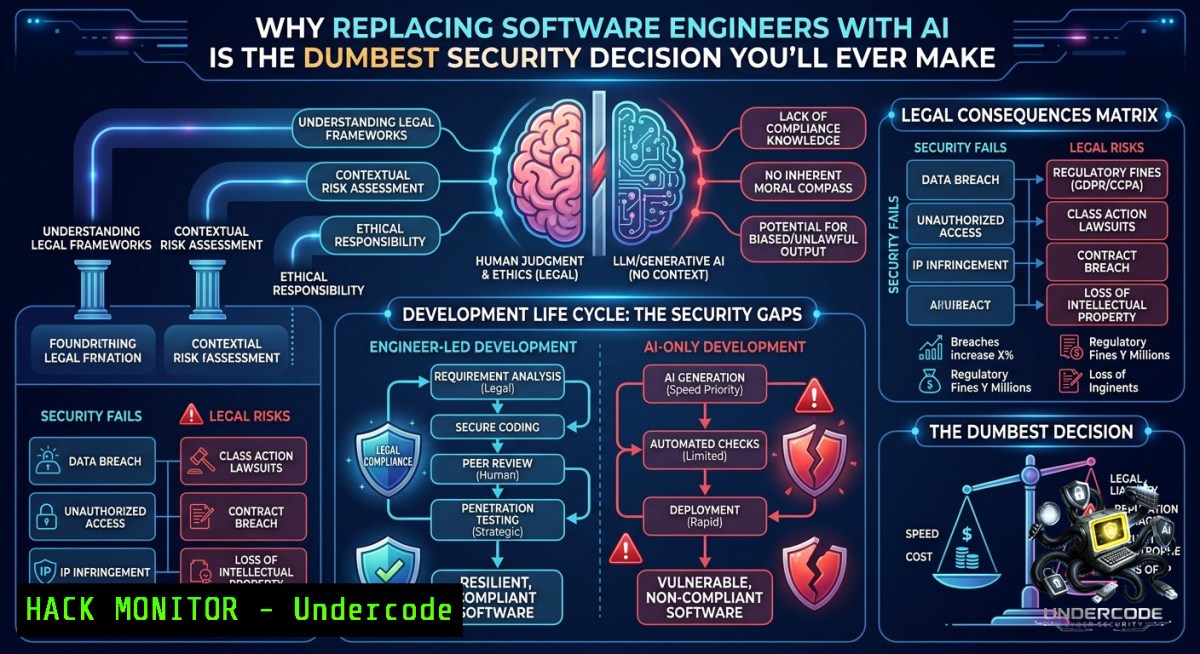
The push to replace software engineers with AI-driven code generators ignores a fundamental truth: writing code is the easiest part of engineering. The real risks—architecture flaws, trust boundary violations, failure modes at scale, and security abuse—remain invisible to large language models. Organizations that confuse code generation with software engineering are systematically removing the immune system that prevents catastrophic breaches and outages.
Learning Objectives:
– Distinguish between AI-assisted coding and true software engineering with security accountability
– Implement practical safeguards and human-in-the-loop controls for AI-generated code
– Apply threat modeling, static analysis, and chaos engineering to validate AI outputs in production environments
You Should Know:
1. The Artifact vs. The Discipline: Why Code Existence Is Not Evidence of Engineering
The original post nails this: “AI can generate code. So what? A thousand bad decisions can generate code.” Code that compiles or runs is not secure, maintainable, or correct. Software engineering involves requirements analysis, threat modeling, architectural trade-offs, and post-deployment observability—none of which AI currently owns.
Step‑by‑step guide to auditing AI‑generated code like an engineer:
1. Run static analysis to catch obvious flaws before review:
– Linux: `bandit -r ./ai_generated_code/ -f json -o bandit_report.json` (Python security linting)
– Windows: `pylint ai_module.py –output-format=json > pylint_report.json`
2. Check for injection vulnerabilities using pattern matching:
grep -rn "eval(" --include=".py" ./ai_code/
grep -rn "exec(" --include=".js" ./ai_code/
3. Manually trace data flows from input to output—AI often creates unsafe concatenations. Document each trust boundary crossed.
4. Run a dependency vulnerability scan:
– `npm audit –json > npm_audit.json` (Node.js)
– `pip-audit –format json –requirement requirements.txt`
2. Threat Modeling AI-Generated Components Before Commit
Most AI-generated code lacks explicit security context. Engineers must insert the threat model that the AI cannot provide. The OWASP Threat Dragon or Microsoft’s TMT can be scripted into CI.
Step‑by‑step threat modeling for AI code:
1. Install OWASP Threat Dragon (Docker container):
docker run -d -p 8080:8080 --1ame threatdragon owasp/threat-dragon:latest
2. Create a data flow diagram (DFD) for the AI-generated function—identify external entities, processes, data stores, and trust boundaries.
3. Apply STRIDE per element (Spoofing, Tampering, Repudiation, Information Disclosure, Denial of Service, Elevation of Privilege).
4. Generate a threat list and map mitigations. If the AI generated an API endpoint, check for missing rate limiting, improper CORS, or lack of input validation.
5. Automate checks using `threatmodel-cli` (example concept):
tm-cli validate --model ./threatmodel.json --output findings.md
Note: No universal CLI exists, but teams can script YAML-based rules for CI.
3. Hardening CI/CD Pipelines to Reject Unsafe AI-Generated Commits
If your CI/CD blindly accepts AI-generated pull requests, you are deploying unknown risk. Insert human‑in‑the‑loop gates and automated security tests that require explicit override.
Step‑by‑step pipeline hardening (GitHub Actions example):
1. Add a mandatory “Security Review” label before merge—enforce via branch protection rules.
2. Insert a SAST (Static Application Security Testing) job that fails on critical findings:
- name: Run Semgrep
run: |
semgrep --config auto --json --output semgrep.json ./src
if grep -q "\"severity\": \"ERROR\"" semgrep.json; then exit 1; fi
3. Use a secrets scanner to catch hardcoded credentials (AI notoriously hallucinates fake but valid‑format keys):
trufflehog --filesystem ./src --json --only-verified
4. Require manual approval for any PR that changes more than 200 lines of AI‑generated code (example using GitHub Environments).
5. Log every AI-generated PR with metadata (model version, prompt hash) for post-incident traceability.
4. Chaos Engineering: Breaking AI-Generated Code on Purpose
AI models optimize for “works on the happy path.” Resilient engineers verify behavior under failure. Use chaos experiments to expose hidden assumptions.
Step‑by‑step chaos test for an AI‑generated microservice:
1. Inject latency into dependencies (Linux using `tc` – traffic control):
tc qdisc add dev eth0 root netem delay 1000ms 500ms distribution normal
Windows alternative: Use Clumsy (GUI/LCL) or `Set-1etAdapterAdvancedProperty` for latency via PowerShell.
2. Randomly kill the service’s database connection:
 Simulate DB failure by blocking port
sudo iptables -A OUTPUT -p tcp --dport 5432 -j DROP
 After 60 seconds, restore
sleep 60 && sudo iptables -D OUTPUT -p tcp --dport 5432 -j DROP
3. Observe error handling – does the AI‑generated code retry? Does it crash? Does it leak sensitive data in error logs?
4. Use Chaos Mesh on Kubernetes for automated experiments:
helm install chaos-mesh chaos-mesh/chaos-mesh -1 chaos-mesh
kubectl apply -f network-delay.yaml  custom YAML that targets AI‑deployed pods
5. Document failure modes – every crash without graceful degradation is a sign the AI generated code without operational context.
5. Windows-Specific Security Hardening for AI-Generated Scripts
Many AI models generate PowerShell or VBScript that inadvertently bypass security controls or introduce LOLBin (Living-off-the-Land) risks.
Step‑by‑step hardening on Windows endpoints:
1. Enable PowerShell logging and block unapproved scripts:
Set-ItemProperty -Path "HKLM:\SOFTWARE\Policies\Microsoft\Windows\PowerShell\ScriptBlockLogging" -1ame "EnableScriptBlockLogging" -Value 1
Set-ExecutionPolicy RemoteSigned -Scope LocalMachine
2. Scan AI-generated PowerShell for suspicious cmdlets:
Select-String -Path .\ai_script.ps1 -Pattern "Invoke-Expression|IEX|Start-Process -WindowStyle Hidden|Net.WebClient|DownloadString"
3. Run Windows Defender Offline scan on dev machines before integrating AI code:
MpCmdRun.exe -Scan -ScanType 3 -File ./ai_generated_folder
4. Use AppLocker to whitelist only signed scripts – AI-generated unsigned scripts will fail to execute, forcing review.
5. Monitor for anomalous parent-child processes (AI-generated code often spawns unexpected shells):
Get-WinEvent -FilterHashtable @{LogName='Security'; ID=4688} | Where-Object {$_.Properties[bash].Value -like 'powershell'}
6. Building the “Immune System” With Code Ownership and Blame
The original post states: “When bad code blows up, nobody is going to care how much money you thought you saved. They are going to ask who approved the code.” Enforce accountability.
Step‑by‑step establishing ownership for AI‑generated contributions:
1. Require a human “Authorized Approver” field in every AI‑assisted commit (use `git commit –author` with real credentials).
2. Use CODEOWNERS file (GitHub/GitLab) to enforce that every line generated by AI must be signed off by a senior engineer.
3. Run `git blame` with annotation to track AI assistance:
git blame -M -C -C --date=short ai_module.py | grep -E "(copilot|chatgpt|claude)" | tee ai_blame.log
4. Automate a weekly report of AI-generated churn vs. human-reviewed fixes – high churn indicates low-quality AI output.
5. Create a post‑incident review template that specifically asks: “Was AI involved? If yes, what threat model step was skipped?”
7. API Security: Where AI-Generated Endpoints Most Often Fail
AI models excel at generating REST APIs but routinely forget rate limiting, input validation, authentication checks, and proper error handling.
Step‑by‑step API security validation for AI‑generated endpoints:
1. Run ZAP (Zed Attack Proxy) automated scan against a local test instance:
docker run -v $(pwd):/zap/wrk/ -t ghcr.io/zaproxy/zaproxy:stable zap-api-scan.py -t http://localhost:3000/openapi.json -f openapi -r api_scan_report.html
2. Manually fuzz input fields using `ffuf` on Linux or Windows WSL:
ffuf -u http://localhost:3000/api/FUZZ -w /usr/share/wordlists/sqlmap.txt -fs 403
3. Check for missing rate limits – write a simple script:
for i in {1..1000}; do curl -s -o /dev/null -w "%{http_code}\n" http://localhost:3000/api/login; done | sort | uniq -c
Expect `429` (Too Many Requests) after ~100 attempts; if all `200`, the AI skipped throttling.
4. Verify authentication is enforced – use `curl` without tokens:
curl -X GET http://localhost:3000/api/sensitive-data -i
A secure endpoint returns `401` or `403` – AI often returns `200` with mock data that becomes real in production.
5. Run `nmap` with http-auth-finder script to detect exposed endpoints:
nmap -p 3000 --script http-auth-finder localhost
What Undercode Say:
– Key Takeaway 1: Code generation is not software engineering. The hard problems—requirements, trust boundaries, failure modes, and operational consequences—are invisible to AI.
– Key Takeaway 2: Removing engineers who understand architecture and security removes your organization’s immune system. Velocity without accountability is negligence dressed up as transformation.
Analysis (10 lines):
This post dismantles the dangerous boardroom delusion that AI replaces engineering judgment. The author correctly identifies that “working” code is a low bar—bad, insecure, and fragile code also works until it doesn’t. The core error is conflating typing with thinking. AI can accelerate grunt work, but it cannot own production risk, threat models, or business logic validation. Organizations that push for replacement over augmentation will experience catastrophic failures at scale, because AI lacks context about what data touches which trust boundary or how abuse manifests. The financial “savings” will be dwarfed by incident response costs, breach liability, and reputational damage. The post’s strongest point is accountability: when code blows up, auditors don’t ask which model wrote it—they ask who approved it. This shifts the conversation from tool fetishism to engineering discipline. Ultimately, AI is a powerful assistant, but the human engineer remains the liable, accountable, and irreplaceable decision-maker in critical systems.
Prediction:
– -1 Over the next 24 months, at least three major data breaches will be publicly attributed to AI-generated code that bypassed security reviews, triggering regulatory scrutiny and class-action lawsuits targeting C-suite executives who authorized “AI-first” engineering reductions.
– +1 However, organizations that implement hybrid models—where AI handles boilerplate and tests while senior engineers own threat modeling and accountability—will see 30-40% developer productivity gains without increased incident rates, creating a competitive moat.
– -1 The rise of AI-generated code will accelerate the “security debt” crisis as legacy systems absorb poorly-understood AI contributions, leading to increased demand for forensic tools that can trace vulnerabilities back to specific model prompts.
– +1 New roles will emerge—AI Security Engineer and Model Output Auditor—with certifications (e.g., CEH+AI, CSSLP-AI) commanding premium salaries, turning the threat into a career opportunity for skilled defenders.
▶️ Related Video (78% Match):
🎯Let’s Practice For Free:
🎓 Live Courses & Certifications:
[Join Undercode Academy for Verified Certifications](https://undercode.co.uk/certifications/)
🚀 Request a Custom Project:
Secure, high-velocity infrastructure and disruptive technological engineering. Contact our engineering team for high-tier development and proprietary systems:
[[email protected]](mailto:[email protected])
💎 Smart Architecture | 🛡️ Secure by Design | ⭐ Trusted by Thousands
IT/Security Reporter URL:
Reported By: [Joshuacopeland Unpopularopinion](https://www.linkedin.com/posts/joshuacopeland_unpopularopinion-ai-unpopularopinionguy-share-7467613876759461888-wjnh/) – Hackers Feeds
Extra Hub: Undercode MoN
Basic Verification: Pass ✅
🔐JOIN OUR CYBER WORLD [ CVE News • HackMonitor • UndercodeNews ]
[💬 Whatsapp](https://undercode.help/whatsapp) | [💬 Telegram](https://t.me/UndercodeCommunity)
📢 Follow UndercodeTesting & Stay Tuned:
[𝕏 formerly Twitter 🐦](https://x.com/undercodeupdate) | [@ Threads](https://www.threads.net/@undercodetesting) | [🔗 Linkedin](https://www.linkedin.com/company/undercodetesting/) | [🦋BlueSky](https://bsky.app/profile/undercode.bsky.social)


