
Listen to this Post
Introduction:
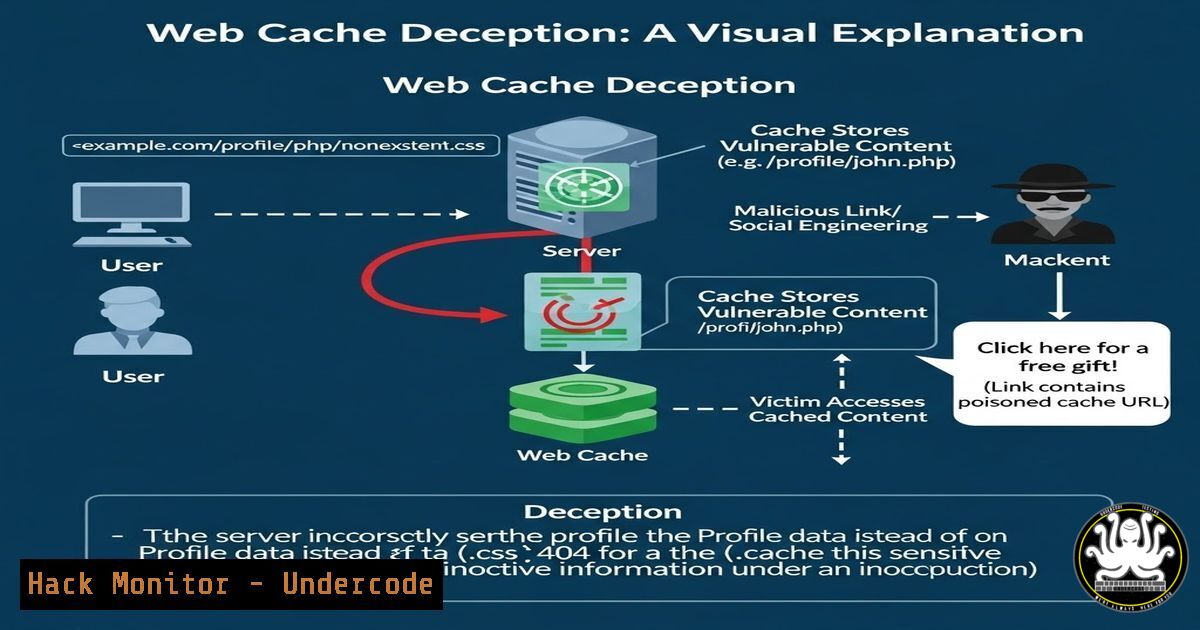
Web Cache Deception is an insidious vulnerability that tricks caching servers into storing and serving dynamic, often sensitive, content as if it were a static, public resource. This occurs when an attacker manipulates a URL to mimic a static file path (e.g., /profile/logo.jpg), and the application’s caching layer, combined with the origin server’s behavior, stores the authenticated response. Unsuspecting users who then access the same manipulated URL may receive the cached sensitive data of a previous victim. This attack exploits a dangerous gap between how a web server parses a path and how the cache decides what to store.
Learning Objectives:
- Understand the mechanics of Web Cache Deception and how it differs from traditional web caching vulnerabilities.
- Learn how to manually identify and exploit misconfigured caching mechanisms in web applications.
- Master the configuration of secure `Cache-Control` headers and cache keys to prevent sensitive data exposure.
You Should Know:
1. Understanding the Core Vulnerability: Path Confusion
The root cause of Web Cache Deception lies in the discrepancy between the web server’s path resolution and the cache’s storage logic. A typical scenario involves an application page that displays sensitive user data, such as a dashboard or profile page (e.g., `https://example.com/my-profile`). This page is usually protected by authentication and should not be cached.
However, if an attacker appends a static-file-looking path to this URL, like `https://example.com/my-profile/nonexistent.css`, the application framework might still route the request to the same profile handler (ignoring the trailing path). Meanwhile, the caching server, configured to cache static files based on extensions (like `.css` or .jpg), sees the extension and decides to cache the entire response. The result is that the HTML of the authenticated profile page is stored in the cache as a “stylesheet.”
Extended Explanation from the Post:
As highlighted in the bug bounty finding by Kerish Ghatraj, this issue allowed dynamic authenticated content to be treated as a static resource. The vulnerability doesn’t reside in a code injection but in the logical flow of how the infrastructure handles the request. The CDN or caching layer sees `.jpg` and thinks “cache this,” while the origin server sees the path structure and thinks “serve the profile.” This mismatch is the attack vector.
2. Step-by-Step Guide to Identifying Web Cache Deception
To test for this vulnerability, you need to analyze how the application and its cache behave. Here is a manual testing methodology:
Step 1: Identify a Dynamic Endpoint
Find a page that requires authentication and displays unique user information, such as an account dashboard or user profile page. Note the URL.
– Example: `https://target.com/dashboard`
Step 2: Construct a Malicious Path
Append a non-existent path to the URL that ends with a static file extension (.css, .js, .jpg, .pdf).
– Example: `https://target.com/dashboard/logo.jpg`
Step 3: Test as an Authenticated User
Log in to your account and request the manipulated URL using a tool like `curl` or Burp Suite. Observe the response.
 Using curl to simulate an authenticated request with a session cookie
curl -H "Cookie: session=YOUR_AUTH_COOKIE" https://target.com/dashboard/logo.jpg -I
Step 4: Analyze the Response Headers
Check the response headers. If the `Cache-Control` header is missing or set to `public` with a `max-age` directive, the response is a candidate for caching.
HTTP/2 200 OK
Content-Type: text/html; charset=UTF-8  <-- Notice this is HTML, not an image
Cache-Control: public, max-age=3600  <-- This is the red flag
Step 5: Verify the Cache
Log out or use a different browser (incognito mode). Access the manipulated URL again without authentication. If you receive the HTML content of the dashboard from the first user, the vulnerability is confirmed.
 Accessing the URL without a session
curl https://target.com/dashboard/logo.jpg
If the page from the authenticated user is served, the cache has been poisoned.
3. Exploitation and Impact
The impact of this vulnerability is high. An attacker can distribute a crafted link (e.g., `https://example.com/dashboard/logo.jpg`) to a victim. If the victim is logged in when they click the link (or if the attacker can force a request via an image tag in a forum post), their sensitive data—API keys, personal information, financial details—will be stored in the public cache. The attacker can then simply visit that same link to retrieve the victim’s data.
4. Mitigation: Hardening Cache-Control Headers
The primary fix lies in the application layer. Developers must ensure that all authenticated responses include restrictive `Cache-Control` headers.
– Directives to use:
Cache-Control: no-store, must-revalidate, private
– no-store: Prevents the cache from storing any version of the response.
– private: Indicates the response is specific to a single user and should not be stored by shared caches (like CDNs).
– must-revalidate: Forces the cache to revalidate with the origin server once it becomes stale (though `no-store` is the strongest).
Example in a Web Server Configuration (Nginx):
For location blocks serving dynamic content, explicitly set headers.
location /dashboard {
add_header Cache-Control "no-store, private, must-revalidate";
 ... rest of config
}
5. Mitigation: Cache Key Configuration (CDN/WAF Level)
Reviewing cache key configurations is crucial. Caching layers should not rely solely on file extensions to determine cache eligibility.
– Validate by Content-Type: Configure your CDN (like Cloudflare, Akamai, or Fastly) to only cache responses with specific `Content-Type` headers (e.g., image/, text/css). An HTML response masquerading as a `.jpg` should be rejected from the cache.
– Key on Authentication Headers: Ensure the `Authorization` header or session cookies are part of the cache key. If the request contains an auth token, it should either be excluded from the cache or keyed differently. However, `private` caching is the safer approach.
6. Linux/Windows Commands for Testing Cache Behavior
Security researchers and engineers can use command-line tools to test caching rules efficiently.
Linux/macOS (using `curl`):
Test the Time-To-Live (TTL) and cache hits.
 First request (simulate victim)
curl -H "Cookie: session=VICTIM_COOKIE" -I https://target.com/profile/test.css

Second request (simulate attacker) - use the -H "Pragma: no-cache" to get origin vs cache
curl -H "Pragma: no-cache" https://target.com/profile/test.css

Check for the "Age" header to confirm cached response
curl -I https://target.com/profile/test.css | grep -i age
Windows (PowerShell):
 Make the request
$response = Invoke-WebRequest -Uri "https://target.com/profile/test.css" -Headers @{"Cookie"="session=VICTIM_COOKIE"}
 View Headers
$response.Headers

Subsequent request to see if cached
$response2 = Invoke-WebRequest -Uri "https://target.com/profile/test.css"
$response2.Content  If this contains HTML from the victim, it's vulnerable
7. The Responsible Disclosure Process
As noted in the original post, responsible disclosure is key. The finder reported the issue appropriately.
1. Document: Save all requests, responses, and headers demonstrating the cache poisoning.
2. Isolate: Ensure you are testing on a live target but avoid extracting excessive data.
3. Report: Provide a clear, step-by-step report to the security team, explaining the cache misconfiguration and suggesting the `Cache-Control: private, no-store` fix.
What Undercode Say:
- Key Takeaway 1: Web Cache Deception is not a complex injection flaw but a logical oversight in infrastructure configuration. It highlights the danger of “path confusion” where different components of a web stack interpret the same URL differently.
- Key Takeaway 2: The defense is multi-layered. Developers cannot rely on CDNs to make security decisions. The origin server must explicitly forbid caching of sensitive pages using robust HTTP headers. Security teams must review CDN rules to ensure they cache by content type, not just by file name extension.
Analysis:
This finding underscores a persistent issue in modern web architecture: the complexity of reverse proxies and caching layers introduces new attack surfaces. As applications increasingly rely on CDNs for performance, the configuration drift between the origin and the edge becomes a prime target for bug bounty hunters. The vulnerability is particularly dangerous because it requires no direct interaction with the server-side code; it exploits the infrastructure itself. For blue teams, this serves as a critical reminder to perform regular audits of caching headers on authenticated routes. It also emphasizes the need for “defense in depth,” where the application (origin) takes ownership of its security posture rather than delegating it entirely to the edge network. A misconfigured cache is a data leak waiting to happen.
Prediction:
As AI-driven development tools and automated deployment pipelines become standard, misconfigurations in caching layers are likely to increase. We predict a rise in automated scanners specifically targeting Web Cache Deception, treating it as a primary vector for initial access to sensitive data. Consequently, we will see the emergence of “Cache-Secure” default policies in major cloud providers, where private data is automatically excluded from caching unless explicitly overridden by a developer, shifting from a “cache by default” to a “don’t cache by default” paradigm for authenticated traffic.
▶️ Related Video (78% Match):
🎯Let’s Practice For Free:
IT/Security Reporter URL:
Reported By: Kerish Ghatraj – Hackers Feeds
Extra Hub: Undercode MoN
Basic Verification: Pass ✅


