Listen to this Post
Introduction:
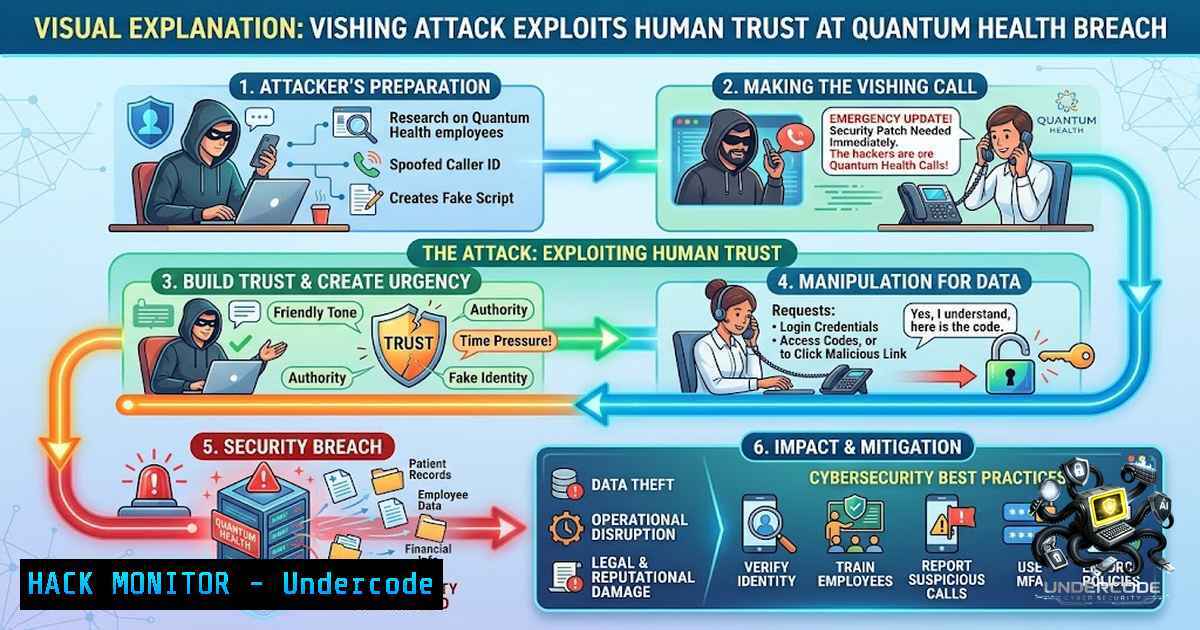
On May 29, 2026, a single phone call—a voice phishing (vishing) attack—granted an unauthorized actor access to Quantum Health’s IT network for three days, exposing Social Security numbers, diagnoses, prescriptions, and insurance information belonging to members of employer health plans. The intrusion was only discovered when a service outage disrupted systems on June 1. This incident underscores a hard truth increasingly validated by Verizon’s 2026 Data Breach Investigations Report: social engineering, system intrusion, and miscellaneous errors now account for 81% of healthcare breaches, as attackers pivot from email phishing to voice-based manipulation. Cybersecurity in healthcare is no longer purely a technology problem—it is a human trust problem that demands identity-layer defenses.
Learning Objectives & Secrets:
- Objective 1: Master the vishing attack kill chain—from reconnaissance and spam bombing to helpdesk manipulation and SSO takeover—to understand how social engineering bypasses technical controls.
- Objective 2 (Secret Tip): Deploy phishing-resistant MFA (FIDO2/WebAuthn security keys) instead of SMS or push-based MFA. Attackers now use real-time phishing kits that synchronize fake login pages with live phone calls to defeat push notifications and one-time passcodes—even number-matching challenges. FIDO2 credentials are cryptographically bound to the domain name, making them resistant to verifier impersonation attacks.
- Objective 3 (Secret Tip): Implement a “no same-call” rule for helpdesk workflows: agents cannot complete password resets or MFA factor changes within the same inbound call. Require a ticket submission followed by a verified callback to a known number. This single policy breaks the vishing → helpdesk → SSO takeover chain that ShinyHunters and similar groups exploit.
You Should Know:
- Incident Response: Detecting and Containing a Vishing-Induced Breach
When a vishing attack succeeds, the attacker typically maintains persistent access through stolen session tokens, OAuth consents, or newly enrolled MFA devices. The Quantum Health breach went undetected for three days—from May 29 to June 1, 2026—until systems became unstable.
Step-by-step guide for initial containment:
Step 1: Force global sign-out. In Microsoft Entra (Azure AD), immediately revoke all active sessions and refresh tokens:
Connect-AzureAD
Get-AzureADUser -All $true | Revoke-AzureADUserAllRefreshToken
This invalidates refresh tokens issued to applications for all users, forcing reauthentication.
Step 2: Audit for unauthorized OAuth apps and MFA registrations. Review audit logs for newly registered applications with vague names like “Support Tool” or “Data Loader”:
Get-AzureADAuditDirectoryLogs -All $true | Where-Object {$_.ActivityDisplayName -eq "Add service principal"}
Check for MFA factor registrations occurring outside normal business hours or from unusual IP addresses.
Step 3: Reset credentials for compromised accounts. Force password resets and require phishing-resistant MFA re-registration for all affected users. Disable SMS and voice MFA fallback methods immediately.
Step 4: Isolate compromised endpoints. Use EDR tools to quarantine systems where remote access tools (e.g., Quick Assist) were installed during the social engineering sequence.
- Identity and Access Management: Auditing Active Directory for Anomalous Activity
Vishing attacks often target helpdesks to reset passwords or enroll attacker-controlled devices. Proactive auditing of authentication events is essential for early detection.
Step-by-step guide for Active Directory audit:
Step 1: Enable advanced audit policies. On domain controllers, enable auditing for account logon events, account management, and directory service access through Group Policy Management (Computer Configuration → Windows Settings → Security Settings → Advanced Audit Policy Configuration).
Step 2: Review failed login attempts (Event ID 4625). Run this PowerShell command to identify brute-force or unauthorized access attempts across the past 7 days:
Get-EventLog -LogName Security -InstanceId 4625 -After (Get-Date).AddDays(-7) |
Select-Object TimeGenerated, @{Name="User";Expression={$<em>.ReplacementStrings[bash]}},
@{Name="SourceIP";Expression={$</em>.ReplacementStrings[bash]}} |
Group-Object User | Sort-Object Count -Descending
This aggregates failed logins by user, highlighting accounts under attack.
Step 3: Monitor successful logins from unusual locations. Event ID 4624 indicates successful logon. Correlate with geographic location and time to detect impossible travel scenarios:
Get-EventLog -LogName Security -InstanceId 4624 -After (Get-Date).AddDays(-1) |
Where-Object {$<em>.ReplacementStrings[bash] -1e "127.0.0.1"} |
Select-Object TimeGenerated, @{Name="User";Expression={$</em>.ReplacementStrings[bash]}},
@{Name="SourceIP";Expression={$_.ReplacementStrings[bash]}}
Step 4: Audit privileged group membership changes. Event ID 4728 (member added to security-enabled global group) and 4732 (member added to security-enabled local group) should trigger immediate alerts for any changes to Domain Admins, Enterprise Admins, or other Tier 0 groups.
- Cloud Identity Hardening: Securing Entra ID (Azure AD) Against SSO Takeover
ShinyHunters and similar threat actors treat SSO as “the keys to the kingdom,” pivoting from a compromised identity into connected SaaS platforms for rapid data exfiltration. The Quantum Health breach exposed files containing Social Security numbers, health insurance policy numbers, claims information, diagnoses, treatment information, prescriptions, provider names, dates of service, and demographic details.
Step-by-step guide for Entra ID hardening:
Step 1: Enforce Conditional Access policies. Require MFA + compliant device for access to sensitive SaaS applications (Microsoft 365, Salesforce, ServiceNow, etc.). Block legacy authentication protocols and apply geo-velocity policies to flag impossible travel:
 Example: Get conditional access policies via Microsoft Graph
Connect-MgGraph -Scopes "Policy.Read.All"
Get-MgIdentityConditionalAccessPolicy |
Select-Object DisplayName, State, Conditions
Step 2: Audit sign-in logs for suspicious activity. Use the `Get-AzureADAuditSignInLogs` cmdlet to retrieve logs and identify anomalies such as MFA bypass or OAuth token creation without interactive authentication:
Get-AzureADAuditSignInLogs -All $true |
Where-Object {$<em>.Status.ErrorCode -1e 0} |
Select-Object CreatedDateTime, UserPrincipalName, AppDisplayName,
@{Name="IP";Expression={$</em>.IPAddress}},
@{Name="MFARequired";Expression={$<em>.MfaRequired}},
@{Name="MFAStatus";Expression={$</em>.MfaStatus}}
Step 3: Restrict MFA factor registration. Require compliant devices, location constraints, or conditional access for any new MFA factor registration. Disable SMS and voice MFA for all users—these are vulnerable to SIM swapping and vishing-based interception.
Step 4: Implement risk-based user blocking. Use Identity Protection to automatically block users with medium or high sign-in risk. Configure automated response policies to force password changes and revoke sessions upon risk detection.
- Helpdesk and Identity Verification Workflows: Breaking the Social Engineering Chain
Attackers exploit helpdesk trust by impersonating employees whose phones are “broken” or who claim urgent account issues. The Health Sector Cybersecurity Coordination Center (HC3) has issued explicit warnings about vishing attacks targeting healthcare IT helpdesks.
Step-by-step guide for helpdesk hardening:
Step 1: Implement out-of-band identity proofing. For any password reset, MFA reset, or device re-enrollment, require verification through a separate communication channel—for example, a callback to a known manager-approved number or a ticket submitted through an internal portal.
Step 2: Enforce the “no same-call” rule. Helpdesk agents cannot complete a reset or factor change within the same inbound call. The caller must create a service ticket, and the agent must initiate a verified callback to a pre-approved number.
Step 3: Require step-up verification for high-risk actions. Anyone requesting changes to authentication factors—especially executives, IT admins, finance, and security personnel—must undergo additional identity proofing, including manager approval and secondary verification.
Step 4: Train helpdesk staff on vishing indicators. Red flags include: urgency or pressure to act immediately, caller inability to verify identity through secondary channels, requests to bypass standard procedures, and callers who become aggressive or demanding when challenged.
- Network Monitoring and Threat Detection: Identifying Vishing-Induced Compromise
Vishing attacks often proceed without malware deployment, complicating traditional signature-based detection. Behavioral monitoring is essential.
Step-by-step guide for enhanced detection:
Step 1: Monitor for unusual OAuth consent grants. Attackers often create new connected apps with names like “Support Tool” or “Data Loader”. Audit all OAuth consent events:
Get-AzureADAuditDirectoryLogs -All $true |
Where-Object {$<em>.ActivityDisplayName -match "Consent to application"} |
Select-Object ActivityDateTime,
@{Name="User";Expression={$</em>.InitiatedBy.User.UserPrincipalName}},
@{Name="App";Expression={$_.TargetResources[bash].DisplayName}}
Step 2: Detect token reuse from foreign IPs. If a session token created during a vishing call is immediately used from a VPN endpoint, TOR node, or foreign IP, this indicates credential theft. Correlate authentication events with IP geolocation data.
Step 3: Monitor helpdesk ticketing systems. Log all MFA reset, password reset, and device enrollment requests. Flag requests that originate from phone calls without prior ticket submission.
Step 4: Deploy endpoint detection and response (EDR). Ensure EDR tools are deployed, tuned, and monitored on all endpoints. Specifically monitor for remote access tools (Quick Assist, AnyDesk, TeamViewer) being installed or executed outside approved workflows.
6. Security Awareness Training: Simulating Vishing Attacks
Human-layer defenses are the first line of defense against social engineering. Regular, realistic vishing simulations are critical for building organizational resilience.
Step-by-step guide for vishing simulation:
Step 1: Establish a baseline. Conduct an initial unannounced vishing simulation to assess current vulnerability levels. Use a third-party provider to generate realistic call scripts based on publicly available employee information.
Step 2: Develop training materials. Create role-specific training that covers: how to verify caller identity, the importance of the “no same-call” rule, how to report suspected vishing attempts, and the consequences of social engineering failures.
Step 3: Run quarterly simulations. Incorporate evolving attack scenarios, including AI-powered voice cloning and multi-stage attacks that combine email flooding with phone calls.
Step 4: Measure and iterate. Track simulation results, identify repeat offenders, and provide targeted remedial training. Celebrate employees who correctly identify and report vishing attempts.
What Undercode Say:
- Key Takeaway 1: The Quantum Health breach was not a technical exploit—it was a human exploit. A single phone call bypassed layers of security technology, proving that cybersecurity investments are wasted if identity verification and social engineering defenses remain underfunded. Healthcare organizations must treat helpdesk and identity workflows as critical security infrastructure.
-
Key Takeaway 2: Attackers are increasingly combining email spam bombing with phone-based social engineering to create credible pretexts. This multi-channel approach overwhelms traditional siloed security controls. Defenders must integrate email security, telephony monitoring, and identity analytics into a unified threat detection framework.
-
Key Takeaway 3: The Verizon 2026 DBIR confirms that social engineering now accounts for a significant portion of healthcare breaches, as attackers pivot from email to voice and SMS. Organizations that continue relying on SMS and push-based MFA are actively exposing themselves to vishing-enabled account takeover. Phishing-resistant MFA (FIDO2/WebAuthn) is no longer optional—it is the minimum standard.
-
Key Takeaway 4: The “no same-call” rule for helpdesk operations is one of the highest-ROI security controls available. It costs nothing to implement but directly breaks the attack chain that ShinyHunters and similar groups exploit. Healthcare leaders should mandate this policy immediately.
-
Key Takeaway 5: Incident detection remains a critical weakness. The Quantum Health breach went undetected for three days, and the intrusion was only discovered because of a service outage. Organizations need better behavioral monitoring—not just for malware, but for anomalous authentication patterns, OAuth consent grants, and helpdesk activity.
Prediction:
-
+1 Healthcare organizations that adopt phishing-resistant MFA (FIDO2/WebAuthn) and enforce “no same-call” helpdesk policies will see a measurable reduction in social engineering-related breaches within 12–18 months, as attackers pivot to softer targets with weaker identity controls.
-
+1 The insurance and regulatory landscape will increasingly mandate phishing-resistant authenticators for healthcare organizations handling PHI, following NIST SP 800-63-3 guidance that restricts SMS, voice, and interceptable OTP as weak authentication factors.
-
-1 AI-powered vishing attacks, using large language models to steer conversations in real time, will become more prevalent and harder to detect through traditional training alone. Organizations that rely solely on awareness training without technical controls will face increasing breach risks.
-
-1 The convergence of email flooding, Teams/Slack social engineering, and phone-based vishing will create multi-channel attack chains that overwhelm siloed security teams. Organizations without integrated threat detection across communication platforms will struggle to detect and respond to these coordinated attacks.
-
-1 Third-party vendor risk will compound the problem: as seen in the Quantum Health incident (a vendor to employer health plans), a single compromised vendor can expose sensitive data across multiple downstream organizations. Healthcare supply chain security will become the next major battleground.
▶️ Related Video (80% Match):
https://www.youtube.com/watch?v=18CKkuzIHPU
🎯Let’s Practice For Free:
🎓 Live Courses & Certifications:
Join Undercode Academy for Verified Certifications
🚀 Request a Custom Project:
Secure, high-velocity infrastructure and disruptive technological engineering. Contact our engineering team for high-tier development and proprietary systems:
[email protected]
💎 Smart Architecture | 🛡️ Secure by Design | ⭐ Trusted by Thousands
IT/Security Reporter URL:
Reported By: https://lnkd.in/p/eRkAEGV5 – Hackers Feeds
Extra Hub: Undercode MoN
Basic Verification: Pass ✅


