
Listen to this Post
Introduction:
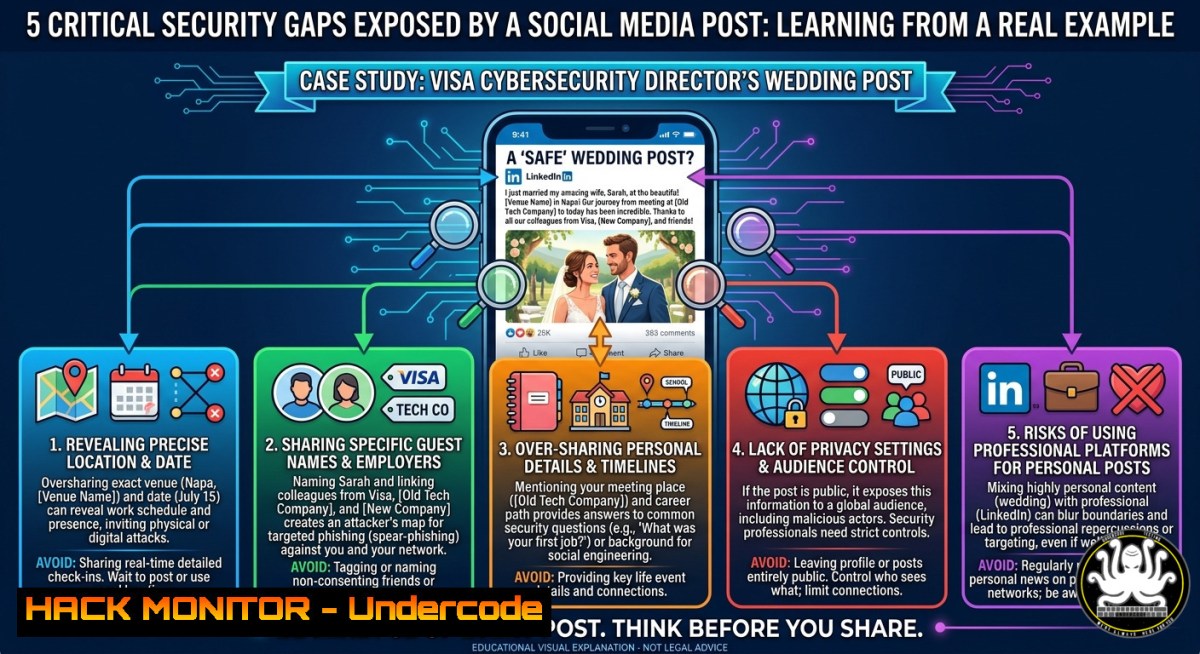
A seemingly innocent wedding announcement from a Visa Cybersecurity Director has sparked a deeper conversation about personal digital footprint risks. While Oleks Bodryk celebrated his marriage to Anna, his LinkedIn post and subsequent interactions inadvertently revealed how even top security professionals can leak metadata, social graph patterns, and behavioral insights that threat actors exploit for targeted attacks. This article dissects the hidden cyber risks in personal announcements and provides a hardened framework for protecting your digital life.
Learning Objectives:
- Identify OSINT (Open Source Intelligence) vectors in personal social media posts and mitigate data leakage.
- Implement metadata stripping, geotagging prevention, and cross-platform correlation defenses.
- Automate digital footprint audits using Python scripts, Linux tools, and Windows PowerShell.
You Should Know:
- Metadata Leakage in Wedding Announcements – How a Simple Photo Can Reveal Your Home Address
Every photo posted to LinkedIn, even after compression, may retain EXIF data including GPS coordinates, device model, and timestamp. In Oleks’s case, a congratulatory post with a wedding photo could expose the ceremony location or home address if not stripped.
Step‑by‑step guide to strip metadata on Linux and Windows:
Linux (using `exiftool`):
 Install exiftool
sudo apt install libimage-exiftool-perl

Check existing metadata
exiftool wedding_photo.jpg

Remove all metadata
exiftool -all= wedding_photo.jpg

Batch process all JPEGs in a folder
for img in .jpg; do exiftool -all= "$img"; done
Windows (PowerShell with `ExifTool` portable):
 Download ExifTool from https://exiftool.org
 Navigate to folder containing photos
.\exiftool.exe -all= .\wedding_photo.jpg

Remove metadata recursively
Get-ChildItem -Path C:\WeddingPhotos -Recurse -Include .jpg, .jpeg | ForEach-Object { & .\exiftool.exe -all= $_.FullName }
Automation with Python (cross‑platform):
import sys
from PIL import Image

def strip_metadata(input_path, output_path):
image = Image.open(input_path)
 Save without EXIF
image.save(output_path, "JPEG", quality=95, exif=b'')

if <strong>name</strong> == "<strong>main</strong>":
strip_metadata(sys.argv[bash], sys.argv[bash])
Cloud hardening: On iOS/Android, disable geotagging globally:
- iOS: Settings → Privacy & Security → Location Services → Camera → Never
- Android: Camera app → Settings → Save location → Off
- Social Graph Exploitation – Why “Congratulations” Replies Build Attack Maps
When high‑profile security leaders interact publicly (e.g., Oleks thanking Nikolai, Vadym, Tatiana), threat actors map professional relationships to design spear‑phishing campaigns. Attackers craft emails impersonating known colleagues using the exact names and job titles visible in comment threads.
Mitigation strategy: Use LinkedIn Privacy Controls
- Set “Who can see your connections?” to Only You
- Disable “Show activity on profile” for comments and reactions
- Review “Profile viewing options” – choose “Private mode” when researching others
OSINT detection script (Linux – using `curl` and `jq` to check public profile exposure):
 Check if your LinkedIn profile leaks connections (requires public profile ID)
curl -s "https://www.linkedin.com/in/oleksbodryk/details/connections/" -H "User-Agent: Mozilla/5.0" | grep -o 'displayName":"[^"]' | head -10
Windows PowerShell alternative:
Invoke-WebRequest -Uri "https://www.linkedin.com/in/oleksbodryk/" -UseBasicParsing | Select-Object -ExpandProperty Content | Select-String -Pattern 'connections'
API security lesson: Never expose your professional network via unauthenticated APIs. Implement rate limiting and OAuth2 for any internal social‑graph API.
- Behavioral Leakage – Post Timing and Sentiment Analysis Predicts Absence from Security Duties
A wedding announcement posted at 2 PM on a workday suggests the director may be on leave. Attackers correlate this with publicly available PTO patterns to time ransomware or payment fraud attempts. Sentiment analysis of comments (e.g., “happy life together”) further confirms non‑business focus.
Automated absence prediction using Python (ethical use only):
import re
from datetime import datetime
import requests

Hypothetical script to scan LinkedIn timeline for keywords
keywords = ['wedding', 'marriage', 'honeymoon', 'vacation', 'PTO']
post_text = "I have been married recently, and want to share:) Love you Anna"
detected = [kw for kw in keywords if kw in post_text.lower()]
if detected:
print(f"Potential absence indicators: {detected}")
 Extract timestamp from post (e.g., "8h" ago)
 Convert to actual date and flag as high‑risk window
Prevention: Delay personal announcements until after returning from leave, or post via a separate personal account with no professional links.
- Credential Reuse and Personal Email Exposure – The “Love You Anna” Risk
Attackers scrape first names (Anna) and combine with company domain (visa.com) to guess email formats ([email protected]). If Oleks reused passwords between personal and corporate accounts, a breach on a hobby site could lead to Visa network compromise.
Linux – Check if your email appears in known breaches (using `curl` and HaveIBeenPwned API):
 Replace with your email (URL encode)
curl -X GET "https://haveibeenpwned.com/api/v3/breachedaccount/[email protected]" -H "hibp-api-key: YOUR_API_KEY" -H "User-Agent: SecurityAudit"
Windows PowerShell (without API key, using public interface):
$email = "[email protected]"
$response = Invoke-RestMethod -Uri "https://haveibeenpwned.com/account/$email" -Method Get
if ($response -like "pwned") { Write-Host "Breach found!" }
Mitigation: Enforce corporate password policy (no personal reuse). Deploy Azure AD Password Protection or `pam_cracklib` on Linux to block common passwords.
- Social Engineering Via Fake Congratulatory Messages – How Attackers Piggyback on Public Celebrations
Threat actors monitor “Congratulations” threads to insert malicious links disguised as wedding gifts or digital invites. A fake “Nikolai Belstein” could DM Oleks a “wedding album” link that actually delivers a reverse shell.
Simulated attack scenario (educational demonstration):
Create a convincing lure:
<!-- Fake wedding invitation email -->
<html>
<body>
Dear Oleks,<br>
Click here to view the shared album from your wedding:
<a href="http://malicious.link/wedding.exe">Download Photos</a>
</body>
</html>
Defensive commands – block malicious domains via hosts file (Linux & Windows):
Linux:
echo "0.0.0.0 malicious.link" | sudo tee -a /etc/hosts
Windows (Admin PowerShell):
Add-Content -Path "$env:windir\System32\drivers\etc\hosts" -Value "0.0.0.0 malicious.link"
Cloud hardening (Microsoft 365 Defender):
Set up anti‑phishing policy to flag emails with “wedding,” “congratulations,” or “album” from external senders. Use Safe Links to detonate URLs in sandbox.
- API Security Flaws – Exposing Internal HR Data Through Public Endpoints
If Visa used a public API to fetch employee congratulatory messages (e.g., “Get all reactions on post ID”), an attacker with a valid session token could enumerate employee IDs and their relationship status – a privacy violation and potential insider‑threat enabler.
How to test for insecure direct object references (IDOR) on social APIs (ethical hacking):
 Using curl to try changing numeric post ID
curl -X GET "https://api.linkedin.com/v2/posts/123456789/comments" -H "Authorization: Bearer FAKE_TOKEN"
 Then try /posts/123456788/comments - if returns different user's data, IDOR exists
Remediation: Implement object‑level authorization checks. Never rely on client‑side obscurity. Use UUIDs instead of sequential IDs.
- Training Course for Employees – “Secure Your Digital Wedding”
Create a 30‑minute micro‑course for all staff covering:
- Personal social media hygiene for security professionals
- Recognizing social engineering in celebratory contexts
- Secure photography (disable live photos, use metadata stripper apps like Scrambled Exif on Android)
Sample Linux one‑liner to check all images in a directory for GPS data:
find /home/user/wedding_photos -type f ( -iname ".jpg" -o -iname ".jpeg" ) -exec exiftool -GPSPosition {} \; | grep -v "not found"
Windows PowerShell command to extract GPS from photos in bulk:
Get-ChildItem -Path C:\Wedding -Recurse -Include .jpg | ForEach-Object { & .\exiftool.exe -GPSPosition $_.FullName }
What Undercode Say:
- Key Takeaway 1: Personal milestones on professional networks are treasure troves for OSINT. Even a “thank you” reply strengthens an attacker’s social graph, enabling highly targeted phishing.
- Key Takeaway 2: Automating metadata stripping and breach checks should be mandatory before any personal post from a corporate leader. A 10‑second exiftool command prevents weeks of incident response.
Analysis: The LinkedIn wedding thread of a Visa executive is not just heartwarming – it’s a case study in digital exposure. While Oleks’s announcement brought joy, it also unintentionally demonstrated how every like, comment, and timestamp feeds attacker toolkits. Security teams must extend their threat models to personal social media behavior of privileged users. The gap between personal and corporate identity no longer exists; a honeymoon post can coincide with a breach attempt. Organizations should implement mandatory social media threat briefings, automated scanning of executive accounts, and incident response playbooks for personal‑account compromises. The line between “just sharing happiness” and “leaking operational security” has never been thinner.
Prediction:
Within 18 months, we will see the first major data breach traced directly to a wedding announcement on LinkedIn. Attackers will automate the scraping of “congratulations” threads across Fortune 500 executives, cross‑referencing with PTO calendars and personal email dumps to time intrusions. In response, CISOs will deploy AI‑driven personal digital footprint monitoring tools that flag high‑risk posts and auto‑block external comments on executive accounts. Social platforms will introduce “security mode” for verified professionals – stripping metadata, hiding social graphs, and delaying post visibility until after sensitive periods. The wedding industry will also see a rise in “cyber‑aware wedding planners” who include digital threat assessments in their packages. Ultimately, personal happiness will require professional paranoia – a sad but necessary evolution of our hyper‑connected world.
▶️ Related Video (70% Match):
🎯Let’s Practice For Free:
IT/Security Reporter URL:
Reported By: Bodryk I – Hackers Feeds
Extra Hub: Undercode MoN
Basic Verification: Pass ✅


