
Listen to this Post
Introduction
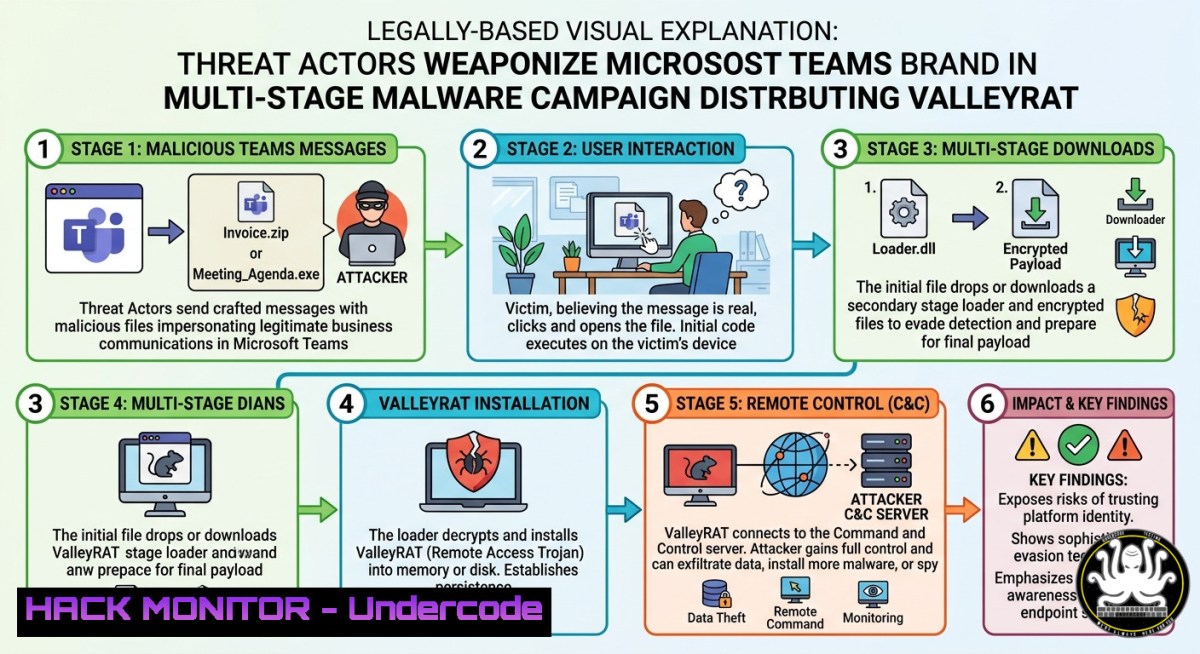
A sophisticated malware campaign is leveraging search engine optimization poisoning and fraudulent websites impersonating Microsoft Teams to distribute ValleyRAT, a multi‑stage remote access trojan linked to Chinese threat actors. Cybercriminals have created deceptive download pages designed to closely mimic the legitimate Microsoft Teams download portal to trick users into pulling down a trojanized installer packaged as a ZIP archive. This campaign relies on an exceptionally clean execution chain comprising social engineering, in‑memory decryption, DLL sideloading, and multiple stealth persistence mechanisms to evade detection and maintain long‑term access to compromised systems.
The attack begins when a victim visits a fraudulent domain such as teams‑securecall[.]com and downloads a ZIP file. Once extracted, the archive launches a malicious Nullsoft Scriptable Install System (NSIS) installer that drops several hidden components while also installing a legitimate version of Microsoft Teams to avoid raising suspicion. In the background, the malware initiates a DLL sideloading attack by abusing a legitimate Tencent executable named GameBox.exe to load a malicious file called Utility.dll.
Immediately after execution, the malware neutralizes the system’s defenses. It runs PowerShell commands that add path and process exclusions to Windows Defender, ensuring the malicious working directory and Utility.dll are ignored by antivirus scans. The malware then copies itself to the ProgramData folder and alters its file attributes to remain hidden. Instead of dropping a plain‑text virus, the installer delivers an AES‑encrypted shellcode payload that decrypts directly in memory, bypassing traditional file‑based security tools. To further obscure its actions, the malware uses API hashing to resolve Windows functions dynamically rather than storing plain‑text API names in its code. The final stage involves contacting a command‑and‑control server to download an encrypted final payload that contains a fully functional ValleyRAT module.
Learning Objectives
- Understand the multi‑stage infection chain of the ValleyRAT malware campaign, from SEO‑poisoned fake download sites to in‑memory decryption and DLL sideloading.
- Learn to identify indicators of compromise associated with the campaign, including malicious domains, file hashes, and registry modifications.
- Acquire practical techniques for detecting and mitigating ValleyRAT infections using Windows‑based commands, PowerShell scripts, and Sigma rules for security information and event management (SIEM) platforms.
You Should Know
- Anatomy of the ValleyRAT Infection Chain: A Step‑by‑Step Guide
The following guide maps the technical progression of the attack and provides actionable commands for analysis and detection on Windows systems.
Step 1: Initial Compromise via SEO Poisoning
Threat actors use SEO poisoning to ensure fraudulent Microsoft Teams download pages rank highly in search engine results. When a user searches for “Microsoft Teams download,” they are presented with paid advertisements or manipulated links that direct them to malicious domains such as teams‑securecall[.]com or teamszs[.]com.
Step 2: Dropper Execution
The victim downloads a ZIP archive (e.g., 98653.2.87.teamsx.zip) from the fake site. Upon extraction, a malicious NSIS installer runs. Use PowerShell to check for suspicious MSI or NSIS installations in Windows Event Logs:
Get-WinEvent -LogName "Application" | Where-Object { $<em>.ProviderName -eq "MsiInstaller" -and $</em>.Message -match "NSIS" }
Step 3: Defense Evasion via Windows Defender Exclusions
The malware executes PowerShell commands to add exclusions for its working directory and Utility.dll:
Add-MpPreference -ExclusionPath "C:\ProgramData\MaliciousFolder"
Add-MpPreference -ExclusionProcess "Utility.dll"
To detect such changes, audit Windows Defender exclusions using:
Get-MpPreference | Select-Object ExclusionPath, ExclusionProcess
Step 4: DLL Sideloading
The malware abuses a legitimate Tencent executable, GameBox.exe, to sideload a malicious Utility.dll. Monitor for this technique by searching for instances where legitimate binaries load unsigned DLLs from unusual paths:
Get-Process | Where-Object { $<em>.ProcessName -eq "GameBox" } | Get-ProcessModule | Where-Object { $</em>.FileName -like "Utility.dll" }
Step 5: In‑Memory Decryption and API Hashing
The installer drops an AES‑encrypted shellcode payload that is decrypted directly in memory, leaving no traces on disk. The malware then uses API hashing to resolve Windows functions, making static analysis difficult. Analysts can use a tool like CAPA to identify API hashing in samples:
capa.exe suspicious.dll -v | findstr "hash"
Step 6: Persistence and Registry Modifications
ValleyRAT establishes persistence by creating scheduled tasks and modifying registry keys. Common modifications include associating `.pwn` file extensions with malicious processes. To detect this, monitor the registry for changes:
reg query "HKLM\SOFTWARE\Classes.pwn" /s
Also check for scheduled tasks related to ValleyRAT:
schtasks /query /fo LIST /v | findstr "ValleyRAT"
Step 7: Command‑and‑Control Communication
The final payload communicates with a remote C2 server using custom XOR encryption. To identify potential C2 traffic, use Sysmon to log network connections and filter for connections to suspicious IP addresses:
Get-WinEvent -FilterHashtable @{LogName="Microsoft-Windows-Sysmon/Operational"; ID=3} | Where-Object { $<em>.Message -match "193.42.33.15" -or $</em>.Message -match "62.182.210.220" }
- Hunting for ValleyRAT Using Sigma Rules and EDR Queries
Sigma Rule for Registry Modifications
Security analysts can deploy the following Sigma rule to detect registry changes associated with ValleyRAT, which is derived from known detection rules for the malware:
title: ValleyRAT Malware Registry Modification
id: 9f8e7d6c-5b4a-3210-9876-abcdef123456
status: experimental
description: Detects creation of registry keys used to store C2 configurations and .pwn file associations by ValleyRAT
references:
- https://valhalla.nextron-systems.com/info/rule/ValleyRAT%20Malware%20Registry%20Modification
author: X__Junior
date: 2024/10/28
logsource:
product: windows
category: registry_event
detection:
selection:
TargetObject|contains:
- '\Software\ValleyRAT'
- '.pwn\shell\open\command'
condition: selection
falsepositives:
- Legitimate software that uses .pwn extensions (rare)
level: high
tags:
- attack.persistence
- attack.defense_evasion
EDR Query for DLL Sideloading
Use the following Kusto Query Language (KQL) query in Microsoft Defender for Endpoint to detect DLL sideloading of Utility.dll by GameBox.exe:
DeviceProcessEvents
| where FileName == "GameBox.exe"
| join kind=inner (
DeviceImageLoadEvents
| where FileName == "Utility.dll"
) on DeviceId, ProcessId
| project Timestamp, DeviceName, InitiatingProcessCommandLine, FileName, FolderPath
Network‑Based Detection
Monitor for suspicious outbound connections to IP addresses associated with the campaign. Defanged IP addresses from the article include:
– 188[.]119[.]241[.]98
– 23[.]95[.]15[.]49
– 193[.]42[.]33[.]15
– 62[.]182[.]210[.]220
To block these addresses on a Windows firewall, use:
New-NetFirewallRule -DisplayName "Block ValleyRAT C2" -Direction Outbound -RemoteAddress 193.42.33.15,62.182.210.220 -Action Block
3. Advanced Evasion Techniques Employed by ValleyRAT
User Account Control (UAC) Bypass
ValleyRAT uses multiple UAC bypass techniques targeting Windows executables such as Fodhelper.exe and Event Viewer while simultaneously manipulating security tokens to gain SeDebugPrivilege access. To detect UAC bypass attempts, monitor event ID 4703 (token manipulation) in Windows Security logs:
Get-WinEvent -FilterHashtable @{LogName="Security"; ID=4703} | Where-Object { $_.Message -match "SeDebugPrivilege" }
Bring Your Own Vulnerable Driver (BYOVD) Attack
The Silver Fox threat actor has been linked to BYOVD campaigns that abuse a previously undisclosed flaw in the WatchDog Anti‑malware driver (amsdk.sys) to deploy ValleyRAT. To detect vulnerable driver loads, monitor for the loading of unsigned or known‑vulnerable drivers using DriverView or Sigcheck:
sigcheck64.exe -nobanner -c amsdk.sys
AMSI Bypass and PowerShell Obfuscation
ValleyRAT attempts to disable the Antimalware Scan Interface (AMSI) to execute malicious PowerShell commands without detection. Analysts should enable AMSI logging and monitor for suspicious PowerShell command lines:
Set-MpPreference -EnableScriptScanning 1
Get-WinEvent -FilterHashtable @{LogName="Windows PowerShell"; ID=4104} | Where-Object { $<em>.Message -match "amsi" -or $</em>.Message -match "bypass" }
4. Incident Response Checklist for ValleyRAT Infections
When responding to a suspected ValleyRAT infection, follow this checklist:
1. Isolate the endpoint from the network to prevent further C2 communication.
2. Collect forensic artifacts, including the malicious ZIP archive, Utility.dll, user.dat, and any scheduled tasks or registry keys related to ValleyRAT.
3. Analyze memory for in‑memory payloads using a memory forensics tool such as Volatility:
volatility -f memory.dump --profile=Win10x64 malfind
4. Review PowerShell logs for commands that added Windows Defender exclusions:
Get-WinEvent -FilterHashtable @{LogName="Windows PowerShell"; ID=4104} | Select-String "Add-MpPreference"
5. Correlate network logs with known C2 IP addresses and block them at the firewall.
6. Reset credentials for any user accounts that may have been compromised.
7. Deploy hunting queries across the environment to identify additional compromised hosts using the Sigma rules and EDR queries provided above.
What Undercode Say
- Key Takeaway 1: Brand impersonation combined with SEO poisoning continues to be a highly effective initial access vector, as threat actors exploit trusted software names to bypass user suspicion.
- Key Takeaway 2: The use of in‑memory decryption and API hashing demonstrates an increasing sophistication among malware authors, requiring defenders to move beyond traditional file‑based detection and adopt behavioral monitoring and memory forensics.
The ValleyRAT campaign underscores a shift in adversary tradecraft toward blended attacks that leverage legitimate software binaries, living‑off‑the‑land techniques, and multi‑stage delivery to remain undetected. For security practitioners, this means that endpoint protection must be complemented with proactive threat hunting, SIEM correlation, and continuous monitoring for anomalous process behavior. The involvement of the Silver Fox APT group suggests this is not a one‑off campaign but part of a sustained, highly resourced operation targeting Chinese‑speaking users and organizations globally.
Prediction
The tactics observed in this campaign—abusing trusted software brands, using SEO poisoning to distribute trojanized installers, and employing in‑memory execution—will become standard practice among both cybercriminal groups and nation‑state actors throughout 2026. Defenders can expect to see increased abuse of other widely deployed collaboration tools, such as Zoom, Slack, and Google Meet, using identical techniques. Furthermore, the ValleyRAT infection chain highlights the growing adoption of BYOVD techniques to bypass kernel‑mode security products, which will likely lead to an uptick in vulnerable driver abuse across the threat landscape. Organizations should prioritize implementing application control policies, restricting sideloading of DLLs from user‑writable directories, and deploying memory‑centric detection capabilities such as endpoint detection and response sensors with behavioral analysis. The arms race between evasion and detection is rapidly accelerating, and defenders must invest in continuous training and tooling to stay ahead.
▶️ Related Video (82% Match):
🎯Let’s Practice For Free:
IT/Security Reporter URL:
Reported By: Varshu25 Cybercriminals – Hackers Feeds
Extra Hub: Undercode MoN
Basic Verification: Pass ✅


