Listen to this Post
Introduction:
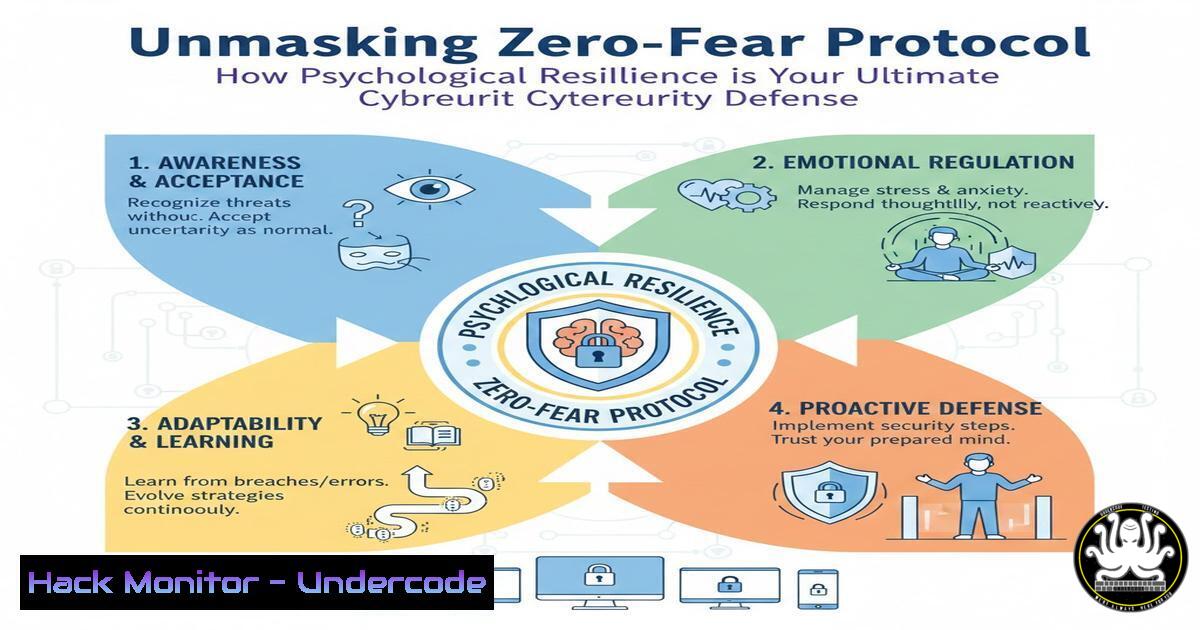
In an era where social engineering and psychological manipulation are the primary attack vectors for cybercriminals, the human element remains the most critical and vulnerable security layer. The concept of “standing your ground,” as illustrated by the anecdote of the kitten, translates directly into cybersecurity posture. This article deconstructs the psychology of fear exploited in phishing, ransomware, and CEO fraud, and provides a technical framework to build “unshakeable confidence” in both human and system defenses.
Learning Objectives:
- Understand the psychological principles behind social engineering attacks and how to immunize against them.
- Implement technical controls that automate vigilance and reduce the human attack surface.
- Develop an incident response plan that prioritizes strategic action over reactive panic.
You Should Know:
- The Anatomy of a Phishing Attack: From Panic to Click
A phishing email’s success hinges on creating a sense of urgency, fear, or curiosity that bypasses logical reasoning. This mimics the “friend’s son trying to scare a kitten.” The kitten’s neutrality is the equivalent of a user recognizing the attempt without an emotional trigger.
Step‑by‑step guide explaining what this does and how to use it.
Step 1: Deconstruct the Sender’s Address. Attackers spoof domains to look legitimate. Use command-line tools to analyze the true origin.
Command (Linux/Mac): `dig +short MX `
What it does: Queries the Mail Exchange records for the domain to verify its legitimate mail servers.
Step 2: Hover Over All Links. Before clicking, hover your cursor over the link. The true destination URL will appear in the bottom-left corner of your browser. A mismatch is a major red flag.
Step 3: Analyze Email Headers for Spoofing. For advanced users, the raw email headers reveal the true path of the message.
How to View: In Gmail, open the email → Click the three dots → “Show original”.
Look for: The Received-SPF, DKIM, and `DMARC` fields. A `fail` result on any of these indicates a high probability of spoofing.
- Building Your Digital “Bully Buddy”: Automated Threat Detection
Just as Bully Buddy AI provides support, you can deploy tools that act as your automated sentinels, monitoring for threats and providing stability.
Step‑by‑step guide explaining what this does and how to use it.
Step 1: Implement a Host-Based Intrusion Detection System (HIDS). Tools like Wazuh or OSSEC monitor your system’s files, logs, and processes for malicious activity.
Install Wazuh Agent (Linux):
`curl -s https://packages.wazuh.com/key/GPG-KEY-WAZUH | sudo gpg –no-default-keyring –keyring gnupg-ring:/usr/share/keyrings/wazuh.gpg –import && sudo chmod 644 /usr/share/keyrings/wazuh.gpg`
`echo “deb [signed-by=/usr/share/keyrings/wazuh.gpg] https://packages.wazuh.com/4.x/apt/ stable main” | sudo tee -a /etc/apt/sources.list.d/wazuh.list`
`sudo apt-get update && sudo apt-get install wazuh-agent`
What it does: The agent will connect to a Wazuh manager server (which you need to set up separately) and start sending security alerts for analysis.
Step 2: Configure File Integrity Monitoring. Within your HIDS, enable monitoring of critical system directories (/etc, /bin, /usr/bin). Any unauthorized change will trigger an immediate alert.
- The Unshakeable System: Hardening Your Cloud & API Endpoints
GLEE Labs powers AI innovations, and similarly, your systems must be powered by a secure foundation. Cloud misconfigurations and insecure APIs are a primary attack vector.
Step‑by‑step guide explaining what this does and how to use it.
Step 1: Enforce the Principle of Least Privilege in IAM. In AWS, never use the root account for daily tasks. Create an IAM user with only the permissions absolutely necessary.
AWS CLI Command to create a low-privilege user:
`aws iam create-user –user-name MyReadOnlyUser`
`aws iam attach-user-policy –user-name MyReadOnlyUser –policy-arn arn:aws:iam::aws:policy/ReadOnlyAccess`
Step 2: Secure API Endpoints with Rate Limiting and Authentication. Use a tool like `htpasswd` to create basic authentication for a development API, forcing a shift from open to secured.
Command (Linux): `sudo htpasswd -c /etc/nginx/.htpasswd api_user`
What it does: Creates a file to store a username and encrypted password, which can then be used by a web server like Nginx to restrict access to an API endpoint.
- From Reactive Panic to Proactive IR: Your Incident Response Playbook
When an incident occurs, fear leads to chaotic, reactive moves. A pre-defined playbook ensures you “stop reacting and start strategizing.”
Step‑by‑step guide explaining what this does and how to use it.
Step 1: Isolation and Containment. The first step is to prevent the threat from spreading.
Command (Linux – Network Isolation): `sudo iptables -A INPUT -s
Command (Windows – Isolate from Network): `netsh advfirewall firewall add rule name=”Block Compromised” dir=in action=block enable=yes remoteip=
Step 2: Evidence Acquisition & Forensics. Preserve logs and memory for analysis. Use `dd` to create a forensic image of a disk or memory.
Command (Linux – Disk Image): `sudo dd if=/dev/sda of=/evidence/sda_image.img bs=4M status=progress`
5. Psychological Safety as a Security Control: Training and Drills
The core message of the post is that confidence neutralizes threats. Regular, simulated phishing attacks and tabletop exercises build this “muscle memory” so employees respond with calm assurance, not panic.
Step‑by‑step guide explaining what this does and how to use it.
Step 1: Deploy a Phishing Simulation Platform. Use open-source tools like Gophish to run controlled campaigns against your own organization.
Step 2: Conduct Quarterly Tabletop Exercises. Present a realistic breach scenario (e.g., “We’ve lost 10,000 customer records”) and walk through the response as a team. The goal is to practice the playbook and communication under pressure.
What Undercode Say:
- The Human Firewall is the Last and Most Critical Layer. No amount of technology can fully compensate for a user who is socially engineered. Training that builds calm, confident skepticism is not a soft skill; it is a hard security control.
- Resilience is a Configurable System Property. Just as you configure a server, you must architect your organization’s human and technical response mechanisms for stability under pressure. This involves automation, clear playbooks, and a culture that rewards reporting potential threats without fear of blame.
The LinkedIn post uses a powerful metaphor that maps perfectly onto modern cybersecurity challenges. The “kitten” represents a system or user with a properly configured “trust but verify” mindset and the technical tools to back it up. The “boy” represents the attacker, whose power is derived solely from the target’s fear and reaction. By investing in the psychological hardening of your team and coupling it with robust, automated technical controls, you effectively “stand your ground,” forcing the attacker to move on to a softer target. The future of security is not just smarter AI, but more resilient humans.
Prediction:
The convergence of AI-powered social engineering (deepfakes, hyper-personalized phishing) and AI-powered defense (like the concepts behind Bully Buddy and Pet Talks AI) will define the next cybersecurity frontier. We will see a rise in “Psychological Security” platforms that use AI to monitor employee morale, stress, and susceptibility to manipulation, allowing organizations to proactively support at-risk individuals before they become the victim of a targeted attack. The organizations that win will be those that integrate human resilience metrics directly into their SOC dashboards.
🎯Let’s Practice For Free:
IT/Security Reporter URL:
Reported By: Jesstoft Leadership – Hackers Feeds
Extra Hub: Undercode MoN
Basic Verification: Pass ✅


