Listen to this Post
Introduction:
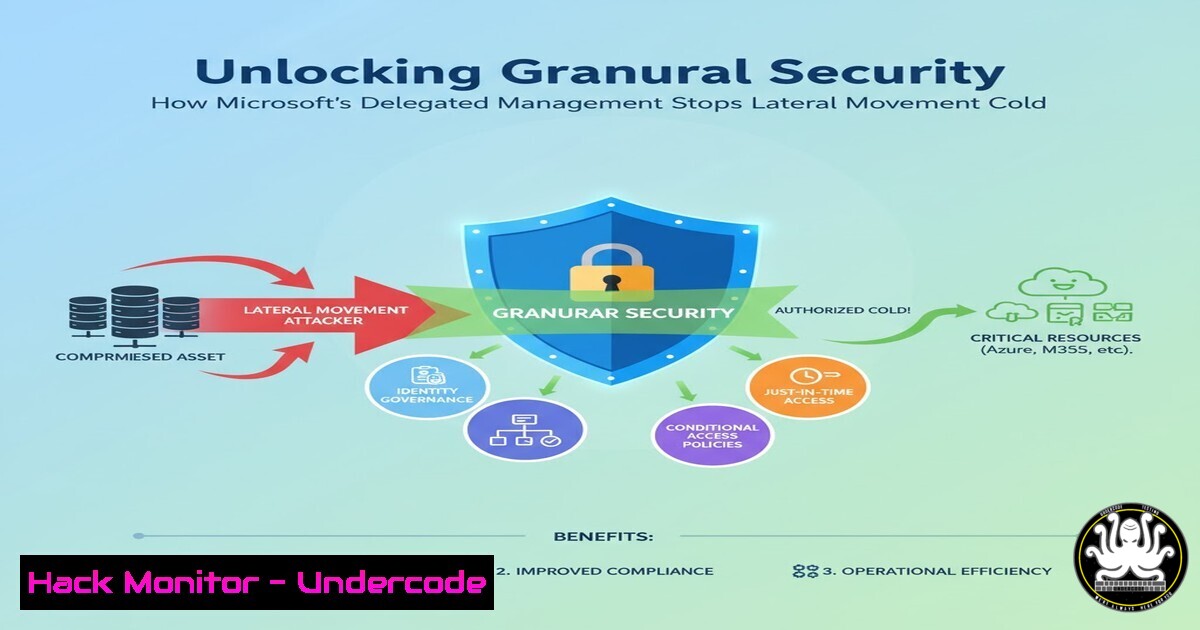
In the relentless battle against sophisticated cyber threats, over-provisioned user permissions remain a primary attack vector, enabling lateral movement and catastrophic breaches. Microsoft’s newly announced Delegated Workflow Management preview directly confronts this by enabling scoped, least-privilege administration through Administrative Units, fundamentally altering an organization’s identity security posture. This article deconstructs this critical feature, providing the actionable commands and hardening techniques to implement it effectively within your Azure AD environment.
Learning Objectives:
- Master the creation and configuration of Administrative Units (AUs) to segment administrative control.
- Implement role assignments scoped to AUs using PowerShell and Azure CLI for precise privilege delegation.
- Configure and manage Entra ID workflows within a delegated AU model to enhance security governance.
You Should Know:
1. Architecting Your Environment with Administrative Units
Administrative Units are the foundational container for this delegated model, acting as a security boundary for role assignments. Before delegating workflow management, you must structure your users and resources into logical AUs based on geography, department, or project.
Verified Azure AD PowerShell Commands:
 Connect to Azure AD
Connect-AzureAD

Create a new Administrative Unit
New-AzureADMSAdministrativeUnit -DisplayName "US-HR-Dept" -Description "Administrative Unit for US HR Department"

Add a user to the Administrative Unit
Add-AzureADMSAdministrativeUnitMember -ObjectId <AU_ObjectId> -RefObjectId <User_ObjectId>

Add a group to the Administrative Unit (recommended for scale)
Add-AzureADMSAdministrativeUnitMember -ObjectId <AU_ObjectId> -RefObjectId <Group_ObjectId>
Step-by-step guide:
This process establishes the security perimeter. First, authenticate to your Azure AD tenant using Connect-AzureAD. Next, create the AU itself with New-AzureADMSAdministrativeUnit, providing a clear display name. Finally, populate the AU by adding individual users or, more efficiently, entire groups using the `Add-AzureADMSAdministrativeUnitMember` cmdlet. This grouping strategy simplifies ongoing management and ensures new group members inherit the correct AU context.
2. Delegating Privileges with Scoped Role Assignments
Simply creating AUs is not enough; you must delegate specific administrative privileges scoped to that AU. Global Administrator privileges are no longer required for day-to-day user and workflow management within a defined scope.
Verified Microsoft Graph PowerShell Commands:
 Connect to Microsoft Graph with required scopes
Connect-MgGraph -Scopes "AdministrativeUnit.ReadWrite.All", "RoleManagement.ReadWrite.Directory"

Get the target Administrative Unit
$AU = Get-MgDirectoryAdministrativeUnit -Filter "displayName eq 'US-HR-Dept'"

Get the User Administrator role definition
$RoleDefinition = Get-MgDirectoryRole -Filter "displayName eq 'User Administrator'"

Create a scoped role assignment for a user or group to the AU
New-MgDirectoryRoleMemberByRef -DirectoryRoleId $RoleDefinition.Id -BodyParameter @{
"@odata.id" = "https://graph.microsoft.com/v1.0/directory/administrativeUnits/$($AU.Id)/members/<User_or_Group_ObjectId>"
}
Step-by-step guide:
After connecting to Microsoft Graph with the necessary permissions, you first retrieve the specific AU and the role definition you wish to assign. The critical step is using the `New-MgDirectoryRoleMemberByRef` cmdlet to create the assignment. This command links the user or group (the principal) to the role, but crucially scopes that assignment to the specific AU using its object ID. The assigned administrator can now manage users, but only those within the “US-HR-Dept” AU.
3. Configuring Delegated Workflow Management for Access Reviews
With AUs and scoped administrators in place, you can delegate the management of sensitive workflows like Access Reviews. This ensures that a line-of-business manager in the HR department can manage HR-specific access reviews without holding broad tenant permissions.
Verified Microsoft Graph API Call (via PowerShell):
 This conceptual step involves using the Graph API to create a workflow scoped to an AU.
 The exact API for delegating workflow management itself is in preview, but the pattern follows scoping.

Get the workflow template (e.g., for Access Reviews)
$WorkflowTemplate = Get-MgIdentityGovernanceLifecycleWorkflowTemplate -Filter "displayName eq 'Access Review'"

Create a new workflow, associating it with the specific AU
$Params = @{
DisplayName = "Quarterly US-HR Access Review"
Description = "Access review for all US HR users"
IsEnabled = $true
 The following would be the mechanism to scope to an AU (conceptual based on preview)
 Scope = @{
 AdministrativeUnitId = $AU.Id
 }
}
New-MgIdentityGovernanceLifecycleWorkflow -BodyParameter $Params
Step-by-step guide:
This step involves leveraging the Microsoft Graph API for Identity Governance. After identifying the correct workflow template, you create a new workflow instance. The key security enhancement is the ability to scope this workflow’s management and execution context to a specific Administrative Unit. While the precise Graph property is still evolving in the preview, the architecture ensures that the delegated HR administrator can only see, manage, and execute this “Quarterly US-HR Access Review” workflow, preventing them from creating or affecting reviews in other departments like Finance or IT.
4. Hardening Cloud Identity with Conditional Access Policies
Delegation must be paired with robust Conditional Access (CA) policies to protect the privileged accounts themselves. A scoped admin account is still a target and must be shielded from unauthorized access.
Verified Azure AD PowerShell for CA Reporting:
 Get all Conditional Access policies (helps in auditing)
Get-AzureADMSConditionalAccessPolicy

A conceptual Conditional Access policy requiring MFA for admin roles (JSON for ARM/bicep)
{
"displayName": "Require MFA for All Admin Roles",
"state": "enabled",
"conditions": {
"users": {
"includeUsers": "All",
"includeRoles": ["User Administrator", "Helpdesk Administrator", "Password Administrator"]
},
"applications": {
"includeApplications": "All"
},
"locations": {
"includeLocations": "All"
}
},
"grantControls": {
"operator": "OR",
"builtInControls": ["mfa"]
}
}
Step-by-step guide:
Use `Get-AzureADMSConditionalAccessPolicy` to audit existing policies. To create a new one (often done via the Azure Portal or Infrastructure-as-Code templates like ARM or Bicep), you define a policy that targets specific admin roles (like the scoped “User Administrator”). The policy conditions should include all cloud apps and grant access only upon requiring Multi-Factor Authentication (MFA). This ensures that even if an attacker compromises a scoped admin’s password, they cannot authenticate without the second factor.
5. Auditing and Monitoring Scoped Administrator Activity
Delegating authority requires heightened vigilance. You must implement comprehensive logging and alerting to monitor the activities of scoped administrators, ensuring they are not abusing their privileges or being exploited.
Verified KQL Query for Azure Sentinel/Microsoft Defender:
// Hunt for suspicious activity by a scoped administrator
AuditLogs
| where TimeGenerated >= ago(7d)
| where ActorUserId contains "<ScopedAdmin_UserID>"
| where Result == "success"
| where ActivityDisplayName has_any ("Add user", "Delete user", "Update user", "Reset password", "Change user licenses")
| project TimeGenerated, ActorUserId, ActorIPAddress, ActivityDisplayName, TargetResources
| sort by TimeGenerated desc
Step-by-step guide:
This Kusto Query Language (KQL) query is designed for Azure Sentinel or Microsoft Defender portals. It searches the audit logs for successful activities performed by a specific scoped administrator over the last week. It filters for high-impact actions like user modifications and password resets. Security teams should schedule this query as a periodic hunting rule or create an alert based on a high volume of such activities from a single scoped admin within a short timeframe, which could indicate a compromised account or insider threat.
6. Automating User Lifecycle with Dynamic Groups
To maximize the efficiency of the AU model, pair it with Azure AD Dynamic Groups. This automates user membership within AUs based on attributes, reducing manual administrative overhead and potential for error.
Verified PowerShell for Dynamic Group Creation:
 Create a dynamic group for a specific department and country
New-MgGroup -DisplayName "Dynamic-US-HR-Users" -Description "All US-based HR Users" -MailEnabled:$false -SecurityEnabled:$true -GroupTypes "DynamicMembership" -MembershipRule "(user.department -eq ""HR"") and (user.country -eq ""US"")" -MembershipRuleProcessingState "On"
Step-by-step guide:
This command creates a new security group with dynamic membership. The rule `(user.department -eq “HR”) and (user.country -eq “US”)` automatically includes any user whose attributes match these criteria. By adding this group to your “US-HR-Dept” Administrative Unit, you ensure that all current and future US-based HR users are automatically placed into the correct security scope. This automation is critical for maintaining a clean and accurate security model as your organization changes.
7. Mitigating Privilege Escalation Vulnerabilities
The final piece is proactive defense. Regularly review role assignments and AU membership to identify and remediate any potential paths for privilege escalation, such as a user being added to multiple powerful AUs.
Verified PowerShell Script for Audit:
 Script to find users with scoped admin roles in multiple AUs
Connect-MgGraph -Scopes "RoleManagement.Read.All", "Directory.Read.All"

$AllScopedAdmins = @()
$Roles = Get-MgDirectoryRole

foreach ($Role in $Roles) {
$Assignments = Get-MgDirectoryRoleMember -DirectoryRoleId $Role.Id
foreach ($Assignment in $Assignments) {
 Check if assignment is scoped (simplified logic - actual check requires expanding AU for each assignment via Graph)
$ScopedAdmin = [bash]@{
UserDisplayName = $Assignment.AdditionalProperties['displayName']
RoleName = $Role.DisplayName
 AU Scoping info would be retrieved here in a full script
}
$AllScopedAdmins += $ScopedAdmin
}
}
$AllScopedAdmins | Group-Object UserDisplayName | Where-Object Count -gt 1 | Select-Object Name, Count
Step-by-step guide:
This script provides a foundational audit. It connects to Graph, iterates through all directory roles and their members, and collects the assignments. A more advanced version would query the specific AU scope for each assignment. The goal is to group the results by user and identify any user who appears in more than one scoped admin role (Where-Object Count -gt 1). Finding such users is a key step in identifying overly broad privileges that could be consolidated or eliminated to adhere to the principle of least privilege.
What Undercode Say:
- The End of the Global Admin Reign: This feature is a decisive step toward the eventual phasing out of the need for perpetual Global Administrator roles for routine tasks, drastically shrinking the attack surface.
- Operational Burden Justifies Security Gain: While introducing AUs adds a layer of management complexity, the security payoff in preventing lateral movement and containing breaches is non-negotiable for mature organizations.
The introduction of Delegated Workflow Management is not merely a feature update; it is a philosophical shift in the Microsoft identity stack. It forces a “zero-trust” mindset onto administrative models that have been permissive by default. The operational overhead of designing and maintaining AUs is a valid concern, particularly for smaller organizations. However, for any enterprise targeted by modern, identity-focused attacks, this granular control is a critical line of defense. It moves security from a reactive “clean-up” posture after a breach to a proactive “containment” posture, ensuring that a compromised scoped admin account cannot become a pivot point to the entire kingdom.
Prediction:
The preview of Delegated Workflow Management signals Microsoft’s strategic direction to embed granular, least-privilege access deeply into every layer of its cloud ecosystem. Within two years, we predict that scoped administration via Administrative Units will become the default and recommended practice for all Entra ID roles and resource management, fundamentally changing enterprise security blueprints. This will be coupled with AI-driven recommendations in the Microsoft Copilot for Security platform to automatically suggest optimal AU structures and identify over-privileged scoped accounts, making robust identity governance accessible to organizations of all security maturity levels.
🎯Let’s Practice For Free:
IT/Security Reporter URL:
Reported By: Timo Hakala – Hackers Feeds
Extra Hub: Undercode MoN
Basic Verification: Pass ✅


