Listen to this Post
Introduction
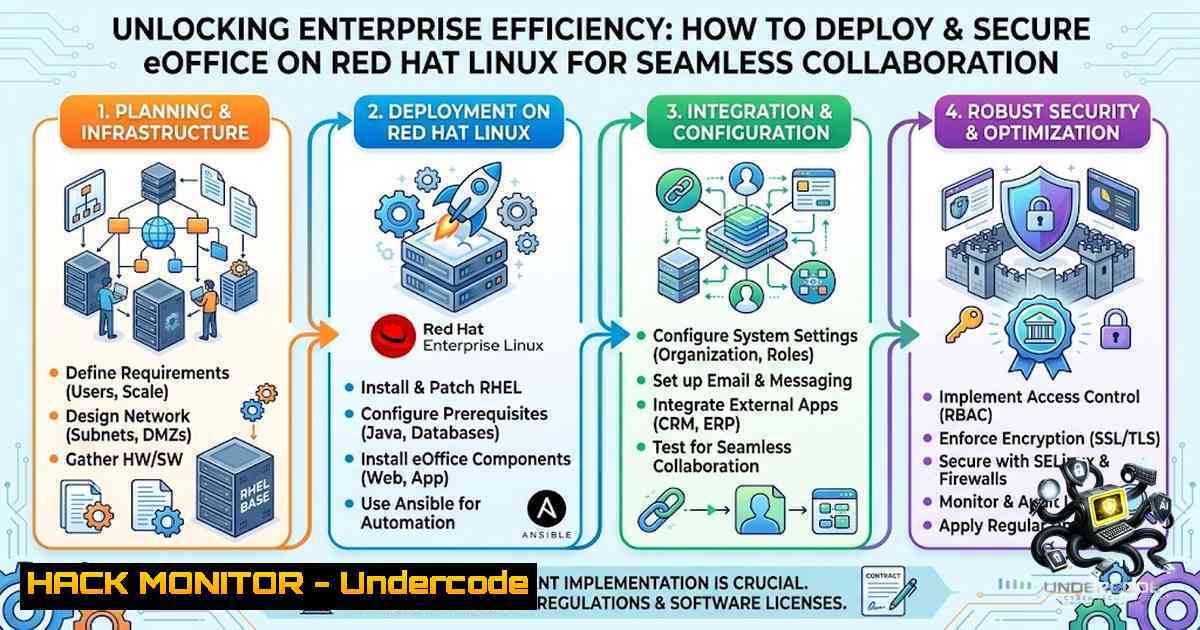
In today’s digital-first workplace, organizations are rapidly migrating to open-source solutions that offer flexibility, cost savings, and robust security. Red Hat Enterprise Linux (RHEL) stands as a cornerstone of enterprise IT infrastructure, providing a stable and secure foundation for mission-critical applications. When combined with powerful office collaboration platforms like eOffice, businesses can achieve unprecedented levels of productivity while maintaining strict control over their data and compliance requirements. This article explores the deployment, configuration, and security hardening of eOffice on Red Hat Linux, offering IT professionals and system administrators a comprehensive guide to building a resilient digital workplace.
Learning Objectives
- Understand the architecture and system requirements for deploying eOffice on Red Hat Enterprise Linux.
- Master the step‑by‑step installation process, including dependency management and repository configuration.
- Implement robust security measures, including firewall rules, SELinux policies, and encryption protocols.
- Learn to integrate eOffice with existing directory services and file-sharing mechanisms.
- Troubleshoot common deployment issues and optimize performance for enterprise-scale usage.
You Should Know
1. Understanding eOffice and Red Hat Linux Integration
eOffice is a comprehensive web‑based office automation solution designed to streamline correspondence, document management, and workflow processes within organizations. It provides modules for knowledge management, email integration, file sharing, and reporting, making it an ideal choice for government agencies and enterprises seeking to digitize administrative operations.
Red Hat Enterprise Linux offers a secure, high‑performance environment for hosting such applications. With built‑in support for virtualization, containerization, and advanced security frameworks like SELinux, RHEL ensures that your eOffice deployment remains resilient against both internal and external threats.
System Requirements
Before installation, verify that your RHEL server meets the following minimum specifications:
- CPU: Dual‑core 2 GHz or higher
- RAM: 4 GB or more (8 GB recommended for production)
- Storage: 20 GB available disk space
- Operating System: Red Hat Enterprise Linux 7, 8, or 9
- Database: MySQL/MariaDB or PostgreSQL
- Web Server: Apache HTTP Server or Nginx
Step‑by‑Step Installation Guide
Step 1: Update Your System
sudo yum update -y
Step 2: Install Required Dependencies
sudo yum install -y epel-release
sudo yum install -y httpd mariadb-server mariadb php php-mysqlnd php-gd php-xml php-mbstring php-json php-curl
Step 3: Start and Enable Services
sudo systemctl start httpd
sudo systemctl enable httpd
sudo systemctl start mariadb
sudo systemctl enable mariadb
Step 4: Secure MariaDB Installation
sudo mysql_secure_installation
Step 5: Download and Deploy eOffice
cd /var/www/html/
sudo wget https://example.com/eoffice-latest.tar.gz  Replace with actual download URL
sudo tar -xzvf eoffice-latest.tar.gz
sudo chown -R apache:apache /var/www/html/eoffice/
sudo chmod -R 755 /var/www/html/eoffice/
Step 6: Configure Apache Virtual Host
Create a new configuration file `/etc/httpd/conf.d/eoffice.conf`:
<VirtualHost :80>
DocumentRoot /var/www/html/eoffice
ServerName your-domain.com
<Directory /var/www/html/eoffice>
Options Indexes FollowSymLinks
AllowOverride All
Require all granted
</Directory>
ErrorLog /var/log/httpd/eoffice-error.log
CustomLog /var/log/httpd/eoffice-access.log combined
</VirtualHost>
Step 7: Restart Apache
sudo systemctl restart httpd
Step 8: Complete Web-Based Installation
Navigate to `http://your-server-ip/eoffice/install` and follow the on‑screen instructions to configure database connection and admin credentials.
2. Securing eOffice with SELinux and Firewall Policies
Security is paramount when deploying any enterprise application. Red Hat Enterprise Linux includes SELinux (Security‑Enhanced Linux), which provides mandatory access control to confine processes and minimize the impact of potential vulnerabilities.
Configuring SELinux for eOffice
After installation, you may encounter SELinux denials. Use the following commands to set appropriate contexts:
sudo chcon -R -t httpd_sys_content_t /var/www/html/eoffice/
sudo chcon -R -t httpd_sys_rw_content_t /var/www/html/eoffice/uploads/
sudo setsebool -P httpd_can_network_connect on
sudo setsebool -P httpd_can_network_connect_db on
If you prefer permissive mode for troubleshooting, use:
sudo setenforce 0 Temporarily disable
To permanently set SELinux to permissive, edit `/etc/selinux/config` and change `SELINUX=enforcing` to SELINUX=permissive.
Firewall Configuration
Open necessary ports using `firewalld`:
sudo firewall-cmd --permanent --add-service=http
sudo firewall-cmd --permanent --add-service=https
sudo firewall-cmd --permanent --add-port=3306/tcp  If remote database access is needed
sudo firewall-cmd --reload
Implementing TLS/SSL Encryption
Secure data in transit by obtaining an SSL certificate (e.g., from Let’s Encrypt) and configuring Apache:
sudo yum install -y mod_ssl certbot python3-certbot-apache
sudo certbot --apache -d your-domain.com
3. Integrating eOffice with Samba for File Sharing
eOffice supports integration with network file shares, enabling seamless document collaboration across Windows and Linux environments. Samba allows your RHEL server to act as a Windows file server, facilitating shared storage for eOffice documents.
Installing and Configuring Samba
sudo yum install -y samba samba-client cifs-utils
Edit `/etc/samba/smb.conf` to define a shared directory:
[bash]
path = /var/www/html/eoffice/documents
browsable = yes
writable = yes
guest ok = no
valid users = @eofficeusers
create mask = 0660
directory mask = 0770
Creating a Samba User
sudo useradd -M -s /sbin/nologin eofficeuser
sudo smbpasswd -a eofficeuser
sudo systemctl start smb nmb
sudo systemctl enable smb nmb
Mounting Samba Share on Windows Clients
- Open File Explorer and right‑click on “This PC”.
2. Select “Map network drive”.
3. Enter `\\your-server-ip\eofficedocs` and provide credentials.
Mounting Samba Share on Linux Clients
sudo mkdir /mnt/eofficedocs
sudo mount -t cifs //server-ip/eofficedocs /mnt/eofficedocs -o username=eofficeuser,password=yourpassword
4. Hardening eOffice Against Common Vulnerabilities
Enterprise applications are prime targets for attackers. Implement these hardening measures to protect your eOffice deployment:
Database Security
- Use strong, unique passwords for database users.
- Restrict database access to localhost only.
- Regularly update MariaDB/MySQL and apply security patches.
Web Application Firewall (WAF)
Deploy ModSecurity with OWASP Core Rule Set:
sudo yum install -y mod_security mod_security_crs
sudo systemctl restart httpd
File Upload Restrictions
In /etc/php.ini, limit file upload sizes and disable dangerous functions:
upload_max_filesize = 10M
post_max_size = 10M
disable_functions = exec,passthru,shell_exec,system,proc_open,popen,curl_exec,curl_multi_exec,parse_ini_file,show_source
Regular Security Audits
Use tools like `lynis` and `chkrootkit` to scan for vulnerabilities:
sudo yum install -y lynis chkrootkit
sudo lynis audit system
Implementing Fail2Ban
Protect against brute‑force attacks:
sudo yum install -y fail2ban
sudo systemctl enable fail2ban
sudo systemctl start fail2ban
Configure `/etc/fail2ban/jail.local` for Apache and SSH protection.
5. Performance Tuning and Monitoring
To ensure optimal performance of eOffice on Red Hat Linux, implement the following tuning measures:
PHP OPcache Optimization
Edit `/etc/php.d/opcache.ini`:
opcache.enable=1
opcache.memory_consumption=128
opcache.interned_strings_buffer=8
opcache.max_accelerated_files=4000
opcache.revalidate_freq=60
MySQL/MariaDB Tuning
Adjust `/etc/my.cnf`:
[bash]
innodb_buffer_pool_size = 1G
innodb_log_file_size = 256M
max_connections = 150
query_cache_size = 64M
Monitoring with Nagios or Zabbix
Set up monitoring to track system resources, service status, and application logs:
sudo yum install -y nagios nagios-plugins
Log Rotation
Ensure logs are rotated to prevent disk exhaustion. Edit `/etc/logrotate.d/httpd` and `/etc/logrotate.d/mariadb` as needed.
6. Backup and Disaster Recovery Strategies
A robust backup strategy is essential for business continuity. Implement the following:
Automated Database Backups
Create a cron job to dump the database daily:
0 2 /usr/bin/mysqldump -u root -p'password' eoffice_db > /backups/eoffice_db_$(date +\%Y\%m\%d).sql
File System Backups
Use `rsync` to synchronize eOffice files to a remote location:
rsync -avz /var/www/html/eoffice/ user@backup-server:/backups/eoffice/
Offsite Replication
Consider using `rclone` to copy backups to cloud storage (e.g., AWS S3, Google Drive).
Testing Recovery
Periodically restore backups to a test environment to verify integrity and procedure effectiveness.
7. Troubleshooting Common Issues
Issue: Apache Fails to Start
- Check syntax: `sudo apachectl configtest`
– Review logs: `sudo tail -f /var/log/httpd/error_log`
Issue: Database Connection Errors
- Verify MariaDB is running: `sudo systemctl status mariadb`
– Test credentials: `mysql -u eofficeuser -p -h localhost`
Issue: SELinux Blocking File Writes
- Check audit logs: `sudo grep “denied” /var/log/audit/audit.log`
– Generate SELinux policy: `sudo audit2allow -a -M eoffice`
Issue: Slow Performance
- Monitor system resources:
top,htop, `vmstat`
– Check PHP error logs: `/var/log/php-fpm/error.log`
– Optimize database queries usingEXPLAIN.
What Undercode Say
- Key Takeaway 1: Deploying eOffice on Red Hat Linux provides enterprises with a secure, scalable, and cost‑effective alternative to proprietary office suites, while leveraging the power of open‑source technologies.
- Key Takeaway 2: Security hardening is not an afterthought—it must be integrated at every layer, from SELinux policies and firewall rules to application‑level controls like input validation and encryption.
Analysis: The convergence of office automation and enterprise Linux platforms represents a paradigm shift in how organizations approach digital transformation. By combining the stability of RHEL with the flexibility of eOffice, IT teams can build collaborative environments that are both productive and resilient. However, the complexity of such deployments demands a thorough understanding of system administration, security best practices, and performance tuning. As cyber threats continue to evolve, proactive hardening and continuous monitoring are non‑negotiable. The future of work is hybrid, and solutions like eOffice on Red Hat Linux are poised to lead that charge, offering organizations the agility they need to adapt to changing business landscapes while maintaining the highest standards of data protection and operational efficiency.
Prediction
- +1 The adoption of open‑source office automation on Linux will accelerate as organizations seek to reduce vendor lock‑in and gain greater control over their data.
- +1 Integration with AI‑powered document processing and workflow automation will become a standard feature in future eOffice releases, further enhancing productivity.
- -1 The shortage of skilled Linux administrators may slow down adoption rates, creating a demand for more user‑friendly deployment tools and managed services.
- +1 Enhanced collaboration features, including real‑time co‑editing and mobile access, will drive wider adoption across both public and private sectors.
- -1 As eOffice becomes more prevalent, it will attract increased attention from threat actors, necessitating continuous security updates and vigilance.
- +1 Containerization using Podman or Docker will simplify deployment and scaling, making eOffice more accessible to smaller organizations.
- +1 Integration with identity providers like Keycloak and LDAP will streamline user management and strengthen access control.
- -1 Legacy systems and proprietary file formats may pose interoperability challenges, requiring robust migration strategies.
- +1 The rise of remote work will further cement the importance of secure, web‑based office solutions like eOffice.
- +1 Community contributions and open‑source collaboration will drive rapid innovation, keeping eOffice competitive with commercial alternatives.
▶️ Related Video (76% Match):
🎯Let’s Practice For Free:
🎓 Live Courses & Certifications:
Join Undercode Academy for Verified Certifications
🚀 Request a Custom Project:
Secure, high-velocity infrastructure and disruptive technological engineering. Contact our engineering team for high-tier development and proprietary systems:
[email protected]
💎 Smart Architecture | 🛡️ Secure by Design | ⭐ Trusted by Thousands
IT/Security Reporter URL:
Reported By: Khalidc2001 Eoffice – Hackers Feeds
Extra Hub: Undercode MoN
Basic Verification: Pass ✅


