Listen to this Post
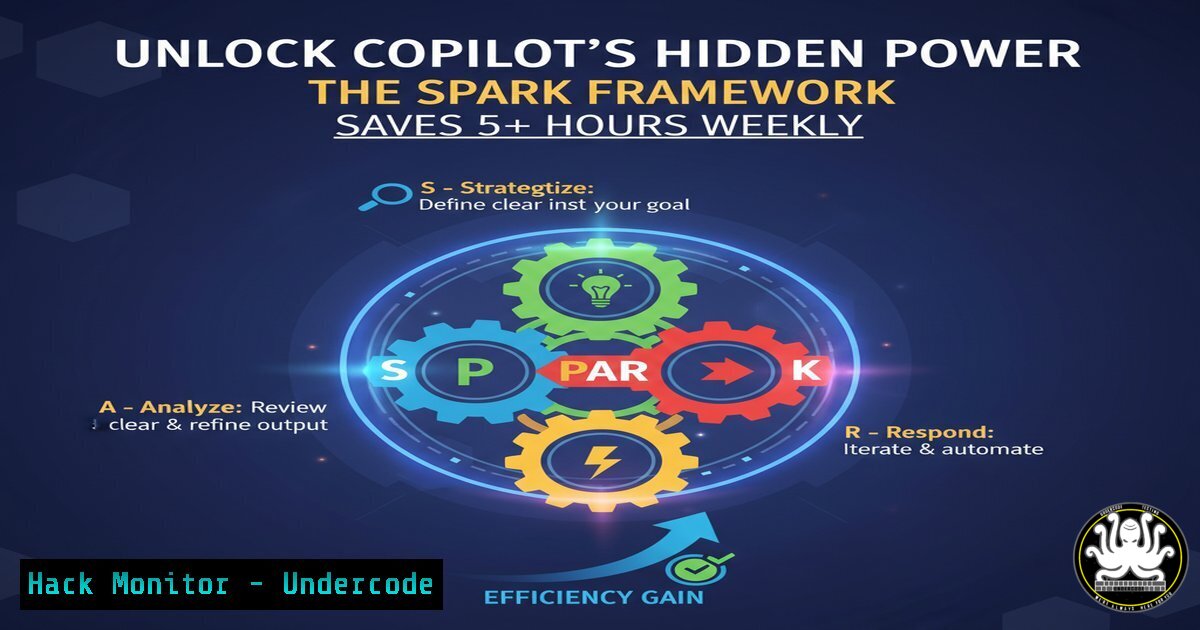
Introduction:
Microsoft Copilot has evolved beyond a simple chatbot into a sophisticated AI productivity partner. However, most users barely scratch the surface of its capabilities, missing advanced features that can automate complex workflows and transform business operations across cybersecurity, IT administration, and development tasks.
Learning Objectives:
- Master the SPARK framework for precise AI prompting
- Implement technical commands that leverage Copilot for cybersecurity and IT operations
- Automate complex workflows across multiple technology domains
You Should Know:
1. Setting the Scene for Security Analysis
 Linux: Analyze suspicious processes
ps aux --sort=-%mem | head -10
Step-by-step guide: This command displays the top 10 memory-consuming processes, crucial for identifying potential malware or resource-intensive applications. When used with Copilot, you can prompt: “Set the scene: You’re a cybersecurity analyst. Analyze this process list and identify any suspicious activity patterns. Provide output in a security risk assessment table.” Copilot can then categorize processes by risk level and suggest mitigation steps.
2. Providing Context for Network Security
 Windows: Network connection analysis
netstat -ano | findstr "ESTABLISHED"
Step-by-step guide: This Windows command shows all established network connections with their process IDs. When providing context to Copilot: “Context: I’m monitoring for unauthorized external connections. Analyze these ESTABLISHED connections and flag any suspicious foreign IP addresses. Include process names and recommend firewall rules.” Copilot can cross-reference IPs with threat databases and suggest blocking rules.
3. Adding Background for Cloud Security
 AWS CLI: Security group audit
aws ec2 describe-security-groups --query 'SecurityGroups[].[GroupName,GroupId,IpPermissions]' --output table
Step-by-step guide: This command retrieves all AWS security group configurations. When adding background to Copilot: “Background: Our company uses AWS for hosting web applications. Review these security group rules and identify any overly permissive rules (0.0.0.0/0) that could expose services. Create a prioritized remediation list.” Copilot can identify public-facing databases and suggest principle of least privilege configurations.
4. Requesting Output for Vulnerability Management
 Nmap vulnerability scanning
nmap -sV --script vuln 192.168.1.0/24 -oX scan_results.xml
Step-by-step guide: This Nmap command performs vulnerability scanning across a network range. When requesting specific output from Copilot: “Request output: Parse this XML scan data and create a executive summary with critical vulnerabilities prioritized by CVSS score. Include affected systems, remediation timeline, and business impact assessment in markdown format.” Copilot can transform technical data into actionable business reports.
5. Keeping it Going for SIEM Integration
 PowerShell: Event log analysis
Get-WinEvent -LogName Security -MaxEvents 50 | Where-Object {$_.Level -eq 2}
Step-by-step guide: This PowerShell command retrieves security events from Windows Event Log. To keep Copilot engaged: “Keep it going: Analyze these security events and ask me clarifying questions about our environment to provide better threat detection rules. Specifically inquire about normal user behavior patterns and critical assets.” Copilot will then ask targeted questions to refine its analysis.
6. API Security Testing Automation
 curl command for API security testing
curl -H "Authorization: Bearer $TOKEN" -X POST https://api.company.com/v1/users \
-d '{"role":"admin"}' -H "Content-Type: application/json"
Step-by-step guide: This tests API endpoint privilege escalation vulnerabilities. With Copilot: “Set the scene: You’re a penetration tester. Context: We’re testing for horizontal privilege escalation. Background: Regular users shouldn’t be able to assign admin roles. Request output: Document any security vulnerabilities found and provide OWASP mitigation recommendations.” Copilot can identify authorization flaws and suggest proper role-based access controls.
7. Incident Response Coordination
 Linux: System integrity monitoring
aide --check | grep -E "(Added|Changed|Removed)" > integrity_changes.txt
Step-by-step guide: This AIDE integrity check identifies unauthorized file system changes. When prompting Copilot: “Context: We’ve detected a potential security incident. Background: These files changed in the last 24 hours without change management approval. Request output: Categorize changes by criticality, suggest investigation priorities, and ask me about recent authorized maintenance windows to filter false positives.” Copilot can help triage incident response efforts efficiently.
What Undercode Say:
- The SPARK framework transforms AI from a novelty to a strategic productivity multiplier
- Technical professionals who master prompt engineering will outperform those who simply learn more commands
- The real value lies in Copilot’s ability to bridge knowledge gaps between different technology domains
Analysis: The shift from basic command execution to AI-augmented technical workflows represents the next evolution in IT operations. Cybersecurity teams that implement structured prompting frameworks like SPARK can reduce mean time to detection (MTTD) by automating initial analysis of security events. The framework’s “keep it going” component is particularly valuable for complex investigations where requirements evolve as new information emerges. Organizations should prioritize prompt engineering training alongside technical skill development to maximize their security tool investments.
Prediction:
Within two years, AI prompting frameworks will become as fundamental to technical roles as command-line proficiency is today. Security operations centers will deploy specialized AI handlers that automatically apply frameworks like SPARK to incoming threats, reducing analyst burnout and improving response consistency. The organizations that systematically implement structured AI interaction patterns will achieve 40% faster incident resolution and significantly reduced human error in critical security operations.
🎯Let’s Practice For Free:
IT/Security Reporter URL:
Reported By: Steven Paul – Hackers Feeds
Extra Hub: Undercode MoN
Basic Verification: Pass ✅


