Listen to this Post
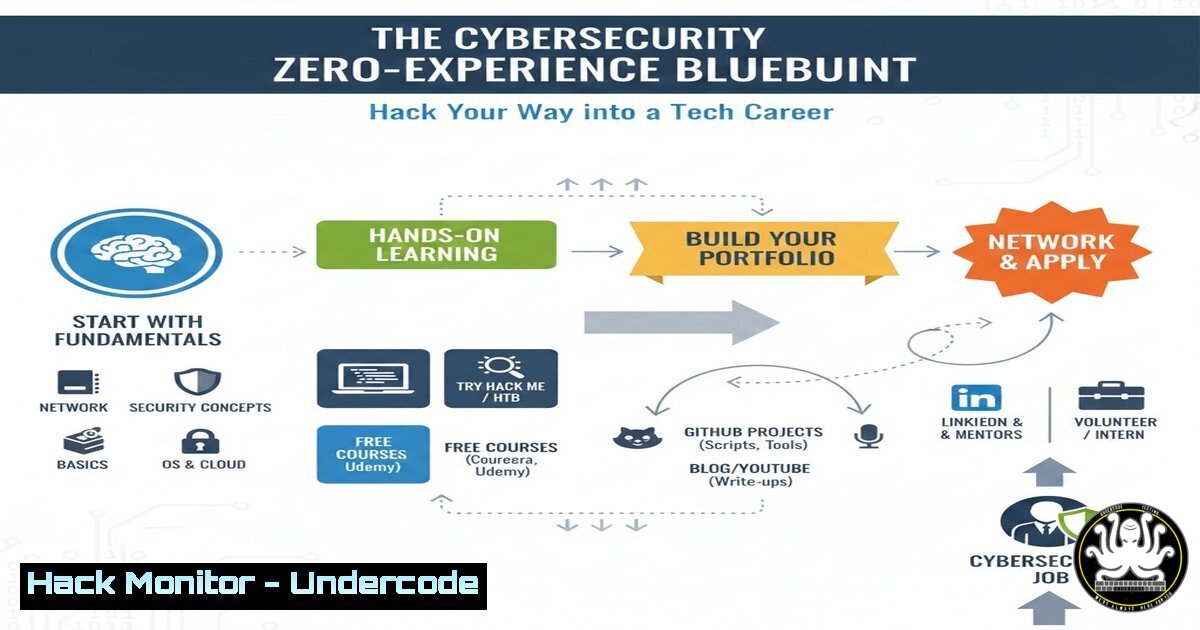
Introduction:
The traditional barrier to entry in the tech industry is crumbling, making way for a new era of skill-based hiring. For aspiring professionals with zero experience, cybersecurity presents a unique and accessible pathway, leveraging readily available tools and a mindset of continuous learning to build a formidable career from the ground up.
Learning Objectives:
- Identify the core pillars of cybersecurity and the most accessible entry-level roles.
- Develop a hands-on, practical skill set using free resources and open-source tools.
- Construct a professional portfolio with documented proof-of-concept exploits and mitigation strategies.
You Should Know:
1. Demystifying Cybersecurity Roles and Fundamentals
The field of cybersecurity is vast, but starting points like Security Operations Center (SOC) Analyst or Vulnerability Analyst are ideal for newcomers. The core fundamentals are non-negotiable and form the bedrock of all advanced knowledge. Before specializing, you must achieve literacy in networking, operating systems, and a scripting language.
Step-by-step guide explaining what this does and how to use it.
Step 1: Networking Fundamentals. Understand TCP/IP, DNS, HTTP/S, and subnetting. Use command-line tools to solidify this knowledge.
On Windows (`Command Prompt`):
ipconfig /all  Displays detailed network configuration
tracert google.com  Traces the route packets take to a network host
On Linux (`Terminal`):
ifconfig -a  Displays all network interfaces (may require <code>net-tools</code>)
traceroute google.com  Traces the network path to a host
Step 2: Operating System Proficiency. Gain comfort in both Linux and Windows environments. For Linux, start with a distribution like Ubuntu and learn essential command-line operations.
Essential Linux Commands:
ls -la /etc/passwd  List file permissions for the system user database
ps aux | grep ssh  View all running processes and filter for 'ssh'
sudo netstat -tulpn  Display all listening ports and the associated processes
Step 3: Introductory Scripting. Python is the lingua franca for security automation. Start with a simple script to replace manual tasks.
Example Python Script (Port Scanner):
 simple_scanner.py
import socket

target = input("Enter target IP: ")
for port in [21, 22, 80, 443, 3389]:
s = socket.socket(socket.AF_INET, socket.SOCK_STREAM)
s.settimeout(5)
result = s.connect_ex((target, port))
if result == 0:
print(f"Port {port}: OPEN")
s.close()
Run with: `python3 simple_scanner.py`
- Building a Home Lab: Your Personal Cyber Playground
A home lab is a controlled environment where you can safely practice offensive and defensive techniques without legal ramifications. It allows you to simulate real-world attacks and defenses.
Step-by-step guide explaining what this does and how to use it.
Step 1: Virtualization Setup. Install virtualization software like VirtualBox or VMware Workstation Player.
Step 2: Deploy Vulnerable Machines. Download and import intentionally vulnerable virtual machines from OWASP Broken Web Apps or VulnHub. These are designed for legal practice.
Step 3: Install Essential Security Tools. On your primary Kali Linux or Parrot OS VM, familiarize yourself with the toolset.
In your Kali Linux terminal, update and explore:
sudo apt update && sudo apt upgrade -y  Update the system
apt list --installed | grep nmap  Check if a tool like nmap is installed
3. Mastering Essential Tools: The Hacker’s Toolkit
Proficiency with core tools is what separates theorists from practitioners. Tools like Nmap for reconnaissance and Burp Suite for web application testing are industry standards.
Step-by-step guide explaining what this does and how to use it.
Step 1: Network Reconnaissance with Nmap. Discover hosts and services on a network.
Basic Scan: `nmap -sV -O 192.168.1.0/24`
-sV: Probes open ports to determine service/version info.
`-O`: Enables OS detection.
`192.168.1.0/24`: The target network range.
Step 2: Web Application Proxy with Burp Suite. Intercept and analyze web traffic.
Configure your browser to use Burp’s proxy (usually 127.0.0.1:8080).
Turn Intercept “on” in Burp Suite and browse to a vulnerable web app (e.g., OWASP Juice Shop). You will see the HTTP request trapped in Burp, allowing you to analyze and manipulate it before it is sent to the server.
4. Exploiting a Common Vulnerability: SQL Injection
Understanding how to find and exploit vulnerabilities is critical for both offensive and defensive roles. SQL Injection (SQLi) is a classic and dangerous web security flaw.
Step-by-step guide explaining what this does and how to use it.
Step 1: Identification. Test login forms or search fields for SQLi by injecting a single quote (').
In a vulnerable field, enter: `’ OR ‘1’=’1`
If this bypasses authentication or causes an error, SQLi is likely present.
Step 2: Manual Exploitation. Use the `UNION` operator to extract data from the database.
Example Payload (discovering column count):
`’ UNION SELECT 1,2,3– -`
Adjust the number of columns (1,2,3...) until the error disappears. The numbers indicate which column’s output is visible.
Step 3: Data Exfiltration. Extract sensitive information like usernames and passwords.
Final Payload:
`’ UNION SELECT 1,username,password FROM users– -`
This attempts to display the username and password from the `users` table in the visible columns of the web page.
5. From Exploitation to Mitigation: The Defender’s Mindset
A true professional doesn’t just break things; they know how to fix them. Documenting the vulnerability and its remediation is a cornerstone of security work.
Step-by-step guide explaining what this does and how to use it.
Step 1: Document the Finding. Write a simple vulnerability report.
SQL Injection in Login Form
Risk: Critical
Proof of Concept: Detail the steps and payloads used.
Step 2: Propose the Mitigation. The primary fix is using Parameterized Queries (Prepared Statements) in the application code.
Vulnerable Code (Python-like pseudocode):
query = "SELECT FROM users WHERE username = '" + username + "' AND password = '" + password + "'"
Secure Code (using parameterized queries):
query = "SELECT  FROM users WHERE username = %s AND password = %s"
cursor.execute(query, (username, password))
This ensures user input is treated as data, not executable SQL code.
6. Building a Professional Portfolio
Your portfolio is your new resume. It provides tangible proof of your skills, problem-solving ability, and dedication to potential employers.
Step-by-step guide explaining what this does and how to use it.
Step 1: Create a GitHub Account. This will host your code, scripts, and documentation.
Step 2: Populate Your Repository.
Upload the Python scripts you write.
Create detailed `README.md` files for each project.
Include write-ups for vulnerabilities you’ve discovered and exploited in your lab, following the report structure from Section 5.
Step 3: Link Your Portfolio. Add your GitHub URL to your LinkedIn profile and resume, creating a direct line of sight to your technical capabilities.
What Undercode Say:
- Skills Trump Pedigree. The modern tech landscape is a meritocracy. A well-documented GitHub portfolio demonstrating practical exploitation and mitigation skills is often more compelling to hiring managers than a degree with no applied experience.
- The Hacker Mindset is the Core Product. The ultimate value you bring is not just knowing how to use a tool, but understanding the underlying logic of a system well enough to break it and, more importantly, rebuild it more robustly. This iterative process of attack and defense is the engine of cybersecurity.
The paradigm has irrevocably shifted. The path into tech, particularly cybersecurity, is no longer guarded by university gates but is accessible to anyone with curiosity, discipline, and a commitment to hands-on learning. By focusing on building and demonstrating practical skills in a home lab, mastering essential tools, and understanding the full cycle from vulnerability to mitigation, aspiring professionals can create their own credentials. This approach not only lands the first job but also instills the continuous learning habit required for a long and successful career.
Prediction:
The “zero-experience” pathway, supercharged by AI-powered learning assistants and personalized lab environments, will become the dominant mode of entry into cybersecurity within the next five years. We will see a rise in “micro-apprenticeships” where candidates are assessed solely on their ability to solve real-world security challenges in a simulated environment, further eroding the relevance of traditional credentials and solidifying a global, skill-based hiring standard.
🎯Let’s Practice For Free:
IT/Security Reporter URL:
Reported By: Tolulopemichael Starting – Hackers Feeds
Extra Hub: Undercode MoN
Basic Verification: Pass ✅


