Listen to this Post
Introduction:
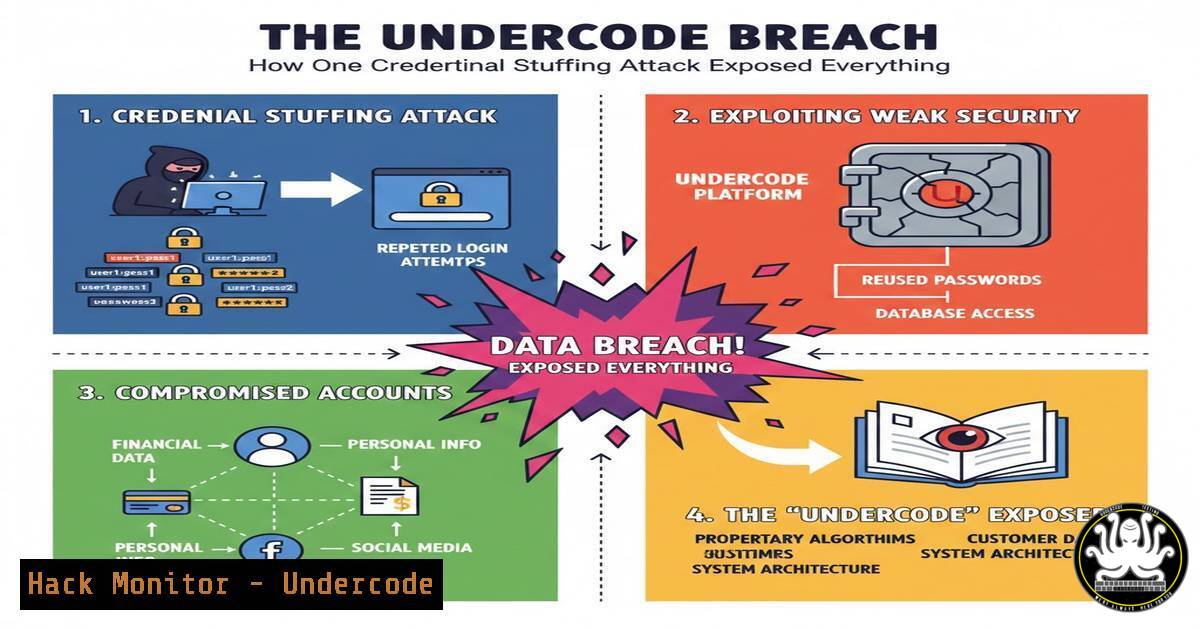
The recent security breach at Undercode serves as a stark reminder of the persistent threat posed by credential stuffing attacks. This incident, which compromised sensitive employee and project data, was not the result of a sophisticated zero-day exploit but rather the successful exploitation of reused passwords and insufficient access controls, highlighting critical vulnerabilities in modern identity and access management practices.
Learning Objectives:
- Understand the mechanics and critical failure points of a credential stuffing attack.
- Learn to implement robust multi-factor authentication (MFA) and monitor for credential exposure.
- Develop a proactive defense strategy using breach monitoring tools and principle of least privilege policies.
You Should Know:
1. The Anatomy of the Credential Stuffing Attack
The Undercode breach began not with a direct assault on its own servers, but with the compromise of employee credentials on a separate, unrelated platform. Attackers acquired a list of email and password pairs from a previous, unrelated data breach. They then used automated tools to test these same credentials against Undercode’s login portals, such as its VPN, email, or project management systems. Because a significant number of users had reused their passwords, the attackers gained a foothold with ease.
Step‑by‑step guide explaining what this does and how to use it.
Step 1: Acquire Credential Dumps. Attackers obtain lists of usernames/emails and passwords from pastebin sites, dark web forums, or previous breach databases.
Step 2: Automate Login Requests. Using tools like Hydra or custom scripts, attackers systematically test these credentials against the target’s login endpoint.
Example Hydra Command (for educational/authorized testing only):
`hydra -L user_list.txt -P password_list.txt target-website.com http-post-form “/login:username=^USER^&password=^PASS^:F=incorrect”`
Step 3: Identify Successful Logins. The tool reports which credential pairs returned a successful login session (e.g., a session cookie or a redirect to a dashboard).
- The Critical Failure: Lack of Multi-Factor Authentication (MFA)
The single most effective mitigation for credential stuffing is MFA. In the Undercode case, the absence of mandatory MFA on critical internal systems meant that a correct password was the only barrier to entry. MFA adds a layer of security by requiring a second (or more) verification factor—something you have (like a phone with an authenticator app) or something you are (like a fingerprint)—rendering a stolen password useless on its own.
Step‑by‑step guide explaining what this does and how to use it.
Step 1: Choose an MFA Solution. Options include Time-based One-Time Password (TOTP) apps (Google Authenticator, Microsoft Authenticator), hardware security keys (Yubikey), or SMS-based codes (less secure).
Step 2: Enforce MFA via Policy. Using platforms like Azure AD or Okta, administrators can create Conditional Access policies.
Example Azure AD Conditional Access Policy Logic:
1. Target: All users.
- Cloud Apps: Select all Microsoft and non-Microsoft cloud apps.
3. Conditions: All client apps, all locations.
4. Grant Access: Require multi-factor authentication.
Step 3: User Enrollment. Force users to enroll in MFA upon their next login, guiding them through the setup process for their chosen method.
3. Proactive Defense: Monitoring for Exposed Credentials
Organizations cannot prevent breaches on other sites, but they can know if their corporate credentials have been exposed. Services like Have I Been Pwned (HIBP) and similar commercial solutions allow companies to monitor for their domain’s email addresses in public data dumps.
Step‑by‑step guide explaining what this does and how to use it.
Step 1: Domain Registration. Register your corporate domain (e.g., @yourcompany.com) with HIBP’s domain search or a commercial threat intelligence platform.
Step 2: Receive Alerts. The service will alert your security team whenever a new data dump appears containing email addresses from your domain.
Step 3: Force Password Resets. Upon receiving an alert, immediately force a password reset for all affected accounts and investigate for any signs of compromise.
- Hardening Access Controls with the Principle of Least Privilege
Once inside, the attackers at Undercode were able to access a wide array of sensitive data. This indicates a failure in implementing the principle of least privilege (PoLP), where users and systems should have only the minimum levels of access necessary to perform their functions.
Step‑by‑step guide explaining what this does and how to use it.
Step 1: Audit Existing Permissions. Use built-in OS tools to review user and group permissions.
Linux Command Example: `getfacl /sensitive/project/directory`
Windows Command Example: `icacls “C:\Sensitive\Data”`
Step 2: Implement Role-Based Access Control (RBAC). Define roles (e.g., Developer, HR, Finance) and assign permissions to these roles, not individual users.
Step 3: Regularly Review and Re-certify Access. Conduct quarterly access reviews to ensure users do not accumulate unnecessary permissions over time.
5. Detection and Response: Hunting for Lateral Movement
After the initial breach, attackers typically move laterally to find valuable data. Security teams must have monitoring in place to detect this activity.
Step‑by‑step guide explaining what this does and how to use it.
Step 1: Enable Detailed Logging. Ensure all critical systems (servers, firewalls, Active Directory) are logging to a central SIEM (Security Information and Event Management) system.
Step 2: Create Detection Rules. Build alerts for suspicious behavior.
Example SIEM Query (Splunk-like) for multiple failed logins followed by a success:
`index=auth (action=failure) | stats count by user, src_ip | where count > 10 | join user [ search index=auth action=success | table user, src_ip ]`
Step 3: Isolate and Eradicate. If a compromised account is identified, immediately disable it, reset its password, and begin forensic analysis on the systems it accessed.
What Undercode Say:
- A Password Alone is No Longer a Secure Key. The era of relying solely on passwords for security is over. They must be considered a single, weak factor in a broader security strategy.
- Visibility is Non-Negotiable. You cannot defend against what you cannot see. Proactive monitoring for credential exposure and internal lateral movement is critical for modern defense.
The Undercode breach was not an anomaly but a predictable outcome of common security oversights. It underscores that while advanced threats exist, the vast majority of damaging incidents stem from the failure to implement foundational security controls. The focus must shift from purely perimeter-based defense to a identity-centric model, where verifying the user is as important as verifying their password. Investing in MFA, breach monitoring, and strict access controls provides a far greater return on investment for most organizations than chasing the latest advanced threat intelligence.
Prediction:
The success of low-sophistication, high-impact attacks like credential stuffing will continue to drive a rapid and widespread adoption of passwordless authentication technologies, such as FIDO2/WebAuthn standards. Within the next 3-5 years, the password will largely become a legacy fallback method, with biometrics and hardware security keys becoming the primary authentication factors. This shift will significantly raise the baseline cost and effort for attackers, forcing them to develop new techniques that target the biometric and hardware token supply chains or exploit implementation flaws in these new systems.
🎯Let’s Practice For Free:
IT/Security Reporter URL:
Reported By: Tolulopemichael In – Hackers Feeds
Extra Hub: Undercode MoN
Basic Verification: Pass ✅


