Listen to this Post
Introduction:
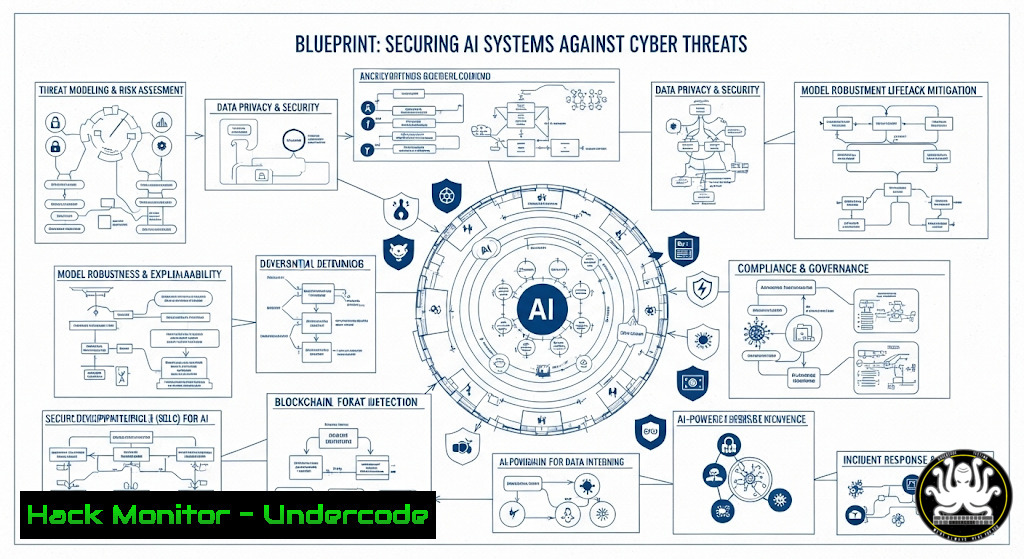
The rapid integration of Artificial Intelligence into business operations has opened a new frontier for cyber attackers. Securing these complex systems requires a multi-layered approach, combining traditional infrastructure hardening with AI-specific security protocols. This guide provides the actionable technical commands and configurations necessary to build a robust defense.
Learning Objectives:
- Understand the core security principles for protecting AI infrastructure and data pipelines.
- Implement practical command-level hardening for servers hosting AI models and training data.
- Learn to monitor and audit AI systems for malicious activity and data poisoning attempts.
You Should Know:
1. Securing the AI Model Repository Server
A primary target is the server housing your AI model code. An exposed Git server or insecure API can lead to model theft or poisoning.
` Linux – Update package lists and upgrade all packages`
`sudo apt-get update && sudo apt-get upgrade -y`
` Harden SSH access to prevent unauthorized entry`
`sudo sed -i ‘s/PermitRootLogin yes/PermitRootLogin no/’ /etc/ssh/sshd_config`
`sudo sed -i ‘s/PasswordAuthentication yes/PasswordAuthentication no/’ /etc/ssh/sshd_config`
`sudo systemctl restart sshd`
Step‑by‑step guide: Start by ensuring your underlying OS is patched. The first command updates your repository lists and upgrades all installed packages. Next, secure SSH by disabling root login and forcing key-based authentication, drastically reducing the risk of brute-force attacks. Always restart the SSH service to apply changes.
2. Container Security for AI Workloads
AI development and deployment heavily rely on containers like Docker. Insecure configurations can expose your entire environment.
` Scan a Docker image for vulnerabilities using Trivy`
`trivy image your-ai-model:latest`
` Run a container with security-enhanced options`
`docker run –rm -it –cap-drop=ALL –read-only –security-opt=no-new-privileges your-ai-model:latest`
Step‑by‑step guide: Before deployment, scan your AI application image for known CVEs using a tool like Trivy. When running the container, adopt a least-privilege model: drop all capabilities, run the container filesystem as read-only to prevent malicious writes, and disable new privilege escalations.
3. Monitoring Model API Endpoints for Abuse
The API serving your model predictions is a critical asset. You must detect and block anomalous inference requests that could indicate an attack.
` Use netstat to monitor active connections to your model’s API port (e.g., 5000)`
`netstat -tulnp | grep :5000`
` Check system logs for errors or spikes in traffic from a single IP`
`sudo tail -f /var/log/syslog | grep -i “5000”`
`sudo journalctl -u your-ai-service.service -f –since “5 minutes ago”`
Step‑by‑step guide: Continuously monitor who is connecting to your model’s port. `netstat` shows all active connections. Tailing system logs or journalctl for your specific AI service allows you to see requests in real-time, helping you identify DDoS attempts or scraping bots based on IP and request volume.
4. Windows Server Hardening for Data Processing
Many AI data pipelines run on Windows servers. Hardening them is crucial to protect training data.
` PowerShell – Enable Windows Defender Application Control (WDAC) for a strict allow-list policy`
`$PolicyPath = “C:\Windows\schemas\CodeIntegrity\ExamplePolicies\AllowMicrosoft.xml”`
`Set-RuleOption -FilePath $PolicyPath -Option 0 Enables UMCI`
`ConvertFrom-CIPolicy -XmlFilePath $PolicyPath -BinaryFilePath “C:\Windows\System32\CodeIntegrity\SiPolicy.p7b”`
` Audit successful and failed logon attempts`
`auditpol /set /subcategory:”Logon” /success:enable /failure:enable`
Step‑by‑step guide: WDAC restricts executable code to only authorized files, preventing many malware-based attacks. Use PowerShell to configure and deploy a base policy. Furthermore, enabling detailed logon auditing in the Windows security policy creates an audit trail for all access attempts to the server housing sensitive data.
5. Data Integrity Checks for Training Datasets
Data poisoning is a primary AI threat. Validating the integrity and source of your training data is a non-negotiable first step.
` Generate a SHA-256 checksum for a dataset file`
`sha256sum training_data.csv > training_data_checksum.txt`
` Verify the integrity of the dataset against the stored checksum later`
`sha256sum -c training_data_checksum.txt`
` Use GnuPG to sign and verify the dataset`
`gpg –output training_data.csv.sig –detach-sig training_data.csv`
`gpg –verify training_data.csv.sig training_data.csv`
Step‑by‑step guide: Before ingesting a dataset, generate a cryptographic hash. Any alteration to the file will change this hash, alerting you to potential tampering. For a stronger guarantee of origin, use GnuPG to create a detached signature file that can only be produced by a trusted private key.
6. Network Segmentation for AI Labs
Isolate your AI development and training environments from the corporate network to contain potential breaches.
` Linux iptables rule to isolate a network segment (e.g., 10.0.5.0/24)`
`sudo iptables -A FORWARD -s 10.0.5.0/24 -d 192.168.1.0/24 -j DROP`
`sudo iptables -A FORWARD -d 10.0.5.0/24 -s 192.168.1.0/24 -j DROP`
` Make the iptables rules persistent`
`sudo apt-get install iptables-persistent`
`sudo netfilter-persistent save`
Step‑by‑step guide: Use `iptables` to create rules that block traffic between your AI lab subnet (10.0.5.0/24) and your main corporate network (192.168.1.0/24). This prevents lateral movement. Installing `iptables-persistent` ensures these rules survive a reboot.
- Cloud API Security for AI Services (AWS S3 Example)
Misconfigured cloud storage is a leading cause of data leaks. Ensure your training data buckets are not publicly accessible.` AWS CLI – Check the S3 bucket policy and ACL for public access`
`aws s3api get-bucket-policy –bucket your-ai-data-bucket –output text`
`aws s3api get-bucket-acl –bucket your-ai-data-bucket`
` Correctly set a bucket policy to deny non-HTTPS and public access`
`aws s3api put-bucket-policy –bucket your-ai-data-bucket –policy file://secure-bucket-policy.json`
Step‑by‑step guide: Regularly audit your S3 bucket permissions. The `get-bucket-policy` and `get-bucket-acl` commands reveal access rules. A secure policy file should include conditions like `”aws:SecureTransport”: “false”` with a `”Deny”` effect and a principal of `””` to explicitly block all public access.
What Undercode Say:
- The Foundation is Everything. AI security is not a standalone discipline; it is built upon a foundation of classic, rigorous IT security hygiene. Hardening OSes, securing networks, and managing access are more critical than ever.
- Assume Your Data is a Target. The value of a proprietary AI model is immense. Threat actors will aim to poison your training data or exfiltrate the model itself. Integrity checks and strict access controls are your first and most important line of defense.
- analysis: The anecdote about turning a dorm into a Mario level is a metaphor for creative problem-solving, a key skill in cybersecurity. The real threat landscape is far more serious. Adversaries are applying that same creativity to exploit AI systems. The commands provided are not just a checklist; they are the building blocks of a security mindset. The future of AI adoption depends on trust, and that trust is earned through demonstrable security. Organizations that fail to implement these fundamental technical controls are building their AI future on a vulnerable house of cards, risking intellectual property theft, reputational damage, and operational sabotage.
Prediction:
The convergence of AI and cybersecurity will lead to an arms race where AI-powered offensive hacking tools will become commercially available, lowering the barrier to entry for sophisticated attacks. This will simultaneously force the mass adoption of AI-driven defensive security systems that can autonomously patch vulnerabilities, detect zero-day exploits in real-time, and conduct continuous red-team exercises. Organizations without these AI-augmented defenses will be at a severe disadvantage, unable to keep pace with the volume and complexity of automated threats.
🎯Let’s Practice For Free:
IT/Security Reporter URL:
Reported By: Jrebholz That – Hackers Feeds
Extra Hub: Undercode MoN
Basic Verification: Pass ✅


