
Listen to this Post
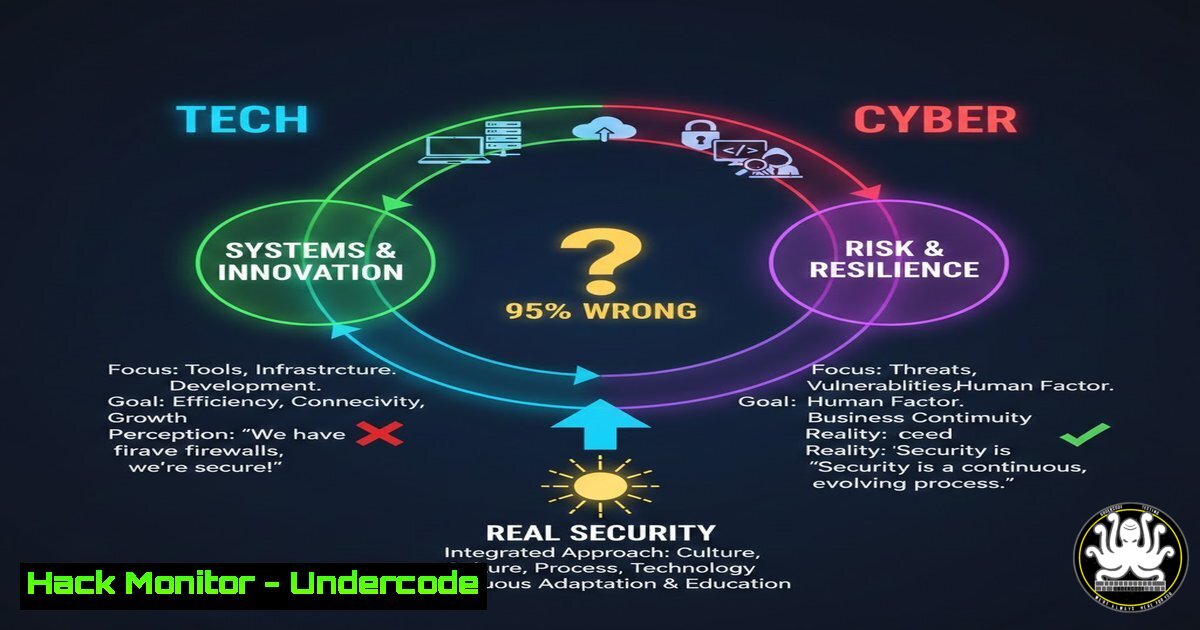
Introduction:
In the digital landscape, conflating “technology” and “cybersecurity” is a critical error that leads to vulnerable systems and ineffective defenses. While technology encompasses the tools and systems we build—servers, networks, and applications—cybersecurity is the dedicated practice of protecting those assets, data, and operations from malicious threats. Understanding this distinction is the foundational step toward moving from mere IT management to proactive cyber defense, a transition essential for mitigating risks in modern infrastructure.
Learning Objectives:
- Understand the operational dichotomy between implementing technology and engineering cybersecurity.
- Learn to apply practical, command-level controls that transform generic tech into a cyber-resilient environment.
- Build a actionable checklist for hardening systems, from endpoints to the cloud, based on core security principles.
You Should Know:
- From Tech Admin to Cyber Defender: The Mindset & Toolset Shift
The core difference lies in intent: a tech setup focuses on functionality and uptime, while a cyber setup prioritizes security and resilience by default. This shift requires re-evaluating every standard operation. For instance, creating a user account is not just about granting access; it’s about enforcing least privilege, logging activities, and preparing for audit.
Step-by-Step Guide:
What it does: Implements foundational security hygiene on a Linux system, moving it from a “working” state to a “hardened” state.
How to use it:
- Audit User Privileges: List all users with sudo/administrative access. This identifies privilege creep.
grep -Po '^sudo.+:\K.$' /etc/group
getent group sudo
- Enforce Strong Authentication: Disable password-based SSH logins for root and enforce key-based authentication, mitigating brute-force attacks.
Edit /etc/ssh/sshd_config
PermitRootLogin no
PasswordAuthentication no
PubkeyAuthentication yes
- Implement Automated Updates: Configure unattended security updates to ensure critical patches are applied without delay.
sudo apt install unattended-upgrades
sudo dpkg-reconfigure --priority=low unattended-upgrades
-
Network Segmentation: Building Walls in Your Digital City
A flat network where all devices talk to each other is a tech convenience but a cyber nightmare. Segmentation acts as internal firewalls, containing breaches and blocking lateral movement. Think of it as dividing a city into districts; a fire in one district doesn’t automatically burn down the entire city.
Step-by-Step Guide:
What it does: Uses firewall rules to create network segments, isolating critical servers (e.g., databases) from general workstations and web servers.
How to use it (Using Windows Defender Firewall with Advanced Security):
1. Identify Critical Assets: Define which servers (e.g., DB server IP: 10.0.1.10) hold sensitive data.
2. Create Restrictive Inbound Rules: On the critical server, create rules that only allow specific source IPs (like your application server) to connect on specific ports.
Open `wf.msc`.
Navigate to `Inbound Rules` > `New Rule`.
Choose `Custom` > `All programs`.
Protocol type: TCP, Specific remote port: `1433` (for MSSQL).
Scope: Under “Which remote IP addresses…”, add the IP of the only server that needs access.
Action: `Allow the connection`.
Apply to `Domain, Private, Public`.
- Create an Explicit “Deny All” Rule: After your allow rules, add a rule that blocks all other inbound connections to that port, ensuring no unintended access is permitted.
3. API Security: The Invisible Doors Hackers Love
APIs are the essential connective technology of modern apps, but they are often deployed without cyber scrutiny. An unsecured API is an unlocked door to your core data. Security must be designed in, not bolted on.
Step-by-Step Guide:
What it does: Implements three key security controls for a REST API: input validation, rate limiting, and proper authentication checks.
How to use it (Python/Flask example with simple checks):
from flask import Flask, request, jsonify
from flask_limiter import Limiter
from flask_limiter.util import get_remote_address
import re

app = Flask(<strong>name</strong>)
limiter = Limiter(get_remote_address, app=app, default_limits=["200 per day", "50 per hour"])

Simulated API Key Store
VALID_API_KEYS = {"abc123-secure-key", "def456-secure-key"}

def validate_api_key(req):
api_key = req.headers.get('X-API-Key')
return api_key in VALID_API_KEYS

@app.route('/api/v1/user/<user_input>', methods=['GET'])
@limiter.limit("10 per minute")  Rate limiting per endpoint
def get_user_data(user_input):
 1. Authentication Check
if not validate_api_key(request):
return jsonify({"error": "Unauthorized"}), 401

<ol>
<li>Input Validation & Sanitization
if not re.match("^[a-zA-Z0-9_]+$", user_input):  Alphanumeric+underscore only
return jsonify({"error": "Invalid input format"}), 400</p></li>
<li><p>(Simulated) Business Logic
... fetch data only if validation and auth pass ...
return jsonify({"data": "secure data here"})</p></li>
</ol>

<p>if <strong>name</strong> == '<strong>main</strong>':
app.run(debug=False)  Always set debug=False in production
4. Cloud Hardening: Shared Responsibility in Action
Cloud technology provides agility, but cyber responsibility is shared. The provider secures the cloud infrastructure, but you are responsible for security in the cloud—your data, configurations, and access controls. Misconfigurations are the primary attack vector.
Step-by-Step Guide:
What it does: Secures an AWS S3 bucket, a common source of catastrophic data leaks, by enforcing encryption, disabling public access, and enabling logging.
How to use it (AWS CLI commands):
- Enable Bucket Encryption: Ensure all data at rest is encrypted.
aws s3api put-bucket-encryption \ --bucket YOUR_BUCKET_NAME \ --server-side-encryption-configuration '{"Rules": [{"ApplyServerSideEncryptionByDefault": {"SSEAlgorithm": "AES256"}}]}' - Block ALL Public Access: Apply this immutable account-level setting as a baseline.
aws s3control put-public-access-block \
--account-id YOUR_ACCOUNT_ID \
--public-access-block-configuration BlockPublicAcls=true, IgnorePublicAcls=true, BlockPublicPolicy=true, RestrictPublicBuckets=true
- Enable Server Access Logging: Turn on auditing to track requests made to the bucket.
aws s3api put-bucket-logging \ --bucket YOUR_BUCKET_NAME \ --bucket-logging-status '{"LoggingEnabled": {"TargetBucket": "YOUR_LOGGING_BUCKET", "TargetPrefix": "s3-access-logs/"}}' -
Vulnerability Management: From Passive Scanning to Active Patching
Knowing a vulnerability exists in your technology (scanning) is IT. Systematically prioritizing and eliminating it before exploitation (patch management) is cybersecurity. This requires a continuous cycle, not a yearly audit.
Step-by-Step Guide:
What it does: Establishes a basic command-line workflow to identify and address vulnerable software packages on a Linux server.
How to use it:
- Scan for Vulnerabilities: Use the package manager to list updates, specifically security updates.
sudo apt update
sudo apt list --upgradable | grep -i security
- Assess & Prioritize: Review CVEs associated with the updates. Use resources like the National Vulnerability Database (NVD) to understand the Critical/High severity flaws that affect your systems.
- Apply Patches: Schedule and apply security updates. For critical servers, test in staging first.
For urgent, critical patches:
sudo unattended-upgrade --dry-run  Simulate first
sudo unattended-upgrade -v  Apply security updates only
- Verify: Reboot if required and verify the patched version is active.
apt-cache policy <package_name>
What Undercode Say:
- Cybersecurity is a Property, Not a Product: You cannot buy “cyber.” It is a property—like safety or reliability—that must be engineered into your technology stack through deliberate design, configuration, and process. The most expensive firewall is useless if misconfigured.
- The Adversary Defines Your Security Posture: Your security measures should not be based on what is convenient for operations, but on what a motivated attacker would do. This adversarial mindset forces the implementation of controls like segmentation, strict authentication, and logging, which are often skipped for the sake of simplicity.
The fundamental takeaway is that the “tech vs. cyber” gap is bridged by actionable, configured paranoia. Every task, from user onboarding to deploying a new cloud service, must be filtered through a security lens. The commands and configurations provided are not just steps; they are manifestations of a security-first philosophy. Failing to make this distinction leaves organizations with a false sense of security, running on technology that is functional but fundamentally fragile against targeted threats.
Prediction:
The convergence of AI-driven development (AI writing code, configuring systems) and AI-driven cyber attacks will dramatically widen the gap between mere technology and true cybersecurity. Organizations that treat “cyber” as an add-on will find their AI-generated code and auto-scaled infrastructure riddled with novel, exploitable weaknesses at machine speed. Conversely, those that bake adversarial security principles into their development and ops lifecycle—using AI to simulate attacks, auto-harden configurations, and interpret logs—will gain a decisive advantage. The future belongs to security-native engineering, where the cyber function is the integral core of all technology, not its anxious gatekeeper.
▶️ Related Video (72% Match):
🎯Let’s Practice For Free:
IT/Security Reporter URL:
Reported By: Whats The – Hackers Feeds
Extra Hub: Undercode MoN
Basic Verification: Pass ✅


