
Listen to this Post
Introduction:
A critical vulnerability in the ubiquitous WinRAR archiving software, designated CVE-2025-8088, is under active exploitation by sophisticated threat actors. This high-severity flaw allows attackers to bypass security restrictions and place malicious files into protected Windows system directories, including Startup folders, thereby establishing persistent access to compromised systems. The emergence of campaigns by groups like China-linked Amaranth Dragon underscores the urgent need for organizations to identify, understand, and remediate this vulnerability across their digital estates before it leads to widespread compromise.
Learning Objectives:
- Understand the technical mechanism and severe impact of the WinRAR CVE-2025-8088 vulnerability.
- Learn how to detect vulnerable WinRAR installations across Windows and Linux monitoring platforms.
- Master the step-by-step process for mitigating the vulnerability through patching and configuration hardening.
You Should Know:
- The Anatomy of the Exploit: Path Traversal to Persistence
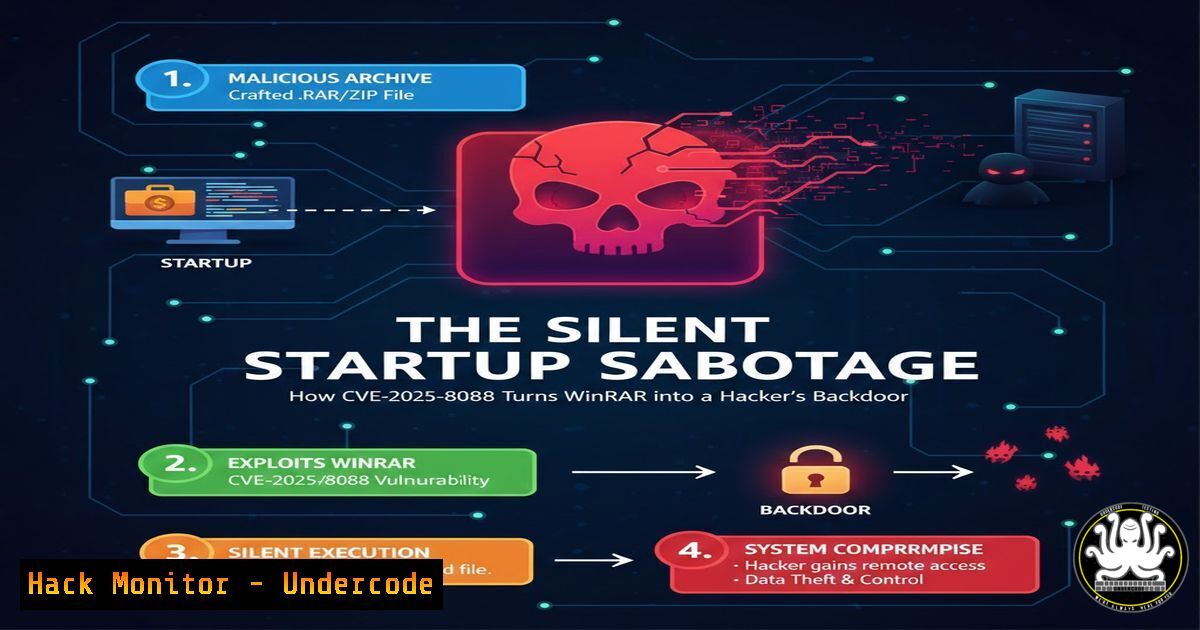
The core of CVE-2025-8088 is a path traversal vulnerability within WinRAR’s file extraction process. Normally, when extracting a ZIP archive, WinRAR should restrict files from being written to sensitive locations like `C:\Windows\System32\` orC:\Users\\AppData\Roaming\Microsoft\Windows\Start Menu\Programs\Startup\</code>. This vulnerability allows a specially crafted archive to bypass those checks.</li> </ol> Step‑by‑step guide explaining what this does and how to use it. Step 1: Crafting the Malicious Archive. An attacker creates a ZIP file where a contained file's name includes directory traversal sequences (e.g., `..\..\..\Windows\System32\evil.dll` or <code>..\..\..\..\Startup\backdoor.vbs</code>). Step 2: Social Engineering. The archive is delivered via phishing email, malicious advertisement, or disguised as legitimate software. Step 3: User Action. A victim using a vulnerable WinRAR version (before the fix) extracts the archive, often by simply double-clicking and selecting "Extract to..." or using the "Extract" button. Step 4: Exploitation. WinRAR, failing to sanitize the file path, writes the malicious file directly to the targeted sensitive directory. If written to a Startup folder, the malicious payload executes automatically the next time the user logs in, establishing persistence. <h2 style="color: yellow;">2. Detecting Vulnerable WinRAR Installations</h2> Before patching, you must inventory all affected systems. This requires checking WinRAR versions. Step‑by‑step guide explaining what this does and how to use it. <h2 style="color: yellow;"> On Windows (via Command Line):</h2> Use `wmic` or PowerShell to check the version of installed software. [bash] wmic product where "name like 'WinRAR%%'" get name, version
Or in PowerShell:
Get-ItemProperty HKLM:\Software\Microsoft\Windows\CurrentVersion\Uninstall\, HKLM:\Software\Wow6432Node\Microsoft\Windows\CurrentVersion\Uninstall\ | Where-Object {$_.DisplayName -like "WinRAR"} | Select-Object DisplayName, DisplayVersionAny version prior to the patched release (e.g., 7.10) is vulnerable. Script this command for network-wide discovery.
On Linux (Monitoring/Asset Management):
While WinRAR is a Windows tool, Linux-based asset management or EDR systems can perform remote checks. Use `ssh` or an agent to run a similar check on Windows hosts from a Linux jump box.
ssh user@windows-host 'reg query "HKEY_LOCAL_MACHINE\SOFTWARE\WinRAR" /v "Version" 2>nulp || echo "Not Found/Not Vulnerable"'
Parse the output to identify vulnerable version numbers.
3. Manual Mitigation and Immediate Hardening
If immediate patching isn't feasible, implement compensatory controls to reduce risk.
Step‑by‑step guide explaining what this does and how to use it.
Step 1: Disable Automatic Extraction to Default Paths. Instruct users to avoid using "Extract to" or drag-and-drop. Instead, mandate a two-step process: 1) Create a new, empty folder. 2) Extract the archive into that new folder. This contains any traversing file.
Step 2: Use Alternative Archivers. Temporarily deploy or recommend using built-in Windows extraction or 7-Zip (once confirmed it's not affected by a similar flaw) for ZIP files.
Step 3: File Integrity Monitoring (FIM). Deploy FIM rules on critical directories like Startup folders and `System32` to alert on unauthorized file creation.Example Sysmon Configuration (for Windows Event Log):
<Sysmon> <EventFiltering> <FileCreate onmatch="include"> <TargetFilename condition="contains">\Windows\System32\</TargetFilename> <TargetFilename condition="contains">\Start Menu\Programs\Startup\</TargetFilename> </FileCreate> </EventFiltering> </Sysmon>
4. Leveraging Qualys for Enterprise-Scale Detection & Patching
The original post highlights using Qualys for efficient management. Here’s how to operationalize it.
Step‑by‑step guide explaining what this does and how to use it.
Step 1: Identify the Patch. As mentioned, use the Qualys Patch Catalog query:patch.cveId:CVE-2025-8088. This returns the specific vendor patch for WinRAR.
Step 2: Assess Exposure with TruRisk Eliminate (TRE). Navigate to the TRE dashboard. The "Patch Status" column will show a count of assets missing this patch, providing immediate visibility into your risk exposure.
Step 3: Evaluate Patch Reliability. TRE's "Patch Reliability" score (e.g., High) indicates the safety of deploying the patch automatically. For a stable application like WinRAR, a high score allows for confident automation.
Step 4: Deploy Remediation. Create an on-demand patch job targeting all assets identified in Step 2. For ongoing management, schedule a recurring job through Patch Automation. Once enrolled, future WinRAR patches will be applied automatically based on your policy.5. Validating Remediation and Post-Patch Actions
Patching is not complete without verification.
Step‑by‑step guide explaining what this does and how to use it.
Step 1: Rescan Assets. In your vulnerability management platform (e.g., Qualys VMDR), run a new vulnerability scan against previously affected hosts, specifically checking for the presence of CVE-2025-8088.
Step 2: Verify Version. Re-run the detection commands from Section 2. Confirm the WinRAR version is now the patched release (e.g., 7.10 or later).(Get-ItemProperty -Path "HKLM:\SOFTWARE\WinRAR\CID" -Name "Version" -ErrorAction SilentlyContinue).Version
Step 3: Hunt for Indicators of Compromise (IOCs). Assume you were vulnerable for a period. Initiate a threat hunt for files created in Startup folders or `System32` around the time WinRAR was used. Look for anomalous scripts (
vbs,ps1,bat), executables, or DLLs in these locations.What Undercode Say:
- Patching Speed is Non-Negotiable: The exploitation by a named APT group transforms this from a theoretical vulnerability into a clear and present danger. The window between patch availability and weaponization is measured in days, not weeks.
- Automation is the Force Multiplier: Manual patch deployment for a tool as common as WinRAR is a losing battle. The true value of platforms like Qualys TRE is not just in finding the patch, but in enabling safe, automated deployment that permanently closes the response gap for this and future vulnerabilities in the same application.
Prediction:
CVE-2025-8088 represents a template for future software supply chain attacks. Its exploitation of a trusted, niche-but-essential tool like WinRAR will inspire threat actors to intensify scrutiny on other "non-critical" but ubiquitous utilities (PDF readers, media players, compression tools). We predict a rise in similar path traversal vulnerabilities being discovered and exploited in these types of applications. Furthermore, the success of embedding persistence via Startup folders will lead to more sophisticated fileless and living-off-the-land (LotL) techniques that leverage such initial access. Organizations that fail to implement robust, automated patch management for all software, not just operating systems and major applications, will find themselves persistently vulnerable to these low-cost, high-impact attack vectors. The future of enterprise defense hinges on treating every application with an internet-facing update mechanism as part of the critical attack surface.
▶️ Related Video (84% Match):
🎯Let’s Practice For Free:
IT/Security Reporter URL:
Reported By: Sanchi Patel - Hackers Feeds
Extra Hub: Undercode MoN
Basic Verification: Pass ✅🔐JOIN OUR CYBER WORLD [ CVE News • HackMonitor • UndercodeNews ]
📢 Follow UndercodeTesting & Stay Tuned:


