
Listen to this Post
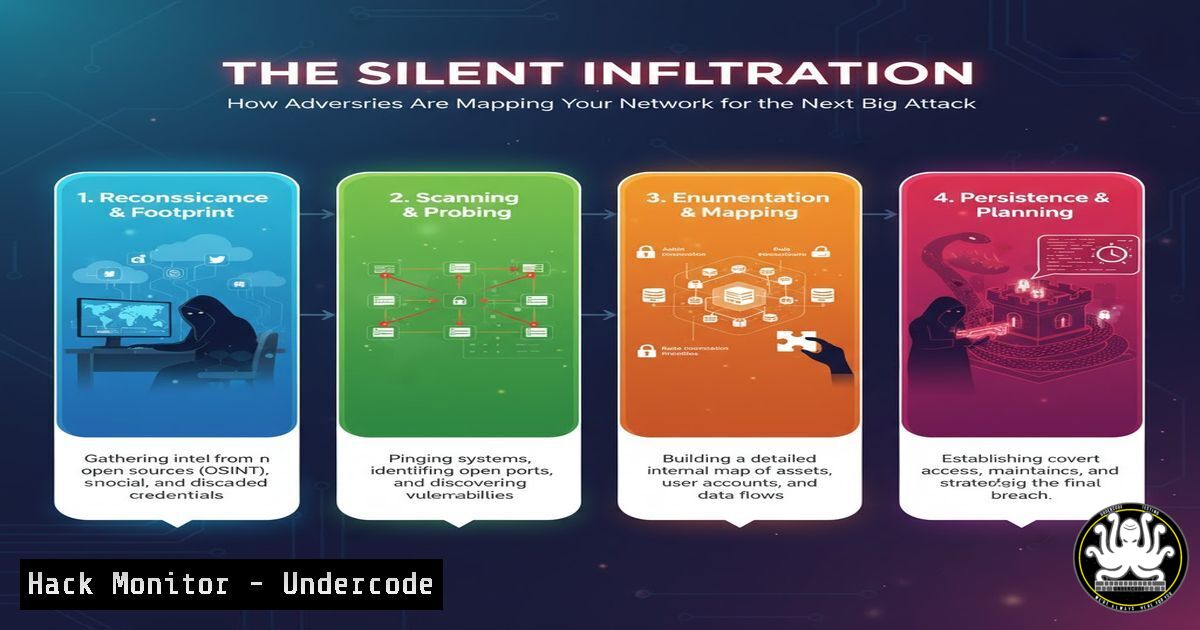
Introduction:
Network mapping, a fundamental IT administration task, has been weaponized by cyber adversaries. The very tools and techniques used to manage and secure infrastructure are now being deployed by threat actors to silently chart your digital terrain, identify critical assets, and plan targeted attacks with surgical precision.
Learning Objectives:
- Understand the dual-use nature of network mapping tools in both defense and offense.
- Master essential command-line techniques for proactive network discovery and hardening.
- Implement defensive configurations to detect and disrupt unauthorized reconnaissance.
You Should Know:
- The Adversary’s First Move: Host Discovery with Nmap
The Nmap (Network Mapper) tool is the industry standard for network discovery and security auditing. Attackers use it to find live hosts before launching targeted exploits.
 Basic Ping Sweep to Discover Live Hosts
nmap -sn 192.168.1.0/24

Stealthy SYN Scan on Specific Ports
nmap -sS -p 22,80,443,3389 192.168.1.100

Aggressive OS and Service Detection
nmap -A -O 192.168.1.100
Step-by-step guide:
The `-sn` flag performs a simple ping sweep, revealing which IP addresses are active. The `-sS` SYN scan is a default, semi-stealth method to check port states without completing a full TCP handshake. The `-A` flag enables OS detection, version detection, script scanning, and traceroute, giving a comprehensive view of the target. Defenders should run these same commands to identify what an attacker can see from both internal and external perspectives.
- Enumerating the Active Directory Attack Surface with PowerShell
In Windows environments, Active Directory is a prime target. Adversaries use built-in PowerShell modules to map the domain structure and identify high-value targets.
 Get Basic Domain Information
Get-ADDomain

Enumerate All Domain Users
Get-ADUser -Filter  | Select-Object Name, SamAccountName, Enabled

Find Domain Administrators
Get-ADGroupMember -Identity "Domain Admins" | Select-Object Name, SamAccountName

Discover Domain Computers
Get-ADComputer -Filter  | Select-Object Name, OperatingSystem
Step-by-step guide:
These PowerShell commands leverage the Active Directory module to extract critical information. `Get-ADDomain` provides the domain forest, name, and functional level. User and computer enumeration helps attackers build a target list, while identifying Domain Admins is a key step in privilege escalation. Defenders should regularly audit these queries to monitor for suspicious enumeration activity.
3. Uncovering Network Relationships with ARP
The Address Resolution Protocol (ARP) table reveals layer 2 connectivity, showing which devices are communicating directly on the local network segment.
 View the ARP Cache on Linux
arp -a

Or use the ip command
ip neighbor show

On Windows, display the ARP table
arp -a

Clear ARP cache (useful for testing)
sudo ip neighbor flush all
Step-by-step guide:
The ARP cache maps IP addresses to MAC addresses, revealing devices that have recently communicated with the host. Attackers can use this to identify network relationships and potential lateral movement paths. Monitoring for abnormal ARP traffic can help detect spoofing attacks and unauthorized device discovery.
4. Mapping Network Routes with Traceroute
Understanding the network path to critical systems helps attackers map network segmentation and identify potential choke points or network security devices.
 Basic traceroute on Linux/Windows
traceroute 10.1.1.100

Windows equivalent
tracert 10.1.1.100

Using mtr for continuous path analysis
mtr --report 10.1.1.100

TCP traceroute to bypass ICMP filters
tcptraceroute -p 443 10.1.1.100
Step-by-step guide:
Traceroute works by sending packets with increasing TTL values, causing each hop along the path to return an error. This reveals the network topology between the source and destination. The `mtr` tool provides a continuous, updated view of the path, while `tcptraceroute` uses TCP SYN packets to bypass firewalls that block traditional ICMP probes.
5. Service Discovery with Netcat and Telnet
Once hosts are identified, attackers probe for open services and banners to identify vulnerable software versions.
 Basic port connectivity test with netcat
nc -zv 192.168.1.100 22 80 443 3389

Banner grabbing with netcat
echo "" | nc -v 192.168.1.100 22

Telnet for service interaction
telnet 192.168.1.100 25

Multiple port scanning with netcat
nc -zv 192.168.1.100 20-443
Step-by-step guide:
Netcat (the “Swiss army knife” of networking) tests TCP/UDP connectivity. The `-z` flag sets zero-I/O mode for scanning, while `-v` enables verbose output. Banner grabbing can reveal service versions and help attackers identify known vulnerabilities. Telnet, while deprecated for remote access, remains useful for interacting with text-based services like SMTP, HTTP, and FTP.
6. DNS Enumeration for Network Intelligence
Domain Name System (DNS) records contain a wealth of information about network structure, services, and trusted relationships.
 Basic DNS lookup
nslookup example.com

Using dig for comprehensive DNS queries
dig example.com ANY

Zone transfer attempt (common reconnaissance technique)
dig @ns1.example.com example.com AXFR

Reverse DNS lookup for IP range
for ip in $(seq 1 254); do dig -x 192.168.1.$ip +short; done

Enumerating MX, NS, and other record types
dig example.com MX
dig example.com NS
dig example.com TXT
Step-by-step guide:
DNS enumeration is often the first step in external reconnaissance. The `ANY` query requests all record types, while zone transfer (AXFR) attempts can sometimes yield the entire DNS zone if misconfigured. Reverse DNS lookups can map IP ranges to hostnames, revealing naming conventions and server purposes. Defenders should monitor for unusual DNS query patterns and restrict zone transfers.
7. Network Service Interrogation with SNMP
Simple Network Management Protocol (SNMP), if poorly secured, can leak extensive network configuration and device information.
 SNMP walk with public community string
snmpwalk -v2c -c public 192.168.1.1

Specific OID queries for system info
snmpget -v2c -c public 192.168.1.1 1.3.6.1.2.1.1.1.0

Enumerating network interfaces
snmpwalk -v2c -c public 192.168.1.1 1.3.6.1.2.1.2.2.1.2

Checking SNMP version 3 (more secure)
snmpwalk -v3 -l authPriv -u user -a SHA -A authpass -x AES -X privpass 192.168.1.1
Step-by-step guide:
SNMP provides deep insight into network devices. The `snmpwalk` command traverses the MIB tree, potentially revealing system details, network interfaces, routing tables, and connected devices. Attackers often try default community strings like “public” and “private.” Version 3 provides encryption and should be used instead of the vulnerable v1 and v2c.
What Undercode Say:
- Network mapping is no longer just administrative—it’s the foundation of modern cyber attacks
- The same tools used for defense provide the attacker’s playbook
- Proactive reconnaissance using these techniques is essential for effective defense
The paradigm has shifted: network reconnaissance tools have become dual-use technologies that blur the line between administration and attack. Organizations that fail to regularly scan their own networks with these same tools are operating blind to their own attack surface. The commands detailed here represent both the attacker’s methodology and the defender’s essential checklist. Modern security requires assuming that adversaries are already mapping your environment, making continuous self-assessment through controlled reconnaissance not just advisable, but mandatory for resilience.
Prediction:
Within two years, AI-driven autonomous network mapping will enable attacks that can reconnoiter, adapt, and exploit enterprise networks within hours of initial compromise. Defensive strategies will shift from prevention to resilience, focusing on deception technologies and dynamic network reconfiguration to counter automated reconnaissance. The organizations that survive will be those that implement continuous attack surface monitoring and can outmaneuver automated mapping algorithms through adaptive defense.
🎯Let’s Practice For Free:
IT/Security Reporter URL:
Reported By: Varghesejm Networkmapping – Hackers Feeds
Extra Hub: Undercode MoN
Basic Verification: Pass ✅


