Listen to this Post
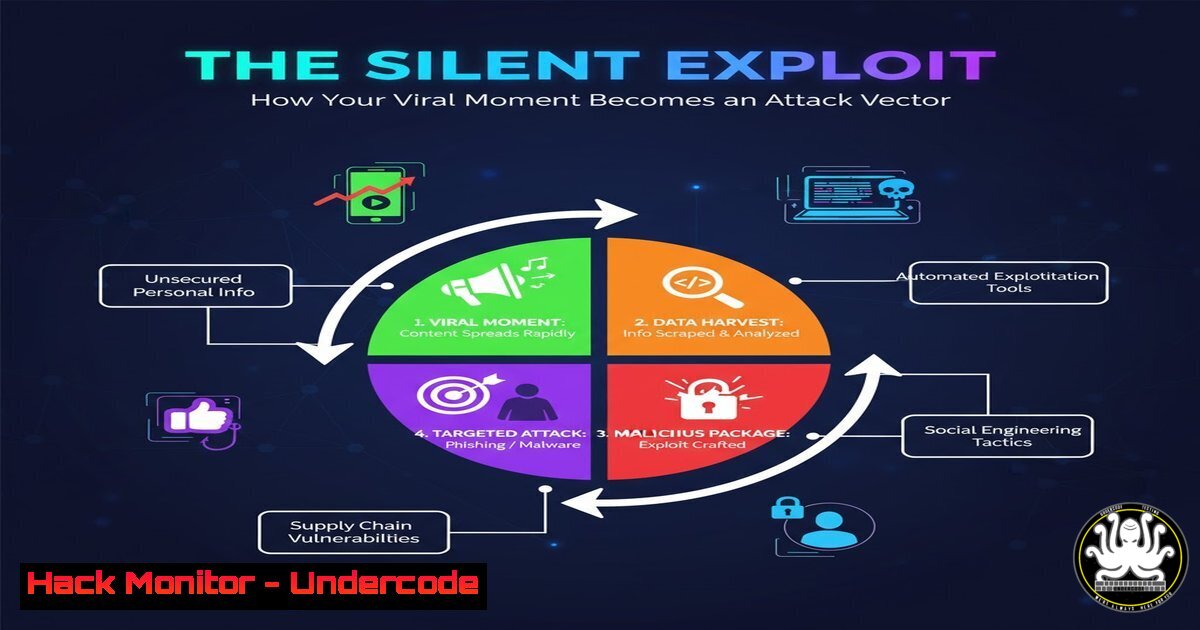
Introduction:
A surge in online visibility, whether from a viral reel or a successful product launch, inevitably expands your digital attack surface. This newfound attention attracts not only followers but also malicious actors who weaponize popularity through sophisticated social engineering and technical exploits. Understanding how to secure your digital presence is no longer optional but a critical component of modern professional life.
Learning Objectives:
- Identify and mitigate the reconnaissance techniques attackers use against high-visibility targets.
- Harden personal and organizational social media accounts against takeover and information leakage.
- Implement monitoring to detect targeted phishing and impersonation campaigns.
You Should Know:
1. Digital Footprint Reconnaissance: The Hacker’s First Step
When your online presence grows, attackers initiate systematic reconnaissance. They scrape publicly available data to build a profile for social engineering or targeted attacks.
Verified Commands & Techniques:
 Use theHarvester for OSINT to see what an attacker learns about you
theharvester -d "yourdomain.com" -l 500 -b google,linkedin
 Check for exposed GitHub secrets or credentials
trufflehog filesystem --directory=/path/to/git/repo
 Analyze social media connections for mapping
sherlock "username"
Step-by-step guide:
The `theHarvester` command collects emails, subdomains, and employee names from public sources. Specify your domain with `-d` and limit results with -l. Trufflehog scans Git history for accidentally committed API keys and passwords. Sherlock checks username consistency across hundreds of platforms, revealing your digital footprint. Run these tools against your own assets to understand what attackers can easily discover.
2. Multi-Factor Authentication Fortification
Basic SMS-based 2FA is vulnerable to SIM-swapping attacks. High-visibility accounts require stronger authentication mechanisms.
Verified Configurations:
 Generate TOTP QR code for authenticator apps
google-authenticator -t -f -d -W -Q
 Check for FIDO2/WebAuthn support on websites
 Navigate to: chrome://settings/security
Windows Command:
 Check Windows Hello for Business status (enterprise protection)
Get-WindowsHelloForBusinessPin | fl
Step-by-step guide:
The `google-authenticator` command generates a Time-based One-Time Password configuration. Flags `-t` enables TOTP, `-f` confirms overwrite, `-d` disables reuse, and `-W` prevents time-window disables. For maximum security, transition to FIDO2 security keys like YubiKey for phishing-resistant authentication, especially on critical social media and financial accounts.
3. Advanced Phishing Campaign Detection
High-profile individuals face sophisticated spear-phishing using personalized information gathered from public content.
Verified Commands & Analysis:
 Analyze email headers for spoofing indicators
python3 phishing_analyzer.py -f suspicious_email.eml
 Check DNS records for impersonation domains
dig MX target-domain.com
nslookup -type=MX target-domain.com
Windows PowerShell:
 Analyze email authentication headers
Get-AuthenticationHeader -MessagePath "C:\email.msg"
Step-by-step guide:
Phishing analysis begins with email header inspection. Look for mismatched “Return-Path” and “From” addresses, and verify SPF/DKIM/DMARC results. The DNS commands check mail exchanger records to identify legitimate infrastructure. For comprehensive protection, implement DMARC policy with `v=DMARC1; p=reject;` to prevent domain spoofing entirely.
4. Social Media Account Hardening
Platform security settings require regular auditing as privacy policies and features frequently change.
Verified Security Configurations:
 Automated privacy setting audit (conceptual framework)
python3 social_media_audit.py --platform linkedin --action check_privacy
 Monitor for unauthorized access attempts
grep "authentication failure" /var/log/auth.log
Step-by-step guide:
While platform-specific tools vary, the principle remains consistent: minimize publicly visible personal information, review third-party app permissions quarterly, and enable login notifications. For LinkedIn specifically, disable “Viewers of your profile also viewed” in privacy settings to obscure your professional network from reconnaissance.
5. API Security and Automation Protection
Content creation tools and automation scripts often rely on APIs that become attractive targets.
Verified Security Scripts:
 Secure API key rotation script
import os
from cryptography.fernet import Fernet

def rotate_api_key(old_key, service):
new_key = Fernet.generate_key()
 Implementation for specific API key update
return new_key
 Scan for exposed API keys in public repositories
git secrets --scan-history
Step-by-step guide:
API key management requires regular rotation and secure storage. The Python script demonstrates key rotation cryptography, while `git-secrets` prevents accidental credential exposure. Always store API keys as environment variables rather than hardcoded values, and implement IP whitelisting where supported by the platform.
6. Impersonation and Brand Abuse Monitoring
Attackers create fake profiles to exploit your audience’s trust, requiring proactive monitoring.
Verified Monitoring Commands:
 Set up Google Alerts for brand mentions
python3 google_alerts_monitor.py --query "Your Name" --frequency "daily"
 Reverse image search for stolen profile pictures
tesseract image.png stdout | grep -i "username"
Step-by-step guide:
Configure automated alerts for your name and brand terms using Google Alerts API or dedicated monitoring services. The reverse image search command uses OCR to detect unauthorized use of your profile pictures. Establish an official verification badge where possible and educate your audience about verified communication channels.
7. Incident Response Readiness
Even with perfect prevention, preparation for inevitable incidents separates professionals from amateurs.
Verified IR Commands:
 Create incident response documentation template
mkdir -p /opt/irp/ && cp ir_template.yaml /opt/irp/
 Secure communication channel setup for IR team
ssh -V [email protected]
Windows Incident Response:
 Capture system state for forensic analysis
Get-WinEvent -FilterHashtable @{LogName='Security'; ID=4624,4625} | Export-CSV login_attempts.csv
Step-by-step guide:
Establish an incident response plan before incidents occur. The commands demonstrate creating an IR directory structure and secure communication channels. The PowerShell command exports successful and failed login attempts for analysis. Document contact information for platform support, legal counsel, and your audience notification procedures in your IR plan.
What Undercode Say:
- Viral visibility exponentially increases attack surface, making security hygiene non-negotiable
- Human elements (social engineering) remain more effective than technical exploits against high-profile targets
- The content creator economy has created a new class of cyber targets requiring specialized protection strategies
The convergence of personal branding and digital security represents a paradigm shift in cybersecurity. As professionals build public-facing personas, they inadvertently create valuable assets worth attacking. The most successful security programs will integrate traditional technical controls with human-centric protections, acknowledging that the person behind the brand has become the primary attack vector. This requires rethinking security education to address the unique vulnerabilities of visibility.
Prediction:
Within two years, we’ll see the first coordinated attack campaign specifically targeting content creators and influencers, compromising not just individual accounts but the entire ecosystems they’ve built. This will spark the emergence of “visibility security” as a specialized cybersecurity discipline, with insurance products and enterprise-grade protection tools designed specifically for high-profile individuals rather than traditional organizations. The economic impact will force platforms to implement more sophisticated identity verification and anomaly detection systems.
🎯Let’s Practice For Free:
IT/Security Reporter URL:
Reported By: Riya Nair – Hackers Feeds
Extra Hub: Undercode MoN
Basic Verification: Pass ✅


