Listen to this Post
Introduction:
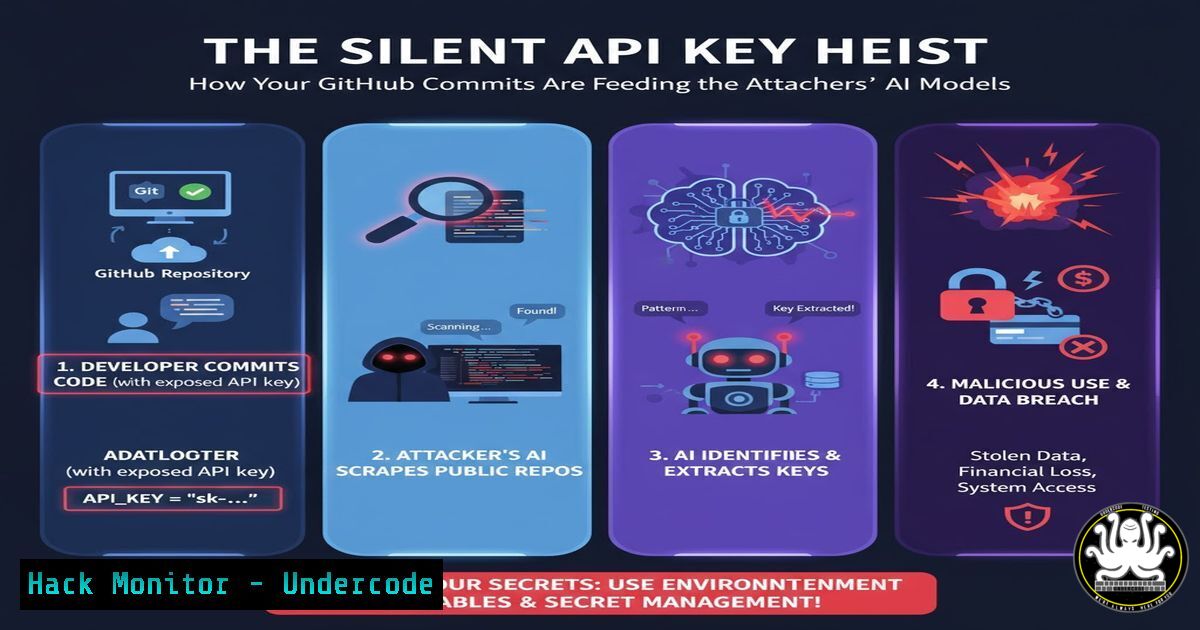
The very repositories meant to foster collaboration and innovation are becoming a prime target for automated attacks. Malicious actors are now employing sophisticated bots to systematically scrape public GitHub commits, hunting for exposed API keys and secrets, which are then used to fuel everything from cryptomining to training private AI models. This article deconstructs this automated threat and provides a critical mitigation blueprint.
Learning Objectives:
- Understand the mechanics of automated secret scanning and exfiltration from public code repositories.
- Learn to identify and remediate exposed credentials in your Git history.
- Implement pre-commit and pre-merge hooks to prevent secret leakage proactively.
You Should Know:
1. The Anatomy of a GitHub Scraping Bot
GitHub scraping bots operate on a simple yet devastatingly effective principle. They continuously monitor the public event stream of GitHub, specifically watching for push events. When a new commit is detected, these bots use the GitHub API to download the diff of that commit. They then run pattern-matching algorithms—using regular expressions—against the code changes to identify strings that resemble API keys, database connection strings, passwords, and other sensitive tokens.
Step-by-step guide explaining what this does and how to use it.
A typical regex pattern for an AWS Access Key ID might look like (A3T[A-Z0-9]|AKIA|AGPA|AIDA|AROA|AIPA|ANPA|ANVA|ASIA)[A-Z0-9]{16}. Once a potential key is found, the bot automatically validates it by making a low-privilege API call to the corresponding service (e.g., a `s3:ListBuckets` call for AWS). If the key is valid, it is logged into a database and sold on dark web marketplaces or used directly for resource hijacking.
- Finding and Eradicating Exposed Secrets in Your History
The moment you realize a secret has been committed, even in a previous commit, you must treat your repository as compromised. Simply removing it in a new commit is insufficient, as the secret remains in the Git history. The solution is to purge the secret from the entire history using tools like `git filter-branch` or BFG Repo-Cleaner.
Step-by-step guide explaining what this does and how to use it.
First, identify the specific file and commit where the secret was introduced. You can use `git log -p` to search through the history.
 Search for a specific string (e.g., 'AKIA') in your entire Git history
git log -p | grep -B 5 -A 5 'AKIA'
Once found, use the BFG Repo-Cleaner for a faster, simpler cleanup process than git filter-branch.
 Download BFG jar file, then run it to replace all instances of 'OLD_PASSWORD' with 'REMOVED'
java -jar bfg.jar --replace-text passwords.txt my-repo.git
The `passwords.txt` file contains the specific secrets you want to remove, one per line. After running BFG, you must force-push the cleaned history to GitHub. Warning: This rewrites history and will require all collaborators to re-clone the repository.
3. Hardening Your SDLC with Pre-commit Hooks
The most effective defense is to prevent secrets from ever entering the repository. This is achieved by integrating secret scanning into your local development workflow using pre-commit hooks. A powerful tool for this is TruffleHog, which scans commits for high-entropy strings, which are characteristic of secrets.
Step-by-step guide explaining what this does and how to use it.
First, install the pre-commit framework and TruffleHog.
pip install pre-commit
Create a `.pre-commit-config.yaml` file in your repository’s root directory.
repos:
- repo: https://github.com/trufflesecurity/truffleHog
rev: develop
hooks:
- id: trufflehog
args: ['--fail-on-issues', '--no-history']
Then, install the git hooks into your repository.
pre-commit install
Now, every time you attempt to make a commit, `truffleHog` will scan the diff. If it detects a potential secret, it will block the commit and output the finding, forcing the developer to remove the credential before proceeding.
4. Implementing Cloud-Specific Countermeasures
Beyond code, you must assume breach and limit the potential damage of a leaked credential. This involves adhering to the principle of least privilege in your cloud environments. Never use root account keys; instead, create Identity and Access Management (IAM) users and roles with minimal permissions.
Step-by-step guide explaining what this does and how to use it.
For an AWS IAM user, a policy for a development application might look like this, granting only the necessary S3 permissions and nothing more:
{
"Version": "2012-10-17",
"Statement": [
{
"Effect": "Allow",
"Action": [
"s3:GetObject",
"s3:PutObject"
],
"Resource": "arn:aws:s3:::my-specific-dev-bucket/"
}
]
}
Regularly rotate all API keys and credentials. Implement this programmatically. For example, using the AWS CLI to rotate keys for a specific IAM user:
 Create a new key
aws iam create-access-key --user-name MyUser

Update your application with the new key, then...
aws iam delete-access-key --user-name MyUser --access-key-id OLD_KEY_ID
5. Securing Your CI/CD Pipelines
Secrets are often passed into builds via environment variables. It’s critical to ensure these are not accidentally printed in CI/CD logs. Most CI systems offer secret masking features.
Step-by-step guide explaining what this does and how to use it.
In a GitHub Actions workflow, you would never hardcode a secret. Instead, you use encrypted secrets and references.
jobs:
build:
runs-on: ubuntu-latest
steps:
- name: Deploy to Server
run: |
ssh -i ${{ secrets.SSH_PRIVATE_KEY }} user@server 'deploy-command'
 The value of secrets.SSH_PRIVATE_KEY is masked in the log output.
In Jenkins, you would use the “Credentials Binding” plugin and the `withCredentials` block in your Pipeline script to securely inject secrets as environment variables without exposing them.
What Undercode Say:
- The automation of secret exfiltration has turned a simple developer mistake into a high-velocity threat. The attack lifecycle, from commit to exploitation, can now be measured in minutes.
- Proactive prevention is no longer optional. Relying on post-leak remediation is a losing strategy; the focus must shift left to the very moment a developer writes a commit message.
The paradigm has shifted from “if” a secret gets committed to “when.” The attackers’ tools are open-source, easily accessible, and ruthlessly efficient. This democratization of advanced threat capabilities means that even small projects with minimal infrastructure are viable targets. The integration of stolen cloud resources for training large AI models is a particularly alarming evolution, as it creates a direct financial incentive for these attacks, funding further malicious activity. Organizations must institutionalize the practices of secret management, treating credentials with the same level of care as they would their core application code. The defensive tools exist; their adoption is now the critical path to security.
Prediction:
The next 18-24 months will see an escalation from simple credential scraping to context-aware AI-powered bots. These systems will not only identify secrets but also understand the codebase they are embedded in, automatically crafting targeted exploitation payloads. They will assess the value of the compromised infrastructure, prioritize targets, and even initiate low-and-slow attacks designed to evade traditional anomaly detection. The rise of “Offensive AI” will turn these scraping operations from a nuisance into a pervasive, intelligent threat actor that continuously learns and adapts its techniques, making static defense systems obsolete.
🎯Let’s Practice For Free:
IT/Security Reporter URL:
Reported By: Hurkankalan M%C3%AAme – Hackers Feeds
Extra Hub: Undercode MoN
Basic Verification: Pass ✅


