Listen to this Post
Introduction:
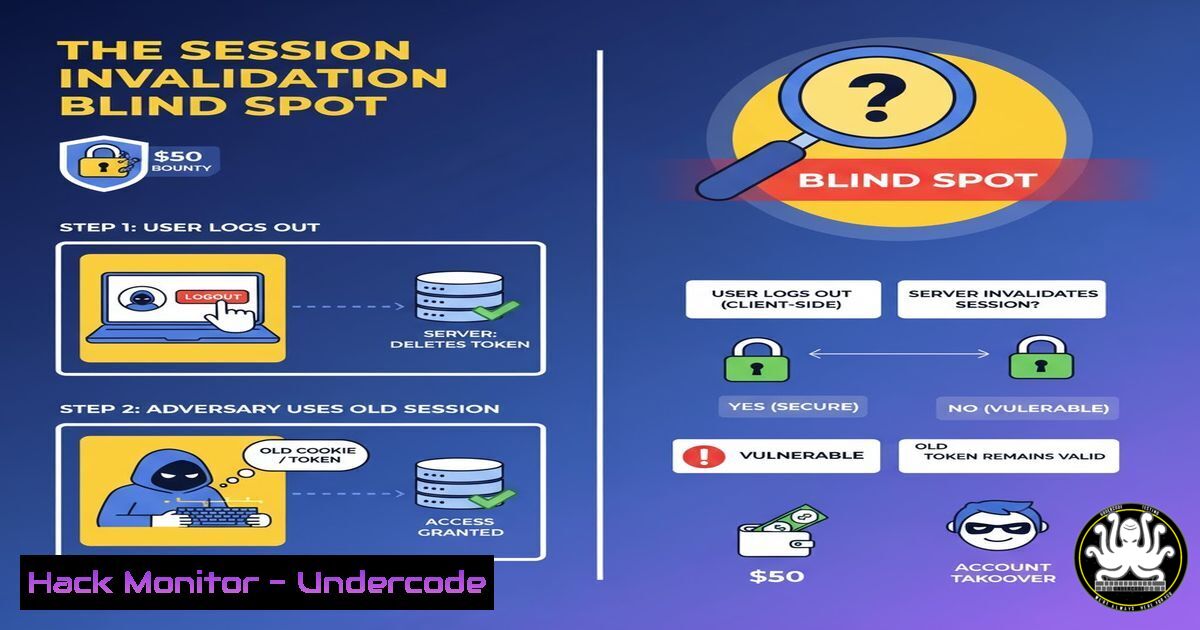
A recent bug bounty discovery, earning a researcher a $50 reward, highlights a pervasive and dangerous vulnerability in web application authentication. The flaw, improper session invalidation after a password change, allowed an active session to remain valid, permitting continued access and data modification even after the user’s password was updated. This incident underscores a critical gap in how many applications manage user state and security.
Learning Objectives:
- Understand the security risks associated with improper session management.
- Learn how to test for session invalidation flaws in web applications.
- Implement robust server-side session termination mechanisms.
You Should Know:
1. The Core Vulnerability: Session Persistence Post-Password-Change
The fundamental issue is a logic flaw in the application’s authentication workflow. When a user changes their password, it is a critical security event that should invalidate all other active sessions to prevent unauthorized access, especially from potentially compromised devices. The failure to do so creates a window of opportunity for an attacker who has hijacked a session.
2. Manual Testing with Browser Developer Tools
You can manually test for this vulnerability using your browser’s developer tools to monitor network activity and manipulate application state.
Verified Command/Tool: Browser Developer Tools (F12), specifically the Network and Console tabs.
Step-by-step guide:
1. Log into the target web application.
- Open Developer Tools (F12), go to the `Network` tab, and check “Preserve log”.
- In the `Application` or `Storage` tab, find and copy your session cookie value.
- In a separate tab or browser window, initiate a password change for your account. Complete the process.
- Return to the original tab with your old session. Try to perform a privileged action, such as updating your profile or accessing private data.
- If the action is successful, a session invalidation flaw exists. To confirm, you can also refresh the page. If you remain logged in, the session is still active.
3. Automated Testing with cURL
cURL is a powerful command-line tool for transferring data with URLs, perfect for scripting authentication tests.
Verified Commands:
 Step 1: Login and capture session cookie
LOGIN_RESPONSE=$(curl -i -s -X POST 'https://target.com/login' \
-H 'Content-Type: application/x-www-form-urlencoded' \
--data-raw 'username=test&password=test123' -c cookies.txt)
SESSION_COOKIE=$(grep 'session' cookies.txt | awk '{print $NF}')

Step 2: Perform a sensitive action with the captured session
curl -s 'https://target.com/api/private/data' -H "Cookie: session=$SESSION_COOKIE" -o private_data_before_change.html

Step 3: Change the password (using a different session/tool)
 ... Password change occurs ...

Step 4: Re-use the old session cookie to attempt the same sensitive action
curl -s 'https://target.com/api/private/data' -H "Cookie: session=$SESSION_COOKIE" -o private_data_after_change.html

Step 5: Compare the outputs. If they are identical, the session is still valid.
diff private_data_before_change.html private_data_after_change.html
Step-by-step guide:
This script automates the test. It first logs in and saves the session cookie. It then uses that cookie to access private data. After a password change (simulated externally), it reuses the same old cookie to try to access the data again. If the `diff` command shows no difference, the old session was not invalidated.
4. Server-Side Mitigation: Immediate Session Destruction
The correct mitigation must be enforced server-side. Upon a password change request, the backend must destroy all active sessions for that user ID, except potentially for the current, verified session making the request.
Verified Code Snippet (Node.js/Express Example):
app.post('/change-password', authMiddleware, async (req, res) => {
const userId = req.user.id;
const { newPassword } = req.body;

// 1. Hash the new password
const hashedPassword = await bcrypt.hash(newPassword, 12);

// 2. Update the user's password in the database
await User.updateOne({ _id: userId }, { password: hashedPassword });

// 3. CRITICAL: Destroy all sessions for this user
await Session.deleteMany({ userId: userId });

// 4. (Optional) Re-login the user by creating a new session
const newSession = await Session.create({ userId: userId });
res.cookie('sessionId', newSession._id, { httpOnly: true, secure: true });

res.status(200).json({ message: 'Password updated successfully.' });
});
Step-by-step guide:
This code demonstrates a secure flow. After updating the password in the database, it proactively deletes all session records associated with the user’s ID from the session store. This ensures that no other logged-in devices can maintain access. Optionally, it immediately creates a new session for the current request to keep the user logged in.
5. Leveraging Framework Security Features
Many web frameworks have built-in mechanisms to handle this. For instance, Django and Laravel have built-in session management that can be leveraged.
Verified Code Snippet (Laravel/PHP Example):
Laravel provides a built-in method to invalidate other sessions.
// In a controller method
public function updatePassword(Request $request)
{
$request->validate([
'new_password' => 'required|string|min:8|confirmed',
]);

// Update the password
Auth::user()->update(['password' => Hash::make($request->new_password)]);

// Logout other devices, invalidating their sessions.
Auth::logoutOtherDevices($request->new_password);

// Alternatively, to invalidate ALL sessions including the current one:
// DB::table('sessions')->where('user_id', Auth::id())->delete();

return redirect('/profile')->with('status', 'Password updated!');
}
Step-by-step guide:
This Laravel example uses Auth::logoutOtherDevices(), a secure, framework-provided method designed specifically for this purpose. It invalidates all other sessions for the user. The commented line shows a more aggressive approach of deleting all session records from the database.
6. Database-Level Enforcement with Triggers
For a defense-in-depth approach, you can use a database trigger to purge sessions whenever a password is updated.
Verified Command/Snippet (PostgreSQL Example):
CREATE OR REPLACE FUNCTION invalidate_sessions_on_password_change()
RETURNS TRIGGER AS $$
BEGIN
IF OLD.password_hash IS DISTINCT FROM NEW.password_hash THEN
DELETE FROM sessions WHERE user_id = NEW.id;
END IF;
RETURN NEW;
END;
$$ LANGUAGE plpgsql;

CREATE TRIGGER trigger_invalidate_sessions
AFTER UPDATE ON users
FOR EACH ROW
EXECUTE FUNCTION invalidate_sessions_on_password_change();
Step-by-step guide:
This PostgreSQL trigger automatically fires after an update on the `users` table. It compares the old and new `password_hash` values. If they are different, it proactively deletes all sessions for that user from the `sessions` table. This acts as a safety net even if the application logic fails.
- Advanced: Exploiting the Flaw with a Hijacked Session
An attacker who has stolen a session cookie (via XSS, a man-in-the-middle attack, or other means) can maintain persistent access to a victim’s account if this flaw exists, even after the victim has changed their password in an attempt to “kick the attacker out.”
Verified Command/Tool: Burp Suite Macro & Session Handling
- In Burp Suite, go to `Project options` >
Sessions. - Add a new session handling rule and define a scope (e.g., the target domain).
- In the “Rule Actions” section, add “Run a macro”.
- Create a macro that first logs into the attacker’s account to obtain a valid session.
- In the macro editor, right-click the login response and select “Define Cookie Jar”. Extract the session cookie from this response.
- Configure the macro to use this extracted cookie for all outbound requests within the scope.
Step-by-step guide:
This Burp Suite configuration simulates an attacker’s persistence. It automates the process of re-authenticating and applying a valid session cookie to all requests. In a real-world attack, the attacker would simply continue using the stolen session token, bypassing any password change the legitimate user performs, because the server never invalidated that token.
What Undercode Say:
- A $50 Bounty Masks a Multi-Million Dollar Risk. The modest reward for this finding is inversely proportional to the potential business impact. A single uninvalidated session in an admin account could lead to a full-scale data breach, reputational ruin, and regulatory fines.
- Logic Flaws are the New Frontier. As standard vulnerabilities like SQLi and XSS become harder to find due to framework protections, subtle logic flaws in authentication and state management are becoming the primary attack vector for sophisticated attackers. This bug is a classic example of a “works as designed but designed incorrectly” flaw.
The analysis reveals a systemic issue in software development: the conflation of “login state” with “security state.” Just because a session was once valid does not mean it should remain valid indefinitely, especially after a critical security event. This flaw is not a coding error in the traditional sense, but a fundamental failure in security design. It highlights the urgent need for developers to adopt threat modeling practices that specifically analyze the lifecycle of a user’s session and define explicit triggers for its termination. Relying on client-side actions (like a password change form triggering a logout) without server-side enforcement is a recipe for disaster.
Prediction:
This specific vulnerability will see a sharp rise in targeted exploitation over the next 12-24 months, particularly in automated credential-stuffing and account-takeover campaigns. As password managers and mandatory password rotations become more common, users are changing passwords more frequently. Attackers, aware of this, will shift from just stealing credentials to actively hunting for and hoarding active session tokens from applications known to have weak invalidation policies. We will see an emergence of botnets specifically designed to test for this flaw across the top 10,000 websites, selling “persistent access” as a service on dark web markets, regardless of password changes.
🎯Let’s Practice For Free:
IT/Security Reporter URL:
Reported By: Isha Sangpal – Hackers Feeds
Extra Hub: Undercode MoN
Basic Verification: Pass ✅


