
Listen to this Post
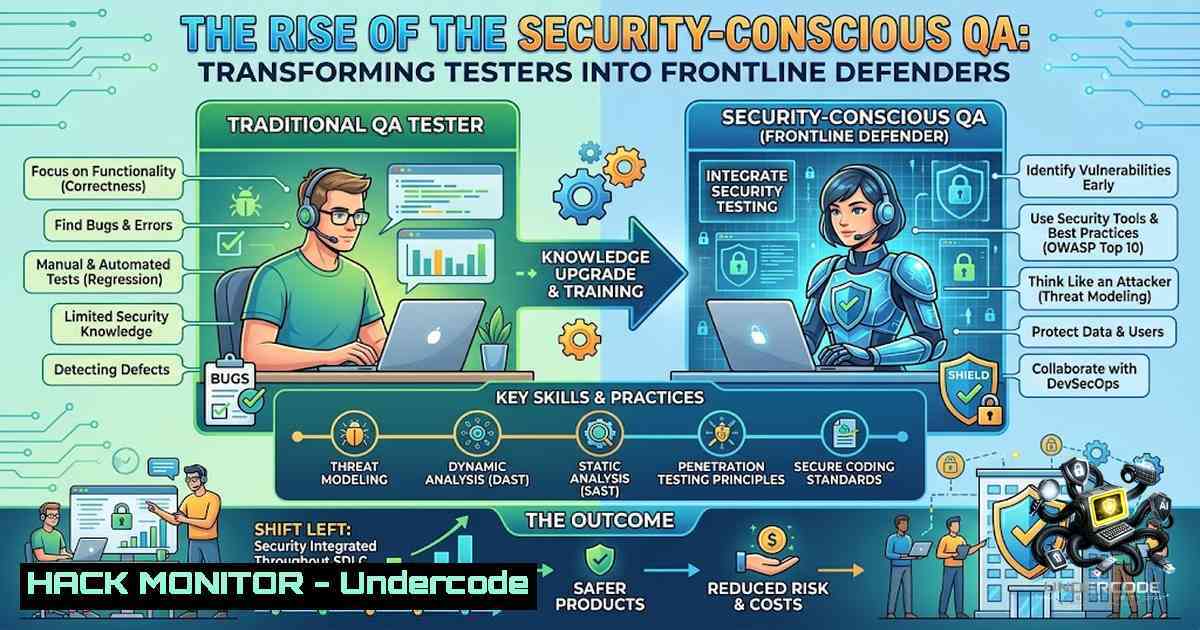
Introduction:
The traditional perimeter of software security is dissolving, shifting responsibility from specialized penetration testers to the broader development and quality assurance (QA) ecosystem. In this evolving landscape, a QA engineer’s role is transcending functional validation to encompass a critical security auditing function, identifying architectural flaws and input validation weaknesses long before production deployment. This proactive shift transforms quality gates into security checkpoints, embedding a defense-in-depth strategy directly into the continuous integration and continuous delivery (CI/CD) pipeline.
Learning Objectives & Secrets:
- Objective 1: Master Role-Based Access Control (RBAC) Exploitation Techniques. Beyond simply checking if a standard user can access an admin panel, testers must learn to manipulate API requests and HTTP parameters to identify horizontal and vertical privilege escalation vulnerabilities.
- Objective 1 Secret Tip: When testing RBAC, focus on the `PUT` and `DELETE` methods, not just
GET. An insecure API might allow `GET` read restrictions but permit `DELETE` requests on any resource ID if authorization is missing on the backend. - Objective 2: Weaponize Input Vectors for Injection Discovery. Standard input validation tests often fail to replicate real-world attacks. Use encoding and context-specific payloads to break sanitization logic.
- Objective 2 Secret Tip: Utilize polyglot payloads that function as both XSS and SQL injection to save testing time. For example, inputting `’ OR ‘1’=’1′; ` can simultaneously test for database and browser vulnerabilities in a single field.
- Objective 3: Decrypt the Lifecycle of Authorization Tokens. Ensure that tokens are not just expiring but are being invalidated on the server side. A token that expires client-side but remains valid in the session store is a severe security hole.
- Objective 3 Secret Tip: Perform “token replay” attacks. Log out of the application, capture the logout request, and attempt to use the old JWT on a protected endpoint using
curl. If the server returns a 200 OK, the logout mechanism is compromised.
You Should Know:
- Exploiting Insecure Direct Object References (IDOR) via Parameter Manipulation
Insecure Direct Object References (IDOR) remain one of the most frequent and critical vulnerabilities found in web applications. This occurs when an application uses user-supplied input to access objects directly, such as database records or files, without proper authorization checks. The classic example is changing a user ID in a URL from `user_id=1001` to `user_id=1002` to view another user’s profile. However, modern implementations often hide these references in JSON payloads or encoded headers.
Step‑by‑Step Guide for IDOR Testing:
- Intercept Traffic: Configure Burp Suite or OWASP ZAP to intercept requests between your browser and the application.
- Capture Baseline: Log in as a standard user and perform actions like viewing a profile or downloading a document. Record the API endpoint and request body.
- Parameter Identification: Look for hashed or numeric identifiers. If an identifier looks like a base64 encoded string, decode it to see if it contains a predictable integer.
- Manipulate and Replay: Use Burp Repeater or `curl` to modify the identifier. For instance, if the API call is
GET /api/v1/order/details?order_id=1234, change it toorder_id=1235. - Analyze Response: If the server returns data for order 1235, the application is vulnerable. This also applies to `POST` requests where the ID is in the JSON body.
Linux/Windows Commands:
- Linux (cURL):
Test for horizontal privilege escalation
curl -X GET "https://target.com/api/user/1002" -H "Authorization: Bearer $TOKEN"

Test for vertical privilege escalation (admin endpoints)
curl -X DELETE "https://target.com/api/admin/user/1001" -H "Authorization: Bearer $TOKEN"
- Windows (PowerShell):
Using Invoke-WebRequest to test IDOR
$headers = @{ Authorization = "Bearer $TOKEN" }
Invoke-WebRequest -Uri "https://target.com/api/user/1002" -Headers $headers -Method GET
2. Comprehensive Input Sanitization and XSS/SQL Injection Testing
Cross-Site Scripting (XSS) and SQL Injection (SQLi) are often tested with simple alerts, but a robust QA strategy requires testing reflected, stored, and DOM-based XSS. Furthermore, testing for blind SQL injection is critical. You don’t need to dump tables; simply injecting a time-based payload can reveal vulnerabilities. This involves injecting code that causes a specific sleep or delay in the database response, confirming a vulnerability without causing data loss.
Step‑by‑Step Guide for Advanced Injection Testing:
- Identify Entry Points: Map all input fields, including search bars, comment sections, and URL parameters. Also inspect hidden fields in HTML forms.
- Contextual Payloads: The payload must fit the context. For HTML context, use
<img src=x onerror=alert(1)>. For attribute context, use" onmouseover="alert(1)". - SQL Injection via Error Messages: Input `’` or `”` to break the SQL query. If a database error appears, you’ve found a likely SQLi vulnerability.
- Blind SQL with Time Delays: Inject `’ OR SLEEP(10)–` (MySQL) or `’ WAITFOR DELAY ‘0:0:10’–` (MSSQL). If the page takes 10 seconds to load, the injection is successful.
- Test for NoSQL Injection: In modern applications, input like `{ “$ne”: null }` or `{ “$gt”: “” }` in JSON bodies can manipulate MongoDB queries.
Commands and Tools:
- Linux: Use `sqlmap` for automated detection.
Basic SQLMap scan
sqlmap -u "https://target.com/page?id=1" --batch --dbs
- Windows: While `sqlmap` works on Windows via Python, use PowerShell for manual validation.
Test for time-based blind SQLi
$payload = "' OR SLEEP(10)--"
$url = "https://target.com/page?id=$payload"
Measure-Command { Invoke-WebRequest -Uri $url }
3. Advanced JWT Token Management and Validation
JSON Web Tokens (JWT) are widely used for authorization. QA testers should validate the entire lifecycle of the token. This includes checking the `iss` (issuer), `exp` (expiration), and `alg` (algorithm) claims. A critical vulnerability is the “none” algorithm attack, where an attacker sets the algorithm to `none` and removes the signature, causing the server to accept the token as valid. Additionally, check for token reuse, weak secret keys, and the absence of the `jti` (JWT ID) claim to prevent replay attacks.
Step‑by‑Step Guide for JWT Security Testing:
- Decode the JWT: Use `jwt.io` to paste the token and inspect the payload. Check the `exp` timestamp.
- Test Expiration: Wait until the token expires and attempt to make an authorized API call. The server must return a
401 Unauthorized. - Test Reuse: Logout from the application. Capture the token, wait a few minutes, and use `curl` to access a protected endpoint with that old token.
- Algorithm Confusion: Attempt to change the `alg` header to `none` and remove the signature. Base64 encode the modified header and payload, and send it to the server.
- Brute Force Secret: If the JWT uses `HS256` and the secret is weak, tools like `hashcat` can crack it.
Commands:
- Linux (JWTAnalyzer):
Check token integrity and expiration
python3 -m jwt.cli --decode --verify --secret $SECRET $TOKEN

Using curl to test token reuse
curl -X GET "https://target.com/api/secure" -H "Authorization: Bearer $TOKEN"
- Windows (PowerShell):
Decode JWT using PowerShell (manual base64 decode)
$token = "eyJhbGciOiJIUzI1NiIs..."; $payload = $token.Split('.')[bash]; [System.Text.Encoding]::UTF8.GetString([System.Convert]::FromBase64String($payload))
- API Security: Rate Limiting and Denial of Service Vectors
Beyond authentication, QA must test the resilience of the API. A lack of rate limiting allows brute force attacks against credentials and resource exhaustion (Denial of Service). This involves sending a high volume of requests to an endpoint to see if the application throttles or crashes. Furthermore, checking for “Mass Assignment” vulnerabilities—where the API accepts extra fields in a JSON payload not intended for public input—is crucial. For instance, adding `{“is_admin”: true}` to a user creation request might elevate privileges.
Step‑by‑Step Guide for Rate Limiting:
- Identify Sensitive Endpoints: Focus on login, OTP generation, and password reset endpoints.
- Automate Requests: Use Apache Bench (
ab) or `wrk` to simulate concurrent traffic. - Monitor Response Codes: A `429 Too Many Requests` indicates rate limiting is active. If all requests return
200 OK, it is vulnerable.
Commands:
- Linux (Apache Bench):
Simulate 1000 requests with 10 concurrent threads
ab -1 1000 -c 10 -p post_data.txt -T application/json https://target.com/api/login
- Windows (PowerShell loop):
Simple brute force simulation
for ($i=0; $i -lt 100; $i++) { Invoke-WebRequest -Uri "https://target.com/api/login" -Method POST -Body '{"user":"test"}' }
5. Hardening CI/CD Pipelines with Security Scans (SAST/DAST)
Integrating security into the CI/CD pipeline ensures vulnerabilities are caught before code merges. QA engineers should facilitate the integration of Static Application Security Testing (SAST) tools like SonarQube and Dynamic Application Security Testing (DAST) tools like OWASP ZAP. This shift-left approach automates the detection of hardcoded secrets, insecure dependencies, and SQL injection patterns.
Step‑by‑Step Guide for Pipeline Integration:
- SAST Configuration: Add a step in the `Jenkinsfile` or GitHub Actions workflow to run `trivy` or `semgrep` on the source code.
- DAST Automation: After deploying the application to a staging environment, trigger an OWASP ZAP full scan against the application’s API endpoints.
- Fail the Build: Configure the pipeline to fail if “High” or “Critical” severity vulnerabilities are detected, preventing deployment.
Commands & Configurations:
- GitHub Actions (YAML):
</li>
<li>name: Run Trivy vulnerability scanner
uses: aquasecurity/trivy-action@master
with:
scan-type: 'fs'
scan-ref: '.'
format: 'table'
exit-code: '1'
severity: 'CRITICAL,HIGH'
- Jenkinsfile (Groovy):
stage('Security Scan') {
steps {
sh 'zap-cli full-scan https://staging.app.com -j -o report.html'
}
}
What Undercode Say:
- Key Takeaway 1: Security is a mindset, not a toolset. Integrating security auditing into the QA cycle reduces the cost of fixing bugs by up to 100x compared to finding them in production, making QA a high-value strategic partner in development.
- Key Takeaway 2: Focusing on the “Edge Cases” of authorization and input validation—like IDOR and JWT reuse—prevents the most impactful breaches. Automation via CI/CD integration is the only scalable solution for modern high-velocity development teams, ensuring consistent coverage.
Prediction:
- +1: The evolution of QA into “Security Champions” will drive higher quality software, reducing the attack surface and building consumer trust in digital products.
- +1: The demand for QA engineers with security skills will skyrocket, with salaries increasingly mirroring those of junior penetration testers, effectively democratizing security knowledge.
- -1: The rapid adoption of AI-assisted coding tools may exacerbate vulnerabilities, as generated code often contains insecure patterns. This will increase the burden on QA to act as the final firewall.
- -1: Without proper security training, QA teams risk being overwhelmed by the sheer volume of false positives from automated SAST/DAST tools, leading to “alert fatigue” and missed critical issues. This necessitates advanced filtering and risk-based prioritization strategies within the pipeline.
▶️ Related Video (86% Match):
🎯Let’s Practice For Free:
🎓 Live Courses & Certifications:
Join Undercode Academy for Verified Certifications
🚀 Request a Custom Project:
Secure, high-velocity infrastructure and disruptive technological engineering. Contact our engineering team for high-tier development and proprietary systems:
[email protected]
💎 Smart Architecture | 🛡️ Secure by Design | ⭐ Trusted by Thousands
IT/Security Reporter URL:
Reported By: https://lnkd.in/p/eePSSMzU – Hackers Feeds
Extra Hub: Undercode MoN
Basic Verification: Pass ✅


