Listen to this Post
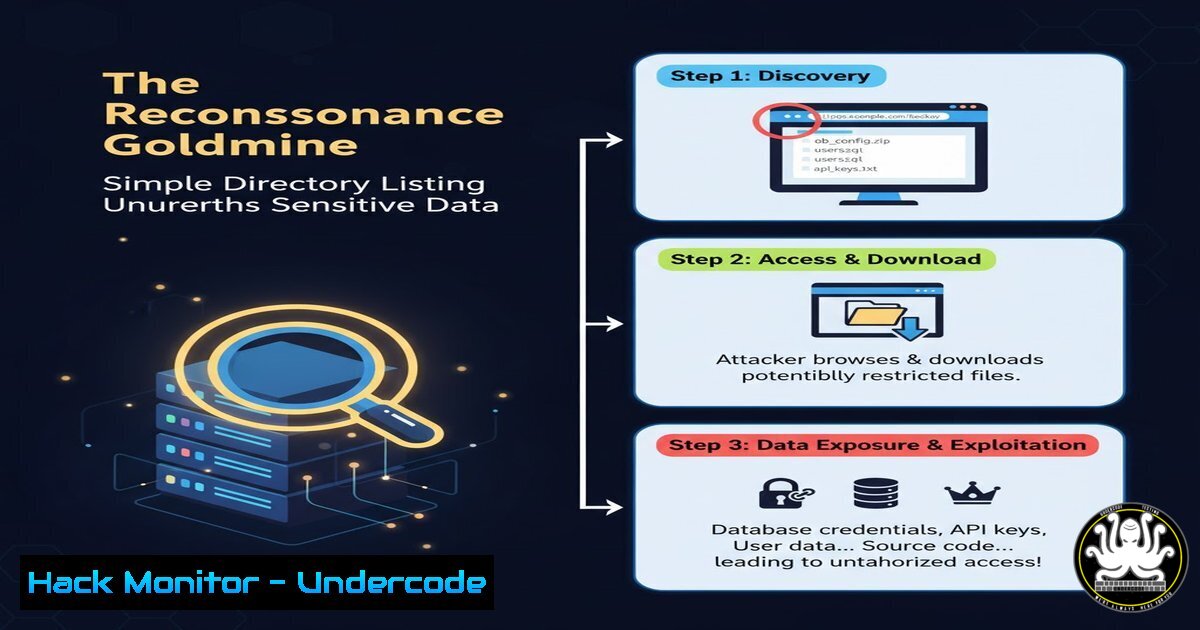
Introduction:
A seemingly minor server misconfiguration—enabled directory listing—recently resulted in a high-severity (CVSS 8.2) information disclosure flaw. This vulnerability acts as a direct gateway for attackers, transforming a standard web directory into a publicly accessible file index, exposing configuration files, backups, and other sensitive data that fuels targeted cyber attacks. Understanding how to identify, exploit, and, most critically, mitigate this common flaw is a fundamental skill for both offensive security professionals and defensive system administrators.
Learning Objectives:
- Understand the mechanisms and risks associated with directory listing vulnerabilities.
- Master manual and automated techniques for discovering these misconfigurations.
- Implement definitive hardening measures across major web servers to disable directory listing.
You Should Know:
1. Manual Discovery: The Art of Forced Browsing
The most straightforward method to check for directory listing is manual “forced browsing.” This involves appending common directory names to a target URL to see if the server returns a file index instead of a standard 403 Forbidden or 404 Not Found error.
 Example in a Linux terminal using curl
curl -I http://target.com/uploads/

Common directories to test:
/uploads
/images
/assets
/js
/css
/backup
/admin
/logs
/config
Step-by-step guide explaining what this does and how to use it:
1. Identify a Potential Path: Start with a known path on the target application, like http://target.com/images/`.curl`.
2. Access the URL: Navigate to this URL in your web browser or use a command-line tool like
3. Analyze the Response: If you see a raw HTML page listing files and folders (e.g., “Index of /uploads”), directory listing is enabled. A proper web application would either show a custom page or an access-denied error.
2. Automated Reconnaissance with Dirb and Gobuster
While manual checks are useful, automated tools are essential for comprehensive testing. Tools like `dirb` and `gobuster` use extensive wordlists to brute-force discover directories and files, automatically flagging those with enabled listing.
 Using Gobuster with a common wordlist
gobuster dir -u http://target.com/ -w /usr/share/wordlists/dirb/common.txt

Using Dirb
dirb http://target.com/
Step-by-step guide explaining what this does and how to use it:
1. Install the Tool: Ensure `gobuster` or `dirb` is installed on your Kali Linux or penetration testing machine (sudo apt install gobuster dirb).
2. Run the Scan: Execute the command, specifying the target URL (-u) and a wordlist (-w). The tool will systematically request each directory in the list.
3. Review Output: The tool’s output will clearly indicate which paths return an “Index of” page, confirming the vulnerability. This is far more efficient than manual testing.
3. Hardening Apache: Disabling Directory Listing
In the Apache HTTP Server, directory listing is controlled by the `Indexes` option within the `Options` directive. The presence of `Indexes` enables listing.
 To DISABLE directory listing in an Apache Virtual Host or .htaccess file
 Locate your Apache config (e.g., /etc/apache2/sites-available/000-default.conf on Debian/Ubuntu)
 Edit the configuration for the specific <Directory> block.

<Directory "/var/www/html">
Options -Indexes +FollowSymLinks
AllowOverride None
Require all granted
</Directory>

After editing, test the configuration and restart Apache
sudo apache2ctl configtest
sudo systemctl restart apache2
Step-by-step guide explaining what this does and how to use it:
1. Locate Configuration File: Find the main Apache configuration file or the specific Virtual Host file for your website.
2. Edit the Directory Block: Within the `
3. Remove ‘Indexes’: Ensure the `Indexes` option is removed or prefixed with a minus sign (-Indexes). The `-` explicitly disables it.
4. Restart Service: Save the file, test the configuration for syntax errors, and restart the Apache service for changes to take effect.
4. Securing Nginx: Preventing Autoindexing
Nginx uses the `autoindex` directive to control directory listing. Unlike Apache, it is typically disabled by default but must be explicitly checked.
 To ensure directory listing is DISABLED in Nginx
 Edit your Nginx server block configuration (e.g., /etc/nginx/sites-available/default)

server {
listen 80;
server_name target.com;

location / {
 ... other directives ...
}

Explicitly disable autoindex for a specific directory or globally
location /uploads/ {
autoindex off;
}
}

Check configuration and reload Nginx
sudo nginx -t
sudo systemctl reload nginx
Step-by-step guide explaining what this does and how to use it:
1. Open Nginx Config: Access your Nginx server block configuration file.
2. Check for ‘autoindex’: Search for any `autoindex on;` directives. These are often found within `location` blocks for specific paths.
3. Set to ‘off’: Ensure all `autoindex` directives are set to off. You can add `autoindex off;` to sensitive location blocks for explicit hardening.
4. Reload Service: Test the configuration and reload Nginx to apply the changes without downtime.
5. Microsoft IIS Mitigation: Hiding Directory Contents
On Windows Server running Internet Information Services (IIS), directory browsing is a feature that can be enabled or disabled via the IIS Manager GUI or configuration.
 PowerShell command to disable Directory Browsing on a specific site
 Run this in an elevated PowerShell session

Import-Module WebAdministration
Set-WebConfigurationProperty -Filter "/system.webServer/directoryBrowse" -Location "IIS_Site_Name" -Name "enabled" -Value "False"
Step-by-step guide explaining what this does and how to use it:
1. Open IIS Manager: Navigate to your server and site in the IIS Manager.
2. Select Feature: Double-click the “Directory Browsing” feature.
- Disable Feature: In the “Actions” pane on the right, click “Disable”.
- Alternative (PowerShell): For automation or remote management, use the provided PowerShell command. Replace `”IIS_Site_Name”` with the actual name of your site. This script directly modifies the configuration to set the `enabled` property to
False.
6. Post-Mitigation Validation: Ensuring the Fix is Effective
After implementing hardening measures, it is critical to re-scan the application to verify the vulnerability is closed. The same tools used for discovery should now return access denied errors.
 Re-run your Gobuster scan to validate
gobuster dir -u http://target.com/uploads/ -w /usr/share/wordlists/dirb/common.txt

Expected output for a successfully patched directory:
 /uploads/.hta (Status: 403)
 /uploads/.htaccess (Status: 403)
 /uploads/.htpasswd (Status: 403)
 ... all returning 403 Forbidden, not 200 OK.
Step-by-step guide explaining what this does and how to use it:
1. Re-execute Scans: Use the same automated command you used to discover the vulnerability initially.
2. Analyze HTTP Status Codes: A successful patch will result in the previously exposed directory now returning `403 Forbidden` (or 404 Not Found) status codes for all requests, instead of `200 OK` with a file listing.
3. Manual Verification: Manually navigate to the URL in a browser. You should no longer see the file index.
7. Beyond the Basics: Scripting for Continuous Monitoring
For organizations with multiple web assets, continuous monitoring is key. A simple Bash script can be scheduled to regularly check critical endpoints for accidental re-enablement of directory listing.
!/bin/bash
 monitor_directories.sh
 A simple script to check for enabled directory listing

TARGETS=("http://target1.com/uploads/" "http://target2.com/backups/" "http://target3.com/assets/")
WORDLIST="/usr/share/wordlists/dirb/common.txt"

for target in "${TARGETS[@]}"; do
echo "Scanning $target"
if gobuster dir -u "$target" -w "$WORDLIST" -q | grep -q "Status: 200"; then
echo "ALERT: Directory Listing might be enabled on $target" | mail -s "Security Alert" [email protected]
fi
done
Step-by-step guide explaining what this does and how to use it:
1. Create the Script: Save the code above into a file, e.g., monitor_directories.sh.
2. Make it Executable: Run `chmod +x monitor_directories.sh`.
- Customize Variables: Edit the `TARGETS` array to include your own sensitive URLs and ensure the path to your wordlist is correct.
- Schedule with Cron: Add the script to your crontab (
crontab -e) to run daily or weekly (e.g.,0 2 /path/to/monitor_directories.sh). This provides proactive alerting if a misconfiguration is introduced.
What Undercode Say:
- A Low-Hanging Fruit with High-Value Payloads: Directory listing is a classic, easily identifiable misconfiguration, but its impact is consistently severe. It provides a low-effort reconnaissance phase for attackers, directly leading to more sophisticated breaches.
- DevSecOps is Non-Negotiable: This vulnerability is a hallmark of a missing “Sec” in DevOps. Hardening checks for server configurations like `-Indexes` and `autoindex off` must be embedded into infrastructure-as-code templates and deployment pipelines to prevent human error from reaching production.
The case of the €150 bounty is a microcosm of a widespread systemic issue. While the financial reward was modest, the exposed data’s potential value to a threat actor was immense, easily justifying a CVSS 8.2 rating. This flaw is not a complex code vulnerability but an operational failure, emphasizing that security is as much about configuration as it is about coding. The persistence of such issues underscores a critical gap in baseline security hygiene and automated compliance checks within many organizations’ development lifecycles.
Prediction:
The fundamental risk of directory listing will remain constant, but its exploitation will become more automated and integrated into the initial access phase of attacks. We predict a rise in AI-powered reconnaissance bots that systematically scan for this and other simple misconfigurations at an internet-scale, cataloging vulnerable endpoints for sale on dark web markets or for immediate, automated data exfiltration. As cloud storage (S3 buckets, Azure Blobs) continues to be misconfigured for public “listing” access, this classic web server flaw will seamlessly transition into the cloud domain, causing continued data leaks unless proactive, automated hardening becomes the universal standard.
🎯Let’s Practice For Free:
IT/Security Reporter URL:
Reported By: Aravind – Hackers Feeds
Extra Hub: Undercode MoN
Basic Verification: Pass ✅


