Listen to this Post
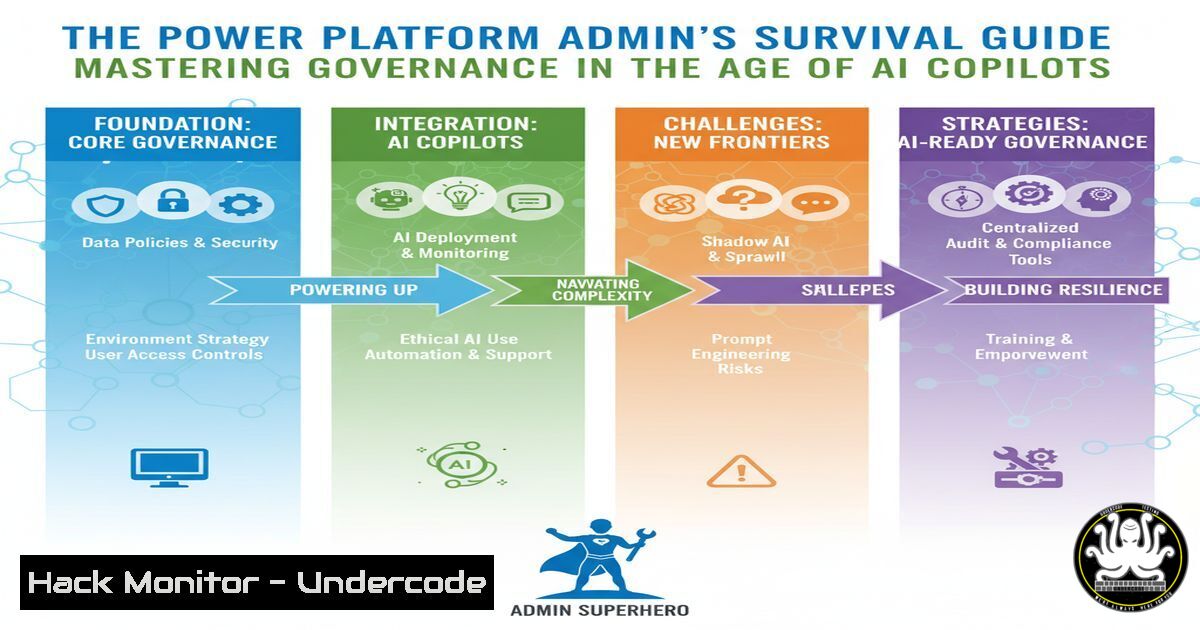
Introduction:
The rapid adoption of Microsoft’s Power Platform and its infusion of AI through Copilot Studio have democratized development, but they have also created a formidable governance challenge for IT administrators. Without stringent oversight, low-code environments can quickly spiral into a landscape of “shadow IT,” leading to data exposure, compliance failures, and unmanaged AI agents. This guide provides the critical commands and procedures necessary to enforce robust governance, ensuring innovation does not come at the cost of security.
Learning Objectives:
- Implement and enforce data loss prevention (DLP) policies across Power Platform environments.
- Proactively inventory, review, and manage AI Copilot agents to mitigate risk.
- Utilize PowerShell and admin centers for automated governance and reporting.
You Should Know:
1. Establishing Core Data Loss Prevention (DLP) Policies
A DLP policy is your first line of defense, controlling how connectors can interact with each other and preventing the exfiltration of sensitive data.
Step‑by‑step guide:
- Navigate to the Power Platform Admin Center (PPAC) > Policies > Data policies.
2. Click + New policy.
- Define policy scope (e.g., “All environments” or specific environment groups).
- In the Connectors section, you will categorize connectors into three groups:
Business Data Only: Approved internal connectors like SharePoint Online and SQL Server.
Non-Business Data Only: Blocked external connectors like personal Gmail or Twitter.
Blocked: Connectors that are explicitly forbidden.
- Configure rules to prevent business and non-business connectors from being used together in the same app or flow. This stops a flow from, for instance, taking data from SharePoint and emailing it via a personal Gmail account.
- Review and save the policy. It can take a few hours to propagate across your tenant.
2. PowerShell-Driven Environment Management
While the PPAC GUI is useful, automation and bulk operations require the Power Platform PowerShell module.
Step‑by‑step guide:
1. Install and Authenticate:
 Install the Power Platform module
Install-Module -Name Microsoft.PowerApps.Administration.PowerShell -Force
Install-Module -Name Microsoft.PowerApps.PowerShell -Force

Authenticate with your admin account
Add-PowerAppsAccount -Endpoint "prod" -Verbose
2. Get a List of All Environments:
 Retrieve all environments and export to CSV
Get-AdminPowerAppEnvironment | Select-Object EnvironmentName, DisplayName, Location, CreatedTime, EnvironmentSku | Export-Csv -Path "C:\temp\AllEnvironments.csv" -NoTypeInformation
3. Create a New Environment with a Dataverse Database:
 Create a new production environment
New-AdminPowerAppEnvironment -DisplayName "HR-Production" -Location "United States" -EnvironmentSku "Production" -ProvisionDatabase
4. Set Environment Permissions:
 Add a user as an Environment Admin
Add-AdminPowerAppEnvironmentRole -EnvironmentName "12345678-1234-1234-1234-123456789012" -RoleName "EnvironmentAdmin" -PrincipalType User -PrincipalObjectId "98765432-9876-9876-9876-987654321098"
3. Agent Inventory and Review for AI Governance
The Agent Inventory tool within Copilot Studio is critical for understanding and controlling your AI footprint.
Step‑by‑step guide:
- In Copilot Studio, navigate to the Admin Center > Agent inventory.
- Use the built-in filters to sort agents by Status (e.g., Published, Draft), Creator, or Last Modified date.
- The Agent Review Tool allows you to systematically assess each agent. Click on an agent to review its:
Topics and Triggers: What conversations can it initiate?
Variables: What data is it storing and processing?
Connectors: What external systems does it connect to? - For agents that are non-compliant or obsolete, you can trigger a review workflow with the creator or, if necessary, decommission them directly from this interface.
-
Advanced Filtering with the Copilot Studio Kit Report
The Copilot Studio Kit provides Power BI templates for deep analytics. Use Advanced Query Language to create custom views.
Step‑by‑step guide:
- Open the Copilot Studio Kit report in Power BI.
- Locate a table visual and click on the Filter pane.
3. Instead of basic filtering, click Advanced filtering.
- Use DAX-like expressions to create powerful queries. For example, to find all agents modified in the last 30 days that use a specific connector:
Field: `Last Modified`
Operator: `is after or on`
Value: `Today() – 30`
And
Field: `Connectors`
Operator: `contains`
Value: `”SharePoint”`
- Apply the filter. You can now see a highly targeted list of agents that require immediate attention for a compliance audit.
5. Hardening Tenant-Wide Settings with PowerShell
Prevent the creation of unmanaged environments and enforce baseline security settings.
Step‑by‑step guide:
1. Disable Tenant-Wide Creation:
 Prevent users from creating new environments
Set-TenantSettings -Policy @{ "disableEnvironmentCreation" = $true }
This is a drastic measure but effective for locking down a tenant.
2. Configure Default Environment Policies:
 Set the default environment to a specific data loss prevention policy
Set-AdminPowerAppEnvironment -EnvironmentName "[Default-d87a7....]" -DefaultDataLossPreventionPolicyId "12345678-1234-1234-1234-123456789012"
3. Monitor for Policy Violations:
 Get all DLP policy violation activities
Get-AdminPowerAppActivity -ActivityType ViolatePolicy -StartTime (Get-Date).AddDays(-7)
6. API Security for Power Platform Connectors
Custom connectors expose APIs to your Power Apps and Flows. Securing them is non-negotiable.
Step‑by‑step guide:
- In PPAC, go to Analytics > Custom connectors.
- Review the list for any connectors using non-HTTPS endpoints or with outdated authentication.
3. For a custom connector, always configure:
Security Type: OAuth 2.0 is preferred.
Client ID & Secret: Store these securely in Azure Key Vault, never in the connector configuration directly.
TLS 1.2 Enforcement: Ensure the backend API mandates TLS 1.2+.
4. Use the following PowerShell cmdlet to audit all custom connectors:
Get-AdminPowerAppConnector -FilterType Custom | Select-Object DisplayName, CreatedBy, CreatedTime, Status | Export-Csv -Path "C:\temp\CustomConnectors.csv" -NoTypeInformation
7. Proactive Monitoring and Alerting
Set up alerts to be notified of critical events before they become incidents.
Step‑by‑step guide:
- In Azure Monitor or your SIEM, create a new alert rule.
- Set the scope to your Power Platform and Dynamics 365 Log Analytics workspace.
- Configure the condition using a Kusto Query Language (KQL) query to detect, for example, a bulk download of data:
// Sample KQL query for PowerPlatformActivity logs
PowerPlatformActivity
| where OperationName == "ExportToDataLake"
| where ResultStatus == "Started"
| where TimeGenerated > ago(5m)
| project TimeGenerated, User, OperationName, EnvironmentName, _ResourceId
- Create an Action Group to send an email or a Teams message to the admin team when this query returns results, indicating a potential data export event.
What Undercode Say:
- Governance is Not the Antithesis of Innovation: A well-governed Power Platform is not a locked-down one; it is a scalable and secure foundation that empowers creators to build with confidence, knowing their solutions are compliant and resilient.
- AI Agents are the New Endpoints: Each Copilot Studio agent is a potential entry point for data leakage or misuse. They must be inventoried, assessed, and managed with the same rigor as a server or a user’s laptop.
The shift to AI-augmented low-code platforms represents a fundamental change in the IT landscape. The administrative role is evolving from a gatekeeper of infrastructure to a curator of intelligent automation. The commands and procedures outlined here are not just tactical fixes but strategic necessities. Failing to implement this level of governance doesn’t just risk data loss; it risks creating an un-auditable, autonomous system where AI agents operate outside of organizational control. The modern admin must be proficient in both the GUI of the admin center and the scripted power of automation to maintain a secure and innovative digital estate.
Prediction:
The convergence of low-code platforms and generative AI will inevitably lead to the first major, publicly disclosed data breach originating from an unmanaged AI Copilot agent. This event will trigger a regulatory scramble, resulting in new compliance frameworks specifically for “AI-Generated Applications.” Organizations that have preemptively implemented the rigorous governance practices detailed above will be positioned as industry leaders, while those who treated AI agents as mere “chatbots” will face significant financial and reputational damage. The role of the Power Platform Admin will become critically central to enterprise risk management.
🎯Let’s Practice For Free:
IT/Security Reporter URL:
Reported By: Danchristian19 Powerplatform – Hackers Feeds
Extra Hub: Undercode MoN
Basic Verification: Pass ✅


