Listen to this Post
Introduction:
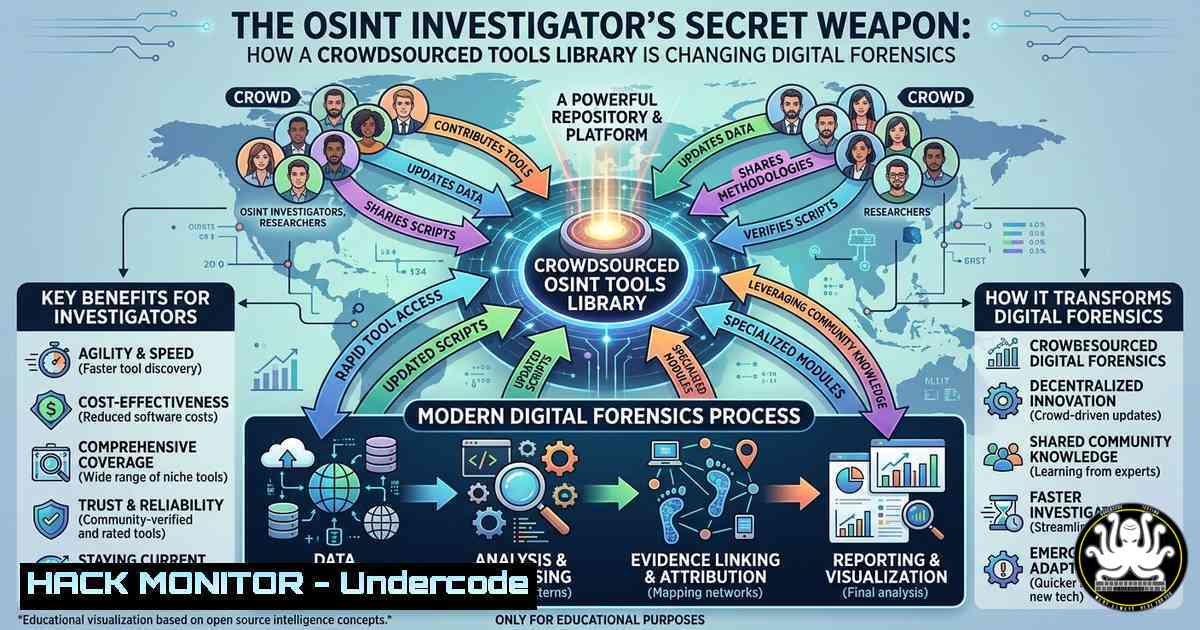
Open Source Intelligence (OSINT) has evolved from a niche hobby into a critical discipline for cybersecurity professionals, law enforcement, and corporate investigators. The challenge has never been finding tools, but filtering through the noise to locate reliable, vetted resources that work in real-world scenarios. The launch of a new, curated OSINT Tools Library represents a paradigm shift, moving away from scattered bookmarks toward a structured, community-driven repository designed to streamline investigative workflows.
Learning Objectives:
- Navigate and utilize a structured OSINT tools library to enhance investigative efficiency.
- Understand the core categories of OSINT tools, from social media analysis to geolocation and domain reconnaissance.
- Apply community-driven feedback mechanisms to verify and contribute to the accuracy of OSINT resources.
You Should Know:
- Setting Up Your OSINT Workbench: Browser Isolation and Tool Management
The foundation of any OSINT investigation is a secure and organized environment. The OSINT Tools Library emphasizes practical utility, but before diving into the directory, you must harden your workstation. Professional investigators often use virtual machines (VMs) or dedicated browsers to prevent data leakage and cross-contamination.
Step‑by‑step guide for a Linux-based OSINT VM:
- Install a Virtual Machine: Use VirtualBox or VMware to create an Ubuntu 22.04 LTS VM.
- Isolate the Browser: Install Firefox and configure it for privacy. Navigate to `about:config` and set `privacy.firstparty.isolate` to `true` and `privacy.resistFingerprinting` to
true. - Install Essential CLI Tools: OSINT isn’t just GUI-based. Open a terminal and install the Swiss army knife of reconnaissance:
sudo apt update
sudo apt install curl wget git jq whois dnsutils
– whois: Query domain registration details.
– dnsutils: Provides `nslookup` and `dig` for DNS enumeration.
– jq: Parses JSON data from API responses.
4. Access the Library: Navigate to the core resource: https://lnkd.in/efwNtASq. Bookmark this within your isolated browser.
- Deep-Diving the Directory: Social Media and Username Reconnaissance
The OSINT Tools Library is structured around investigative workflows. For identity resolution, the “Social Media” and “Username” categories are paramount. Instead of manually searching across platforms, investigators use aggregated tools to map a digital footprint.
Step‑by‑step guide using a recommended tool (based on the library’s ethos):
1. Identify a Target Username: Assume you have a username (e.g., johndoe_sec).
2. Use a Username Aggregator: Tools like `sherlock` (often listed in such libraries) scan hundreds of sites. Clone and run it:
git clone https://github.com/sherlock-project/sherlock.git
cd sherlock
python3 -m pip install -r requirements.txt
python3 sherlock johndoe_sec
Note: This command returns a list of platforms where the username is registered.
3. Analyze Output: The tool will output a colored list. Green indicates existing profiles. Cross-reference these with social media analysis tools from the library to scrape publicly available posts or profile data, ensuring compliance with local laws and platform terms of service.
3. Technical Reconnaissance: Domain and Infrastructure Mapping
For cybersecurity professionals, OSINT is integral to external attack surface management. The library’s “Domain Names” section provides tools to discover subdomains, DNS records, and technologies used by a target organization before any active scanning begins.
Step‑by‑step guide for passive domain reconnaissance:
- Passive DNS Recon: Use `dig` to perform a DNS ANY query (though often limited) or a TXT record query for SPF/DKIM configurations.
dig +nocmd example.com ANY +noall +answer
dig +nocmd example.com TXT +noall +answer
- Subdomain Enumeration: Use `sublist3r` or `amass` to enumerate subdomains passively using search engines and public datasets.
Install Sublist3r
git clone https://github.com/aboul3la/Sublist3r.git
cd Sublist3r
pip install -r requirements.txt
python sublist3r.py -d example.com
- Technology Fingerprinting: Tools like `whatweb` (command line) or `Wappalyzer` (browser extension) identify CMS, JavaScript libraries, and web server versions.
whatweb example.com
4. Geolocation and Image Verification: Beyond Metadata
The “Geolocation and Maps” section is critical for verifying the authenticity of media. Investigators move beyond simple EXIF data (which is often stripped) to contextual geolocation using land features, signage, and satellite imagery.
Step‑by‑step guide for image geolocation:
- Extract Available Metadata: Use `exiftool` to check if any GPS coordinates remain in the image.
Install exiftool
sudo apt install exiftool
exiftool image.jpg | grep -i gps
- Perform Reverse Image Search: Use tools from the library (like Google Lens or Yandex Images) to find where the image has appeared before.
- Contextual Analysis: If coordinates are absent, use the library’s mapping tools. Overlay the image with satellite views. Look for unique identifiers: street signs, business logos, or architectural styles. Tools like `Pic2Map` or manual cross-referencing with OpenStreetMap are essential workflows.
5. Archiving and Preservation: The Chain of Custody
When evidence is found, it must be preserved. The “Archiving” section of the library focuses on tools that capture web pages, social media posts, and documents before they are deleted or altered. This is crucial for maintaining integrity in legal or corporate investigations.
Step‑by‑step guide for web archiving:
- Use the Wayback Machine: Access archive.org via the library link to view historical versions of a webpage. You can also use the `waybackurls` tool to list all archived URLs for a domain.
Install waybackurls via Go
go install github.com/tomnomnom/waybackurls@latest
echo "example.com" | waybackurls
- Create a Snapshot: If a page is live but might be taken down, use `archive.is` (also available via the library) to create a permanent snapshot.
- Local Archiving: Use `wget` to mirror a single page locally for offline analysis.
wget --page-requisites --convert-links --adjust-extension https://target-site.com/important-page
6. Contributing to the Library: Community Hardening
The library’s success hinges on community contributions. If a tool is outdated, broken, or missing, users are directed to the submission portal: https://lnkd.in/eMjxwPSa. This model ensures the resource remains a living document, adapting to new threats and technologies.
Step‑by‑step guide for contributing:
- Verify the Tool: Before submitting, test the tool in your isolated environment to confirm functionality and relevance.
- Categorize Correctly: Ensure the tool fits one of the library’s core workflows (e.g., “Email” for email breach checks, “Public Records” for data aggregators).
- Provide Context: When submitting, include a brief description of the tool’s use case, any prerequisites (like API keys), and whether it is free or paid.
- Report Issues: If a tool is defunct, use the same form to flag it, helping maintain the directory’s “no noise, no filler” standard.
What Undercode Say:
- Centralization is Security: Fragmented tooling leads to missed evidence and inconsistent methodologies. A centralized, vetted library reduces the risk of using malicious or ineffective tools.
- Community Resilience: The cybersecurity landscape shifts daily. A static list of tools is obsolete on arrival. By implementing a community-driven submission model, this library mirrors the collaborative nature of open-source security, ensuring it stays relevant.
- Operational Security (OPSEC) Matters: The emphasis on “investigator-first” design implicitly teaches OPSEC. Using isolated VMs, browser hardening, and understanding the legal boundaries of OSINT are as critical as the tools themselves. This resource not only lists tools but implicitly guides users toward professional, secure investigative practices.
Prediction:
As AI-generated content and deepfakes proliferate, OSINT tools will rapidly integrate machine learning models for authenticity verification and automated cross-referencing. The OSINT Tools Library is positioned to become a critical aggregation point for these next-generation AI-driven investigative tools. We will likely see a bifurcation in the industry: standardized, community-vetted directories like this one will become the default entry point for professionals, while unvetted, scattered tools will be relegated to hobbyist use, raising the baseline of professionalism across digital forensics and threat intelligence.
🎯Let’s Practice For Free:
IT/Security Reporter URL:
Reported By: Shivam Mittal2023 – Hackers Feeds
Extra Hub: Undercode MoN
Basic Verification: Pass ✅


