Listen to this Post
Introduction:
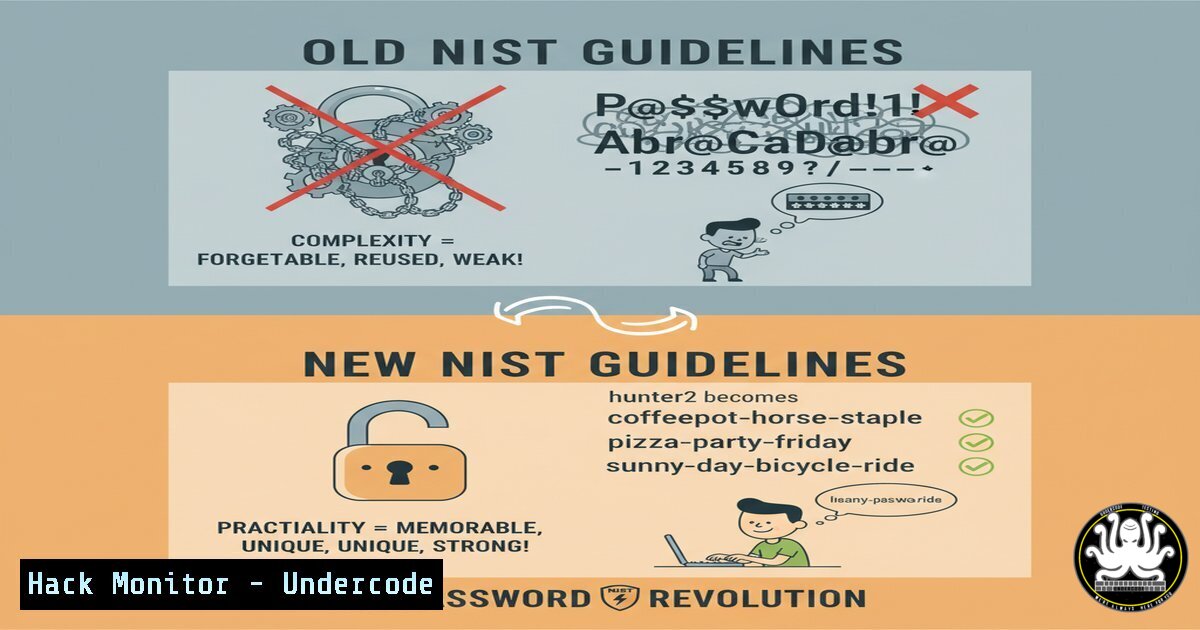
The US National Institute of Standards and Technology (NIST) has fundamentally shifted its password guidance, moving away from enforcing complex, frequently changed passwords. This article delves into the technical rationale behind this change and provides actionable steps for IT professionals to audit, reconfigure, and harden authentication systems in line with modern security practices.
Learning Objectives:
- Understand the core principles of the updated NIST SP 800-63B Digital Identity Guidelines.
- Learn how to implement and enforce a password blocklist to prevent the use of compromised credentials.
- Configure multi-factor authentication (MFA) and monitoring systems to create a defense-in-depth strategy for identity and access management.
You Should Know:
1. Auditing Existing Password Policies
The first step in aligning with NIST guidelines is to audit your current Active Directory or identity provider settings. This involves using PowerShell to extract the existing fine-grained password policy.
`Get-ADFineGrainedPasswordPolicy -Identity “YourPolicyName” | Select-Object `
Step-by-step guide:
This PowerShell command, executed on a domain controller or a machine with the Remote Server Administration Tools (RSAT) installed, retrieves the detailed configuration of a specified password policy. It will show you the current settings for complexity requirements, minimum password length, maximum password age (which should now be set to 0, meaning it never expires), and password history. Use this to establish a baseline before making changes.
2. Implementing a Password Blocklist
NIST recommends checking new passwords against a list of known compromised values. In a Microsoft Active Directory environment, this is achieved using a custom password filter DLL or leveraging Azure AD Password Protection.
// Example: Check password against a local blocklist file in a custom script.

<h2 style="color: yellow;">if (Get-Content "C:\blocklist.txt" | %{$_ -eq $NewPassword}) {</h2>

<h2 style="color: yellow;">throw "Password is found in the blocklist."</h2>

<h2 style="color: yellow;">}
Step-by-step guide:
While a full implementation requires a compiled DLL, the concept is demonstrated with this PowerShell logic. You can maintain a text file (blocklist.txt) containing commonly used and breached passwords. A custom script can then validate any new password against this list during a change event, rejecting it if a match is found. For production, use the built-in Azure AD Password Protection feature which includes a global blocklist Microsoft maintains.
3. Configuring Account Lockout Thresholds
To prevent online brute-force attacks while minimizing help desk calls for accidental lockouts, configure a sensible account lockout policy.
`net accounts /lockoutthreshold:10 /lockoutduration:30 /lockoutwindow:30`
Step-by-step guide:
This Windows command sets the account lockout threshold to 10 invalid attempts, with a lockout duration and observation window reset of 30 minutes. This means after 10 failed logins, the account will be locked for 30 minutes, deterring automated attacks without permanently locking out a user who makes a few mistakes.
4. Enforcing Multi-Factor Authentication (MFA) via Conditional Access
The new guidelines heavily emphasize MFA. In an Azure AD environment, this is managed through Conditional Access policies. Use PowerShell to check the status of a user’s MFA registration.
`Get-MsolUser -UserPrincipalName [email protected] | Select-Object StrongAuthenticationMethods`
Step-by-step guide:
This command, part of the MSOnline PowerShell module, displays the strong authentication methods (such as phone app notification, SMS, etc.) configured for a specific user. This is crucial for auditing MFA enrollment compliance across your organization before you enforce a Conditional Access policy that requires MFA for all cloud applications.
5. Monitoring for Authentication Anomalies
With fewer forced password changes, monitoring for account compromise becomes critical. Utilize SIEM queries to detect brute-force attacks.
`index=windows_security EventCode=4625 | stats count by user, src_ip | where count > 10`
Step-by-step guide:
This Splunk query searches for Windows security events with ID 4625 (failed logon). It then counts these failures, grouping them by username and source IP address. The final filter highlights any user-IP combination with more than 10 failures, which is a strong indicator of a targeted brute-force attack and should trigger an alert.
6. Hardening Linux SSH Authentication
Apply NIST principles to Linux systems by disabling password authentication for SSH in favor of key-based authentication, which is inherently stronger.
`sudo nano /etc/ssh/sshd_config`
` Set the following lines:
PasswordAuthentication no
PubkeyAuthentication yes
ChallengeResponseAuthentication no`
Step-by-step guide:
Edit the SSH daemon configuration file with a text editor like nano. Changing `PasswordAuthentication` to `no` forces all users to authenticate with cryptographic key pairs. After saving the file, restart the SSH service with sudo systemctl restart sshd. Ensure you have deployed your public key to the server’s `~/.ssh/authorized_keys` file before closing your current session.
7. Scripting Password Length and Complexity Checks
While complexity rules are relaxed, length is paramount. Here is a Python script to validate a new password meets the core NIST requirements.
`import re
def validate_password(password):
if len(password) < 12:
return False, “Password must be at least 12 characters.”
Check for repetitive or sequential characters (e.g., ‘aaaa’, ‘1234’)
if re.search(r'(.)\1\1′, password) or re.search(r'(0123|abcd)’, password, re.IGNORECASE):
return False, “Password contains repetitive or sequential patterns.”
return True, “Password is valid.”`
Step-by-step guide:
This Python function first checks that the password is at least 12 characters long. It then uses regular expressions to check for three or more identical characters in a row ((.)\1\1) or common sequential patterns. This is a basic implementation of the NIST recommendation to screen for known weak patterns, which can be integrated into a custom password change portal.
What Undercode Say:
- The paradigm shift from complexity to length and memorability is a net positive for security, reducing the burden on users and the “password1!” phenomenon.
- The real security uplift comes from the surrounding technical controls: MFA, blocklists, and robust monitoring, which collectively mitigate the risks of static, long-term passwords.
Analysis:
NIST’s updated guidelines are a formal recognition that human-centric security is more effective than rigid, complex rules that users circumvent. The focus has correctly moved from forcing unpredictable passwords to preventing the use of known-bad ones and layering defenses. This approach acknowledges that a password, no matter how complex, is a single factor. Its strength is now defined not just by its composition, but by the ecosystem that validates, monitors, and protects it. IT departments must pivot from being policy enforcers to being architects of a resilient identity infrastructure where the password is just one part of a much stronger chain.
Prediction:
The widespread adoption of these guidelines will lead to a measurable decrease in certain types of credential-based attacks, such as those relying on users creating simple variants of old passwords. However, it will simultaneously place a greater premium on phishing-resistant MFA and AI-driven behavioral analytics. Cybercriminals will adapt by refining phishing kits to steal both the long-term password and the MFA token in a single session, making continuous authentication and endpoint detection and response (EDR) solutions the next critical frontier in the defense of digital identity.
🎯Let’s Practice For Free:
IT/Security Reporter URL:
Reported By: Michael Tchuindjang – Hackers Feeds
Extra Hub: Undercode MoN
Basic Verification: Pass ✅


