
Listen to this Post
Introduction:
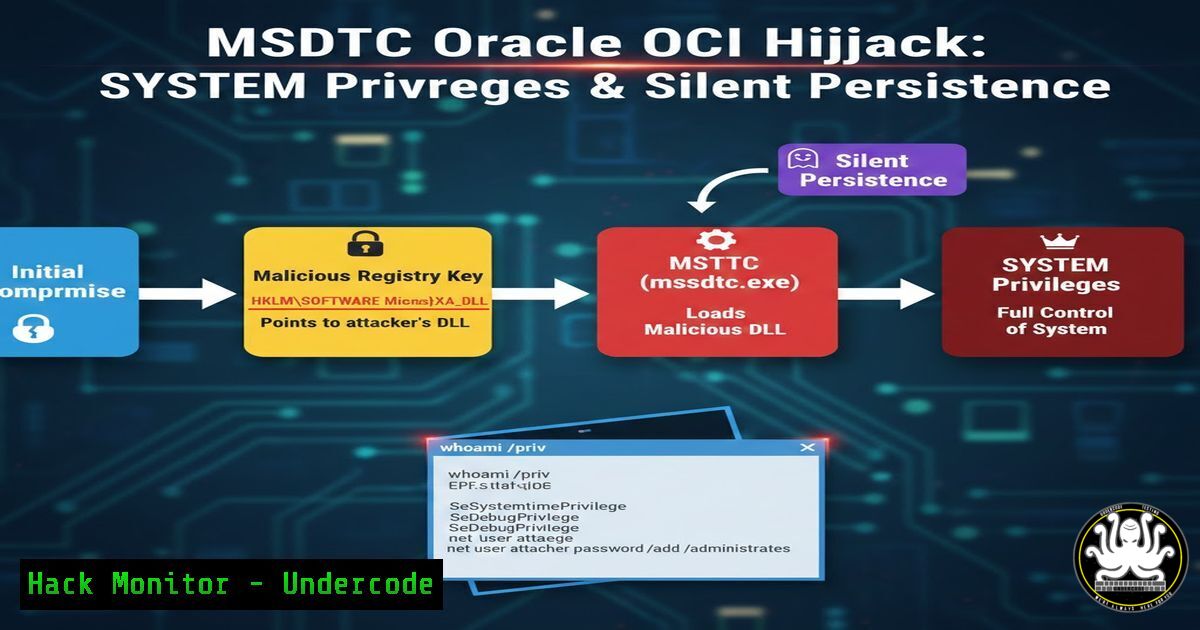
In the evolving landscape of cyber threats, attackers increasingly abuse legitimate Windows components to bypass security controls. One such technique involves hijacking the Microsoft Distributed Transaction Coordinator (MSDTC) service via a specific Oracle OCI registry key, enabling both persistence and privilege escalation to SYSTEM level. This article delves into this sophisticated attack vector, detailing how threat hunters can detect and mitigate it using Sysmon and digital signature validation.
Learning Objectives:
- Understand how attackers modify the HKLM\SOFTWARE\Microsoft\MSDTC\MTxOCI\OracleOciLibPath registry key to sideload malicious DLLs.
- Learn to correlate Sysmon Event ID 13 (registry value set) and Event ID 7 (image loaded) for detecting this threat.
- Master steps to validate Oracle-related binaries and harden MSDTC configurations against exploitation.
You Should Know:
- The Anatomy of the MSDTC and Oracle OCI Registry Key
The HKLM\SOFTWARE\Microsoft\MSDTC\MTxOCI\OracleOciLibPath registry key specifies the path to Oracle Call Interface (OCI) libraries, used by MSDTC for coordinating distributed transactions with Oracle databases. Legitimately, this key is updated only during Oracle Client installations or patches signed by Oracle. However, attackers with administrative privileges can change this path to point to a malicious oci.dll, which is then sideloaded by msdtc.exe, executing code under the service’s identity. By default, MSDTC runs as NetworkService, but threats often escalate it to LocalSystem for higher privileges.
Step‑by‑step guide explaining what this does and how to use it:
– Step 1: Identify the registry key. On Windows, open Registry Editor (regedit.exe) and navigate to HKLM\SOFTWARE\Microsoft\MSDTC\MTxOCI. Check the `OracleOciLibPath` value—it should typically point to a legitimate Oracle directory like C:\Oracle\product\...\bin.
– Step 2: Understand legitimate changes. Use PowerShell to audit changes: Get-WinEvent -LogName "Microsoft-Windows-Sysmon/Operational" | Where-Object {$_.ID -eq 13 -and $_.Message -like "OracleOciLibPath"}. This queries Sysmon for registry modifications, but note that legitimate updates are rare and signed.
– Step 3: Recognize malicious patterns. If the path points to unusual locations like `C:\Temp\oci.dll` or network shares, it’s a red flag. Attackers may use commands like `reg add “HKLM\SOFTWARE\Microsoft\MSDTC\MTxOCI” /v OracleOciLibPath /t REG_SZ /d “C:\Malware\oci.dll” /f` to set the key.
2. Exploiting MSDTC for Persistence and Privilege Escalation
Attackers modify the registry key to load a malicious DLL, often combining this with service configuration changes to achieve LocalSystem privileges. This technique is stealthy because MSDTC is a trusted service, and DLL sideloading evades many endpoint detection tools.
Step‑by‑step guide explaining what this does and how to use it:
– Step 1: Gain administrative access. Attackers first compromise a system with admin rights, using tools like Mimikatz or exploits. For demonstration in a lab, use an elevated Command Prompt.
– Step 2: Change the registry key. As shown above, use the `reg add` command to redirect the path. Ensure the malicious oci.dll is crafted to export required OCI functions—attackers often use tools like DLL proxying to wrap legitimate DLLs.
– Step 3: Escalate service identity. To change MSDTC to LocalSystem, use `sc config MSDTC obj= LocalSystem password= “”` and restart the service with `sc stop MSDTC` and sc start MSDTC. This gives the DLL SYSTEM privileges.
– Step 4: Verify execution. The malicious DLL loads when MSDTC initiates a transaction, often triggered by network events or manually via msdtc.exe. Use Process Monitor to confirm DLL loading.
- Monitoring Registry Changes with Sysmon Event ID 13
Sysmon is crucial for detecting this attack. Event ID 13 logs registry value sets, providing visibility into modifications to critical keys like OracleOciLibPath.
Step‑by‑step guide explaining what this does and how to use it:
– Step 1: Install and configure Sysmon. Download Sysmon from Microsoft Sysinternals. Use a configuration file that includes Event ID 13 monitoring for the MSDTC key. Example rule in XML:
<Sysmon schemaversion="4.90">
<EventFiltering>
<RuleGroup name="" groupRelation="or">
<RegistryEvent onmatch="include">
<TargetObject condition="contains">HKLM\SOFTWARE\Microsoft\MSDTC\MTxOCI\OracleOciLibPath</TargetObject>
</RegistryEvent>
</RuleGroup>
</EventFiltering>
</Sysmon>
– Step 2: Deploy Sysmon. Run `sysmon64.exe -accepteula -i config.xml` to install with this config. On Linux-based SIEMs, forward logs via Windows Event Forwarding.
– Step 3: Query events. Use PowerShell to extract recent Event ID 13 entries: Get-WinEvent -FilterHashtable @{LogName='Microsoft-Windows-Sysmon/Operational';ID=13} | Where-Object {$_.Properties
.Value -like 'OracleOciLibPath'} | Format-List</code>. This lists details like process ID, image path, and new value.

<ol>
<li>Correlating with DLL Loads via Sysmon Event ID 7
Event ID 7 logs image loads (DLLs), allowing correlation with registry changes to confirm malicious sideloading by msdtc.exe.</li>
</ol>

Step‑by‑step guide explaining what this does and how to use it:
- Step 1: Enable Event ID 7 in Sysmon. Ensure your Sysmon config includes image loading events. Example rule:
[bash]
<RuleGroup name="" groupRelation="or">
<ImageLoad onmatch="include">
<Image condition="contains">msdtc.exe</Image>
<ImageLoaded condition="contains">oci.dll</ImageLoaded>
</ImageLoad>
</RuleGroup>
- Step 2: Hunt for anomalies. After a registry change, look for Event ID 7 where msdtc.exe loads oci.dll from a suspicious path. Use a SIEM query like:
source="Sysmon" EventID=7 Image="msdtc.exe" ImageLoaded="oci.dll" | stats count by ImageLoaded, ProcessGuid
- Step 3: Analyze process chains. Tools like Elastic Security or Splunk can correlate Event ID 13 and 7 within a timeframe (e.g., 5 minutes). In PowerShell, script a correlation: store Event ID 13 data and match with subsequent Event ID 7 logs based on ProcessID.
5. Validating Binary Signatures to Filter Legitimate Changes
Legitimate Oracle updates are signed by Oracle certificates. Validating signatures helps filter false positives and identify malicious binaries.
Step‑by‑step guide explaining what this does and how to use it:
- Step 1: Check digital signatures. Use PowerShell's `Get-AuthenticodeSignature` cmdlet. For example, to verify an oci.dll:
Get-AuthenticodeSignature -FilePath "C:\Oracle\product\19c\bin\oci.dll" | Select-Object Status, SignerCertificate
A status of "Valid" with an Oracle Corporation signer indicates legitimacy. For malicious paths, status may be "NotSigned" or "HashMismatch".
- Step 2: Automate validation. Create a script to scan DLLs loaded by msdtc.exe. Example:
$events = Get-WinEvent -FilterHashtable @{LogName='Microsoft-Windows-Sysmon/Operational';ID=7} | Where-Object {$_.Properties[bash].Value -like 'oci.dll'}
foreach ($event in $events) {
$path = $event.Properties[bash].Value
$sig = Get-AuthenticodeSignature -FilePath $path
if ($sig.Status -ne "Valid") { Write-Host "Suspicious DLL: $path" }
}
- Step 3: Integrate with threat intelligence. Use tools like VirusTotal API to hash-check binaries. For Linux-based analysis, use `osslsigncode` on Windows DLLs exported to Linux: osslsigncode verify -in oci.dll.
- Building Detection Rules for SIEM and EDR Platforms
Proactive detection requires crafting rules for security tools. This involves YARA, Sigma rules, or native EDR queries.
Step‑by‑step guide explaining what this does and how to use it:
- Step 1: Create a Sigma rule. Sigma is a generic signature format. Example rule for this attack:
title: MSDTC Oracle OCI Registry Modification
id: abc12345-6789
status: experimental
description: Detects changes to HKLM\SOFTWARE\Microsoft\MSDTC\MTxOCI\OracleOciLibPath
logsource:
product: windows
service: sysmon
detection:
selection:
EventID: 13
TargetObject: '\SOFTWARE\Microsoft\MSDTC\MTxOCI\OracleOciLibPath'
condition: selection
falsepositives:
- Legitimate Oracle software updates
level: high
- Step 2: Deploy to SIEM. Convert Sigma to SIEM-specific queries (e.g., Splunk: EventID=13 TargetObject="\\\\SOFTWARE\\\\Microsoft\\\\MSDTC\\\\MTxOCI\\\\OracleOciLibPath"). Use tools like Sigmac for conversion.
- Step 3: EDR custom rules. In CrowdStrike Falcon, create an IOA rule monitoring registry writes to this key. In Microsoft Defender for Endpoint, use Advanced Hunting query:
DeviceRegistryEvents
| where RegistryKey contains @"HKLM\SOFTWARE\Microsoft\MSDTC\MTxOCI\OracleOciLibPath"
| project Timestamp, DeviceName, ActionType, RegistryValueName, RegistryValueData
- Mitigation and Hardening Steps for MSDTC and Registry Security
Preventing this attack involves hardening MSDTC, restricting registry permissions, and implementing application control.
Step‑by‑step guide explaining what this does and how to use it:
- Step 1: Disable MSDTC if unused. Assess if MSDTC is required. Disable it via PowerShell: `Set-Service MSDTC -StartupType Disabled` and Stop-Service MSDTC. On Linux-based systems interacting with Windows, ensure Oracle clients are secured.
- Step 2: Secure registry permissions. Use `icacls` to restrict write access to the key:
icacls "HKLM\SOFTWARE\Microsoft\MSDTC\MTxOCI" /deny S-1-5-32-544:(W) /deny S-1-5-18:(W)
This denies write access to Administrators and SYSTEM, but test in production to avoid breaking Oracle updates.
- Step 3: Implement application whitelisting. Use Windows Defender Application Control or AppLocker to allow only signed Oracle binaries. Create a rule for msdtc.exe: New-AppLockerPolicy -RuleType Publisher -User Everyone -FilePath "C:\Windows\System32\msdtc.exe" -Action Allow.
- Step 4: Network segmentation. Isolate systems running MSDTC and Oracle databases from untrusted networks. Use firewall rules to limit MSDTC traffic (ports 135, 137-139, 445).
What Undercode Say:
- Key Takeaway 1: This attack underscores the importance of baselining normal registry activity—legitimate changes to the OracleOciLibPath key are rare and signed, making anomalies easy to spot but only if hunters understand the baseline.
- Key Takeaway 2: Correlation of multiple Sysmon events (ID 13 and 7) is critical for detecting sideloading attacks, as isolated registry changes might be missed without context on subsequent DLL loads.
Analysis: The technique exploits trust in Microsoft and Oracle components, highlighting a broader trend of "living-off-the-land" attacks. Threat actors leverage administrative privileges to manipulate obscure registry keys, achieving persistence with low detection rates. Effective defense requires layered monitoring, from registry auditing to binary validation, and emphasizes the need for continuous threat hunting education. Courses like those mentioned in the original post are vital for building skills to baseline normalcy and hunt abnormalities.
Prediction:
In the future, similar attacks will target other Windows services and registry keys associated with third-party software integrations, such as SAP or IBM databases. As EDR solutions improve, attackers will evolve to use more legitimate-signed binaries or exploit cloud-based transaction coordinators in hybrid environments. Additionally, AI-driven threat hunting may automate baseline creation, but attackers will counter with AI-generated malware signatures. Organizations must adopt zero-trust principles, micro-segmentation, and robust certificate pinning to mitigate these advanced persistence techniques.
▶️ Related Video (72% Match):
🎯Let’s Practice For Free:
IT/Security Reporter URL:
Reported By: Mauricefielenbach Threatintel - Hackers Feeds
Extra Hub: Undercode MoN
Basic Verification: Pass ✅


