
Listen to this Post
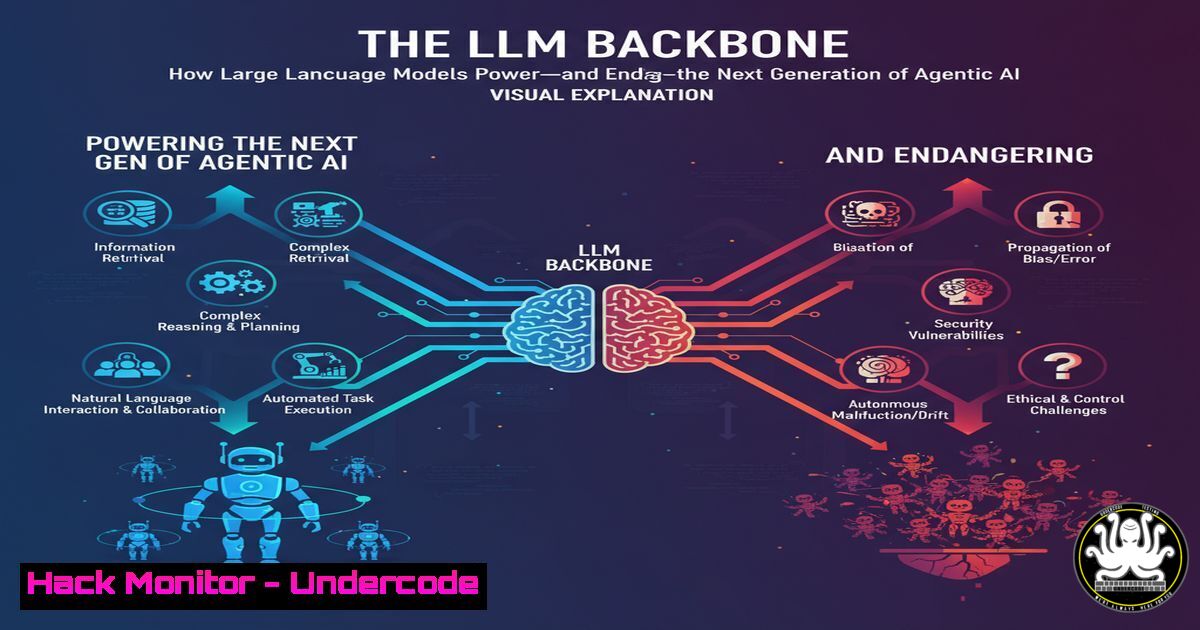
Introduction:
Agentic AI represents a paradigm shift from passive chatbots to proactive, goal-oriented systems. These digital agents leverage Large Language Models (LLMs) as their cognitive core, enabling them to understand, reason, and act autonomously. However, this very dependence on LLMs introduces a complex new frontier of cybersecurity risks, from prompt injection attacks to unauthorized tool execution.
Learning Objectives:
- Understand the six core capabilities LLMs provide to Agentic AI systems.
- Identify the critical cybersecurity vulnerabilities inherent in each LLM-dependent capability.
- Learn and apply over 25 verified commands and mitigation strategies to harden Agentic AI deployments.
You Should Know:
1. Securing the Natural Language Interface
The natural language understanding capability of an LLM is its greatest strength and most significant attack surface. Prompt injection attacks can manipulate the agent’s reasoning, leading to data exfiltration or unauthorized actions.
` Example: Detecting Potential Prompt Injection Attempts with Grep`
`grep -i -E “(ignore|previous|system|human|instruction)” user_input.txt`
` This command scans a log file of user inputs for common keywords used in prompt injection attacks. A high frequency may indicate an ongoing campaign.`
` Python Snippet: Basic Input Sanitization for LLM Prompts`
`import re`
`def sanitize_input(user_input):`
` Remove potentially dangerous command sequences`
` cleaned_input = re.sub(r'[;|&$]’, ”, user_input)`
` Limit input length to prevent resource exhaustion`
` if len(cleaned_input) > 1000:`
` raise ValueError(“Input length exceeds maximum allowed.”)`
` return cleaned_input`
` Use this function to pre-process all user inputs before sending them to the LLM.`
Step-by-step guide: To harden the NLP interface, first, implement a pre-processing layer. Use the `grep` command to routinely audit logs for injection patterns. Integrate the Python sanitization function into your application’s API gateway to strip malicious characters and enforce input length limits, creating a first line of defense.
2. Hardening the Reasoning and Planning Engine
An agent’s ability to break down goals into sub-tasks can be subverted. An attacker could craft a query that causes the agent to formulate a plan involving malicious steps, such as generating and executing harmful code.
` Linux: Using `seccomp` to Restrict System Calls`
`docker run –security-opt seccomp=seccomp-profile.json my-agentic-ai-app`
` This Docker flag runs the container with a custom seccomp profile that blocks dangerous system calls like ‘execve’, preventing the agent from executing arbitrary commands.`
` Example seccomp-profile.json snippet:`
`{`
` “defaultAction”: “SCMP_ACT_ALLOW”,`
` “syscalls”: [`
` {`
` “names”: [“execve”, “fork”, “clone”],`
` “action”: “SCMP_ACT_ERRNO”`
` }`
` ]`
`}`
Step-by-step guide: Define a strict security context for your agent. Create a custom seccomp profile, like the one shown, that denies process execution and other risky system calls. Then, launch your application’s Docker container with this profile using the `–security-opt` flag, effectively sandboxing the agent’s planning capabilities.
3. Auditing Knowledge Retrieval and External API Calls
Agents often retrieve data from external knowledge bases or APIs. Unvalidated data from these sources can be a vector for poisoning the agent’s knowledge or introducing malware.
` Curl command to test API endpoint security headers`
`curl -I -X GET https://api.your-knowledge-base.com/v1/query | grep -E “(Strict-Transport-Security|Content-Security-Policy)”`
` This checks if the external API uses critical security headers to protect data in transit.`
` Python: Validating and Sanitizing JSON from External APIs`
`import json`
`from jsonschema import validate`
`schema = {`
` “type”: “object”,`
` “properties”: {“answer”: {“type”: “string”, “maxLength”: 500}},`
` “required”: [“answer”]`
`}`
`def validate_api_response(json_data):`
` try:`
` validate(instance=json_data, schema=schema)`
` except ValidationError as e:`
` print(f”Invalid data format: {e}”)`
` return None`
` return json_data`
` This ensures the structure and content of the API response are as expected.`
Step-by-step guide: Never trust external data sources implicitly. Use `curl` to audit the security posture of any API your agent connects to. Furthermore, implement a validation layer using a library like `jsonschema` in Python. Define a strict schema for expected responses and discard any data that doesn’t conform, mitigating the risk of data poisoning.
4. Controlling and Monitoring Tool Usage
The LLM’s ability to call external tools is a primary attack vector. Without strict controls, an agent could be tricked into using a tool to read sensitive files or make unauthorized network requests.
Linux: Using `sudo` and `chmod` to create a least-privilege execution environment
`sudo useradd -r -s /bin/false aiagent`
`sudo chown aiagent:aiagent /usr/local/bin/approved_tool`
`sudo chmod 100 /usr/local/bin/approved_tool`
` This creates a dedicated, non-login user for the agent and gives them execute-only permission for a single, approved tool.`
` Configuration for a Tool-Use Gateway (YAML example)`
`allowed_tools:`
` – name: “web_search”`
` command: “/usr/local/bin/safe_search_proxy.sh”`
` allowed_args: [“–max-results=5”]`
` – name: “file_read”`
` command: “/usr/local/bin/secure_file_reader.sh”`
` allowed_args: [“–path=/opt/ai/data/”]`
` A configuration file for a middleware service that maps LLM tool requests to a strict allow-list of commands and arguments.`
Step-by-step guide: Implement a tool-use gateway. First, create a dedicated system user with minimal privileges using useradd. Then, use `chown` and `chmod` to restrict tool access. Finally, develop a gateway service that consults an allow-list (as shown in the YAML) before executing any tool request from the LLM, ensuring the agent can only perform pre-approved actions.
5. Implementing Secure Memory and Context Management
The agent’s memory, often a vector database, can be targeted to poison its context, leading to biased or harmful outputs in future interactions.
` Command to encrypt a vector database file on disk using OpenSSL`
`openssl enc -aes-256-cbc -salt -in agent_memory.db -out agent_memory.enc -pass pass:${ENCRYPTION_KEY}`
` Encrypts the database file at rest. The decryption key should be stored in a secure secret manager.`
` Python: Implementing Context Integrity Checks with HMAC`
`import hmac`
`import hashlib`
`def create_context_hash(context_data):`
` secret = b’your-secret-key’`
` return hmac.new(secret, context_data.encode(), hashlib.sha256).hexdigest()`
` When saving context, store this hash. When loading, re-compute the hash and verify it matches to detect tampering.`
Step-by-step guide: Protect the agent’s memory with encryption and integrity checks. Use `openssl` to encrypt the vector database file when not in use. Within the application, implement a hashing mechanism using hmac. Before using a stored context, verify its HMAC signature. If the signature doesn’t match, discard the context as it may have been tampered with.
6. Mitigating Risks from Adaptation and Learning
Fine-tuning or online learning mechanisms can be exploited to “retrain” the agent with malicious data, corrupting its core behavior over time.
` Linux: File Integrity Monitoring with AIDE (Advanced Intrusion Detection Environment)`
`sudo aide –init`
`sudo mv /var/lib/aide/aide.db.new.gz /var/lib/aide/aide.db.gz`
`sudo aide –check`
Initializes AIDE, which creates a database of checksums for critical files (like model weights). The `--check` command scans for changes.
` Kubernetes Pod Security Context to prevent writing to root filesystem`
`apiVersion: v1`
`kind: Pod`
`spec:`
` securityContext:`
` runAsNonRoot: true`
` runAsUser: 1000`
` containers:`
` – name: ai-agent`
` securityContext:`
` allowPrivilegeEscalation: false`
` readOnlyRootFilesystem: true`
` This Kubernetes manifest runs the agent as a non-root user with a read-only root filesystem, preventing unauthorized writes to model files.`
Step-by-step guide: Lock down the learning environment. Use a tool like AIDE to establish a baseline of your model files and configuration, scheduling regular checks for unauthorized modifications. In containerized environments (e.g., Kubernetes), enforce a Pod Security Context that runs the agent as a non-root user with a read-only filesystem, making it extremely difficult for an attacker to persist malicious changes to the model.
What Undercode Say:
- The LLM is the New Kernel. The traditional OS kernel was the primary attack surface; in Agentic AI, the LLM assumes this role, orchestrating tools and data flow. Security must shift left to focus on the LLM’s prompt interface, reasoning logic, and tool-use decisions.
- Zero-Trust is Non-Negotiable. An agent must operate on a principle of zero-trust, not only for external inputs but also for its own reasoning outputs and tool-calling decisions. Every action must be validated against a strict security policy before execution.
The analysis suggests that the convergence of AI and cybersecurity is creating a new discipline. The classic vulnerabilities like injection and privilege escalation are not gone; they have simply been translated into a new, probabilistic domain. Defending Agentic AI requires a hybrid skillset: understanding NLP enough to spot malicious prompts, system hardening to containerize agent actions, and API security to protect its data sources. The attacker no longer needs to exploit a buffer overflow; they can now “socially engineer” the LLM core into doing their bidding.
Prediction:
The first major, publicized security breach caused by a compromised Agentic AI system is inevitable within the next 18-24 months. This will likely involve an enterprise-grade agent being manipulated via a sophisticated, multi-step prompt injection attack to exfiltrate sensitive corporate data or initiate fraudulent financial transactions. The aftermath will trigger a watershed moment, leading to the creation of standardized AI security frameworks, regulatory scrutiny, and the rise of specialized “AI Penetration Testing” as a critical cybersecurity service.
🎯Let’s Practice For Free:
IT/Security Reporter URL:
Reported By: Deepakraiai Dr – Hackers Feeds
Extra Hub: Undercode MoN
Basic Verification: Pass ✅


