Listen to this Post
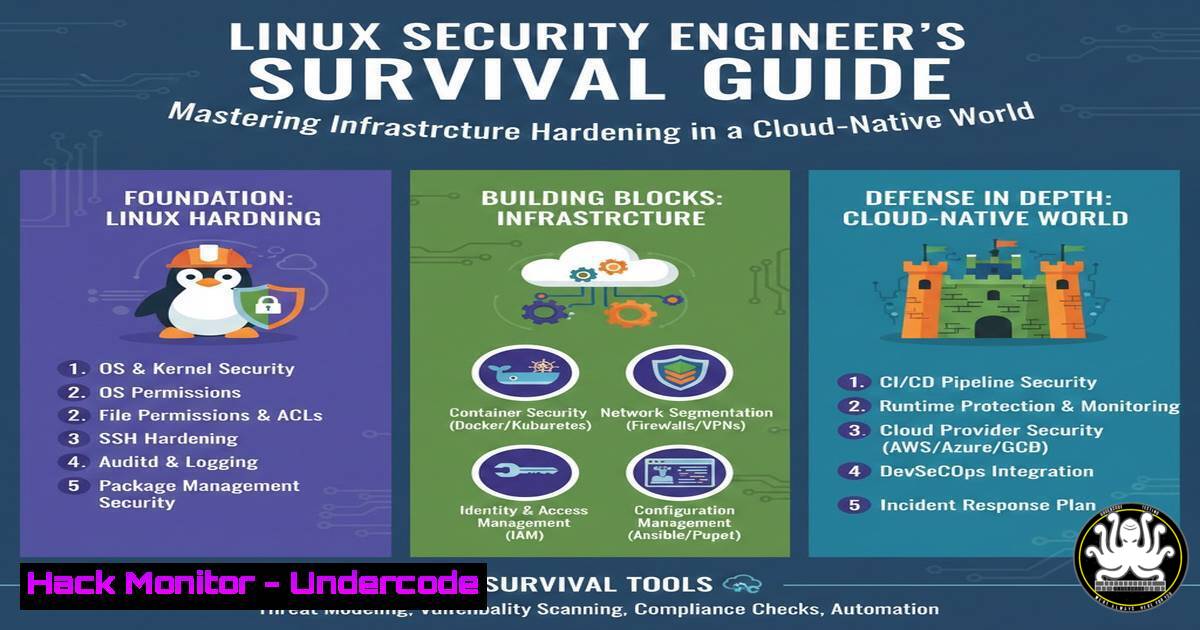
Introduction:
The escalating demand for Linux Security Engineers reflects a critical industry shift where organizations now treat infrastructure security as a foundational component rather than an afterthought. As enterprises migrate to cloud-native architectures and face increasingly sophisticated cyber threats, professionals who can implement robust security controls across Linux environments have become indispensable assets in protecting digital assets.
Learning Objectives:
- Master essential Linux security hardening techniques and command-line tools
- Implement advanced security monitoring and intrusion detection systems
- Develop comprehensive vulnerability management and patch deployment strategies
You Should Know:
1. Linux System Hardening Fundamentals
Linux infrastructure security begins with systematic hardening of the underlying operating system. This process involves reducing the attack surface by minimizing unnecessary services, configuring strict permissions, and implementing mandatory access controls. Enterprise environments typically run various distributions, but the security principles remain consistent across CentOS, Ubuntu, and RHEL systems.
Step-by-step guide explaining what this does and how to use it:
First, conduct a comprehensive system assessment to identify potential vulnerabilities:
 Check for unnecessary network services
ss -tulpn
 Verify installed packages and identify unnecessary software
dpkg -l | grep -E "^ii"  For Debian/Ubuntu
rpm -qa  For RHEL/CentOS
 Review system accounts and privileges
awk -F: '($3 < 1000) {print $1}' /etc/passwd
Implement filesystem hardening and permission controls:
 Set strict permissions on critical directories
chmod 700 /root
chmod 755 /bin /boot /lib /sbin
chmod 755 /usr/bin /usr/include /usr/lib /usr/sbin
 Configure /tmp with noexec and nosuid options in /etc/fstab
tmpfs /tmp tmpfs defaults,nosuid,noexec,nodev 0 0
 Disable core dumps to prevent memory exposure
echo " hard core 0" >> /etc/security/limits.conf
Enable and configure SELinux or AppArmor for mandatory access control:
 Check SELinux status
sestatus
 Set SELinux to enforcing mode
setenforce 1
sed -i 's/SELINUX=permissive/SELINUX=enforcing/g' /etc/selinux/config
 For AppArmor systems
aa-status
aa-enforce /etc/apparmor.d/
- Advanced Security Monitoring with Auditd and Log Management
Effective security engineering requires comprehensive monitoring capabilities to detect potential intrusions and policy violations. The Linux Audit daemon (auditd) provides detailed logging of system calls, file access, and security-relevant events that traditional system logs might miss.
Step-by-step guide explaining what this does and how to use it:
Configure auditd to monitor critical system files and directories:
 Install auditd if not present
apt-get install auditd audispd-plugins  Ubuntu/Debian
yum install audit audispd-plugins  RHEL/CentOS

Create rules to monitor sensitive directories
echo "-w /etc/passwd -p wa -k identity" >> /etc/audit/rules.d/audit.rules
echo "-w /etc/shadow -p wa -k identity" >> /etc/audit/rules.d/audit.rules
echo "-w /etc/sudoers -p wa -k privilege_escalation" >> /etc/audit/rules.d/audit.rules
echo "-w /bin -p x -k binary_modifications" >> /etc/audit/rules.d/audit.rules

Monitor sudo usage and privilege escalation
echo "-a always,exit -F arch=b64 -S execve -C uid!=euid -F euid=0 -k privilege_escalation" >> /etc/audit/rules.d/audit.rules

Restart auditd to apply new rules
systemctl restart auditd && auditctl -R /etc/audit/rules.d/audit.rules
Implement log aggregation and analysis using centralized logging:
 Configure rsyslog for remote logging to SIEM
echo ". @10.10.10.100:514" >> /etc/rsyslog.conf
 Enable log rotation with compression
cat /etc/logrotate.d/audit
/var/log/audit/audit.log {
rotate 7
daily
compress
delaycompress
postrotate
/usr/bin/systemctl kill -s HUP auditd.service > /dev/null 2>&1 || true
endscript
}
- Network Security Hardening with Firewalls and TCP Wrappers
Linux security engineers must implement multiple layers of network defense to protect infrastructure from unauthorized access and network-based attacks. This involves configuring host-based firewalls, implementing network segmentation, and restricting service exposure.
Step-by-step guide explaining what this does and how to use it:
Configure iptables or firewalld for host-based firewall protection:
 Basic iptables configuration for web server
iptables -F
iptables -X
iptables -P INPUT DROP
iptables -P FORWARD DROP
iptables -P OUTPUT ACCEPT
iptables -A INPUT -i lo -j ACCEPT
iptables -A INPUT -m state --state ESTABLISHED,RELATED -j ACCEPT
iptables -A INPUT -p tcp --dport 22 -j ACCEPT  SSH
iptables -A INPUT -p tcp --dport 80 -j ACCEPT  HTTP
iptables -A INPUT -p tcp --dport 443 -j ACCEPT  HTTPS
iptables-save > /etc/iptables/rules.v4

Alternative using firewalld (RHEL/CentOS)
firewall-cmd --permanent --add-service=ssh
firewall-cmd --permanent --add-service=http
firewall-cmd --permanent --add-service=https
firewall-cmd --permanent --remove-service=dhcpv6-client
firewall-cmd --reload
Implement TCP Wrappers for additional access control:
 Configure /etc/hosts.allow and /etc/hosts.deny
echo "ALL: ALL" > /etc/hosts.deny
echo "sshd: 10.0.0.0/24, 192.168.1.100" >> /etc/hosts.allow
echo "ALL: LOCAL, 10.0.0." >> /etc/hosts.allow
4. Vulnerability Management and Automated Patching
Proactive vulnerability management is critical for maintaining secure Linux infrastructure. Security engineers must establish processes for identifying vulnerabilities, assessing risk, and deploying patches with minimal disruption to services.
Step-by-step guide explaining what this does and how to use it:
Implement automated security updates with careful testing:
 Configure unattended-upgrades on Debian/Ubuntu
apt-get install unattended-upgrades
dpkg-reconfigure -plow unattended-upgrades

Configure yum-cron for automatic updates on RHEL/CentOS
yum install yum-cron
systemctl enable yum-cron
systemctl start yum-cron

Edit configuration to security updates only
cat /etc/yum/yum-cron.conf
[bash]
update_cmd = security
download_updates = yes
apply_updates = yes
Integrate vulnerability scanning into the deployment pipeline:
 Use OpenSCAP for compliance scanning
yum install openscap-scanner scap-security-guide
oscap xccdf eval --profile stig-rhel7-server-upstream \
--results /tmp/scan-results.xml \
--report /tmp/scan-report.html \
/usr/share/xml/scap/ssg/content/ssg-rhel7-ds.xml

Automate scanning with cron
echo "0 2   0 root /usr/bin/oscap xccdf eval --profile stig-rhel7-server-upstream --results /var/log/openscap-scan-$(date +\%Y\%m\%d).xml /usr/share/xml/scap/ssg/content/ssg-rhel7-ds.xml" >> /etc/crontab
5. Container Security and Orchestration Hardening
Modern Linux infrastructure increasingly relies on containerized applications, requiring security engineers to implement robust container security practices, including image scanning, runtime protection, and orchestration platform hardening.
Step-by-step guide explaining what this does and how to use it:
Implement Docker security best practices and runtime protection:
 Create dedicated user for Docker management
useradd -r -s /bin/false dockuser
usermod -aG docker dockuser

Configure Docker daemon with security options
cat /etc/docker/daemon.json
{
"userns-remap": "dockuser",
"log-driver": "syslog",
"disable-legacy-registry": true,
"live-restore": true,
"userland-proxy": false
}

Run containers with security constraints
docker run -d \
--name secure-app \
--read-only \
--security-opt=no-new-privileges:true \
--cap-drop=ALL \
--cap-add=NET_BIND_SERVICE \
--memory=512m \
--cpus=1.0 \
nginx:latest
Implement Kubernetes security controls and pod security standards:
 Create Pod Security Standards
cat > pss-restricted.yaml << EOF
apiVersion: policy/v1beta1
kind: PodSecurityPolicy
metadata:
name: restricted
spec:
privileged: false
allowPrivilegeEscalation: false
requiredDropCapabilities:
- ALL
volumes:
- 'configMap'
- 'emptyDir'
- 'projected'
- 'secret'
- 'downwardAPI'
- 'persistentVolumeClaim'
hostNetwork: false
hostIPC: false
hostPID: false
runAsUser:
rule: 'MustRunAsNonRoot'
seLinux:
rule: 'RunAsAny'
fsGroup:
rule: 'RunAsAny'
EOF
kubectl apply -f pss-restricted.yaml
What Undercode Say:
- The convergence of cloud-native technologies and traditional infrastructure management demands security engineers who can operate across multiple domains and technology stacks
- Organizations are prioritizing hands-on technical skills over theoretical knowledge, seeking professionals who can implement security controls that balance protection with operational practicality
The cybersecurity job market evolution reflected in these recruitment patterns indicates a fundamental transformation in how enterprises approach infrastructure protection. Companies are no longer satisfied with security professionals who merely understand concepts; they demand engineers who can implement complex security controls across hybrid environments while maintaining system stability and performance. The specific emphasis on Linux security engineering suggests that organizations recognize Linux as both their most critical infrastructure component and their most vulnerable attack surface. This trend will likely accelerate as containerization and cloud adoption continues, creating even greater demand for professionals who can bridge the gap between development teams and traditional security operations.
Prediction:
The specialized focus on Linux security engineering will expand into DevSecOps integration roles, where security controls are embedded directly into development pipelines and infrastructure-as-code templates. Within two years, we anticipate 70% of enterprise security breaches will originate from misconfigured cloud-native infrastructure, driving demand for professionals who can implement automated security validation and continuous compliance monitoring. The convergence of AI-driven threat detection and infrastructure security will create new hybrid roles requiring knowledge of machine learning implementation alongside traditional system hardening techniques.
🎯Let’s Practice For Free:
IT/Security Reporter URL:
Reported By: Jacob Bywater – Hackers Feeds
Extra Hub: Undercode MoN
Basic Verification: Pass ✅


