Listen to this Post
Introduction:
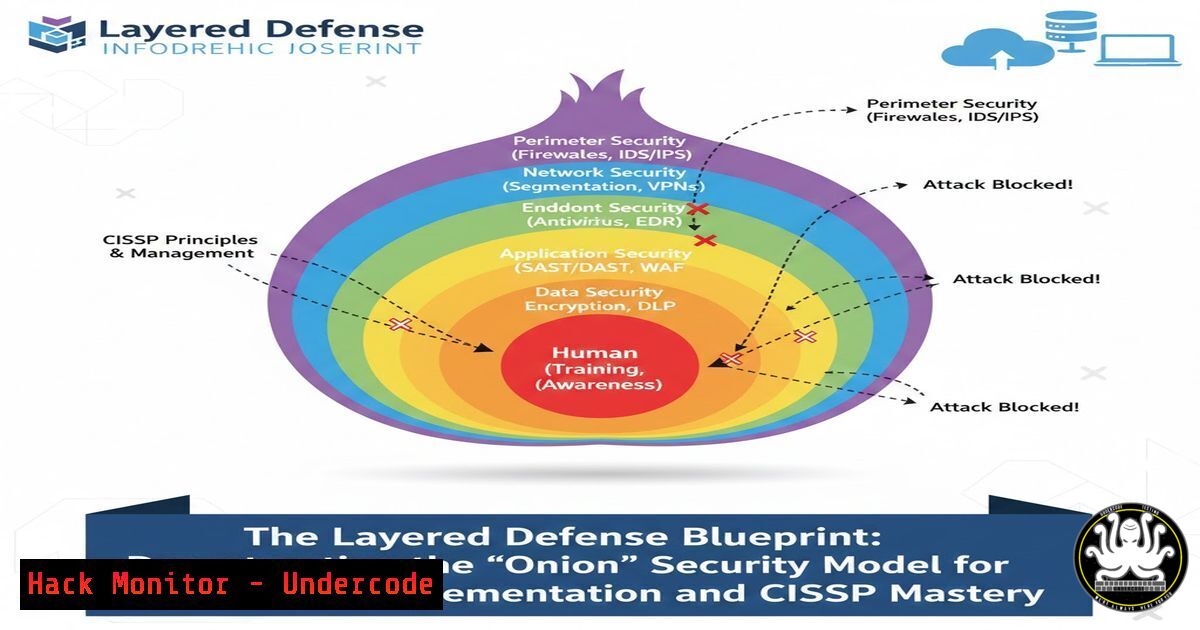
Cybersecurity is not a single product or a magic bullet; it is a structured, multi-faceted discipline built on the principle of defense-in-depth. This article deconstructs the layered security model—often visualized as an onion—translating the conceptual framework into actionable technical controls for networks, endpoints, and cloud environments. We will move beyond theory to provide verified commands and configurations that fortify each successive layer.
Learning Objectives:
- Understand the core components and strategic purpose of each layer in a modern defense-in-depth architecture.
- Apply specific, technical hardening steps across operating systems, networks, and applications to implement layered controls.
- Develop a methodological approach to threat analysis and control selection, aligning with advanced certifications like the CISSP.
You Should Know:
- The Perimeter Layer: Network Access Control and Firewall Filtering
This outermost layer controls the initial point of contact between untrusted and trusted zones. It’s about limiting exposure before an attacker can probe deeper layers.
Step‑by‑step guide explaining what this does and how to use it.
First, implement stringent firewall rules. On Linux usingiptables, block all traffic by default and only allow necessary services.Set default policies to DROP sudo iptables -P INPUT DROP sudo iptables -P FORWARD DROP sudo iptables -P OUTPUT ACCEPT Allow established/related connections sudo iptables -A INPUT -m conntrack --ctstate ESTABLISHED,RELATED -j ACCEPT Allow SSH from a specific management subnet only sudo iptables -A INPUT -p tcp --dport 22 -s 192.168.1.0/24 -j ACCEPT Save rules (distribution-specific) sudo iptables-save | sudo tee /etc/iptables/rules.v4
On Windows, use the `NetSecurity` module in PowerShell to achieve similar filtering:
Block all inbound traffic by default
Set-NetFirewallProfile -All -DefaultInboundAction Block
Create a rule to allow RDP from a specific IP
New-NetFirewallRule -DisplayName "Allow RDP from Management" -Direction Inbound -Protocol TCP -LocalPort 3389 -RemoteAddress 192.168.1.50 -Action Allow
This step ensures that only authorized, necessary communication paths exist, significantly reducing the attack surface.
2. The Network Layer: Segmentation and Intrusion Detection
Once inside the perimeter, lateral movement must be contained. This layer involves dividing the network into segments (VLANs, subnets) and monitoring for suspicious activity.
Step‑by‑step guide explaining what this does and how to use it.
Implement micro-segmentation. Configure a VLAN for your web servers, another for databases, and control traffic between them with strict Access Control Lists (ACLs) on your router or switch. For example, a database subnet should only accept connections from the application subnet on the specific database port (e.g., 3306 for MySQL). Then, deploy a Network Intrusion Detection System (NIDS) like Suricata on a strategic network tap or SPAN port.
 Install Suricata on Ubuntu
sudo add-apt-repository ppa:oisf/suricata-stable
sudo apt update
sudo apt install suricata
 Update rules and run in IPS mode (if capable)
sudo suricata-update
sudo suricata -c /etc/suricata/suricata.yaml --af-packet
Segmentation limits breach scope, while NIDS provides visibility into attack patterns crossing internal boundaries.
- The Host Layer: Endpoint Hardening and Least Privilege
This layer protects individual assets (servers, workstations). Assume the network layers have been bypassed.
Step‑by‑step guide explaining what this does and how to use it.
Harden the OS. Disable unnecessary services, enforce strong password policies, and apply the principle of least privilege. For Linux, use `auditd` and `lynis` for auditing and hardening.Install and run a Lynis audit sudo apt install lynis sudo lynis audit system Harden based on its recommendations, e.g., set kernel parameters: sudo sh -c 'echo "net.ipv4.conf.all.rp_filter = 1" >> /etc/sysctl.conf' sudo sysctl -p
On Windows, leverage Group Policy or PowerShell:
 Disable SMBv1, a legacy vulnerable protocol
Set-SmbServerConfiguration -EnableSMB1Protocol $false
 Ensure Windows Defender real-time protection is on
Set-MpPreference -DisableRealtimeMonitoring $false
Implement application allow-listing where possible to prevent execution of unauthorized binaries.
- The Application Layer: Secure Coding and WAF Protection
This layer targets vulnerabilities within the software itself, the most common attack vector.
Step‑by‑step guide explaining what this does and how to use it.
Integrate security into the SDLC. Use Static Application Security Testing (SAST) tools like `semgrep` for code analysis and Dynamic Application Security Testing (DAST) tools like OWASP ZAP. Deploy a Web Application Firewall (WAF) as a protective shield. For a simple reverse proxy with ModSecurity WAF rules on Apache:sudo apt install libapache2-mod-security2 sudo a2enmod security2 sudo systemctl restart apache2 Download and update OWASP Core Rule Set sudo git clone https://github.com/coreruleset/coreruleset /etc/modsecurity/coreruleset
Configure the WAF to protect against SQL injection, XSS, and other OWASP Top 10 vulnerabilities. This layer compensates for potential coding flaws.
5. The Data Layer: Encryption and Access Governance
The innermost layer protects the core asset: data. Security here ensures confidentiality and integrity even if other layers fail.
Step‑by‑step guide explaining what this does and how to use it.
Encrypt data at rest and in transit. For databases, enable Transparent Data Encryption (TDE). For Linux file systems, use LUKS disk encryption. For data in transit, enforce TLS 1.2+ everywhere.
 Encrypt a data partition with LUKS
sudo cryptsetup luksFormat /dev/sdb1
sudo cryptsetup open /dev/sdb1 encrypted_volume
sudo mkfs.ext4 /dev/mapper/encrypted_volume
Implement strict access controls using Role-Based Access Control (RBAC). Regularly audit access logs (/var/log/auth.log on Linux, Security logs on Windows) to detect unauthorized data access attempts. Data Loss Prevention (DLP) tools can monitor for exfiltration.
- The Identity Layer: Zero Trust and Multi-Factor Authentication (MFA)
This conceptual layer permeates all others, enforcing that no user or system is inherently trusted. It is the cornerstone of modern Zero Trust architectures.
Step‑by‑step guide explaining what this does and how to use it.
Mandate MFA for all user access, especially for administrative and cloud management consoles. For cloud services like AWS, enable MFA for the root account and all IAM users. For on-premises systems, integrate with an identity provider (e.g., Keycloak, Microsoft Entra ID). On Linux, you can enforce MFA for SSH using PAM modules likegoogle-authenticator.Install Google Authenticator PAM module sudo apt install libpam-google-authenticator Run configuration for a user google-authenticator Edit /etc/pam.d/sshd to add: auth required pam_google_authenticator.so
Combine MFA with just-in-time and just-enough-privilege (JIT/JEP) access models to minimize standing privileges.
-
The Continuous Improvement Layer: Monitoring, Logging, and Patching
Security is a process, not a state. This meta-layer ensures all other layers adapt and respond to new threats.
Step‑by‑step guide explaining what this does and how to use it.
Centralize logs using a SIEM (e.g., Elastic Stack, Wazuh). Establish a rigorous, automated patching cadence for OS and applications. Use vulnerability scanners (e.g., OpenVAS) regularly.Schedule automatic security updates on Ubuntu sudo dpkg-reconfigure --priority=low unattended-upgrades Perform a network scan with OpenVAS (after installation) gvm-cli --gmp-username admin --gmp-password password socket --socketpath /run/gvmd/gvmd.sock --xml "<get_tasks/>"
Conduct periodic penetration tests and tabletop exercises to validate the effectiveness of the entire layered defense.
What Undercode Say:
- The “Magic Tool” Myth is Dead: The most critical takeaway is that no single control, however advanced, can guarantee security. A well-configured WAF is useless if an attacker phishes an admin’s credentials (bypassing Layers 1-4) and the data is unencrypted (Layer 5). The model forces a systemic view.
- The Hacker’s Path Dictates Your Defense: The layered model directly mirrors an attacker’s kill chain. Effective security involves placing successively more granular and stringent barriers at each stage of their anticipated advance (Reconnaissance -> Initial Access -> Lateral Movement -> Data Exfiltration). Your controls must intersect each of these phases.
This analysis underscores that cybersecurity is an architectural challenge. The “onion” model is not just a diagram; it is a strategic imperative. The technical commands provided are the concrete implementation of each conceptual ring. In the CISSP context, this explains why “management,” “process,” and “holistic” answers are often correct—they represent the understanding that security is about the reasoned integration of complementary controls across all layers, not the depth of any single technical silo.
Prediction:
The future of cybersecurity will see the formalization of this layered approach through AI-driven security orchestration, automation, and response (SOAR) platforms. These systems will dynamically adjust the “thickness” and configuration of each layer in near-real-time based on active threat intelligence. For instance, upon detecting a new ransomware strain targeting a specific service, the perimeter (Layer 1) and host (Layer 3) controls could be automatically reconfigured to temporarily restrict related traffic and enforce stricter execution policies, while the monitoring layer (Layer 7) hunts for related IoCs. The human role will evolve from manual controller to strategic overseer of these autonomous, layered defense systems.
▶️ Related Video (78% Match):
🎯Let’s Practice For Free:
IT/Security Reporter URL:
Reported By: Biren Bastien – Hackers Feeds
Extra Hub: Undercode MoN
Basic Verification: Pass ✅


