
Listen to this Post
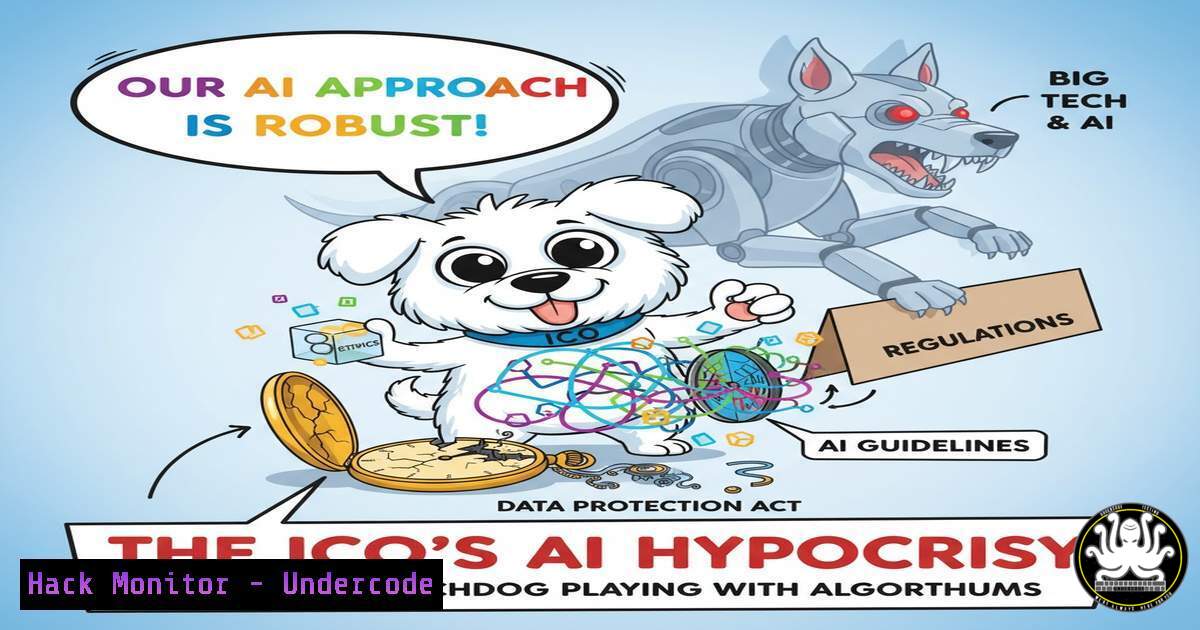
Introduction:
The UK’s Information Commissioner’s Office (ICO) has released a new “AI Use Policy” advocating for ethics and transparency, yet critics argue the regulator itself lacks the technical understanding and enforcement capability to provide meaningful oversight. This gap between policy and practical enforcement creates a dangerous landscape where AI systems can be deployed without robust security, leaving data and systems vulnerable. For cybersecurity and IT professionals, understanding how to secure AI systems and the underlying infrastructure is no longer optional—it’s a critical line of defense.
Learning Objectives:
- Understand the core technical vulnerabilities in AI systems and their supporting infrastructure.
- Learn practical commands and configurations to harden systems against AI-related threats.
- Develop a proactive security posture to mitigate risks in the absence of stringent regulation.
You Should Know:
1. Securing the Foundation: Hardening Your Web Servers
The comment regarding insecure servers at major institutions highlights a critical first line of defense. An unsecured web server is a gateway to the data that fuels AI systems.
Verified Commands & Configurations:
Nginx Security Headers:
add_header X-Frame-Options "SAMEORIGIN" always;
add_header X-XSS-Protection "1; mode=block" always;
add_header X-Content-Type-Options "nosniff" always;
add_header Referrer-Policy "strict-origin-when-cross-origin" always;
add_header Content-Security-Policy "default-src 'self'; script-src 'self' 'unsafe-inline';" always;
Apache .htaccess Hardening:
Header always set X-Frame-Options SAMEORIGIN
Header always set X-XSS-Protection "1; mode=block"
Header always set X-Content-Type-Options nosniff
Header always set Strict-Transport-Security "max-age=63072000; includeSubDomains; preload"
Server Vulnerability Scan (Linux):
`sudo lynis audit system`
Check for Open Ports (Linux/Windows):
`sudo netstat -tulpn` (Linux)
`netstat -an` (Windows)
Step-by-step guide:
These commands and configurations are your first step in building a secure perimeter. The Nginx/Apache headers prevent common client-side attacks like clickjacking and cross-site scripting (XSS), which could be used to poison AI training data or manipulate outputs. Regularly running `lynis` provides a comprehensive security audit of the entire system, identifying misconfigurations and outdated software. Use `netstat` to identify any unauthorized services listening for connections that could be a backdoor into your AI’s operational environment.
2. Infrastructure Integrity: DNS and Network Security
The mention of DNS vulnerabilities points to a foundational weakness. Compromised DNS can redirect AI model queries to malicious data sources or exfiltrate sensitive information.
Verified Commands & Configurations:
Check DNS Records for Hijacking:
`dig A example.com`
`dig NS example.com`
DNSSEC Validation Check:
`dig DNSKEY example.com +multiline`
Network Traffic Analysis with tcpdump:
`sudo tcpdump -i any -n port 53`
Firewall Rule to Limit DNS Queries (Linux iptables):
`sudo iptables -A OUTPUT -p udp –dport 53 -m limit –limit 1/s -j ACCEPT`
Step-by-step guide:
Use `dig` to verify that the domain name system (DNS) records for your critical AI services (e.g., API endpoints, data sources) have not been maliciously altered. The `tcpdump` command allows you to monitor all DNS traffic in real-time, looking for anomalous queries to unknown domains, which could indicate data exfiltration or malware communication. The iptables rule helps mitigate DNS amplification attacks by rate-limiting outgoing DNS queries.
- AI Model Security: Input Sanitization and Poisoning Mitigation
AI models are vulnerable to data poisoning and adversarial attacks. Securing the data pipeline is essential to ensure model integrity.
Verified Code Snippets & Commands:
Python Input Sanitization Snippet:
import re
from html import escape

def sanitize_input(user_input):
 Escape HTML to prevent XSS
cleaned_input = escape(user_input)
 Remove potentially dangerous SQL patterns
cleaned_input = re.sub(r'(\%27)|(\')|(--)|(\%23)|()', '', cleaned_input, flags=re.IGNORECASE)
return cleaned_input

Example for an AI prompt input
user_prompt = request.get_json()['prompt']
safe_prompt = sanitize_input(user_prompt)
model_response = ai_model.generate(safe_prompt)
Check for Model File Tampering (Linux):
`sha256sum model_v1.pt`
Isolate AI Training Environment with Docker:
`docker run –rm -it –network none -v /safe/data:/data python:3.9-slim python train.py`
Step-by-step guide:
Before any user input reaches your AI model, it must be sanitized. The Python code demonstrates basic cleansing to prevent injection attacks that could alter the model’s behavior or output. Regularly generating SHA-256 checksums of your model files ensures they have not been corrupted or tampered with. Running the training process in a container with no network access (--network none) prevents a compromised model from exfiltrating data during training.
4. API Security: Gatekeeping AI Endpoints
AI functionalities are often exposed via APIs, which become prime targets. Hardening these endpoints is non-negotiable.
Verified Commands & Configurations:
Test for Common API Vulnerabilities with curl:
`curl -H “Authorization: Bearer $TOKEN” https://api.example.com/v1/predict -X POST -d ‘{“input”:”test”}’ -H “Content-Type: application/json”`
Rate Limiting with Nginx:
limit_req_zone $binary_remote_addr zone=api:10m rate=1r/s;
location /v1/predict {
limit_req zone=api burst=5 nodelay;
proxy_pass http://ai_backend;
}
Scan for API Vulnerabilities:
`sudo apt install sqlmap`
`sqlmap -u “https://api.example.com/v1/predict” –data='{“input”:””}’ –headers=”Content-Type: application/json” –level=3`
Step-by-step guide:
Use `curl` to manually test your API endpoints, ensuring they properly validate authentication tokens and input data types. The Nginx configuration implements rate limiting to protect your AI service from denial-of-wallet and denial-of-service attacks. While `sqlmap` is an offensive tool, using it to test your own endpoints for SQL injection flaws—even in JSON payloads—is a crucial step in proactive defense.
5. Cloud Hardening for AI Workloads
AI systems frequently run in the cloud. Misconfigurations here can expose vast amounts of data.
Verified Commands & Configurations:
AWS S3 Bucket Security Check:
`aws s3api get-bucket-policy –bucket my-ai-models-bucket`
Scan for Publicly Accessible Cloud Storage:
`aws s3 ls | while read bucket; do echo $bucket; aws s3api get-bucket-acl –bucket $bucket –output text; done`
Azure Storage Container Check:
`az storage container list –account-name –query “[?publicAccess!=’None’].name”`
Kubernetes Pod Security Context:
apiVersion: v1
kind: Pod
spec:
securityContext:
runAsNonRoot: true
runAsUser: 1000
containers:
- name: ai-api
securityContext:
allowPrivilegeEscalation: false
capabilities:
drop:
- ALL
Step-by-step guide:
Regularly audit your cloud permissions and storage settings. The AWS CLI commands help you verify that S3 buckets containing models or training data are not publicly accessible. In Kubernetes environments, applying a restrictive security context to pods running AI services minimizes the attack surface by ensuring the container runs as a non-root user without unnecessary privileges.
6. Proactive Threat Hunting in AI Logs
Monitoring and analyzing logs can detect attacks against your AI systems before they cause significant damage.
Verified Commands & Configurations:
Search for SQL Injection Attempts in Logs:
`sudo grep -E “(\%27)|(\’)|(\-\-)|(\%23)|()” /var/log/ai-api.log`
Find High-Frequency Requests (Potential Brute Force):
`sudo awk ‘{print $1}’ /var/log/nginx/access.log | sort | uniq -c | sort -nr | head -20`
Python Script to Monitor for Model Drift/Anomalies:
from scipy import stats
import numpy as np
 Assuming 'predictions' is a log of model confidence scores
z_scores = stats.zscore(predictions)
anomalies = np.where(np.abs(z_scores) > 3)
if anomalies[bash].any():
alert_secops("Statistical anomaly detected in model output.")
Step-by-step guide:
Threat hunting is an active process. Use `grep` with common attack patterns to sift through your application logs for evidence of exploitation attempts. The `awk` command helps identify IP addresses making an excessive number of requests, which could indicate a coordinated attack. Implementing statistical checks on your model’s outputs can serve as an early warning system for data drift or an ongoing, subtle adversarial attack designed to degrade performance over time.
7. Mitigating Insider Threats and Ensuring Audit Compliance
In a climate of regulatory opacity, internal governance and detailed auditing are your best tools for accountability.
Verified Commands & Configurations:
Linux Comprehensive Auditing with auditd:
`sudo auditctl -w /etc/passwd -p wa -k identity_management`
`sudo auditctl -w /var/lib/ai-models/ -p rwxa -k ai_model_access`
Windows Command to Audit File Access:
`icacls “C:\AI\Models\model.pt” /grant:r “USER:(R)” /audit:r “USER:(R,WD)”`
Centralized Log Aggregation (Linux):
`sudo rsyslogd && logger -p local0.info “AI Model v2.1 accessed by user $USER”`
Database Query Logging (PostgreSQL):
`ALTER DATABASE ai_training SET log_statement = ‘all’;`
Step-by-step guide:
Configure `auditd` on Linux systems to monitor critical files, including your AI models and system configuration. The `-w` flag watches a file or directory, and `-p` specifies the permissions (write, read, attribute change, etc.) to log. This creates an immutable trail of who accessed or modified what and when. On Windows, `icacls` can be used to set and audit permissions on sensitive files. Sending all these logs to a centralized, secure server prevents tampering and provides a single source of truth for any forensic investigation.
What Undercode Say:
- Technical self-reliance is the new regulation. In the absence of competent external oversight, organizations must build and verify their own security walls.
- The convergence of AI and legacy IT infrastructure multiplies the attack surface, making foundational security practices more critical than ever.
The ICO’s policy, while well-intentioned, underscores a systemic failure: regulators are perpetually behind the technology curve. The critical comments on insecure servers and internal governance failures are not just complaints; they are a diagnosis. This environment forces the technical community’s hand. The responsibility for securing AI systems falls squarely on the shoulders of the engineers, architects, and security professionals who build and maintain them. Relying on a “toothless watchdog” is a strategic vulnerability. The extensive list of commands and configurations provided here is not merely a guide; it is a necessary toolkit for survival in a regulatory vacuum. The focus must shift from waiting for policy to perfecting practice.
Prediction:
The gap between AI policy and technical enforcement will widen, leading to a significant, public AI-related data breach or model manipulation incident within the next 18-24 months. This event will not be caused by a sophisticated, novel zero-day exploit, but by a failure to implement basic security hygiene—misconfigured cloud storage, unpatched servers, or inadequate input validation. The fallout will be catastrophic for the affected organization and will finally serve as the catalyst for punitive, technically-specific regulation. However, this reactive legislation will place a heavy compliance burden on all organizations, ultimately stifling innovation. The companies that proactively implemented robust, technical security controls today will be the only ones positioned to adapt and thrive.
🎯Let’s Practice For Free:
IT/Security Reporter URL:
Reported By: John Barwell – Hackers Feeds
Extra Hub: Undercode MoN
Basic Verification: Pass ✅


