Listen to this Post
Introduction:
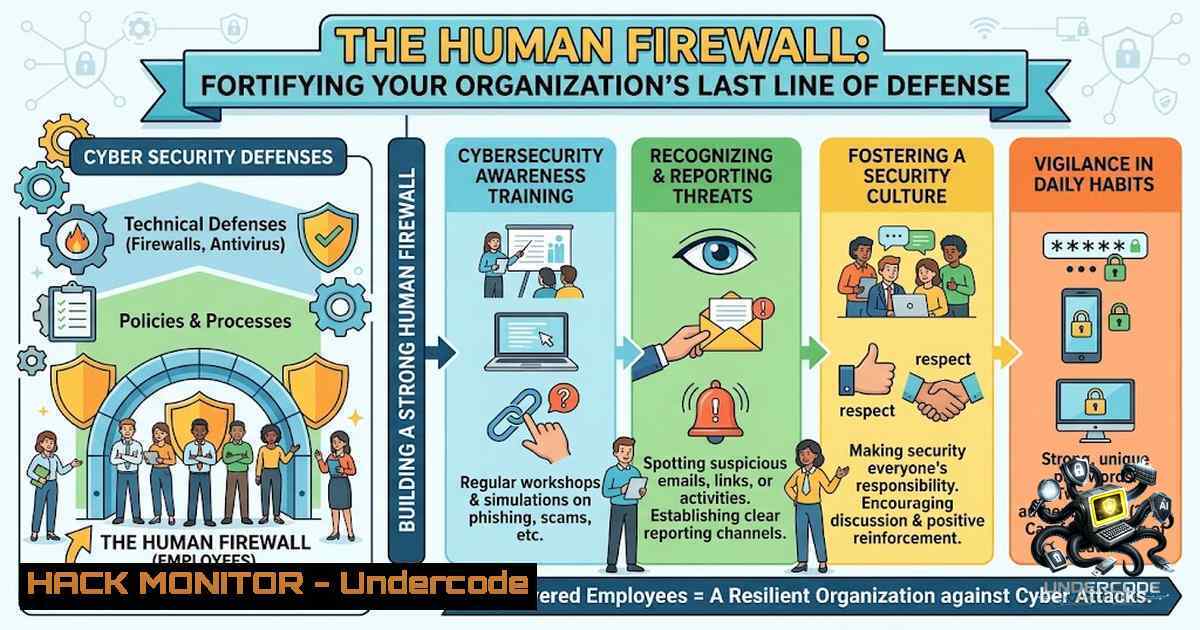
In the modern threat landscape, advanced persistent threats (APTs) and zero-day exploits often dominate headlines, yet the most common attack vectors remain the simplest. The concept of the “Human Firewall” refers to the collective security awareness and habitual vigilance of an organization’s employees, acting as the final and often most critical perimeter of defense. This article translates basic cyber hygiene principles into actionable technical and procedural controls, reinforcing the idea that security is a culture, not just a checklist.
Learning Objectives:
- Understand the technical mechanisms behind common social engineering and exploitation tactics (phishing, USB drops, credential theft).
- Master the implementation and configuration of multi-factor authentication (MFA) and secure password policies.
- Develop a systematic approach to patch management and system hardening to mitigate known vulnerabilities.
You Should Know:
1. Credential Hygiene: From “Password123” to Complex Passphrases
Weak passwords are a direct bypass to your network’s encryption. Adversaries utilize dictionary attacks, brute-force tools (like Hashcat), and credential-stuffing algorithms to compromise accounts. The shift from complex passwords (e.g., “P@ssw0rd!”) to longer passphrases (e.g., “BlueSky$OverGreenHills”) offers higher entropy and is easier to remember.
Step‑by‑step guide explaining what this does and how to use it:
– Linux (Checking Password Policy): To enforce password aging and complexity, administrators should utilize the `/etc/login.defs` file and `pam_pwquality` module.
– Command: `sudo apt-get install libpam-pwquality` (Installation)
– Configuration: Edit `/etc/security/pwquality.conf` to set minlen = 14, `dcredit = -1` (require digits), and `ucredit = -1` (require uppercase).
– Verification: Use `chage -l username` to view password expiration details.
– Windows (Active Directory): In a domain environment, Group Policy Management Editor is used to define password policies under Computer Configuration > Policies > Windows Settings > Security Settings > Account Policies > Password Policy.
– Ensure “Enforce password history” is set to 24 or more.
– Set “Minimum password length” to 14+.
2. Implementing Multi-Factor Authentication (MFA) and Conditional Access
Relying solely on passwords is insufficient. MFA adds a layer of security through “something you have” (TOTP, hardware token) or “something you are” (biometrics). Conditional Access policies in Azure AD or similar identity providers allow you to enforce MFA based on risk signals (location, device compliance, user risk).
Step‑by‑step guide explaining what this does and how to use it:
– Microsoft Entra ID (Azure AD): Navigate to Security > Conditional Access > New Policy.
– Assignments: Target specific users or groups.
– Cloud apps: Select “All cloud apps” or specific sensitive applications.
– Conditions: Configure “Locations” to exclude trusted corporate IP ranges.
– Grant: Select “Grant access” and require “Multi-factor authentication” and “Require device to be marked as compliant.”
– TOTP Configuration: For internal applications, integrate libraries like `pyotp` (Python) to validate time-based tokens. Ensure synchronization with NTP (Network Time Protocol) is accurate to avoid failed authentications.
3. Endpoint Hardening and Patch Management
Outdated software is a goldmine for attackers. Vulnerability databases like CVE detail flaws that allow remote code execution. Automated patching is critical. This involves updating the Operating System (OS), firmware, and third-party applications.
Step‑by‑step guide explaining what this does and how to use it:
– Linux (Debian/Ubuntu): Utilize `apt-get update` and `apt-get upgrade` for standard packages. For kernel updates, `sudo apt-get dist-upgrade` or `sudo do-release-upgrade` is required.
– Automation: Use `cron` to schedule updates. `sudo crontab -e` and add `0 3 /usr/bin/apt-get update && /usr/bin/apt-get -y upgrade` to run at 3 AM daily.
– Windows: Windows Server Update Services (WSUS) or Windows Update for Business can be configured via Group Policy.
– Navigate to Computer Configuration > Administrative Templates > Windows Components > Windows Update.
– Enable “Configure Automatic Updates” and set to “4 – Auto download and schedule the install.”
– Command line: Use `wuauclt /detectnow /updatenow` to force an immediate check for new patches.
4. Phishing Defense: Analyzing Headers and Payloads
Phishing remains the primary vector for malware delivery. Technical defenses include Secure Email Gateways (SEGs) and email authentication protocols like SPF, DKIM, and DMARC. However, employees must be trained to inspect URLs and headers manually.
Step‑by‑step guide explaining what this does and how to use it:
– Email Header Analysis (Gmail): Open the email, click the three dots, and select “Show original.”
– Check the `Received` field for spf=pass or fail.
– Verify `ARC-Authentication-Results` to see if the email passed DKIM checks.
– Hover over links to view the actual URL; short URLs should be expanded using tools like `unshorten.me` or `curl -I bit.ly/xxxx` to reveal the destination without exposing the browser.
– Linux Command: `curl -I [malicious_domain.com]` to inspect response headers and identify if the server is redirecting to a spoofed login page.
5. USB Drop and Removable Media Controls
Attackers often leave USB drives containing malware (e.g., USB Rubber Ducky or BadUSB) in parking lots. To mitigate this, disable AutoRun and restrict USB access via Group Policy or Endpoint Detection and Response (EDR).
Step‑by‑step guide explaining what this does and how to use it:
– Windows: To disable AutoRun, navigate to Computer Configuration > Administrative Templates > Windows Components > AutoPlay Policies and enable “Turn off Autoplay.”
– Linux (Disable USB Storage): Block the usb-storage kernel module.
– Command: `echo ‘install usb-storage /bin/true’ >> /etc/modprobe.d/blacklist.conf`
– Update: `sudo update-initramfs -u` and reboot. This prevents the system from loading the driver for USB storage devices.
What Undercode Say:
- Key Takeaway 1: Security is a shared responsibility. The post highlights that awareness is not just an IT burden but a behavioral necessity for every employee.
- Key Takeaway 2: Simplicity is key. Focusing on the basics—MFA, screen locks, and software updates—often prevents more incidents than complex, expensive security suites alone.
- Analysis: The post’s checklist serves as an excellent foundation for a “Security Champion” program. By adopting these practices, organizations transform their workforce from a vulnerability into a detection network. For example, strict patch management (Rule 5) directly correlates with the ability to defend against “EternalBlue” or similar exploits. While the post is tactically light on commands, it provides the strategic framework; implementing the technical steps outlined above ensures these policies are enforced. Furthermore, the shift toward a culture of verification (Rule 4) is a direct counter to the growing sophistication of Business Email Compromise (BEC), which relies on trust rather than exploits.
Prediction:
- -1: As AI and deepfake technology become more accessible, we will see a rise in “Vishing” (Voice Phishing) and video impersonation, rendering traditional phishing training less effective. Companies will need to adopt cryptographic verification methods for internal communications.
- +1: The continued emphasis on “Zero Trust” architectures will validate the checklist provided; by assuming every user is a potential breach point, we are forced to implement strong authentication and least-privilege access, which the post advocates for.
- -1: The disparity between remote workforces and corporate security policies will widen. Employees working from home are often tempted to disregard rule 5 (updates) due to bandwidth concerns and rule 7 (protection of data) due to personal device usage, leading to an increase in “Shadow IT” incidents.
- +1: The proliferation of Password Managers and Passkeys (FIDO2) will eventually solve rule 1 and 2, automating “strong” credentials and MFA, making employee adherence seamless.
- -1: Human error will remain the leading cause of data breaches. No amount of technical control can fully patch “user behavior,” highlighting the need for continuous, gamified training rather than annual tick-box exercises.
- +1: The integration of “Security Awareness” into performance reviews (as suggested by rule 8) will create a tangible metric for risk management, driving executive buy-in for future security budgets and fostering a proactive security culture.
▶️ Related Video (88% Match):
🎯Let’s Practice For Free:
🎓 Live Courses & Certifications:
Join Undercode Academy for Verified Certifications
🚀 Request a Custom Project:
Secure, high-velocity infrastructure and disruptive technological engineering. Contact our engineering team for high-tier development and proprietary systems:
[email protected]
💎 Smart Architecture | 🛡️ Secure by Design | ⭐ Trusted by Thousands
IT/Security Reporter URL:
Reported By: https://lnkd.in/p/eAYPatSS – Hackers Feeds
Extra Hub: Undercode MoN
Basic Verification: Pass ✅


