
Listen to this Post
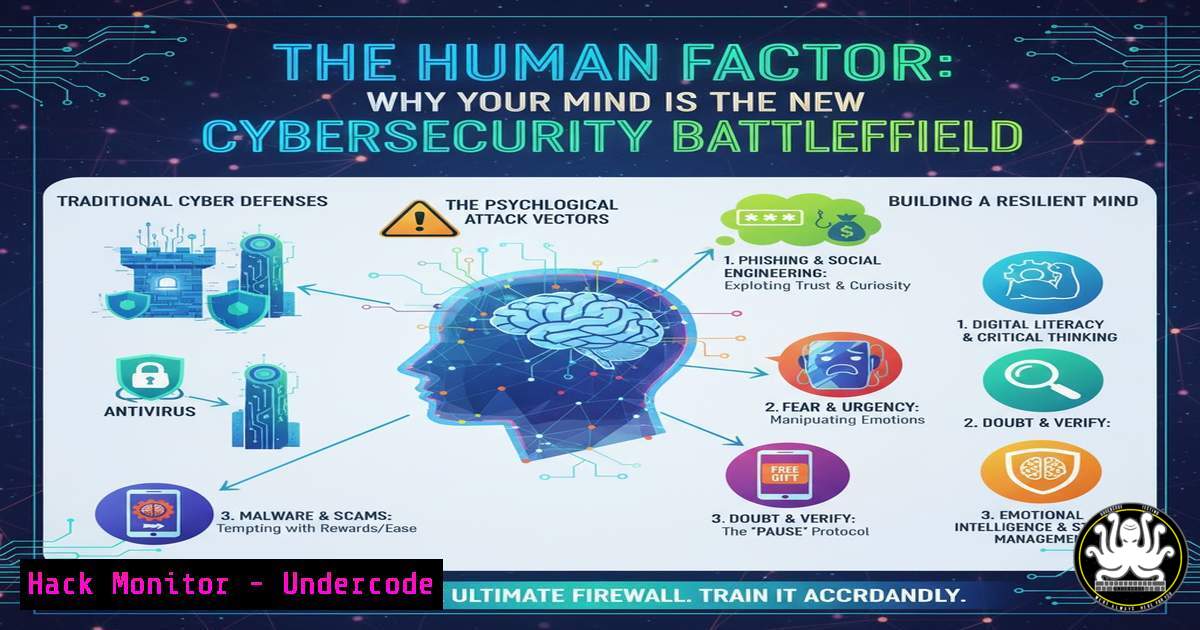
Introduction:
The most sophisticated firewall cannot block a manipulated human decision. As highlighted at FIC Montréal 2025, the future of security is increasingly focused on the intersection of technology and the human element, where social engineering attacks exploit emotions, trust, and cognitive biases to bypass technical controls. This article provides a technical deep dive into the tools and commands used to both simulate these attacks for awareness and harden defenses against them.
Learning Objectives:
- Understand the technical execution of common social engineering attacks.
- Learn defensive commands and configurations to mitigate human-centric threats.
- Implement monitoring and logging to detect post-breach attacker activity.
You Should Know:
1. Phishing Campaign Simulation with GoPhish
Verified Command & Configuration:
 Clone the GoPhish tool
git clone https://github.com/gophish/gophish.git
cd gophish
 Build the source
go build
 Launch the GoPhish server (Linux/Mac)
./gophish
Step-by-step guide:
GoPhish is an open-source phishing framework used for security awareness training. After cloning and building the tool, access the admin interface via `https://localhost:3333`. Here, you can create a sending profile (SMTP details), a landing page that mimics a real login portal, and an email template. By importing a target email list, you can launch a controlled campaign to gauge which users click links and submit credentials, providing critical data on organizational vulnerability.
2. Detecting Credential Harvesting with Apache Log Analysis
Verified Linux Command:
 Search Apache access logs for POST requests to login pages, which may indicate credential submission.
grep 'POST /login' /var/log/apache2/access.log | awk '{print $1, $4, $7}'

Cross-reference with potential phishing campaign IPs from a blocklist.
grep -f suspected_ips.txt /var/log/apache2/access.log > potential_breaches.log
Step-by-step guide:
Web server logs are a goldmine for detecting post-phishing activity. The first command filters the Apache access log for all POST requests to a ‘/login’ endpoint, which is often how stolen credentials are sent. The `awk` command extracts and prints the IP address, timestamp, and requested URL. The second command cross-references the entire log against a file containing known suspicious IP addresses (suspected_ips.txt), helping to identify potential breaches originating from a phishing attack.
3. Windows Command Line Social Engineering Reconnaissance
Verified Windows Command:
 Query system for user information and domain
systeminfo | findstr /B /C:"Domain" /C:"Host Name"
net user %username%
 Network discovery commands
net view /domain
Step-by-step guide:
An attacker on a compromised workstation uses these commands for internal reconnaissance. `systeminfo` filtered with `findstr` reveals if the machine is part of a domain and its hostname. `net user %username%` displays detailed information about the currently logged-in user, including group memberships. `net view /domain` lists all computers available in the network domain. This information is critical for an attacker to map the network and identify high-value targets for lateral movement.
4. Hardening Windows Against Local Information Disclosure
Verified Windows Command (Run as Administrator):
 Enable Windows Defender Attack Surface Reduction (ASR) rule to block credential stealing from LSASS
powershell -Command "Set-MpPreference -AttackSurfaceReductionRules_Ids 9e6c4e1f-7d60-472f-ba1a-a39ef669e4b2 -AttackSurfaceReductionRules_Actions Enabled"
Step-by-step guide:
This PowerShell command activates a specific Windows Defender ASR rule designed to prevent credential theft. This rule blocks processes from attempting to read the memory of the Local Security Authority Subsystem Service (LSASS), a common technique used by tools like Mimikatz. Enabling this rule adds a critical layer of defense, making it significantly harder for an attacker who has gained an initial foothold to escalate privileges by harvesting credentials stored in memory.
5. Analyzing Phishing Email Headers with Command Line
Verified Linux Command:
 Download full email headers (e.g., from Gmail's 'Show original') and save as 'phish_email.eml'
 Parse headers for originating IP and mail server path
cat phish_email.eml | grep -E '(Received:|From:|Return-Path:)'
 Analyze the originating IP for reputation
whois $(cat phish_email.eml | grep 'Received: from' | tail -1 | awk -F'[[]' '{print $2}' | awk -F']' '{print $1}')
Step-by-step guide:
When analyzing a suspicious email, the raw headers contain the routing information. The first `grep` command extracts key header lines showing the email’s path. The more complex command isolates the very first originating IP address from the `Received` headers (using `tail -1` to get the first hop in the chain, which is at the bottom of the header list) and then performs a `whois` lookup on that IP. This can reveal if the email originated from a known malicious server or an unrelated personal domain.
- Implementing DNS Security Extensions (DNSSEC) to Prevent Phishing
Verified Linux Command (BIND9):
 Check if DNSSEC is validated on a resolver (using Cloudflare's public DNS)
dig sigfail.verteiltesysteme.net @1.1.1.1
dig sigok.verteiltesysteme.net @1.1.1.1

Generate DNSSEC keys for a zone (BIND9)
dnssec-keygen -a RSASHA256 -b 2048 -n ZONE yourdomain.com
dnssec-keygen -a RSASHA256 -b 1024 -n ZONE -f KSK yourdomain.com
Step-by-step guide:
DNSSEC protects against DNS cache poisoning, a technique that can redirect users to fraudulent phishing sites. The `dig` commands test a resolver’s ability to validate DNSSEC signatures; the first should return a `SERVFAIL` status, and the second a `NOERROR` status. The `dnssec-keygen` commands generate two keys for your domain: a Zone Signing Key (ZSK) and a Key Signing Key (KSK). These keys are used to cryptographically sign your DNS records, ensuring their authenticity.
- PowerShell Logging for Insider Threat and Social Engineering Detection
Verified Windows Command (Group Policy/Registry):
 Enable PowerShell Script Block Logging via Local Group Policy
 This can be set via: Computer Configuration -> Administrative Templates -> Windows Components -> Windows PowerShell -> "Turn on PowerShell Script Block Logging"
 Or via registry:
New-Item -Path "HKLM:\SOFTWARE\Policies\Microsoft\Windows\PowerShell\ScriptBlockLogging" -Force
Set-ItemProperty -Path "HKLM:\SOFTWARE\Policies\Microsoft\Windows\PowerShell\ScriptBlockLogging" -Name "EnableScriptBlockLogging" -Value 1
Step-by-step guide:
Attackers using social engineering often leverage PowerShell for post-exploitation. Enabling Script Block Logging captures the contents of all PowerShell scripts that are run, sending them to the Microsoft-Windows-PowerShell/Operational event log. This provides unparalleled visibility into malicious activity, allowing defenders to see exactly what commands an attacker (or a manipulated user) executed, which is crucial for incident response and understanding the attack chain.
What Undercode Say:
- The Perimeter is Psychological. The primary attack surface is no longer the network boundary but the human mind. Technical defenses must be designed with an understanding of the cognitive biases they are meant to protect.
- Detection Over Perfect Prevention. Assuming a social engineering attack will eventually succeed, the focus must shift to robust logging, monitoring, and anomaly detection to minimize dwell time and impact.
The presentations at FIC Montréal 2025 underscore a pivotal shift. Defending against social engineering requires a dual-pronged approach: continuous, realistic human training and a “zero-trust” configuration of technical systems that assumes user compromise. The commands and configurations detailed here are not just IT tasks; they are the technological embodiment of a human-centric security strategy. Hardening systems against credential dumping, logging PowerShell activity, and analyzing phishing artifacts are direct technical responses to a human-based threat. The organizations that thrive will be those that seamlessly integrate this human-tech synergy, creating a culture where security is a shared responsibility supported by intelligent, defensive infrastructure.
Prediction:
The next wave of social engineering will be supercharged by AI, enabling hyper-personalized, automated phishing at an unprecedented scale. Deepfake audio and video will be used for real-time vishing (voice phishing) and impersonation of executives, making traditional verification methods obsolete. This will force a rapid adoption of AI-driven defense systems that can analyze communication patterns in real-time, alongside a mandatory shift towards cryptographically verified identities and communication channels for all critical decisions.
🎯Let’s Practice For Free:
IT/Security Reporter URL:
Reported By: Youna Chosse – Hackers Feeds
Extra Hub: Undercode MoN
Basic Verification: Pass ✅


